Obsidian Markdown to Medium Converter
I have been using obsidian for several months as a personal knowledge base, research, and writing tool.
The Problem
I am currently only writing for Medium and one of my frustrations has been that there is no simple way to export content from Obsidian into Medium. Copying a note from Obsidian and pasting it into the Medium editor requires significant editing to correct the formatting.
Markdown to Medium
Fredrik Andersson has created an Open Source application that converts Markdown format text and converts it to HTML that can be copied and pasted directly into the Medium text editor.
The code is available on GitHub at, https://github.com/fanderzon/markdown-to-medium-tool.
Hosted Solution
The author has made a hosted solution available at, http://markdown-to-medium.surge.sh/.
Usage
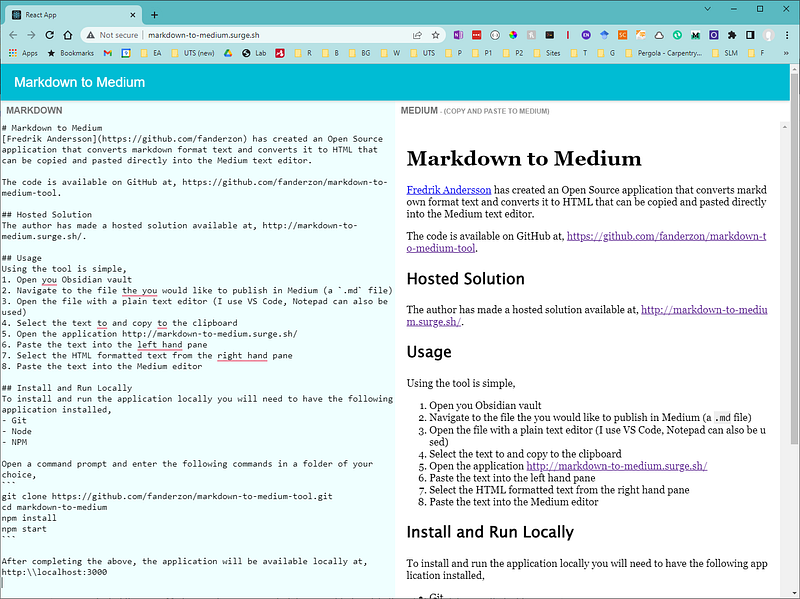
Using the tool is simple,
- Open your Obsidian vault
- Navigate to the file you would like to publish in Medium (a
.mdfile) - Open the file with a plain text editor (I use VS Code, Notepad can also be used)
- Select the text and copy it to the clipboard
- Open the application http://markdown-to-medium.surge.sh/
- Paste the text into the left-hand pane
- Select the HTML formatted text from the right-hand pane
- Paste the text into the Medium editor
The final step is to manually perform the following edits in the Medium editor,
- Assign the title and subtitle
- Insert any images
Install and Run Locally
To install and run the application locally you will need to have the following application installed,
- Git
- Node
- NPM
Open a command prompt and enter the following commands in a folder of your choice,
git clone https://github.com/fanderzon/markdown-to-medium-tool.git
cd markdown-to-medium
npm install
npm start
After completing the above, the application will be available locally at, http:\\localhost:3000
Conclusion
Using the converter provided by Fredrik Andersson is a dramatic improvement in the effort required to publish an article from Obsidian to Medium. I find that manual editing in the Medium editor is now restricted to inserting images only.
Read Further
Thanks for reading, hope you enjoyed this article.
My other writing related to Obsidian includes,
To explore further,
- Subscribe to email notifications
- Click on the ‘follow’ button at the top of the article
- For all things Industry 4.0, check out my Industrial Digital Transformation & Industry 4.0 publication
- Feel free to join my network on LinkedIn (remember to mention that you have read the article)
To support medium authors, consider a subscription.
Remember to click on the subscribe and follow button,