
Paid Ad Pro
Everything I Did to Increase My Google Search Ads CTR by 33%
5 proven tactics that worked

I’ve been dealing with Google Ads for a year, and I should admit it is not that easy and intuitive a tool to work with. Moreover, I think it has been intentionally designed this way to make more money out of young and unexperienced advertisers.
Let’s get things clear: More clicks for your ads seems to be good since more people are interested in your offer and land on your website to learn more about your business. However, if your clicks don’t result in conversions, most probably there is something wrong with your ad settings.
This time, I want to share my experience on how to generate relevant clicks for your ads and improve your ad CTR. These seem to be easy and straightforward tips, but they might produce a different outcome for your campaigns depending on your niche and audience preferences. Give it a try and see if it works for you. I bet it will.
1. Old and Well-Known Ad Extensions
Ad extensions are essential for every ad campaign. It helps to stand out among all the competitor ads showing on your target keyword.
A well-optimized ad with extensions occupies much more space in Google search thus attracting more attention from your potential buyers.
Have a look at the example below. The first two ads utilize different ad extensions. They add more information about the offer for potential customers. If you communicate your message clearly by adding pricing, location, shipping conditions, rating, discounts, etc., you narrow down the offer to your target audience and save budget expenses from irrelevant clicks.
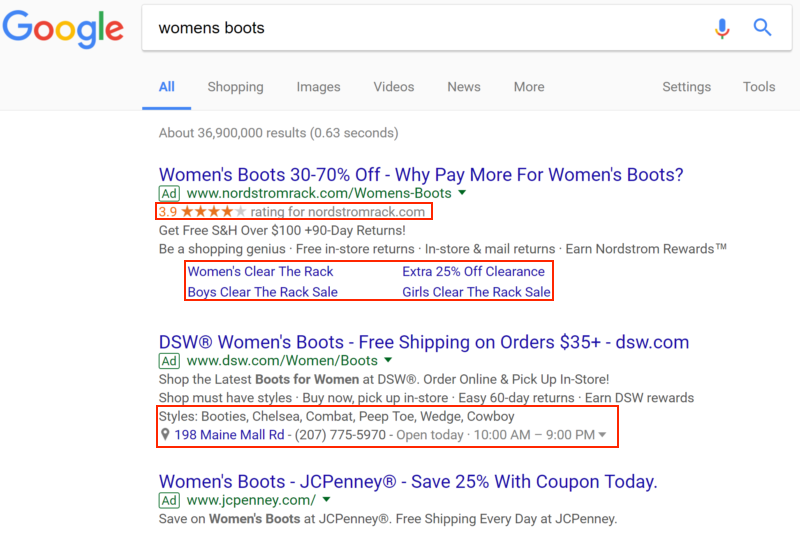
Here are the extension types I use and how they work in terms of CTR.
Sitelink extensions
I used to advertise a B2B service with a relatively low keyword volume per month, around 500 searches globally.
When you don’t have a lot of impressions, you want to get as many clicks out of your target keyword as possible. And this is what I achieved via the Google Ads extensions.
I added a few links to relevant website pages and blog posts where users could read more about the value of the service before they get in touch with the company. The site links CTR was around 7–9%.
Callout extensions
These are 25-character-long descriptions of your benefits, services, company, etc. Here is what a callout extension looks like on our above-mentioned example with women’s boots:
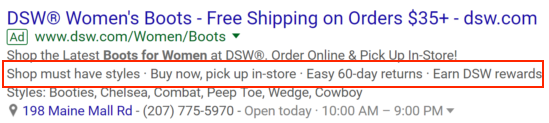
For the advertised B2B service, I tested various callouts, where I listed the competitive advantages of the company as well as highlighted some prominent services. I got the following results: CTR 8–14.29%.
Structured snippet extensions
With a structured snippet, you are limited to certain product/service types offered by Google. These are all the types available for advertisers:
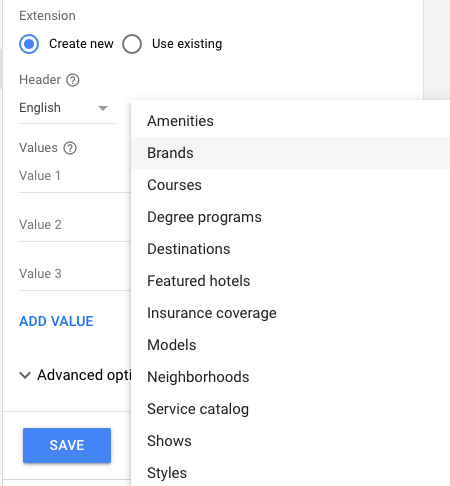
It’s a bit tricky since you cannot select another type outside of the list, while these types do not always suit an advertiser's needs (my case). Nevertheless, I would suggest that you find a way to use the structured snippets since they work. Here is my CTR 6.62–15%
It’s important to mention that some of my ads struggled with a low quality score, which might have influenced the CTR as well.
Price extension
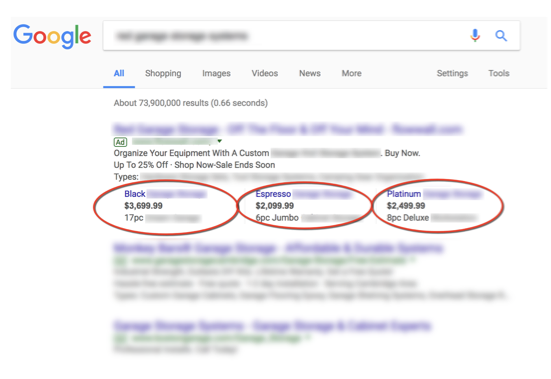
I have tested this extension for one month only and managed to get an extremely high CTR of 33.33%. This proves that pricing is one of the crucial factors in sales. Users want to know the price right away before spending their precious time on checking how good your company is.
Here is an example of how the price extension might look:
Important to know
- If your ad quality score is low (1–3), Google might not always show your extensions. As a result, your CTR could be lower. This is one of the reasons that you should understand how quality score is formed and how to improve it.
- The mobile search page looks different from the desktop one. Users see a maximum of one to three ads on one screen. If you are a local business, make sure you provide a phone number, your strongest value, and an address right in the ad. This answers the user’s intent and might generate sales right from the phone calls.
2. The Right Bidding Strategy Matters
Last month, I have switched to the target CPA bidding strategy in Google Ads since the account has already accumulated enough statistics. Here is what Google says about target CPA strategy:
“Target CPA is a Google Ads Smart Bidding strategy that sets bids to help get as many conversions as possible at or below the target cost-per-action (CPA) you set. It uses advanced machine learning to automatically optimize bids and offers auction-time bidding capabilities that tailor bids for each and every auction.”
How this bidding strategy can bring more users on site
If your account has conversion tracking and enough statistics, you can focus on acquiring clicks from users who are most likely to convert on-site. It is a much wiser approach than trying to maximize clicks.
Google knows a lot about users and can predict if a certain user who is searching for your product/service will convert or not.
Once I switched to target CPA, I obtained the following campaign results:
- 33.33 % increase in conversions per month (sorry, can’t reveal exact numbers)
- The target CPA was exactly the one I specified in the settings. Google Ads did not go beyond the budget.
- Traffic to lead CR was around 4%.
Important to know
Apart from the good results delivered using the arget CPA strategy, you have to be aware of one small trick. If you apply the target CPA bidding strategy to your ad campaigns, Google Ads can rewrite your daily budget limits and spend the whole monthly budget within a day if there is a high chance to deliver conversions.
This information has been confirmed by Google Ads account representatives and made me think that advertisers have to be very careful with their settings.
3. The Right Audience Setup
This month I decided to play a bit more with the audiences in Google Ads. I set up new audiences to promote a B2B service a few days ago. It’s a low-volume keyword as well.
The quantity of traffic doesn’t allow me to say with 100% certainty that it will work well by the end of the month, but the CTR numbers I’ve got are quite promising.
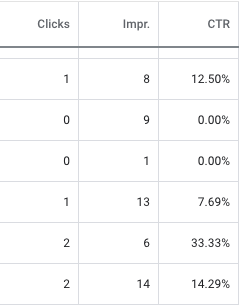
The lesson I want to share is that audiences matter. Even the poorest ads will work if you show them to the right people. Let the audience be relatively small but ensure the highest level of targeting.
It’s not easy, to be honest, and I usually apply cross-audience intersection, meaning I combine different settings to pick the right audience.
4. Utilize the Power of Responsive Ad Type
Responsive search ads
Write a lot of different headlines and descriptions for the responsive search ads and see which ones resonate with your audience. For instance, one of my responsive ads has 11 titles and two descriptions.
It’s running quite well and gets a higher CTR than text ads. Google creates multiple combinations from ad creatives and defines the best-performing ones. So far, responsive search ads have 2–3% higher CTR than the extended text ads.
I’ve heard dynamic ad type works well for ecommerce projects since these ads show users specific products/services they expressed interest in.
Unfortunately, dynamic ad type did not work well for my B2B ads. There could be multiple reasons why. If I get some great results in the future, I’ll share them.
5. Keep an Eye on Your Search Terms Report
Precise targeting matters a lot. Each irrelevant click eats your budget. To avoid wasting my budget, I check the search report daily (yes, daily).
I know that some marketing gurus recommend that you do it weekly, but if you see an irrelevant search query, make sure to put it in the negative keyword list as soon as possible; no need to delay.
Here is how the CTR changed once I narrowed down the targeting and eliminated multiple irrelevant keywords:
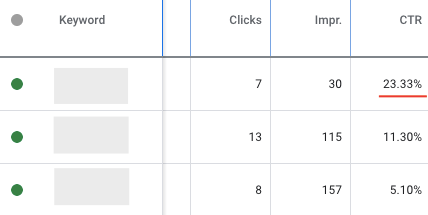
The screenshot above is from the same low keyword-volume service type that I described at the beginning of this article. The keyword with the 5.10% CTR has a broad keyword-match type modifier, while the first one in the list with the highest CTR was found through the search terms report and later on added as an exact type keyword. The ads had an impression share above 80%.
Important Metrics Influencing Your Ad Performance
I’ve tried to explain the key factors influencing your search ads CTR as well as show some numbers. However, there are many more aspects that influence the performance of your ad campaigns and CTR in particular.
1. Search impression share
Pay close attention to your keywords search impression share since it has a direct impact on the amount of traffic your ads generate.
If the impression share is 80%, I consider it good enough. Your ads are shown in most cases when users initiate a search. The reasons for poor impression share have to be investigated, since it may adversely influence your CTR.
2. Keyword quality score
A quality score is an identifier of how well your ad corresponds to the search intent of a user. The higher the ad relevance and your quality score, the better your ad rank and the less you pay every time someone clicks on your ad.
When it comes to quality score, everyone wants a 10/10. However, that’s not always easy to achieve. Sometimes it requires hard work and nonstandard decisions.
Here is a step-by-step guide to how I managed to increase the quality score from 3 to 7 for one of the B2B services. If you are struggling with poor ad performance, these would be quite useful tips to consider.
3. Bounce rate
The bounce rate is a good metric to check every month because it shows your target audience's reaction to the landing page and its content. I used to have some poor landing page performance, with a 70% bounce rate. The user session duration was also low, just a few seconds.
Since I did not have much coding capacity, the problem has been solved with a landing page builder, Unbounce. By dragging and dropping objects, I managed to build landing pages that eventually had a bounce rate of 40–60%, which is a huge improvement.
I encourage you not to be afraid of testing new approaches in Google Ads. Something that works for me might not work for you, but you will never know until you try. We are learning by applying our new knowledge in practice.