
Paid Ad Pro
How I Improved Google Ads’ Keyword Quality Score From 3 to 7
10 tips for optimizing your Google PPC campaigns
Do your Google search ads have a low-quality score, no matter how hard you try? You’re not alone! Welcome to the club of PPC managers trying to figure out how Google Ads works.
This article will share ten tactics on how I managed to improve my Google Ads Quality Score for the B2B services. However, the same tips will be useful for B2C as well.
I’ve been managing ad campaigns for a year. I started with zero knowledge about PPC and had to manage Google Ads alone quickly.
It seemed setting up ad campaigns was a piece of cake. You indicate your budget, write down the keywords and their match types, come up with clickbait ad creatives, specify bidding strategy, and you’re done. Sit, relax, and wait for your potential clients to come to you. What a beautiful and idealistic scenario. When you are a newbie to the whole PPC world, you can still believe such things happen. However, the reality turns out to be completely different.
A Low-Quality Score, No Matter What I Was Doing
I advertised a specific B2B service with 10–100 monthly searches in total. However, I wanted to advertise it in a few locations only. So, I created several campaigns targeting the same keyword, but different locations.
I thought I was following generally accepted guidelines. In fact, this is what happened:
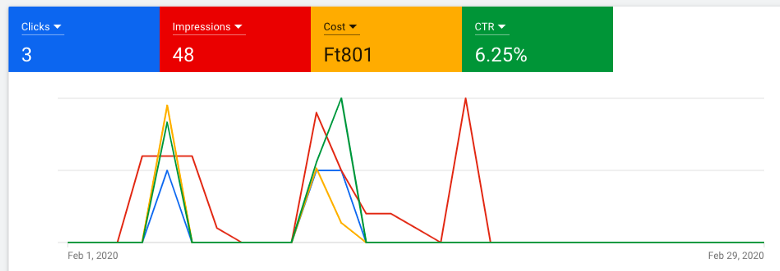
I used to advertise a low-volume keyword in a specific region. Although this was my target keyword, I did not know that the number of impressions (and clicks) will be so low. I used to advertise it for one month. Google Ads assigned a low QS — 3/10 and it has never changed:
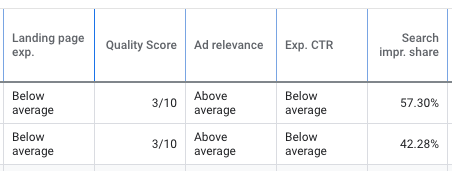
No matter what I was doing, my keyword Quality Score was always 3/10. I knew a low Quality Score made me pay a higher CPC. I desperately browsed multiple sources and tried to figure out a new strategy for dealing with it. Here are a few suggestions I found online, and they did not work (at least for me):
- Always include a keyword in your ad copy and URL to improve the ad relevance.
- Always include target keywords on your landing page content to improve landing page experience and relevance.
- Make use of all ad extensions available.
- Use title-case capitalization in your ads.
I came up with a list of tips that should work for you if your company operates globally, your service is specific, and the CPC is high.
How I Managed to Improve the Keyword Quality Score From 3 to 7
I am sharing a few tips that helped me to improve my Quality Score. These seem to be easy and straightforward suggestions. I wish I knew all of them from the very beginning.
1. Mind your ad group structure
You can find multiple suggestions online on how to structure your ad groups. In fact, the best ad group structure would represent your advertised product/services + its location(s). I have tried two different methods:
- Put multiple different keywords with the same intention into one ad group.
- Follow the rule: one keyword — one ad group.
According to my experience, a single keyword ad group (SKADs) worked the best. I could optimize the ad creatives, select the most suitable landing page to target this keyword, and adjust the bids. Moreover, consider switching off broad and phrase-match type keywords if the bounce rate is high, traffic is not relevant, and the costs are high.
2. Always use negative keywords
Make sure to narrow down your targeting by eliminating irrelevant keyword combinations that might trigger your ad. How to do it? Utilize negative keyword lists.
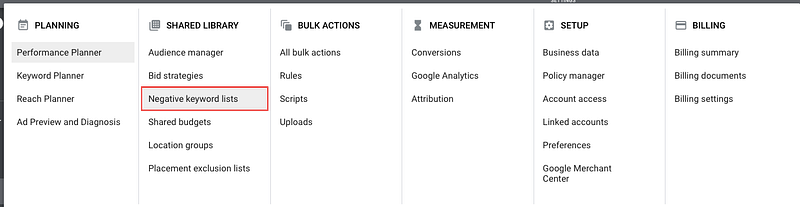
Common words that are (almost) always added to the negative keywords list include the following: free, jobs, career, porn, template, etc. In fact, negative keywords are different for various products and services advertised. So, you will have to think carefully:
- What are the search queries you would like to target?
- What are the most frequently used search queries that include your target keyword?
- What are the most suitable keyword match types for you?
Exact match keyword type: [Keyword]
This keyword match type will narrow down your ads to the exact keyword you indicated in your ad group. However, Google might show your ads under very similar search terms as well.
Phrase match keyword type: “Keyword”
If you select a phrase match type all the search queries that include your keyword will be triggered. For instance, imagine your keyword is “buy books”; your ad will be shown under the following keywords:
- buy books online
- where to buy books online
- cheapest places to buy books
See the logic behind it? With a phrase match type, your keyword will trigger the ads that have other words before or after your target keyword. Make sure to check different search queries since you might end up showing your ads under informational keywords.
Broad match keyword type: +Keyword
Broad match keywords can bring you lots of traffic fast. However, you have to always think about the traffic quality. Let’s see our former example with the keyword +buy +books. In this case, your ad will trigger the following keywords:
- buy used books online
- where can I buy cheap books online?
- best websites to buy new books as a present
See how many different search queries can be triggered with the help of a broad match keyword type? Some of them might be informational, while others are transactional. If you are a bookseller, you might want to exclude keywords like cheap, used, free, etc.
Where can you find negative keywords?
I use Keywords Explorer in Ahrefs to check the search terms for my keywords and their estimated traffic volume per month.
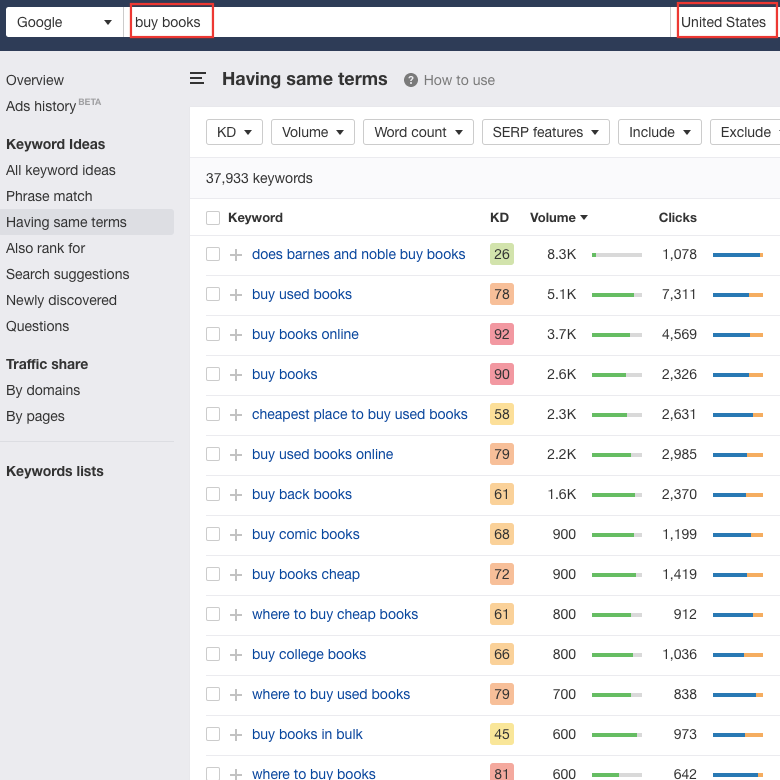
If you have other tips on how and where to find negative keywords, please share your ideas in the comments.
3. Target specific countries in one campaign and exclude irrelevant locations
Target the locations from one or similar time zones that fit your business needs and where you would like your ads to be shown.
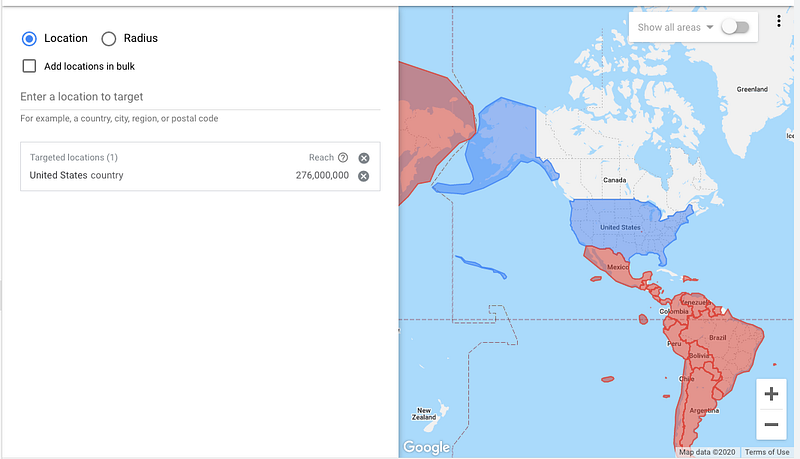
This specific campaign targets the USA only, while it excludes other locations in the same time zone. I had to exclude some irrelevant countries since I was getting clicks from there. Canada is neither targeted nor excluded.
Once you limit your ad’s exposure, you will get a lower amount of impressions. However, your CTR might increase due to more accurate targeting. Use this hint to improve your Quality Score metric.
4. Schedule your ads to run on certain days of the week
Ad scheduling, along with location targeting, helps to show your ads to certain people, in certain countries, at a certain time. If you would like to set up ads scheduling, consider the following:
- Where does your target audience live?
- When are they active? (what time of the day)
- Are they active on the weekend?
Test different time and day options to define what works for you. These tips are essential for B2B advertisers, where a keyword volume might be low. I use these settings very often to show my ads in the daytime, excluding weekends, and allocate more budget to well-performing days.
5. Find extensions that suit you best
If you have ever tried to Google “how to improve Quality Score,” you must have seen multiple articles dedicated to ad extensions and their impact on CTR.
Extensions worked for my ads as well. However, it is important to find extension types that would work for you. Set up various extensions, test creatives, check the CTR for each extension and iterate from time to time.
If your ad Quality Score is low (1–3), Google might not always show your extensions. As a result, your CTR could be low. This is one of the reasons to understand how a Quality Score is formed and how to improve it.
The following extensions worked well for my ads:
- Sitelink extensions. I added a few links to relevant pages and blog posts, where users could read more about the service's value before they get in touch with the company. The CTR was around 7–9%.
- Callout extensions. 25-characters-long description of your benefits, services, company, etc. I tested various callouts, where I listed the company's competitive advantages and highlighted some prominent services. I have got the following results: CTR 8–10%.
- Structured snippet extensions. You can select a specific product or service type and list its benefits. It could be brands, courses, degree programs, service catalogs, insurance coverage, etc. Once you select the type, you can list multiple values to support your ad. Each value must be up to 25 characters long. Even though Google Ads has approved my structured snippets, they did not get any impressions/clicks. One of the reasons could be a poor Quality Score from the very beginning.
- Price extension. I have tested this extension for one month only and managed to get an extremely high CTR — 33.33%. Here is an example of how the price extension might look:
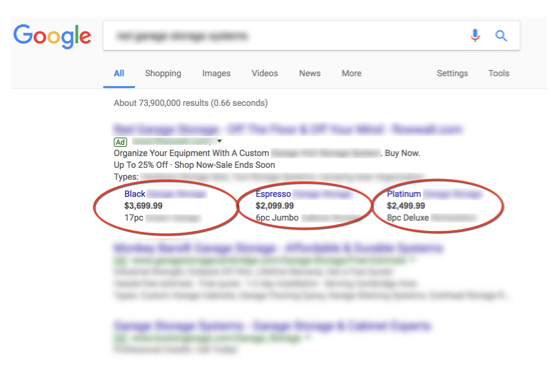
With the price extension, you can give extensive information about your services and prices. This is always attractive for users since they tend to compare prices and select the most appealing offer.
Did you experiment with extensions? Let me know in the comments what worked for you and what did not.
6. Consider landing page experience
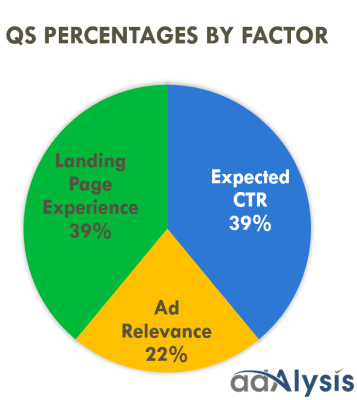
Landing page experience accounts for 39% of the Quality Score, according to adAlysis. It is an important component of the Quality Score along with the CTR. You have to keep an eye on these metrics to improve your Quality Score and decrease costs.
Multiple online sources state that the landing page should have target keywords in titles, subtitles, and text to be considered relevant for your ads. Besides, the message shown in the ad creatives should also be repeated on your landing page. Do you agree with it? Does it work for you? I will share my experience below.
Unfortunately, general recommendations did not work for me. I did not manage to improve the landing page experience by simply including the target keywords into the content. Instead, I tried to add interactive elements, like sliders, exit pop-ups, sticky bars, and free incentives. I assume these actions helped me improve the landing page experience for some keywords from below average to average.
One more concern to share — I did not have enough design and development capabilities to create new landing pages and iterate the old ones. So, I started using Unbounce (affiliate link.)
Unbounce is a landing page builder that allows you to drag and drop objects and create new landing pages, pop-ups, sticky bars within a couple of hours. It perfectly meets my needs, so I use it.
7. Set up campaign device targeting
Google ads allow you to adjust your bids for different device types. As an example, some of my landing pages are suitable for desktops only. Hence, I have specified the following bid adjustment for tablets and mobile phones: -100%.
By doing this, I managed to eliminate mobile and tablet traffic, save budget, decrease bounce rate, and ensure a good user experience.
The same practice could be applied if your landing page is not well optimized for mobile users. On the other hand, well-performing devices and audiences can get a positive bid adjustment to capture more relevant traffic.
8. Manage your audience demographics
Narrow down your impression share with the help of an audience demographics set-up. Google Ads allows you to choose what age, gender, and household income your target audience should have. Settings would differ significantly depending on your target audience. For instance, my ads target various audiences in the B2B market. Thus, I have excluded some age ranges that did not perform well.
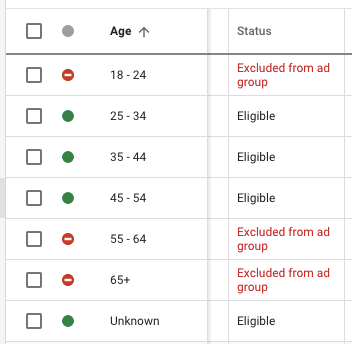
You might have noticed an audience called “unknown,” which is included in all demographic reports. When Google cannot assign users to a certain age, gender, and income category, these users will be marked as “Unknown.”
Do not exclude “Unknown” users, let your ads run for a while, and later, analyze how this audience performed. If you notice a certain age group performs better than another, you can increase bids to target this segment better.
9. Use responsive search ads to get a higher CTR
Google offers various ad types to choose from. If you want to set up a search campaign, you can select among the following ad types:
- Expanded text ads. These are static ads with a maximum of 30 characters for the title and 90 characters for the description.
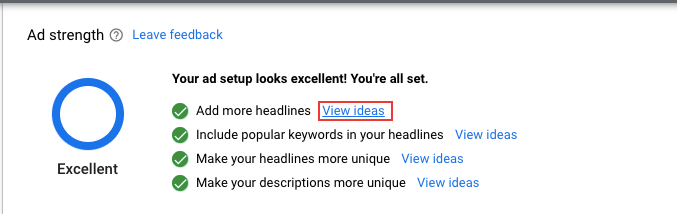
- Responsive search ads. You can write multiple headlines and descriptions for responsive search ads. For instance, one of my responsive ads has 11 titles and two descriptions. It is running quite well and gets a higher CTR. Google creates multiple combinations from ad creatives and defines the best-performing ones. Moreover, Google shows the strengths of your ad and provides you with title and description suggestions. They are not always perfect, but these could be some ideas to work on.
- Dynamic search ads. This type creates and shows ads on your website without using keywords. It targets relevant searches with ads generated right from your website content. It allows generating multiple clicks quickly. However, traffic quality might be low.
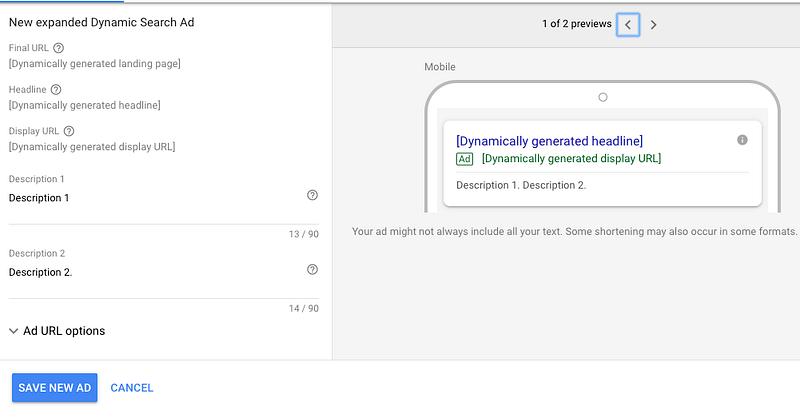
The ideal ad group should contain a minimum of three ad creatives, which Google would rotate to identify the best performing ads. I include 2–3 extended text ads as well as 1 responsive search ad per ad group. So far, responsive search ads have 2–3% higher CTR than extended text ads.
10. Find the right bidding strategy for you
When I set new ads, I indicate the “Maximise Clicks” bidding strategy with the maximum CPC bid limit to accumulate some data and start optimizing based on conversions.
In my case, a submitted contact form is a conversion. Once Google Ads accumulates enough data, I switch the bidding strategy from “Maximise Clicks” to “Target CPA.”
In this case, I already know an estimated price per one conversion, while Google Ads will try to optimize bidding and bring conversions with the target cost per acquisition.
Besides, an estimated CPA can be found in the Keyword Planner. This is how you can check the price and the conversion forecast for the upcoming month for a specific location.
In the example below, I used the keyword “buy books” for the USA with May 2020 forecast. With an average price of $1.03 (HUF 350) and an average budget of $1100 (HUF 370K) for May, this particular campaign can generate 62 conversions with an average CPA of $18 (HUF 5.9K).
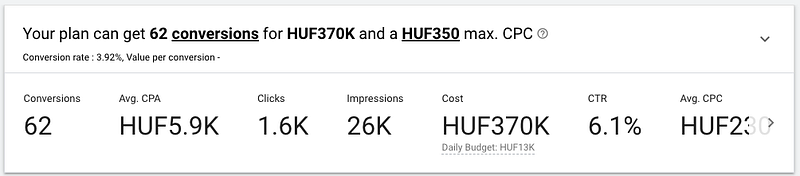
Note: To see the conversion rate estimates, your account should have historical conversion stats. You can also enter your own conversion rate and conversion value to see how the bid changes. It is a convenient tool, and I would definitely suggest checking it out during a new ad campaign planning.
This is not the end yet.
Once I implemented all the changes mentioned above, I noticed the Quality Score had changed. You can see my results below:
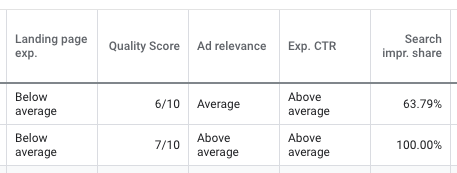
I continued testing new bidding strategies, audiences, remarketing, and different keywords to identify the best working tactics. Besides, a 7/10 Quality Score is not enough, and I will continue working on it.
Meanwhile, I have prepared a shortlist of tips to remember while working with Google Ads.
Things to Remember
- Adwords keyword Quality Score is updated within a day if your ads generate enough impressions (clicks). Google needs to have historical data to judge your ad’s performance. It is believed that Google needs around 1,000 impressions to calculate the Quality Score.
- Try different bid strategies and see how your ad’s performance changes.
- If your campaign does not generate enough impressions and the number of clicks is low, it might be limited by the bid strategy. I used to have budget restrictions that prevented my ads from showing.
- No need to create a separate campaign for one country if there is a low keyword volume per month. You will not be able to get enough impressions or clicks, and your CTR will be low.
- Ads with a poor Quality Score can still bring conversions, but they will cost you more money. However, the price is reasonable for B2B leads acquisition.
- Check your ad’s performance daily. However, major changes should be done once in 1–2 weeks to see their positive/negative effect.
- In case the bounce rate is high, check if your URL is accessible. Besides, you might need to check page usability and compare it to what is shown/advertised by your competitors.
Grab my 50-page guide to learn how I create blog posts that hit Google front page. You can easily replicate my 3-step process even if you are just starting.
You can get full access to every story on Medium for just $5/month by signing up through this link.
Your membership fee will directly support me and other writers on Medium to keep creating helpful content for you. :)


