
Everything Flows: Use Personal Kanban And Get Things Right — Chapter 12
How you, as a freelancer, get a grip on your tasks and use your time more efficiently
Tips and Tricks
Digital Kanban Board: Trello
You can set up and use a Kanban board as a purely physical board. A physical Kanban board has the following advantages:
- You can set it up fast and quickly.
- You have it of always at hand, and
- It is easy to work with.
You can, for example, place it on the wall in your office, and if you have completed a task and want to start something new, you can go there, move the sticky note, see what is next and pull it to “In Progress.”
Companies often use digital boards in addition to physical boards. In enterprises, Atlassian Jira and Mircosoft Azure DevOps are ubiquitous. A digital board makes sense since the boards support teamwork and teams sit partially distributed. A digital board is also helpful for documentation and archiving purposes.
If you travel a lot or have very little space, a digital board might be helpful for you. However, the two mentioned tools are somewhat oversized for personal use. Therefore, if you are looking for a digital Personal Kanban board, I recommend Trello from Atlassian. It offers a quick, easy, and free option for a limited number of users. During setup, you only need to spend a few clicks creating digital columns that represent the individual steps of your work process. Trello does not support swim lanes, but you can use labels to display different types of work. You can put a date on the cards, and to show blocked tasks, you can also use labels.
The following figure shows a Trello board:
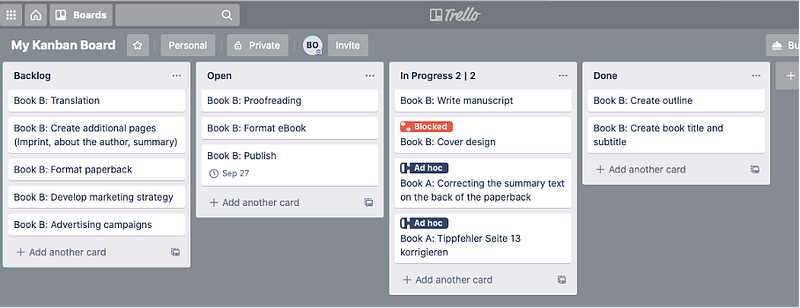
Table of contents
- Chapter 1: Introduction
- Chapter 2: Time management — a problem?
- Chapter 3: The Kanban principles
- Chapter 4: Visualization of the workflow: The Kanban Board. Make the work visible
- Chapter 5: Visualization of the workflow: The Kanban Board. Thematic Kanban Boards
- Chapter 6: Visualization of the workflow: The Kanban Board. Time Planning
- Chapter 7: Limitation of ongoing work and control of the workflow
- Chapter 8: Continuous Improvement
- Chapter 9: Tips and Tricks: Timeboxing
- Chapter 10: Tips and Tricks: User Stories
- Chapter 11: Tips and Tricks: Pareto-Rule, 72-Hour-Rule
- Chapter 12: Tips and Tricks: Digital Kanban Board: Trello
- Chapter 13: Advantages at a glance
© 2020 Britta Ollrogge Everything flows: Use Personal Kanban and get things right How you, as a freelancer, get a grip on your tasks and use your time more efficiently
Author: Britta Ollrogge Independently published
This book, including its parts, is protected by copyright. Any use without the consent of the author is prohibited. This applies in particular to electronic or other duplication, translation, distribution, and making publicly available.
Britta Ollrogge, Eschersheimer Landstraße 42, 60322 Frankfurt am Main, Germany