Free AI web copilot to create summaries, insights and extended knowledge, download it at here
7330
Abstract
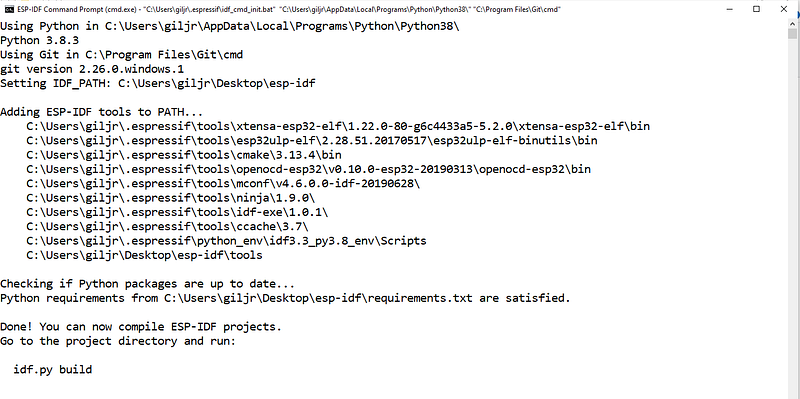
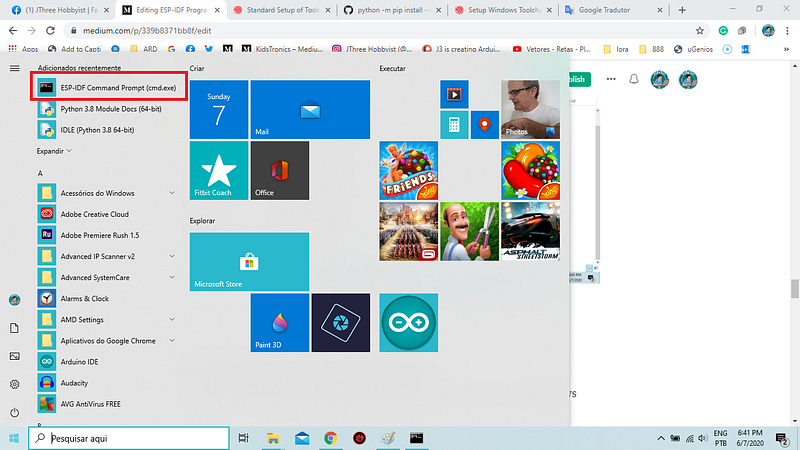
m.com/v2/resize:fit:800/1*egu7dgelQcHEp_7ai5Se8w.png"><figcaption>Fig 14. The next time, just execute <b>ESP-IDF Command Prompt (cmd.exe</b>) and <b>YOU ARE GOOD TO GO!</b></figcaption></figure><h2 id="a392">Why I had to start from the beginning</h2><p id="d25c">Because the <a href="https://docs.espressif.com/projects/esp-idf/en/latest/esp32/get-started-legacy/windows-setup.html">Legacy GNU Make Build System</a> did not work in my Windows 10:/, maybe because of the <a href="https://www.anaconda.com/">Anaconda </a>installation (?)</p><div id="03ce"><pre><span class="hljs-attribute">Operational</span> System name: Microsoft Windows <span class="hljs-number">10</span> Home Single Language
<span class="hljs-attribute">Vertion</span>: <span class="hljs-number">10</span>.<span class="hljs-number">0</span>.<span class="hljs-number">18363</span> Compilation <span class="hljs-number">18363</span>
<span class="hljs-attribute">Laptop</span>: Dell Inc.
<span class="hljs-attribute">Model</span>: Inspiron <span class="hljs-number">5447</span>
<span class="hljs-attribute">System</span> PC based <span class="hljs-literal">on</span> X64</pre></div><p id="82a8">To recreate the problem I’ve taken these steps (previous <a href="https://readmedium.com/esp-idf-programming-guide-wifi-lora-32-v2-53f89e12c96e">post</a>):</p><ul><li>Freshly unzipped msys32 into (C:);</li><li>create <i>esp </i>directory in the <i>home/user</i> directory;</li><li>clone idf repo into ‘esp’ directory with <i>git clone — recursive <a href="https://github.com/espressif/esp-idf.git">https://github.com/espressif/esp-idf.git</a>;</i></li><li>create script to export path variable <i>export IDF_PATH=C:/msys32/home/owen.lyke/esp/esp-idf;</i></li><li>close msys32 and reopen, verify path variable existence with printenv IDF_PATH;</li><li>check python version and <i>which python2.7</i> (it is /mingw32/bin/python2.7);</li><li>upgraded pip with <i>python -m pip install — upgrade pip;</i></li><li>upgrade setuptools with <i>pip install — upgrade setuptools;</i></li><li>used <i>pacman -S mingw-w64-i686-python2-cryptography</i> per above;</li><li>tried to install requirements with <i>python2.7 -m pip install — user -r IDF_PATH/requirements.txt;</i></li><li><a href="https://github.com/espressif/esp-idf/issues/2480#issuecomment-425790054">#2480 (comment)</a></li></ul><p id="d4cb">If you want to try for yourself, here are my <a href="https://readmedium.com/esp-idf-programming-guide-wifi-lora-32-v2-53f89e12c96e">annotations</a> about my try:</p><p id="e1b4">I recommend you to use the new method exposed here:). It is the easiest way ever!</p><p id="19e9">And from what I have been reading at <a href="https://docs.espressif.com/projects/esp-idf/en/v4.1-beta2/get-started/index.html">Expressif</a>, perhaps in the near future, it will be the facto <i>ESP-IDF</i> Windows 10 deployer:) — Access Jun 2020.</p><p id="8261">Fine, now we can go code <i>a new ESP-IDF project</i>:)</p><p id="0ff0">But that will be a task for another post…</p><p id="e379">That’s all for now!</p><p id="35ef">Thank you!</p><p id="b507"><b>Please see</b> the <b>Troubleshooting</b> section <b>below</b>…</p><h2 id="3f85">Credits & References:</h2><div id="1a0f" class="link-block">
<a href="https://docs.espressif.com/projects/esp-idf/en/latest/esp32/get-started/windows-setup-scratch.html">
<div>
<div>
<h2>Setup Windows Toolchain from Scratch - ESP32 - - ESP-IDF Programming Guide latest documentation</h2>
<div><h3>This command will clone the master branch, which has the latest development ("bleeding edge") version of ESP-IDF. It is…</h3></div>
<div><p>docs.espressif.com</p></div>
</div>
<div>
<div style="background-image: url(https://miro.readmedium.com/v2/resize:fit:320/)"></div>
</div>
</div>
</a>
</div><p id="5c67"><a href="https://docs.espressif.com/projects/esp-idf/en/v3.3/api-guides/build-system-cmake.html">https://docs.espressif.com/projects/esp-idf/en/v3.3/api-guides/build-system-cmake.html</a></p><div id="03f9" class="link-block">
<a href="https://cmake.org/cmake/help/latest/guide/tutorial/index.html#cmake-tutorial">
<div>
<div>
<h2>CMake Tutorial - CMake 3.17.3 Documentation</h2>
<div><h3>The CMake tutorial provides a step-by-step guide that covers common build system issues that CMake helps address…</h3></div>
<div><p>cmake.org</p></div>
</div>
<div>
<div style="background-image: url(https://miro.readmedium.com/v2/resize:fit:320/)"></div>
</div>
</div>
</a>
</div><div id="b22d" class="link-block">
<a href="https://www.espressif.com/">
<div>
<div>
<h2>Espressif Systems - Wi-Fi and Bluetooth chipsets and solutions</h2>
<div><h3>ESPRESSIF SYSTEMS (SHANGHAI) CO., LTD. is a fabless semiconductor company, with headquarter in Shanghai Zhangjiang…</h3></div>
<div><p>www.espressif.com</p></div>
</div>
<div>
<div style="background-image: url(https://miro.readmedium.com/v2/resize:fit:320/0*oRkZ_PeJvxnWrxB-)"></div>
</div>
</div>
</a>
</div><div id="22fa" class="link-block">
<a href="https://heltec-automation-docs.readthedocs.io/en/latest/esp32+arduino/quick_start.html">
<div>
<div>
<h2>Heltec ESP32+Arduino Series Quick Start - Heltec Automation Docs V0.0.1 documentation</h2>
<div><h3>Edit description</h3></div>
<div><p>heltec-automation-docs.readthedocs.io</p></div>
</div>
<div>
<div style="background-image: url(https://miro.readmedium.com/v2/resize:fit:320/)"></div>
</div>
</div>
</a>
</div><div id="15c0" class="link-block">
<a href="https://my-esp-idf.readthedocs.io/en/latest/get-started/index.html">
<div>
<div>
<h2>Get Started - ESP-IDF Programming Guide v3.0-dev-1395-gb9c6175 documentation</h2>
<div><h3>This document is intended to help users set up the software environment for developement of applications using hardware…</h3></div>
<div><p>my-esp-idf.readthedocs.io</p></div>
</div>
<div>
<div style="background-image: url(https://miro.readmedium.com/v2/resize:fit:320/0*-Ajp4uJSNxCNGAJ6)"></div>
</div>
</div>
</a>
</div><div id="6c9f" class="link-block">
<a href="https://heltec.org/project/wifi-kit-32/">
<div>
<div>
<h2>WiFi Kit 32</h2>
<div><h3>Sale! 16.00 $9.99 Include a SH1.25 x 2 battery cable; Not include Li-Po battery and Micro USB cable. 1550 in stock…</h3></div>
<div><p>heltec.org</p></div>
</div>
<div>
<div style="background-image: url(https://miro.readmedium.com/v2/resize:fit:320/0*j02mwZCPMqlvHpuI)"></div>
Options
</div>
</div>
</a>
</div><div id="979f" class="link-block">
<a href="https://github.com/HelTecAutomation/Heltec_ESP32">
<div>
<div>
<h2>HelTecAutomation/Heltec_ESP32</h2>
<div><h3>English | 简体中文 This library must work with Heltec ESP32 develop framework! A detail document about how to install…</h3></div>
<div><p>github.com</p></div>
</div>
<div>
<div style="background-image: url(https://miro.readmedium.com/v2/resize:fit:320/0*piw9_H0xX9xXe-q1)"></div>
</div>
</div>
</a>
</div><div id="31b2" class="link-block">
<a href="https://github.com/Heltec-Aaron-Lee/WiFi_Kit_series">
<div>
<div>
<h2>Heltec-Aaron-Lee/WiFi_Kit_series</h2>
<div><h3>English | 简体中文 This environment is fully cloned from espressif ESP32 and ESP8266 projects, on that basis, we fixed…</h3></div>
<div><p>github.com</p></div>
</div>
<div>
<div style="background-image: url(https://miro.readmedium.com/v2/resize:fit:320/0*Z-9nFGE6Jv3zFQ4G)"></div>
</div>
</div>
</a>
</div><div id="5d70" class="link-block">
<a href="https://heltec.org/project/wifi-lora-32/">
<div>
<div>
<h2>WIFI LoRa 32 (V2)</h2>
<div><h3>WiFi LoRa 32 is a classic IoT dev-board designed & produced by Heltec Automation(TM), it's a highly integrated product…</h3></div>
<div><p>heltec.org</p></div>
</div>
<div>
<div style="background-image: url(https://miro.readmedium.com/v2/resize:fit:320/0*QTTn_f-ZxsLbXoiI)"></div>
</div>
</div>
</a>
</div><div id="9928" class="link-block">
<a href="https://pt.aliexpress.com/item/32824839148.html?src=google&src=google&albch=shopping&acnt=494-037-6276&isdl=y&slnk=&plac=&mtctp=&albbt=Google_7_shopping&aff_platform=google&aff_short_key=UneMJZVf&&albagn=888888&albcp=7303158455&albag=86143156931&trgt=743612850714&crea=pt32824839148&netw=u&device=c&gclid=CjwKCAiA0svwBRBhEiwAHqKjFoG2YOLlBO5lcEYuX8_aBW9q8aY-2fAKifQYp5oDg36UPUuFOK6_1RoCEEQQAvD_BwE&gclsrc=aw.ds">
<div>
<div>
<h2>R$42.9 |LILYGO®4 m byte (32 m bit) pro esp32 oled v2.0 ttgo & esp32 oled wifi módulos + bluetooth…</h2>
<div><h3>LILYGO®4 m byte (32 m bit) pro esp32 oled v2.0 ttgo & esp32 oled wifi módulos + bluetooth duplo ESP 32 esp8266 et…</h3></div>
<div><p>pt.aliexpress.com</p></div>
</div>
<div>
<div style="background-image: url(https://miro.readmedium.com/v2/resize:fit:320/0*SVaSE5840yJ5_eb-)"></div>
</div>
</div>
</a>
</div><div id="4488" class="link-block">
<a href="https://www.semtech.com/lora/resources/lora-videos">
<div>
<div>
<h2>Videos | Resources | Semtech LoRa Technology | Semtech</h2>
<div><h3>Discover LoRa use cases, meet the ecosystem, view conference presentations, and more. Find more technical videos in the…</h3></div>
<div><p>www.semtech.com</p></div>
</div>
<div>
<div style="background-image: url(https://miro.readmedium.com/v2/resize:fit:320/0*lo5NmlTYlsZWhf3i)"></div>
</div>
</div>
</a>
</div><div id="8b62" class="link-block">
<a href="https://lora-developers.semtech.com/get-started/what-can-i-do-with-lora">
<div>
<div>
<h2>What Can I Do With LoRa?</h2>
<div><h3>To date, LoRa and LoRaWAN®-based solutions have deployed in a wide variety of use cases around the world. In Africa…</h3></div>
<div><p>lora-developers.semtech.com</p></div>
</div>
<div>
<div style="background-image: url(https://miro.readmedium.com/v2/resize:fit:320/0*ZBg05f3RjsLCFFkF)"></div>
</div>
</div>
</a>
</div><div id="07fb" class="link-block">
<a href="https://discourse.cmake.org/t/welcome-to-the-cmake-discourse-site/8">
<div>
<div>
<h2>Welcome to the CMake Discourse Site</h2>
<div><h3>This forum hosts discussion of topics related to CMake. Please follow our Code of Conduct when posting to this forum…</h3></div>
<div><p>discourse.cmake.org</p></div>
</div>
<div>
<div style="background-image: url(https://miro.readmedium.com/v2/resize:fit:320/0*2hHvS0mTwDp1eQgz)"></div>
</div>
</div>
</a>
</div><h1 id="886a">Related Post</h1><p id="a1a2">00#Episode — <a href="https://readmedium.com/esp-idf-programming-guide-wifi-lora-32-v2-53f89e12c96e">ESP_IDF_Series — ESP-IDF Programming Guide + WiFi LoRa 32 (v2) — How To Get Started</a></p><p id="466a">01#Episode — ESP_IDF_Series — <a href="https://readmedium.com/lora-lpwan-long-range-low-power-wide-area-network-65cfa264d7c6">LoRa LPWAN — Long Range Low Power Wide Area Network</a> — LoRa was developed by Semtech, founder LoRa Alliance —</p><p id="dd64">02#Episode — ESP_IDF_Series — ESP-IDF Programming Guide + WiFi LoRa 32 (v2) + idf.py utility — How To Really Get Started (this one)</p><p id="9ef3">03#Episode — ESP_IDF_Series — <a href="https://readmedium.com/esp32-idf-helloworld-get-started-b891a52a681d">ESP32-IDF — HelloWorld Get Started — How To Get Started</a></p><p id="013e">05#Episode FreeRTOS — <a href="https://readmedium.com/freertos-a-real-real-time-tv-transmissions-7d09e2b2d1bb">A Real Real-Time TV Transmissions — Fundamental Understanding about FreeRTOS Apps </a>— IoT</p><h1 id="cc0c">Troubleshooting — Driver Bridge — WiFi LoRa 32 V2</h1><p id="1927">If the driver is installed previously, a COM port will be allotted as soon as you plug your ESP32 kit (mine is <a href="https://heltec.org/project/wifi-lora-32/">WiFi LoRa 32 V2</a>). Otherwise, download the silicon labs cp2102 driver from <a href="http://www.silabs.com/documents/public/software/CP210x_Windows_Drivers.zip">here</a> & install it with this utility Program <a href="http://www.wch.cn/download/CH341SER_EXE.html">CH341SER.EXE</a> on your PC. <a href="https://youtu.be/bX14whtcXAw">Everything will be allright</a> o/</p><figure id="0777"><img src="https://cdn-images-1.readmedium.com/v2/resize:fit:800/0*1qOSPcu0gqYi8Xgs.png"><figcaption>Fig 15 . This is the driver: <a href="https://www.silabs.com/products/development-tools/software/usb-to-uart-bridge-vcp-drivers">Silicon Labs CP210x USB to UART Bridge</a> \o/</figcaption></figure><p id="fb48">If it didn’t help, please access this page: <a href="https://my-esp-idf.readthedocs.io/en/latest/get-started/establish-serial-connection.html#establish-serial-connection-with-esp32">Establish Serial Connection with ESP32</a>.</p></article></body>