Tools — Chrome Medium Earnings Extension
Earnings Extension Update
A sight to behold, a thrill to experience
I finally figured out I have not paid enough attention to the UX of the Earnings-extension. This realisation came when I installed Windows 11. Ever since installing it, I have been subject to the sadistic whims of a designer who takes perverse pleasure in making the lives of others miserable.
Luckily, I was able to ‘fix’ some of the ‘upgrades’ by applying some tweaks to my OS. You, as a user of this extension, are not so lucky. Time to change.
You deserve a decent interface. In fact, you deserve even more. And that’s what you’re getting.
Explore the Sights and Sounds of Your Earnings with Vista, the Latest Release

A panoramic view of the updates
As usual, let’s first take a panoramic view of what this update is all about:
- A decent interface(🧬 improved)
- Change ¢/s to ¢/m (🧬 improved)
- Go to medium-stats on a click of a button (🎁 new)
- Earnings graph for individual stories (🎁 new)
- A panic button (or a Help-button, if your prefer) (🎁 new)
- Various improvements hardly worth mentioning. (💉 booster-shot)
- Removal of legacy table (🎭 Good for most and bad for some, I guess?)
Consider yourself lucky that you won’t get to experience the smell of your earnings this update, by the way.
A Decent Interface — What a Vista
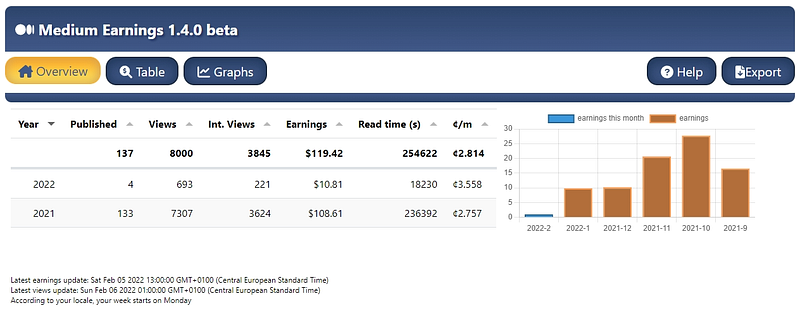
The first sight on the list is the Overview screen. You get your past years and months, and details about when your stats were last updated, just like you used to.
Nothing new here, but it does look nicer! Notice the navigation bar with the friendly yellow and blue buttons on top? Go ahead and explore them.
A future release will include past months as a table too. For now, we’ll have to live with the graphical presentation. Maybe it will help some of us not to count every penny.
Not having everything on the same page is such a relief. You truly feel that you have some overview. It makes you want to stay, enjoy the quiet and relax.
Or is it only quiet when it comes to my own earnings?
Cents/minute
I write my extensions and the release stories in my free time and it is sometimes getting late when I want to push a new version out. BichoDoMato slapped some sense into me about the silliness of the ¢/s. I stubbornly refused to listen. And to think about it. So, I went ahead with the release, boldly stating that I was not out to destroy your sanity (link for historical reference).
All it took was a night’s sleep and his insistence to see the error of my ways. Boy, do I have good news for you. The extension now shows your earnings as cents per minute! Your 0.035 ¢/s will now finally show as 2.1 ¢/m.
See for yourself:
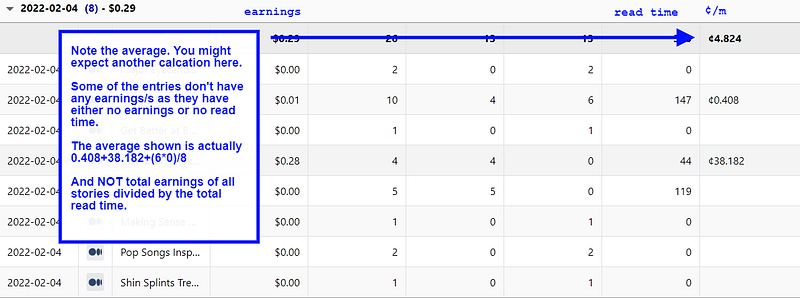
Sorry that most of the image is taken up by an annotation about the average. Lately, I have been answering a lot of questions on how the average is calculated. The average in this table is done lazily, as I explain in the image.
Why? Performance. Remember I had the table reduce its loading time from 19 minutes to under 100 milliseconds in the Everest update? I want to keep it that way. The ¢/m in the Overview screen is accurate, though.
Want to see another calculation of the average here? Let me know in the comments.
I’ll allow you one last gaze from this splendid viewpoint. When you’re ready, we’ll take our binoculars for a closer look at other features.
Let’s Have Some Interactivity

You could already expand some groups by clicking on them. To me that felt like a solo-performance. This version comes with some actual interaction.
See the graph above? It shows when you click on the date of a story.
You’ll also notice a new button in the tables. Click on it to go to the Medium-stats page. No screenshot of the buttons. I’m sure you’ll figure it out.
But, clicking on a date to show a graph? Is that intuitive?
I admit it isn’t:
Maybe I am as perverse as the designers at Microsoft.
I didn’t want to pollute the table with things that are less important. Let me know in the comments to suggest improvements to my dirty mind.
Or to the extension. You decide.
Don’t Panic
Stuck? Confused? Can’t remember everything in this update? Not to worry. You might have seen the new ‘Help’ button in the first screenshot. Click on it and I’ll fly over to hold your hand.
While you wait for me to arrive, you might as well check the text that appears.
Note that the help is context-sensitive. If you’re checking out the table, you’ll get some info about what you see in the table. When you are confused about the graph, click on it and you’ll see some info about it. If you’re drinking in the view of the lake, and click on it, then… Well, I’m sure you get it.
And I’d appreciate it if you let me know that I can cancel my flight.
Legacy table
And, it’s gone. Oh, come on! I just had to make this reference. This is an earnings extension after all. Go on, click it. You know you want to. Unless you don’t like to laugh, of course.
The old table was giving me more trouble than it was worth. It had some buggy behaviour and I didn’t feel that updating it would make any sense as the new tables surpass the functionality of this old one.
I was unable to create a screenshot for this ‘feature’. It’s gone forever.
Other Boosters
A number of other things have been boosted. Some changes have been made to provide a more consistent look of the tables, while other include better logging and performance.
By the way, if you have made it this far, I take it you are interested in previous updates. You might have missed the silent update for 1.3.1 here.
Overall, I am pretty happy with how this release turned out. There are features that didn’t make the cut, but there’s always next update, right?
Feedback
I love to hear what you think about this release. As always, don’t shy away from the comment button to let me know what you like best and what you want to see next.
I also greatly appreciate reviews on the Chrome Webstore.
You can also buy me a coffee to show your appreciation: buymeacoffee/patreon.
I hope that you enjoy the view your earnings on this platform provide you. And that the new version extends the pleasure you take from mountainous views.
Downloading/Installing/Updating
Installing is easy. First, make sure you have either Google Chrome or the Blaze browser installed. Then head over to the store using the link below and click on ‘Add to Chrome’ (or Blaze’s equivalent).
Already have the extension installed? Any updates will be automatically installed.
Awesomators
This group of wonderful people have supported the extension recently. Consider reading their stories:
- Jane Frost (Jane Grows Garden Rooms)
- Brian Feutz
- Karen Madej
- Danell teNyenhuis Black
- Jeanne-Erin (Pluto) Wolnosci
- Russell Lim (I think I have finally found you! Maybe I got the wrong guy, but do yourself a favour and check out his pinned story about Medium Tags)
- Anthony Lawrence (Pcunix) — a true pioneer who has once again been invaluable during development. Thanks for your rigorous testing, Anthony!
Release History
Check out earlier updates here. Note that this might also be a good place to visit to check whether this is the latest version. This version was released on February 9, 2022.