Tools — Chrome Earnings Extension
Earnings Extension — Bugfixes in 1.3.1
Just to make your life easier
It’s only been a couple of days and I already received some wonderful feedback about how the extension can improve. Or actually, how to make it behave as it should. In this release:
- More correct earnings/second (🩹 bugfix)
- Disappearing summary row (🩹 bugfix)
- Changed $/second to something more humanly readable(🧬 improved)

Correct Earnings/second
Paul Mansfield was so kind to notify me that the earnings/second were not calculated correctly in the rollups of the main table.
To make things worse, the same was happening to the table with the yearly overview. A fix was in order.
The table rolls up information according to how you have grouped your data (stories/days/weeks). It displays the sum of all values in bold just below the title. That, as Paul pointed out, doesn’t make sense.
Main Table vs Year Overview
I have corrected this in the table that displays your previous years. In the main table, however, I cheated my way out. Instead of doing a proper calculation, I display the average of the numbers in the rows below. This results in a nice enough, yet incorrect number. I’ll spare you the math.
So, why go for an average? Simple: performance. If you have enough data in the table, you’ll have to wait for quite a while before the table finally shows on your screen. I didn’t deem the number important enough for this.
Like it? Disagree? Let me know in the comments!
While I was making changes to the calculations, I got bothered by the ‘$/s’-column. So, I made a small improvement there.
Dollar-cent / second
BichoDoMato happened to ask a great question just minutes before I made these few changes:
Hey, very happy to see the revenues per reading time… But why in seconds? That is a bit too precise for me. Could we have it in minutes?
Boy, do I have bad news for you. Do you think seconds are too precise? How about going from a full dollar to a measly cent? Yeah, that’ll teach you to ask for things!
I assure you, I am not set out on destroying your sanity. Let me explain why seconds and cents make more sense.
I don’t like really small numbers. I have a hard time processing data like $ 0.00035 and $ 0.00032. There are just too many zeroes in there. ̶C̶h̶a̶n̶g̶i̶n̶g̶ ̶t̶o̶ ̶d̶o̶l̶l̶a̶r̶/̶m̶i̶n̶u̶t̶e̶,̶ ̶l̶i̶k̶e̶ ̶B̶i̶c̶h̶o̶D̶o̶M̶a̶t̶o̶ ̶s̶u̶g̶g̶e̶s̶t̶s̶,̶ ̶w̶o̶u̶l̶d̶ ̶m̶a̶k̶e̶ ̶t̶h̶a̶t̶ ̶e̶v̶e̶n̶ ̶w̶o̶r̶s̶e̶.̶
Edit, after releasing the new version: Changing to a dollar/minute would make even more sense. Multiply the ‘¢/s’ by 60 and you get ‘¢/m’. That would be genius! The 0.035 ¢/s would become 2.1 ¢/m!
As it happens, though. I crunched out the update while I should have been sleeping. I was too tired to think and my brain thought I need to divide by 60. Oops. Next update I’ll update this number again. Now to a more sensible ¢/m.
So, I went with a smaller unit to divide by. Instead of showing dollars per second ($/s) I am now displaying cents/second (¢/s). The 0.00035 suddenly becomes $ 0.035. It’s still hard to read, but it’s an improvement anyway (and next version I will improve upon it further, thanks to BichoDoMato).
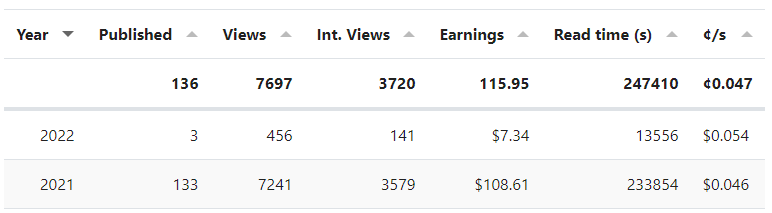
Summary row no longers vanishes
Did you ever notice that the summary-rows on the top would disappear if you clicked on ‘Stories’ or ‘Weeks’? No? Phew… Neither did I.
As I was testing the fixes of the bugs above, I did notice.
Now, they no longer have a will of their own and will stay put, just where we like them.
Feedback
As always, leave me your feedback if you particularly like or dislike something and I might just put it on my todo-list.
If you have a minute to spare, I would appreciate it if you leave a rating on the Chrome webstore. Donations are, obviously, also very much appreciated. You can buy me a coffee at patreon or buymeacoffee.
Support to the extension has graciously been extended by Jane Frost (Jane Grows Garden Rooms), Brian Feutz, Karen Madej, Danell teNyenhuis Black, Russel Lim (who I still can’t find on Medium), Jeanne-Erin (Pluto) Wolnosci and Anthony Lawrence (Pcunix).
Releases
This update has been released to the Chrome webstore on January 24, 2022. Your extension shall automatically update once it is available.
You can find an overview of all past releases of this extension here.