How to embed a Dash app into an existing Flask app

Dash (by Plotly) is an open source, simple-to-use Python framework for building beautiful data-driven web applications.
If you’re interested in knowing more about the framework, head over to “Introducing Dash”, the official release announcement, or check out the many examples from their gallery.
What’s relevant though is that Dash uses Flask for the back end.
If you’re familiar with Flask, you will know that it has a minimalistic core, it’s highly customizable and comes with easy-to-add extensions.
And so, it’s only natural to think that Dash apps should be easy to integrate into an existing Flask app.
Table of Contents
- Existing solutions
- A self-contained example
- Factor out the Dash app into its own subfolder
- Multiple Dash apps on a single Flask server
- Deploy to Heroku
- Outstanding points
- Notes on setup, direnv and virtualenvwrapper
- Log of updates
Existing solutions
Resources on Dash integration with an existing Flask app are sparse and incomplete.
Searching for “dash integration flask” brings up code from the official docs on deployment. B̵u̵t̵ ̵i̵t̵’̵s̵ ̵h̵a̵r̵d̵l̵y̵ ̵e̵v̵e̵n̵ ̵a̵n̵ ̵e̵x̵a̵m̵p̵l̵e̵. The Dash team did a great job and addressed requests by the community. Notheless, the new examples are only using a bare-bones Flask setup.
Other search results point to StackOverflow questions like Running a Dash app within a Flask app or to the Dash’s github issue that requests A simple working example for embedding dash in flask under a path.
These resources are still insufficient and usually have several of the following problems:
- examples are not self-contained, difficult to test, disorganized
- require an unrealistically simplified Flask app
- do not address specific basic requirements like authentication
And so, if you also have spent hours searching, reading and testing through dozens of nested links, without much success, you probably came to the same conclusion.
We need a documented strategy for embedding a Dash app into an existing Flask app!
A self-contained example
I created an easily testable and self-contained example which integrates a Dash app into a realistic Flask project.
To test it
Clone the github repository:
git clone https://github.com/okomarov/dash_on_flask
cd dash_on_flask
touch .env
Add config details to the .env file (not committed):
export FLASK_APP=dashapp
export FLASK_ENV=development
export DATABASE_URL=sqlite:///${PWD}/app.dbexport SECRET_KEY=secret_key_change_as_you_wish_make_it_long_123Now, either with Docker:
docker-compose build
docker-compose run
Or… load config details, create a virtual environment (optional, will get back to this), install python dependencies, initialize the database, and run the app:
source .env
pip install -r requirements.txt
flask db init
flask db migrate -m 'init'
flask db upgradeflask runFinally, check the app at http://127.0.0.1:5000/dashboard!
You should be re-directed to a sign-in form, with a link to register first. That is, the dashboard requires authentication:
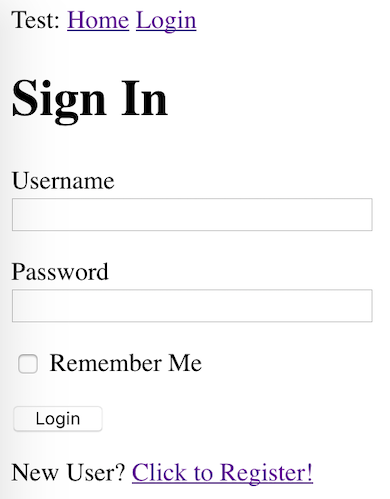
This is exactly what we want! Register first, then sign in, and go back to to the /dashboard.
Now we have an independently built Dash app, served by our Flask app, playing well with our authentication and other extensions.
Implementation details
The app adds the simple stock plotter displayed below (modified to use yahoo prices):
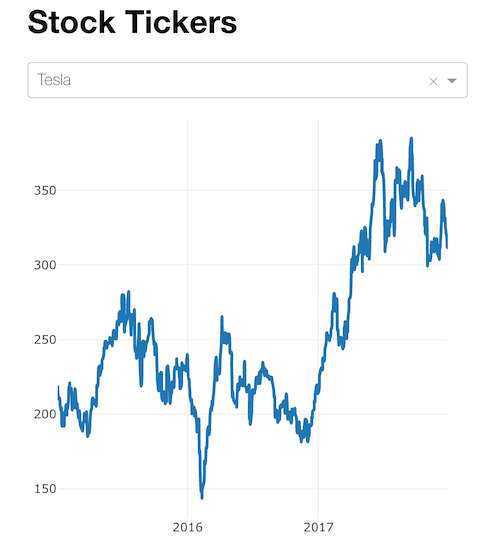
to a Flask app which uses:
- the application factory pattern and blueprints
- a database to manage users (sqlite with Flask-SQLAlchemy and Flask-Migrate)
- authentication (Flask-Login)
This is a standard setup with most Flask applications. Steps and code on how to implement the infrastructure used in my repo are adapted directly from the excellent Flask Mega Tutorial by Miguel Grinberg.
There are a couple of things to note. So let’s have a look at the folder structure:
.
├── app/
│   ├── __init__.py
│   ├── extensions.py
│   ├── forms.py
│   ├── models.py
│   ├── templates/
│   │   └── ...
│   └── webapp.py
├── app.db
├── config.py
├── dashapp.py
├── migrations/
│   └── ...
├── .env
└── requirements.txt
First, the app/ folder contains everything related to our Flask app, or the server, as referred by the Dash documentation. We create the main Blueprint and the routes in webapp.py (edited for clarity):
and define the app factory in __init__.py :
Second, dashapp.py is the file which we run with flask run. That file creates the server Flask app which is re-used by the Dash app.
Moreover, the file is also used to define the layout and callbacks of the Dash app and to protect its routes/views (edited for clarity):
Factor out the Dash app into its own subfolder
As you probably noticed, the file that instantiates the app (sometimes called run.py) is more cluttered than usual. For instance, the Dash app should really belong to its own folder.
So, if you are not using the application factory pattern, you are probably better off with the simpler structure described in this answer.
Following the workaround explained in this answer, we can put the Dash app code into its own subfolder under the /app:
.
├── app
│   ├── __init__.py
│   ├── dashapp1
│   │   ├── assets/
│   │   ├── callbacks.py
│   │   └── layout.py
│   ⋮
│   └── webapp.py
├── dashapp.py
⋮
where layout and callbacks are in their separate files (side by side editing is easier than having callbacks underneath layout):

The Dash app instatiation is now all done inside __init__.py (for details check the github repository) and our main dashapp.py is just:
from app import create_appserver = create_app()Feels good!
Multiple Dash apps on a single Flask server
Now that we know how to factor out our Dash app into its own subfolder we can instantiate multiple Dash apps under the same Flask server.
The full solution is on github under the branch feature/multiple_dash_apps.
As a side note, if you are not using the factory pattern to start the Flask server, skip this section and follow the official documention in how to structure a multi-page app.
Now, suppose you have another Dash app which you created under /app/dashapp1 :
.
├── app
│   ├── __init__.py
│   ├── dashapp1
│   │   ├── assets/
│   │   ├── callbacks.py
│   │   └── layout.py
│   ├── dashapp2
│   │   ├── assets/
│   │   ├── callbacks.py
│   │   └── layout.py
│   ⋮
│   └── webapp.py
├── dashapp.py
⋮
We can adapt our /app/__init__.py to:
We can now launch our Flask server and navigate to <base_url>/dashboard for the first Dash app or to <base_url>/example for the second app!
Deploy to Heroku for Free
- Fork the Github repository
- In the forked repository, edit the
app.jsonand replace the value of the"repository": "https://github.com/okomarov/dash_on_flask"with the URL of the forked repository. - Click on the “Deploy to Heroku” button

In the new screen, if you don’t have a Heroku account create one. Then in the app creation screen, pick a name for the app and click on Deploy.

Outstanding points
Jinja templating: when accessing the dashboard route, the Dash app is loaded into its own page instead of a div element that can be fitted into our Jinja templates. This answer describes a workaround on how to re-use our Jinja templating for the Dash app.
Notes on setup
direnv
To run the example we need to create some environment variables, which are then automatically imported by the config.py. We place those variables into a file called .env and source them when required.
I let direnv auto-magically load project-specific environment variables defined in the .env file when I cd into the folder.
virtualenvwrapper
Before installing the requirements, I recommend creating a virtual environment. One way to do this is by running from the project root:
python3 -m venv env
source env/bin/activate
Another way among the many, is to manage and organize your environments in one place with virtualenvwrapper, which is what I use in conjunction with the direnv integration.
Log of updates
- Initial post — 2019/01/02
- Better Dash app files organization — 2019/02/21
- Multiple Dash apps under a single Flask server — 2019/05/05
- Added Flask context to Dash apps — 2019/07/09
- Deploy to Heroku — 2019/11/15
- Added Docker support — 2021/05/03
If you liked the story, leave a few claps 👏


