
Docker — A Beginner’s guide to Dockerfile with a sample project
A step by step guide to understanding the Dockerfile


Dockerfile is used to automate the Docker image creation. Docker builds images by reading instructions from the Dockerfile.
We will understand Dockerfile instructions by building a sample project. clone the below repo for all the examples.
git clone https://github.com/bbachi/dockerfile-examples.gitHere are all the commands that we can use in the Dockerfile.
- Comments
- FROM
- CMD
- ENTRYPOINT
- WORKDIR
- ENV
- COPY
- LABEL
- RUN
- ADD
- .dockerignore
- ARG
- EXPOSE
- USER
- VOLUME
Comments
Comments in the dockerfile start with # and you can put anywhere those comments.
# from base image nodeFROM
This is the first command in the Dockerfile. Without this, we can’t build an image. We can build the image just with this command. when we build just with FROM, we are actually taking the base image CMD whenever the image is instantiated.
// build the image
docker build -t first-dockerfile -f Dockerfile1 .
// list image
docker images// run the image
docker run -it -d first-dockerfile// use exec for interaction
docker exec -it f1edbfca3eac bash
CMD
CMD command is used to give the default commands when the image is instantiated, it doesn’t execute while build stage. There should be only one CMD per Dockerfile, you can list multiple but the last one will be executed.
// build the image
docker build -t dockerfile2 -f Dockerfile2 .
// list image
docker images// run the image
docker run -it -d dockerfile2// use exec for interaction
docker exec -it <conatiner id> bash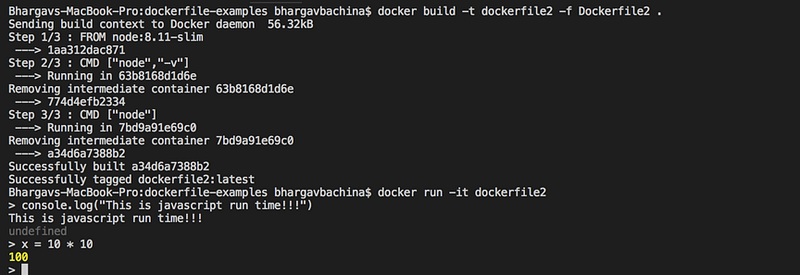
if you notice it, the last command is executed when we ran the container. There are a couple of points to notice here.
- if we specify executable in ENTRYPOINT, we can use CMD to pass default parameters to it (look at ENTRYPOINT section)
- if not, we can specify executable and default params in the CMD.
- we can override the default command given in CMD while running the container
ENTRYPOINT
ENTRYPOINT is used as an executable for the container. Let’s look at the below example
we are using ENTRYPOINT for executable command and using CMD command to pass some default commands to the executable.
// build the image
docker build -t dockerfile3 -f Dockerfile3 .
// run the container
docker run -it dockerfile3
WORKDIR
WORKDIR sets the working directory for all the consecutive commands. we can have multiple WORKDIR commands and will be appended with a relative path. Consider the following example where we have two WORKDIR commands leads to /usr/node/app
// build the image
docker build -t dockerfile4 -f Dockerfile4 .
// run the container
docker run -it dockerfile4// open in another terminal and do exec
docker exec -it <container id> bash// see the current working directory
pwd

ENV
ENV sets the environment variables for the subsequent instructions in the build stage. Consider the below example where we define the environment variable workdirectory and we used that later with $. There are two forms: single and multiple values
// form1
ENV param value
// form2
ENV param1=value1,param2=value2// build the image
docker build -t dockerfile5 -f Dockerfile5 .// run the container
docker run -it dockerfile5// open in another terminal and do exec
docker exec -it <container id> bash// see the current working directory
pwd
COPY
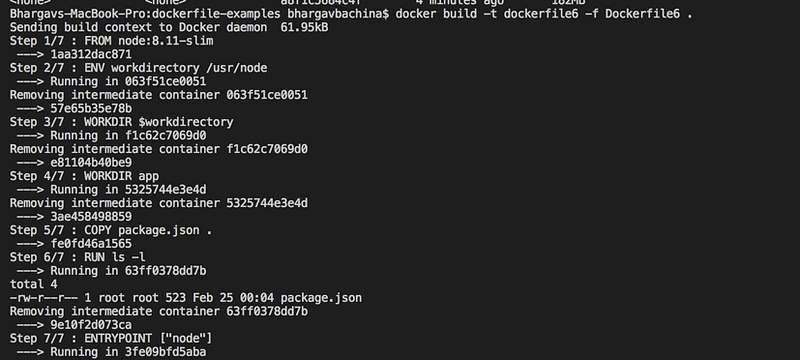
COPY is used to copy files or directories from source host filesystem to a destination in the container file system. consider this example where we are copying package.json from our system to container file system. we can verify that while building with the RUN command ls -l.
LABEL
LABEL is used to add some metadata to the image. if we use the same label as the base image and the most recent label value is applied.
// build the image
docker build -t dockerfile7 -f Dockerfile7 .
// inspect the image
docker image inspect dockerfile7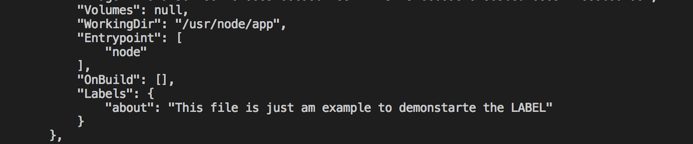
RUN
RUN executes the instructions in a new layer on top of the existing image and commit those layers and the resulted layer will be used for the next instructions in the Dockerfile. consider this example we are doing npm install and ls -l with one RUN to avoid any additional layers.
// build the image
docker build -t dockerfile8 -f Dockerfile8 .
ADD
ADD is used to add files or directories and remote files from URL from source host filesystem to a destination in the container file system. Consider this example where we are adding index.js from our system to container file system. We can verify that while building with the RUN command ls -l.
// build the image
docker build -t dockerfile9 -f Dockerfile9 .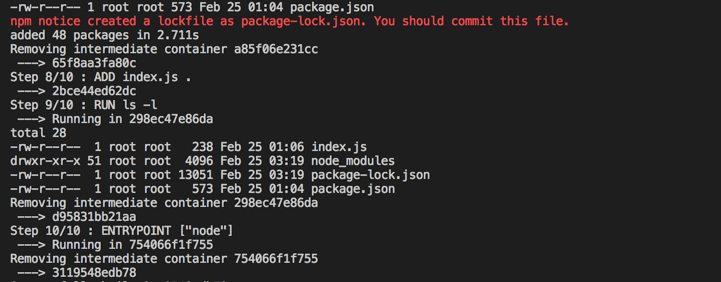
.dockerignore
Whenever we build the image at the root level, the entire context is sent to the Docker daemon. Sometimes we don’t need to send all the content to Docker daemon, those files or directories should be added to this .dockerignore file.
for example, we have node_modules in the context and we have added that to .dockerignore file.

ARG
ARG is used to pass some arguments to consecutive instructions and this is only command other than a comment can be used before FROM. We can see ARG usage in the below file and also we can pass that with the build command.
// build command
docker build -t dockerfile10 -f Dockerfile10 .
// build-arg usage
docker build -t dockerfile10 --build-arg NODE_VERSION=8.11.4 -f Dockerfile10 .
EXPOSE
EXPOSE is used as documentation for the port. This is just a communication between the person who builds the image and the person who runs the container. It doesn’t serve any other purpose other than documentation.
For example, we have used port 3070 in the index.js file. So, we are letting people know who runs the container by using EXPOSE instruction in the Dockerfile.
USER
USER instruction sets the user name and optionally the user group to use when running the image and for any instructions that follow it in the Dockerfile
VOLUME
VOLUME is used to create a mount point with the specified name. Following are the examples of Dockerfile and running instructions.
// build command
docker build -t dockerfile13 -f Dockerfile13 .
Here is an article for a more detailed explanation of volumes.
Conclusion
we built the project step by step with Dockerfile and looked at most of the instructions. Please look at the Docker docs if you need more info.
Thank you for reading and If you find this useful, Please give it a clap and help others to find it. Please follow me for more interesting stories:)


