
Django Shorts — Password validators
Django by default has a good set of password validators, but what about if you want to add your own? It’s super easy.

Welcome to Django Shorts.
This tutorial series will provide you with quick and simple solutions for different needs of your Django projects and to improve your knowledge.
Django is the web framework for perfectionists with deadlines, so let’s perfect our password validators.
This article assumes that you have already experience with Django projects.
What are password validators ?
Password validators are small pieces of code that check if a password meets certain requirements.
The goal of the validators is to ensure that a password is not a simple set of characters that can be easily a victim of a brute-force or dictionary attack.
Common password validators rules include:
- At least 1 digit;
- At least 1 uppercase character;
- At least 1 lowercase character;
- At least 1 special character;
Django built-in password validators
Django includes a set of built-in password validators that check for the following rules:
- Similarity of the password and username;
- Minimum length of the password;
- Password similar to common passwords (20.000 records);
- Password not entirely numeric;
To activate and use these validators, they need to be defined in the settings.py file:
AUTH_PASSWORD_VALIDATORS = [
    {
        'NAME': 'django.contrib.auth.password_validation.UserAttributeSimilarityValidator',
    },
    {
        'NAME': 'django.contrib.auth.password_validation.MinimumLengthValidator',
        'OPTIONS': {
            'min_length': 9,
        }
    },
    {
        'NAME': 'django.contrib.auth.password_validation.CommonPasswordValidator',
    },
    {
        'NAME': 'django.contrib.auth.password_validation.NumericPasswordValidator',
    },
]
Some validators can accept options for configuring certain parameters, in this example, the minimum length validator takes the value for the length of a password (the default length is 8 characters).
The errors and help texts are returned to the user in the order which they are defined in the settings file.
Writing simple custom password validators
It’s quite easy to write a custom password validator to use with Django. All is needed is to create a class that implements two functions:
- validate, which validates the password according to the implemented rules and returns None (for success) or raises a ValidationError (in case of failure);
- get_help_text, which returns the help text to show to the user;
Let’s see an example for a custom password validator that checks if the password has at least 1 digit (using regex):
class NumberValidator(object):
    def validate(self, password, user=None):
        if not re.findall('\d', password):
            raise ValidationError(
                _("The password must contain at least 1 digit, 0-9."),
                code='password_no_number',
            )

    def get_help_text(self):
        return _(
            "Your password must contain at least 1 digit, 0-9."
        )
Other custom validators can be easily implemented following this convention pattern, so let’s take a look at our full example of custom validators, which we create in a separate file called validators.py:
Let’s walk-through our custom validators code:
- Line 6, we define a NumberValidator that validates if a password has at least 1 digit;
- Line 20, we define a UppercaseValidator that validates if a password has at least 1 upper case character;
- Line 34, we define a SymbolValidator that validates if a password has at least of symbol (special character);
Each validator has a simple implementation of a regex rule to check and validate each of the intended rules.
To use the new custom validators we need to add them to the settings.py file:
AUTH_PASSWORD_VALIDATORS = [
    {
        'NAME': 'django.contrib.auth.password_validation.UserAttributeSimilarityValidator',
    },
    {
        'NAME': 'django.contrib.auth.password_validation.MinimumLengthValidator',
        'OPTIONS': {
            'min_length': 9,
        }
    },
    {
        'NAME': 'django.contrib.auth.password_validation.CommonPasswordValidator',
    },
    {
        'NAME': 'django.contrib.auth.password_validation.NumericPasswordValidator',
    },
    {
        'NAME': 'password_validators.validators.NumberValidator',
    },
    {
        'NAME': 'password_validators.validators.UppercaseValidator',
    },
    {
        'NAME': 'password_validators.validators.SymbolValidator',
    },
]
Let’s see the validators in action.
For that we can log in to the Django Admin dashboard and try to change the password for a user using the standard form:
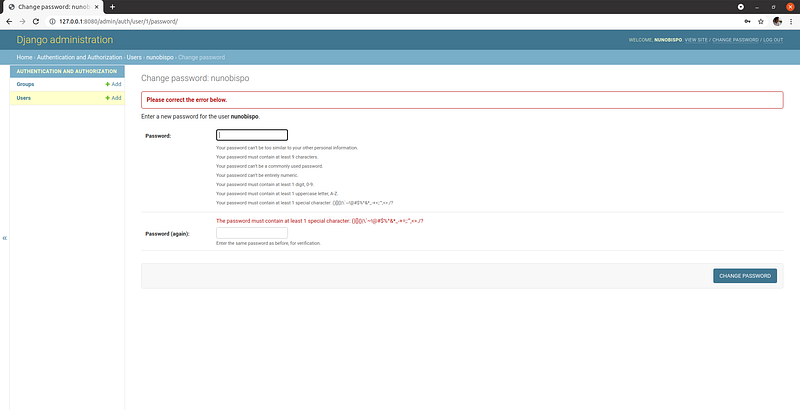
And that is all that is needed for creating and using our custom validators.
Our custom validators are now in action and are used both in the Admin dashboard and in the “normal” applications.
With our new validators we have now covered most of the common scenarios (together with the built-in validators in Django).
Accessing model data with custom password validators
One last common scenario for password validation is checking if the password is identical to previously used passwords by the user.
For that scenario we will need to access stored data, which means that we need to add also models definition to read and write hashed passwords to keep our data secure.
Let’s start by defining our StoredPassword model in models.py:
from django.conf import settings
from django.db import models


class StoredPassword(models.Model):
    user = models.ForeignKey(
        settings.AUTH_USER_MODEL,
        on_delete=models.CASCADE,
        editable=False
    )
    password = models.CharField(
        'Password hash',
        max_length=255,
        editable=False
    )
    date = models.DateTimeField(
        'Date',
        auto_now_add=True,
        editable=False
    )
Our model definition is very straightforward, we store the user, the hashed password and the created date for reference.
Since we now have added a model, we also need to make sure that the application where we define the model is defined in the settings.py file:
INSTALLED_APPS = [
    'django.contrib.admin',
    'django.contrib.auth',
    'django.contrib.contenttypes',
    'django.contrib.sessions',
    'django.contrib.messages',
    'django.contrib.staticfiles',
    'password_validators'
]
And of course we need to create and run and the database migrations:
$ python3 manage.py makemigrations
$ python3 manage.py migrate
With the model in place to save the previous user passwords we can now add the new custom password validator:
Let’s do a quick code walk-trough:
- Line 7, we define the SALT that will be used to hash the password to store in our model;
- Line 53, we implement our repeated password validator, where besides defining the validate method we also implement the password_changed (which is called after changing a password successfully) to store the passwords;
- Line 59–61, we hash our password using the SALT and search if an identical record (combination user/password) exists in the database;
- Line 72–78, we hash our password and check if the record already exists in the database (should not be the case) and store it in our StoredPassword model;
Now if we try to change the password to a previous one it will show the following error:
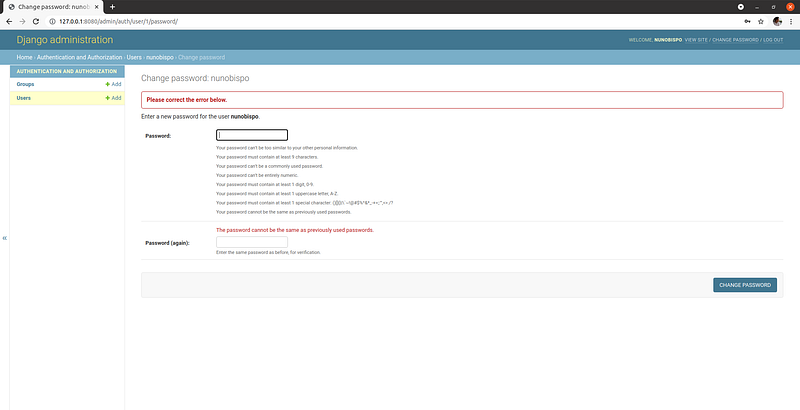
Keep in mind that you will need to change the password twice so that you have one previous password that will match the rule.
Conclusion
As you could see, it is quite easy to implement password validators in Django so you can customize your password validation rules, which can be necessary to keep compliant with certain regulations.
Check out the full source code on GitHub at: https://github.com/nunombispo/DjangoShorts-PasswordValidators
Check out other Python/Django shorts:
Follow me on Twitter: https://twitter.com/DevAsService
Check out my website at: https://developer-service.io/
If you enjoyed reading this article and found it usefull, you can support me by signing up for a Medium membership (if you are not a member). It will only cost you $5 a month — this will give you access to all stories on Medium! (and I will receive a small commission)
Besides that, if you want to stay updated when I post a new story, you can signup for my free newsletter!


