avatarMark Ellis

Free AI web copilot to create summaries, insights and extended knowledge, download it at here

4592

Abstract

d your credentials.</p><p id="2c46">Nice.</p><h2 id="43a5">Desktop widgets</h2><p id="a7b1">Craig Federighi bloody loves his widgets, doesn’t he? They’re appearing everywhere and are acting as a way to unify the OS experience across all of Apple’s devices.</p><p id="99a8">I like this approach, and I very much like the look of what they’re doing with widgets in macOS Sonoma.</p><p id="ee7d">Widgets have always led a troubled life on the Mac. They’ve shown promise, but have been poorly adopted by third-party developers and I’d wager that most users, like yours truly, inevitably forget they exist.</p><p id="6c8e">Apple is addressing this in macOS Sonoma by introducing desktop widgets. This enables users to pick widgets from a new widget gallery, drag them onto the desktop, and interact with them once in situ. Sounds very iPadOS 17-like, doesn’t it?</p><div id="c368" class="link-block"> <a href="https://readmedium.com/the-new-m2-macbook-air-conundrum-5a61f2dd2051"> <div> <div> <h2>The NEW M2 MacBook Air Conundrum!</h2> <div><h3>How do you choose between the 13-inch and 15-inch?</h3></div> <div><p>medium.com</p></div> </div> <div> <div style="background-image: url(https://miro.readmedium.com/v2/resize:fit:320/1*-NS_W2cqLy1NZExv8P_wqA.png)"></div> </div> </div> </a> </div><p id="2542">I’m the sort of person who likes to keep a very clean desktop, therefore I only ever have one or two folders sitting on there at any one time. The idea of adding interactive widgets to the desktop to make practical use of that unused space is, therefore, very enticing.</p><p id="c940">Curiously, we’re also going to be able to add iPhone widgets to our Macs without installing the corresponding app on the latter. I’m intrigued to see how this works, and I confess I don’t quite understand the point, but it’s another example of how powerful Apple’s Continuity platform is.</p><h2 id="1f0a">Video conferencing</h2><p id="acb8">My days of daily Zoom and Teams calls are thankfully behind me, but Apple knows just as well as anyone else that most work endeavours these days include some form of regular conference calling.</p><p id="88d7">This explains the slew of impressive updates for conference calling in macOS Sonoma. They’re not limited to FaceTime, either; Apple was keen to highlight compatibility with the likes of WebEx, Teams, and Zoom.</p><p id="dd29">Chief among these updates is new presentation modes. Thanks to some very smart machine learning-fuelled masking, you can now place yourself in front of your shared window or within a moveable bubble. How this feature reacts to the myriad of awful lighting conditions that feature in most conference calls undertaken at home remains to be seen, but it’s a nice touch.</p><div id="d3af" class="link-block"> <a href="https://readmedium.com/5-macos-menu-bar-apps-that-never-leave-my-mac-5fe916677ec6"> <div> <div> <h2>5 macOS Menu Bar Apps That NEVER Leave My Mac</h2> <div><h3>You’d need a crowbar to release my grip from these gems!</h3></div> <div><p>medium.com</p></div> </div> <div> <div style="background-image: url(https://miro.readmedium.com/v2/resize:fit:320/1*GEpD3SjeLFeJ_mMZJuFdcg.jpeg)"></div> </div> </div> </a> </div><p id="93c8">Apple has also added a bunch of gesture-ready ‘reactions’ which fill the frame with “fun 3D augmented reality effects like hearts, confetti, fireworks, and more”. The demos of people putting their thumbs up to instigate fireworks behind them are teeth-grindingly cheesy, but it’ll be something to lighten the mood during dull Q3 performance updates, at least.</p><h2 id="f9da">Safari stuff</h2><p id="c67f">We’re normally guaranteed a pretty significant round of Safari updates each year, and WWDC 2023 didn’t disappoint. The usual claims of “faster and more relevant search” were trotted out, but it was the feature additions that piqued my interest.</p><p id="b86a">In macOS Sonoma, you can create Safari ‘profiles’ which create silos for browsing history, cookies, favourites, and tab groups. The idea is that you create, say, a profile for work, and one for home, thus removing the domination of the former from your personal life. I have little use for this myself, but it’ll be welcomed by anyone who struggles to switch off from work, a

Options

nd I’m sure there’ll be more creative uses as the feature matures.</p><div id="8601" class="link-block"> <a href="https://readmedium.com/why-the-m2-macbook-air-remains-the-laptop-king-54398eda7063"> <div> <div> <h2>Why the M2 MacBook Air Remains the Laptop King</h2> <div><h3>It’s a masterpiece.</h3></div> <div><p>medium.com</p></div> </div> <div> <div style="background-image: url(https://miro.readmedium.com/v2/resize:fit:320/1*0Sf5C15Qb0Dz8vCvz8H43g.jpeg)"></div> </div> </div> </a> </div><p id="4f61">Web apps are also receiving serious attention this year. You can now add them to the Dock as ‘apps’, and, upon launching, you’re greeted with a simplified toolbar that helps you focus on the controls within the web app itself. As a user of several web apps, that is a nice tweak.</p><p id="c7af">We’ll also be able to share passwords and passkeys via — I assume — iCloud Keychain. This puts Apple’s password vault roughly in line with the likes of 1Password (bar multi-platform support). The ability to group and share specific passwords with anyone securely will give Mac-only users even less of a reason to search for a third-party alternative.</p><h2 id="db4a">PDFs and Notes</h2><p id="482b">Just like iPadOS 17, macOS Sonoma is upping its PDF game. The updates aren’t significant, but they will make your life easier if you haven’t invested in a third-party PDF app.</p><p id="5f0b">Dubbed ‘Enhanced AutoFill’, the new feature will enable users to securely enter their saved information from Contacts into a PDF. So, if you receive a document from your solicitors that needs filling out, it’ll only require a couple of mouse clicks.</p><div id="78db" class="link-block"> <a href="https://readmedium.com/the-truth-about-using-apple-notes-as-a-second-brain-478d411be7e0"> <div> <div> <h2>The Truth About Using Apple Notes as a Second Brain</h2> <div><h3>An update on my quest to become more efficient</h3></div> <div><p>medium.com</p></div> </div> <div> <div style="background-image: url(https://miro.readmedium.com/v2/resize:fit:320/1*L7aGlX5muQJ5sueFpkrRUQ.jpeg)"></div> </div> </div> </a> </div><p id="5f4d">You’ll also be able to embed PDFs into Apple Notes. This means you can swipe through multi-page PDFs within the note — a feature that will be incredibly useful for anyone who uses Apple Notes as their ‘second brain’ (like me).</p><p id="3501">On that note (if you excuse the pun), Apple is also adding the ability for notes to be interlinked. I’ve been crying out for this ever since I started using Apple Notes as my second brain; the inability to reference a note from within another note has been genuinely frustrating at times. I’m glad they’re addressing this.</p><h2 id="80e5">Final thought</h2><p id="3b60">There was some other stuff, including updates to Messages (an app I rarely use due to the UK’s reliance on WhatsApp) and a new Game Mode. The latter gives top priority to the GPU and CPU for the game you’re running and reduces latency for wireless accessories such as AirPods and third-party controllers.</p><p id="66e0">I’m the most casual of gamers these days, but Apple’s gentle and continual fiddling with the gaming capabilities of the Mac indicates that they’re still keen on reserving its place within that space. The presence of Hideo Kojima (I had no idea who he was — but he’s apparently a big noise in gaming) at WWDC suggests that Apple’s gaming ambitions might be bigger than we think.</p><p id="3ca3">Over to you! What are you most looking forward to in macOS Sonoma?</p><h2 id="381b">Before you go</h2><p id="c92c"><a href="https://markellis.substack.com/"><b><i>Join my Substack newsletter for tips on becoming a profitable, happy online creator!</i></b></a></p><p id="bd9d"><i>If you enjoy my writing, it’s only a snippet of what’s on Medium. I’m a paying member myself and highly recommend joining. <a href="https://markellisreviews.medium.com/membership"><b>Click here to join</b></a> (a portion of your membership fee will be sent my way and therefore directly support my work!).</i></p><p id="dc44"><i>Originally published at <a href="https://markellisreviews.com/digging-for-the-most-interesting-macos-sonoma-updates/">https://markellisreviews.com</a> on June 9, 2023.</i></p></article></body>

Digging for the Most Interesting macOS Sonoma Updates

Did macOS get short shrift at WWDC?
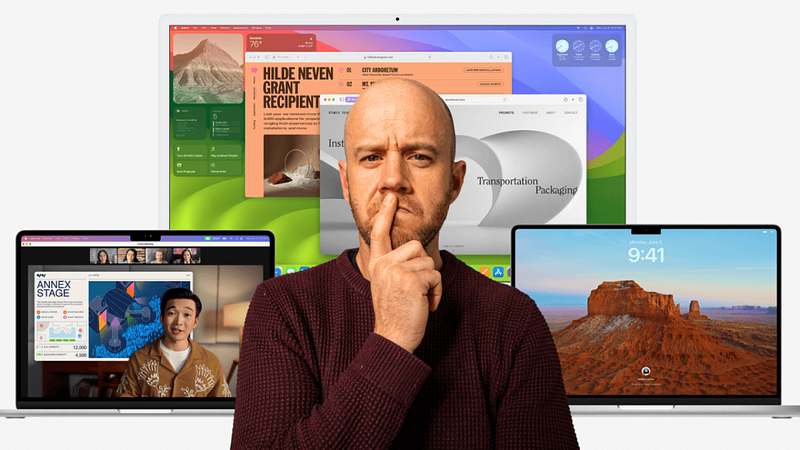
Image courtesy of Author

There was a delicate balance on display at WWDC this year. Apple needed to launch several new — and long-awaited — Macs, refresh all of its operating systems, and introduce a brand-new product category and form of computing.

In two hours.

Hands up if you’d like that job. Nah, me neither.

Unsurprisingly, this has resulted in some tepid OS updates. I’ve already offered my thoughts about iPadOS 17, which has received little more than an iOS-inspired dusting of Lock Screen customisation and interactive widgetification.

That’s fine, though. We’re reaching a point with these operating systems where we can’t expect massive changes or genre-defining shifts. For the next few years at least, the iPad, iPhone, and Mac are going to evolve gradually while Apple focuses on making visionOS digestible for the masses.

This is evident in the opening gambit for macOS Sonoma on Apple’s website. “Come for the Power. Stay for the fun,” reads the heading. This positions the Mac as an ultimately capable device that can switch from serious productivity to chilled-out entertainment in the blink of an eye. As it always has done.

This year’s updates to Apple’s longest-standing operating system are brief, surface level, and continuing the trend of focusing intently on remote work. But there is some very interesting stuff in there.

Screen savers

Nothing signals a new OS update like a bunch of new screen savers, eh?

This particular update isn’t going to supercharge your productivity, improve your ability to communicate with loved ones or make your online browsing safer.

But it does look really cool.

The new screen savers in macOS Sonoma are clearly inspired by those on the Apple TV. If you’ve not witnessed the latter, Apple has commissioned drone footage of cities from around the world to act as screen savers for its set-top box. They look superb and are always a talking point for visitors to our house (“is that real?”).

macOS Sonoma comes complete with its own screen-saver drone footage which appears to have been shot specifically for the Mac (there were no familiar Apple TV vistas displayed during the keynote). These screen savers appear behind the login window and gracefully turn into static desktop wallpaper once you’ve confirmed your credentials.

Nice.

Desktop widgets

Craig Federighi bloody loves his widgets, doesn’t he? They’re appearing everywhere and are acting as a way to unify the OS experience across all of Apple’s devices.

I like this approach, and I very much like the look of what they’re doing with widgets in macOS Sonoma.

Widgets have always led a troubled life on the Mac. They’ve shown promise, but have been poorly adopted by third-party developers and I’d wager that most users, like yours truly, inevitably forget they exist.

Apple is addressing this in macOS Sonoma by introducing desktop widgets. This enables users to pick widgets from a new widget gallery, drag them onto the desktop, and interact with them once in situ. Sounds very iPadOS 17-like, doesn’t it?

I’m the sort of person who likes to keep a very clean desktop, therefore I only ever have one or two folders sitting on there at any one time. The idea of adding interactive widgets to the desktop to make practical use of that unused space is, therefore, very enticing.

Curiously, we’re also going to be able to add iPhone widgets to our Macs without installing the corresponding app on the latter. I’m intrigued to see how this works, and I confess I don’t quite understand the point, but it’s another example of how powerful Apple’s Continuity platform is.

Video conferencing

My days of daily Zoom and Teams calls are thankfully behind me, but Apple knows just as well as anyone else that most work endeavours these days include some form of regular conference calling.

This explains the slew of impressive updates for conference calling in macOS Sonoma. They’re not limited to FaceTime, either; Apple was keen to highlight compatibility with the likes of WebEx, Teams, and Zoom.

Chief among these updates is new presentation modes. Thanks to some very smart machine learning-fuelled masking, you can now place yourself in front of your shared window or within a moveable bubble. How this feature reacts to the myriad of awful lighting conditions that feature in most conference calls undertaken at home remains to be seen, but it’s a nice touch.

Apple has also added a bunch of gesture-ready ‘reactions’ which fill the frame with “fun 3D augmented reality effects like hearts, confetti, fireworks, and more”. The demos of people putting their thumbs up to instigate fireworks behind them are teeth-grindingly cheesy, but it’ll be something to lighten the mood during dull Q3 performance updates, at least.

Safari stuff

We’re normally guaranteed a pretty significant round of Safari updates each year, and WWDC 2023 didn’t disappoint. The usual claims of “faster and more relevant search” were trotted out, but it was the feature additions that piqued my interest.

In macOS Sonoma, you can create Safari ‘profiles’ which create silos for browsing history, cookies, favourites, and tab groups. The idea is that you create, say, a profile for work, and one for home, thus removing the domination of the former from your personal life. I have little use for this myself, but it’ll be welcomed by anyone who struggles to switch off from work, and I’m sure there’ll be more creative uses as the feature matures.

Web apps are also receiving serious attention this year. You can now add them to the Dock as ‘apps’, and, upon launching, you’re greeted with a simplified toolbar that helps you focus on the controls within the web app itself. As a user of several web apps, that is a nice tweak.

We’ll also be able to share passwords and passkeys via — I assume — iCloud Keychain. This puts Apple’s password vault roughly in line with the likes of 1Password (bar multi-platform support). The ability to group and share specific passwords with anyone securely will give Mac-only users even less of a reason to search for a third-party alternative.

PDFs and Notes

Just like iPadOS 17, macOS Sonoma is upping its PDF game. The updates aren’t significant, but they will make your life easier if you haven’t invested in a third-party PDF app.

Dubbed ‘Enhanced AutoFill’, the new feature will enable users to securely enter their saved information from Contacts into a PDF. So, if you receive a document from your solicitors that needs filling out, it’ll only require a couple of mouse clicks.

You’ll also be able to embed PDFs into Apple Notes. This means you can swipe through multi-page PDFs within the note — a feature that will be incredibly useful for anyone who uses Apple Notes as their ‘second brain’ (like me).

On that note (if you excuse the pun), Apple is also adding the ability for notes to be interlinked. I’ve been crying out for this ever since I started using Apple Notes as my second brain; the inability to reference a note from within another note has been genuinely frustrating at times. I’m glad they’re addressing this.

Final thought

There was some other stuff, including updates to Messages (an app I rarely use due to the UK’s reliance on WhatsApp) and a new Game Mode. The latter gives top priority to the GPU and CPU for the game you’re running and reduces latency for wireless accessories such as AirPods and third-party controllers.

I’m the most casual of gamers these days, but Apple’s gentle and continual fiddling with the gaming capabilities of the Mac indicates that they’re still keen on reserving its place within that space. The presence of Hideo Kojima (I had no idea who he was — but he’s apparently a big noise in gaming) at WWDC suggests that Apple’s gaming ambitions might be bigger than we think.

Over to you! What are you most looking forward to in macOS Sonoma?

Before you go

Join my Substack newsletter for tips on becoming a profitable, happy online creator!

If you enjoy my writing, it’s only a snippet of what’s on Medium. I’m a paying member myself and highly recommend joining. Click here to join (a portion of your membership fee will be sent my way and therefore directly support my work!).

Originally published at https://markellisreviews.com on June 9, 2023.

Technology
Apple
Mac
Macos
Gadgets
Recommended from ReadMedium