
Design Google search -part2(LLD)
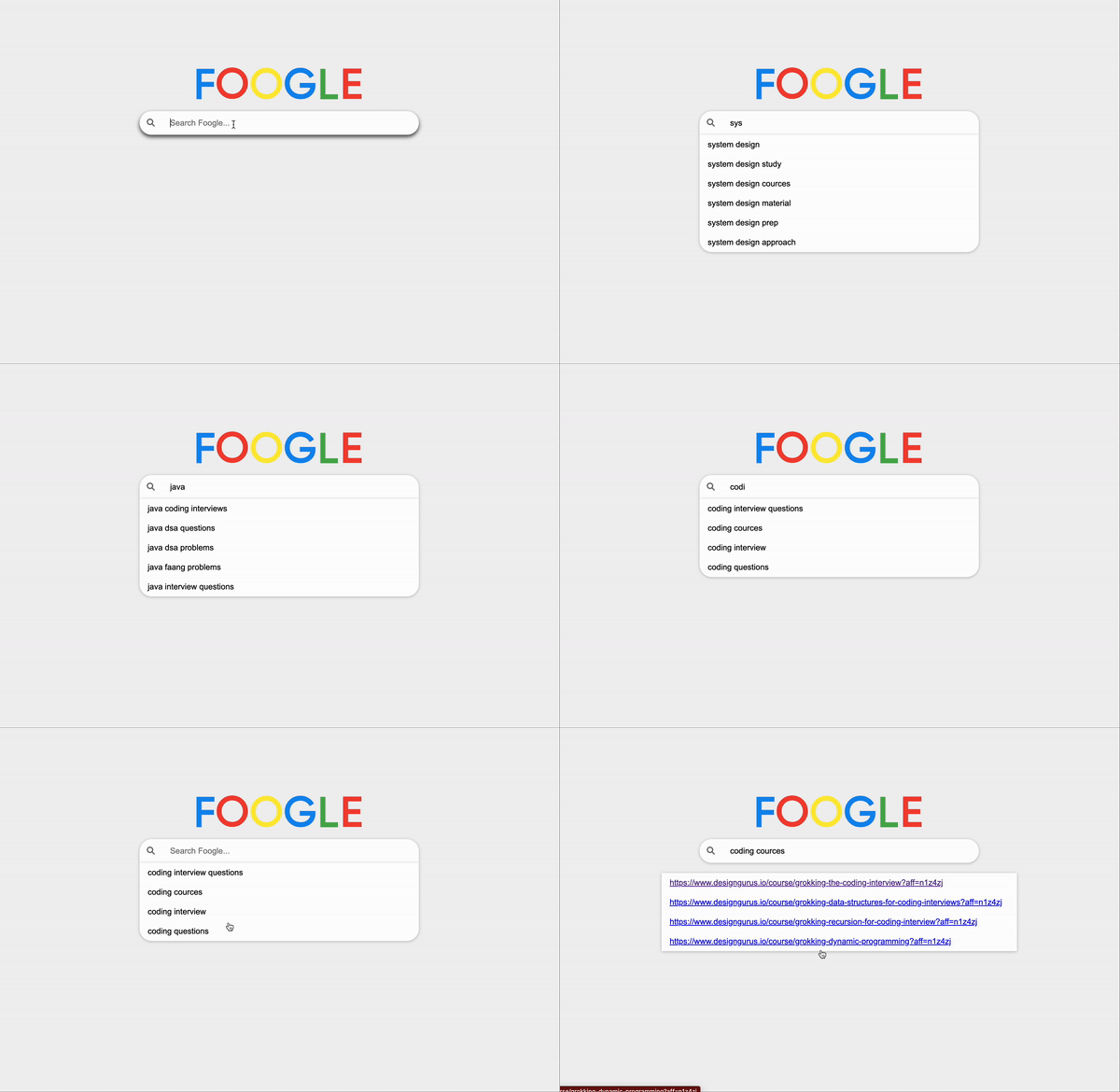
In this article we are going to implement one of the feature in google search. In the previous article we discussed high level design, some the challenges for large scale system and possible resolutions.
Read part-1 if your are only interested in HLD: Part-1
Let’s establish the problem statement and the requirements for the system.
Create a search typeahead functionality similar to Google search.
Functional requirement.
- Support only prefix-based searching.
- Ensure case-insensitive search capability.
- Enable searches up to 50 characters in length, including spaces.
- Display the most popular search strings first.
- Whenever a user selects a string from the search results or presses enter on a string, increase the popularity or search count of that string.
- Display only the top 10 most popular searches based on search frequency and trending queries.
- When user selects a auto suggest result or hit enter. If the search string is associated with links then those links should be shown.
Which data-structure does a good job with prefix based searching?
Most of you guessed it correctly its Trie.
How does a Trie assist in this?
Think of it this way, if we store all the past search strings in a Trie, when a user starts typing a search, we can swiftly perform a prefix search on the Trie. From the matching node, we can explore its entire branch to locate all words with the search prefix. If, at the end of each word, we also store a search count, we can then arrange all matching strings by their search count in descending order. This allows us to select the top 10 results and present them as auto-suggestions.
Let’s understand this with an example.
Assume we have following historical search strings
“abcd”, “abce”, “abceg”, “abcegk”, “abcegi”, “abceh”, “abcf”, “dpr”, “dqr”
Our Trie would look like this. Red coloured node show end of node and it also shows search count.
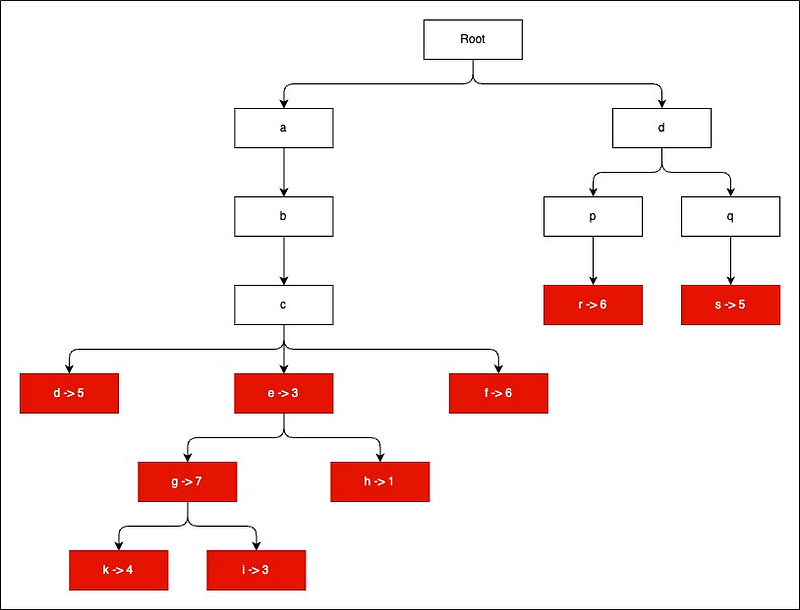
When user types “abc” in search input then we traverse all the nodes with prefix “abc” and sort them by searchCount in descending order.
Here is the order in which we need to show suggestions.
[
  {
    "word": "abceg",
    "searchCount": 7
  },
  {
    "word": "abcf",
    "searchCount": 6
  },
  {
    "word": "abcd",
    "searchCount": 5
  },
  {
    "word": "abcegk",
    "searchCount": 4
  },
  {
    "word": "abce",
    "searchCount": 3
  },
  {
    "word": "abcegi",
    "searchCount": 3
  },
  {
    "word": "abceh",
    "searchCount": 1
  }
]
Is there any problem with this solution?
What if we have millions of strings that starts with prefix “abc”? In that case our search query will be very slow and we need to collect all the millions of strings sort and then sort them by their searchCount.
Is there any way to improve performance of search function?
We are only interested in top 10 search result. We can use this fact to reduce latency of search function.
How?
What if we already had search results available at last node of prefix match. In this case node c. If node c contains the top 10 search results matching prefix abc then time complexity of search function would depend on length of search string which is very small.
Next question.
But who is going to update these top 10 results? and when do we need to update them?
Whenever user either selects a string from search result or hit enter on a search string. We need to update the search count for that string. What is right after that we can update top 10 results for all the prefix match of this string.
Let’s understand this with an example.
suppose user select string "abcdegk" and we know that searchCount for
this string is 4. We need to increase this search count to 5. We also need to
update top 10 results for all the prefixes of string "abcdegk"
update top 10 results for "abcdeg"
update top 10 results for "abcde"
update top 10 results for "abcd"
update top 10 results for "abc"
update top 10 results for "ab"
update top 10 results for "a"
Is there any further scope for optimisation?
We can only start showing results after user typed at-least 3 characters. So we can only keep top 10 results from 3rd level nodes onward.
We can use debounce functionality which can reduce load on search function. As with debounce function we only call search when user take a pause while typing.
Enough theory and explanation let’s look at code for Trie.
class TrieNode {
  constructor() {
    this.children = {};
    this.topResults = [];
    this.searchCount = 0;
  }
}

class Trie {
  constructor() {
    this.root = new TrieNode();
  }

  async insert(word) {
   const node = this._getNodeByWord(word);
   if(node == null) {
    this.update({word,searchCount:1});
    return;
   }
   this.update({word,searchCount:node.searchCount+1});
  }

  async update({ word, searchCount }) {
    if (word.length < 3) return;

    let node = this.root;
    let childNo = 1;

    for (let char of word) {
      node = await this._getOrCreateChild(node, char);

      if (childNo >= 3) {
        await this.updateTopResults(node, word, searchCount);
      }

      childNo++;
    }
    node.searchCount = searchCount;
  }

  async _getOrCreateChild(node, char) {
    if (!node.children[char]) {
      node.children[char] = new TrieNode();
    }
    return node.children[char];
  }

  async updateTopResults(node, word, searchCount) {
    node.topResults = node.topResults.filter(result => result.word !== word);
    node.topResults.push({ word, searchCount });
    node.topResults.sort((a, b) => b.searchCount - a.searchCount);
    node.topResults = node.topResults.slice(0, 10);
  }

  _getNodeByWord(word) {
    let node = this.root;
    for (let char of word) {
      node = node.children[char];
      if (!node) return null;
    }
    return node;
  }

  search(prefix) {
    let node = this._getNodeByWord(prefix);
    return node ? node.topResults : [];
  }
}
This code defines a Trie data structure in JavaScript, along with methods to insert words into the Trie, update search counts, and search for words based on a given prefix.
Here’s a breakdown of the code:
TrieNode class:
- Represents a node in the Trie.
- Properties: — `children`: An object representing child nodes, where each key is a character and the corresponding value is the child TrieNode. — `topResults`: An array containing top search results for words with the same prefix. — `searchCount`: An integer representing the count of times the word with the given prefix has been searched.
Trie class:
- Represents a Trie data structure.
- Properties: — `root`: The root node of the Trie.
insert(word) method:
- Inserts a word into the Trie and updates its search count.
- Checks if the word already exists in the Trie. If it does, increments the search count; otherwise, inserts a new node for each character in the word.
update({ word, searchCount }) method:
- Updates the Trie with the given word and search count.
- Ignores words with a length less than 3.
- Iterates through each character of the word, creating or retrieving child nodes as necessary.
- If the word has at least three characters, updates the top search results based on the search count.
updateTopResults(node, word, searchCount) method:
- Updates the top search results for a given node.
- Filters out the current word from the results, adds the new word, sorts the results by search count in descending order, and keeps only the top 10.
search(prefix) method:
- Searches for words in the Trie that start with the given prefix.
- Retrieves the node corresponding to the prefix and returns the top results stored in that node.
Checkout working web app in action: Foogle app Try searching words like system, java and select a option from autosuggest Next time you will see that selected options will show on top. Also try entering new strings It will get added to Trie and next time onwards it will start showing in autosuggest. Don’t ask for code link just do an inspect element in your browser and you can see entire code. JS is not minified.
We used debounce function which greatly reduces no of calls to trie.search. We did not used any library for javascript. We used vanilla javascript.
Thank you for taking the time to read. Feel free to connect with me on LinkedIn if you require any assistance! I’m more than happy to help with your interview preparation or provide guidance for your career.
Follow me on LinkedIn and Medium for more tech content and insights.
Similar interesting read Pastebin System design Instagram System design Google search High Level design
My interview Experience Google interview experience Read about my interview experience at Facebook Read about my interview experience at Amazon
Checkout Design Guru Courses on DSA and System design
Thank you so much for reading!!!


