
Delegation in Swift
Boss those classes

Prerequisites:
- Be able to produce a “Hello, World!” iOS application (guide HERE)
- Be comfortable with Classes in Swift (guide HERE)
- Some understanding of callbacks (closures) in Swift would be useful(guide HERE)
- I’ve used segues to pass information in part of the demo (guide HERE)
Terminology
Delegation: A pattern that enables a class to delegate responsibility for some actions to an instance of another class
Protocol: A blueprint on methods, properties and requirements to suit a piece of functionality
UITableView: A view that presents data using rows arranged in a single column
Why delegate?
The real life proxy
So the word delegate in the English language is about giving responsibility for a task to another person.
Your boss might delegate opening the office to a deputy, particularly if the boss is on vacation.
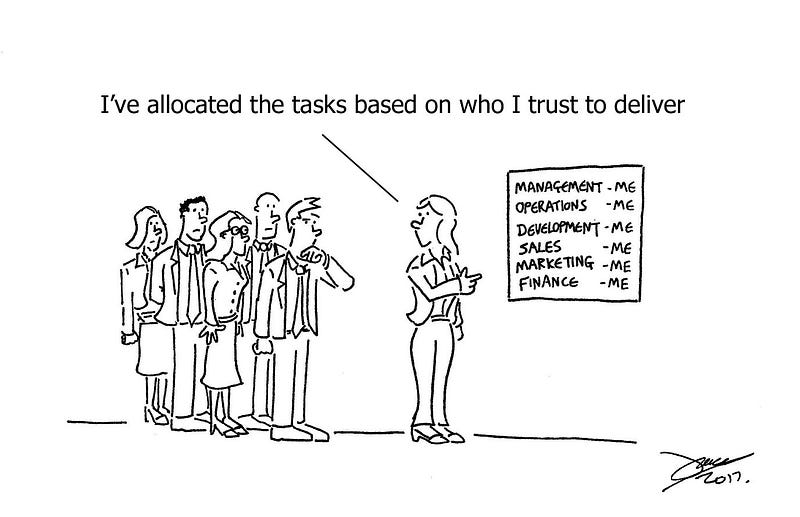
delegation, they take on too many tasksThe iOS application
Delegation is kind of the same thing, but rather than having a boss or employees you have classes.
However, much like the real-life example you avoid having massive classes that are responsible for everything. This isn’t something that you should allow to happen and should adopt an architecture that supports the App you wish to create.
A type using delegation sets up a 1:1 relationship between the delegate and the owner.
This article will cover both a UITableViewController and a delegate, chosen by a simple menu.
The pattern of this Application is shown below:
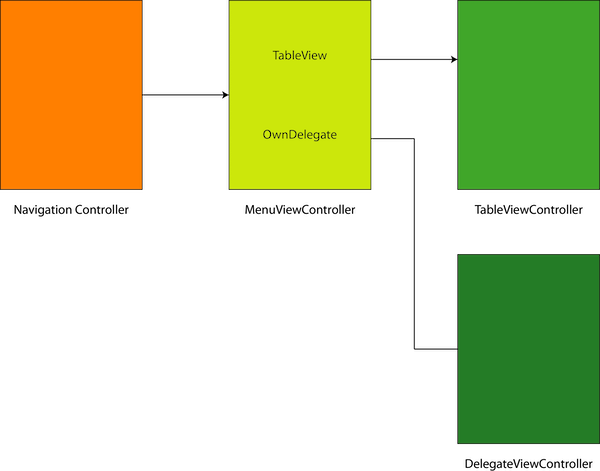
So let us press on with the demo!
UITableViewDelegate: Delegate Protocols
A common way that delegation is embedded in the iOS SDK is through delegate protocols.
When we create a UITableViewController that simply prints the row number to the console when the user selects a row. If you are unsure how to implement this, just go down to the Repo link below or have a look at the Gist that should appear right below this line.
Below this line:
What we are looking at here is the ViewController (which is the UIViewController) and we have said that the delegate of the tableview tableView.delegate is the ViewController (self in this case).
The UITableViewDelegate here has a number of optional methods and the one of interest here is tableView(_:didSelectRowAt:).
When we tap on one of the tableView cells, by implementing tableView(_:didSelectRowAt:) the function is called when the user taps a cell, which in this tutorial is the function we are interested in.
This has been placed into an extension (and it could even have been placed in another file, although it wasn’t done here) in order to tidy the code to make it easier to understand without placing everything into the same class without consideration to readability.
extension ViewController: UITableViewDelegate {
    func tableView(_ tableView: UITableView, didSelectRowAt indexPath: IndexPath) {
        print ("Selected: ", indexPath.row)
    }
}
In this case we print to the console with print (“Selected: “, indexPath.row).
Delegate Protocols
Wider Understanding: Required Methods in Protocols
Other protocols can have required methods, and since they are required they must be implemented by a delegate.
Create your own Delegate
One way of using delegates is to pass data from one view controller to another.
When passing from the MenuViewController to the DelegateViewController we use a segue. This is then set from override func prepare(for segue: UIStoryboardSegue, sender: Any?) that sets the delegate in the destination
Which of course needs to be set in the destination, and then can be called (here is the entire destination view controller for reference):
which in turn will call the following function in the original view controller (shown as an extension here)
Conclusion
Delegation is simply everywhere in the iOS SDK! This guide has taken us through two uses, one is the UITableViewDelegate which frankly is so common that it is well worth getting used to in your iOS developer journey. The other is a way of passing information through view controllers.
This is an interesting way of doing so, and is called a pattern as it is so common in computer programming. In any case, it is probably time to get used to using it in your own projects and production code.
Extend your knowledge
- There is documentation for tableView(_:didSelectRowAt:) HERE
The Twitter contact:
Any questions? You can get in touch with me HERE


