avatarSahiti Kappagantula

Free AI web copilot to create summaries, insights and extended knowledge, download it at here

21805

Abstract

t (age ~ incomelevel, <span class="hljs-built_in">data</span> = TrainSet, main = <span class="hljs-string">"Income levels based on the Age of an individual"</span>, xlab = <span class="hljs-string">"Income Level"</span>, ylab = <span class="hljs-string">"Age"</span>, col = <span class="hljs-string">"salmon"</span>)</pre></div><figure id="be80"><img src="https://cdn-images-1.readmedium.com/v2/resize:fit:800/1*bkVEQE249nzX3MZC-eZTrw.png"><figcaption><i>Box Plot — Data Science Projects — Edureka</i></figcaption></figure><div id="231c"><pre><span class="hljs-comment">#Histogram for age variable</span> incomeBelow50K = <span class="hljs-params">(TrainSet<span class="hljs-attr">incomelevel</span> == "&lt;=50K")</span> xlimit = c <span class="hljs-params">(min (TrainSetage)</span>, max <span class="hljs-params">(TrainSet$age)</span>) ylimit = c <span class="hljs-params">(0, 1600)</span>

hist1 = qplot <span class="hljs-params">(age, <span class="hljs-attr">data</span> = TrainSet[incomeBelow50K,], <span class="hljs-attr">margins</span> = TRUE, <span class="hljs-attr">binwidth</span> = 2, <span class="hljs-attr">xlim</span> = xlimit, <span class="hljs-attr">ylim</span> = ylimit, <span class="hljs-attr">colour</span> = incomelevel)</span>

hist2 = qplot <span class="hljs-params">(age, <span class="hljs-attr">data</span> = TrainSet[!incomeBelow50K,], <span class="hljs-attr">margins</span> = TRUE, <span class="hljs-attr">binwidth</span> = 2, <span class="hljs-attr">xlim</span> = xlimit, <span class="hljs-attr">ylim</span> = ylimit, <span class="hljs-attr">colour</span> = incomelevel)</span>

grid.arrange <span class="hljs-params">(hist1, hist2, <span class="hljs-attr">nrow</span> = 2)</span></pre></div><figure id="2cc1"><img src="https://cdn-images-1.readmedium.com/v2/resize:fit:800/1*kwCcId2InE2sRXjFAwc2Hg.png"><figcaption><i>Histogram — Data Science Projects — Edureka</i></figcaption></figure><p id="1110">The above illustrations show that the age variable is varying with the level of income and hence it is a strong predictor variable.</p><p id="3f72"><b>Exploring the 'educationnum' variable</b></p><p id="dbfd">This variable denotes the number of years of education of an individual. Let's see how the 'educationnum' variable varies with respect to the income levels:</p><div id="7be2"><pre>> summary (TrainSet<span class="hljs-symbol">$</span>educationnum) <span class="hljs-built_in">Min</span>. <span class="hljs-number">1</span>st Qu. Median Mean <span class="hljs-number">3</span>rd Qu. <span class="hljs-built_in">Max</span>. <span class="hljs-number">1.00</span> <span class="hljs-number">9.00</span> <span class="hljs-number">10.00</span> <span class="hljs-number">10.12</span> <span class="hljs-number">13.00</span> <span class="hljs-number">16.00</span>

#Boxplot <span class="hljs-keyword">for</span> education-num <span class="hljs-keyword">variable</span> boxplot <span class="hljs-comment">(educationnum</span> ~ <span class="hljs-comment">incomelevel, data = TrainSet,</span> main <span class="hljs-comment">=</span> <span class="hljs-comment">"Years of Education distribution for different income levels"</span><span class="hljs-comment">,</span> xlab <span class="hljs-comment">=</span> <span class="hljs-comment">"Income Levels"</span><span class="hljs-comment">, ylab =</span> <span class="hljs-comment">"Years of Education"</span><span class="hljs-comment">, col =</span> <span class="hljs-comment">"green"</span><span class="hljs-comment">)</span></pre></div><figure id="636a"><img src="https://cdn-images-1.readmedium.com/v2/resize:fit:800/1*XRJCblx_od74BEOKzD5f4g.png"><figcaption><i>Data Exploration (educationnum) — Data Science Projects — Edureka</i></figcaption></figure><p id="cb0c">The above illustration depicts that the 'educationnum' variable varies for income levels <=50k and >50k, thus proving that it is a significant variable for predicting the outcome.</p><p id="4f90"><b>Exploring capital-gain and capital-loss variable</b></p><p id="c07a">After studying the summary of the capital-gain and capital-loss variable for each income level, it is clear that their means vary significantly, thus indicating that they are suitable variables for predicting the income level of an individual.</p><div id="bd06"><pre><span class="hljs-operator">></span> <span class="hljs-variable">summary</span> <span class="hljs-punctuation">(</span><span class="hljs-variable">TrainSet</span><span class="hljs-punctuation">[</span> <span class="hljs-variable">TrainSet$incomelevel</span> <span class="hljs-operator">==</span> <span class="hljs-string">"<=50K"</span><span class="hljs-operator">,</span> <span class="hljs-operator">+</span> <span class="hljs-variable">c</span><span class="hljs-punctuation">(</span><span class="hljs-string">"capitalgain"</span><span class="hljs-operator">,</span> <span class="hljs-string">"capitalloss"</span><span class="hljs-punctuation">)</span><span class="hljs-punctuation">]</span><span class="hljs-punctuation">)</span> <span class="hljs-variable">capitalgain</span> <span class="hljs-variable">capitalloss</span>
<span class="hljs-built_in">Min</span><span class="hljs-operator">.</span> <span class="hljs-operator">:</span> <span class="hljs-number">0.0</span> <span class="hljs-built_in">Min</span><span class="hljs-operator">.</span> <span class="hljs-operator">:</span> <span class="hljs-number">0.00</span>
<span class="hljs-number">1</span><span class="hljs-variable">st</span> <span class="hljs-variable">Qu</span><span class="hljs-operator">.:</span> <span class="hljs-number">0.0</span> <span class="hljs-number">1</span><span class="hljs-variable">st</span> <span class="hljs-variable">Qu</span><span class="hljs-operator">.:</span> <span class="hljs-number">0.00</span>
<span class="hljs-built_in">Median</span> <span class="hljs-operator">:</span> <span class="hljs-number">0.0</span> <span class="hljs-built_in">Median</span> <span class="hljs-operator">:</span> <span class="hljs-number">0.00</span>
<span class="hljs-built_in">Mean</span> <span class="hljs-operator">:</span> <span class="hljs-number">148.9</span> <span class="hljs-built_in">Mean</span> <span class="hljs-operator">:</span> <span class="hljs-number">53.45</span>
<span class="hljs-number">3</span><span class="hljs-variable">rd</span> <span class="hljs-variable">Qu</span><span class="hljs-operator">.:</span> <span class="hljs-number">0.0</span> <span class="hljs-number">3</span><span class="hljs-variable">rd</span> <span class="hljs-variable">Qu</span><span class="hljs-operator">.:</span> <span class="hljs-number">0.00</span>
<span class="hljs-built_in">Max</span><span class="hljs-operator">.</span> <span class="hljs-operator">:</span><span class="hljs-number">41310.0</span> <span class="hljs-built_in">Max</span><span class="hljs-operator">.</span> <span class="hljs-operator">:</span><span class="hljs-number">4356.00</span></pre></div><p id="984b"><b>Exploring hours/week variable</b></p><p id="c83c">Similarly, the 'hoursperweek' variable is evaluated to check if it is a significant predictor variable.</p><div id="4fc3"><pre>#Evaluate hours/week <span class="hljs-keyword">variable</span>

> summary <span class="hljs-comment">(TrainSet$hoursperweek)</span> Min. 1st <span class="hljs-comment">Qu. Median Mean 3rd Qu. Max.</span> 1.00 40.00 40.00 40.93 45.00 99.00

boxplot <span class="hljs-comment">(hoursperweek</span> ~ <span class="hljs-comment">incomelevel, data = TrainSet,</span> main <span class="hljs-comment">=</span> <span class="hljs-comment">"Hours Per Week distribution for different income levels"</span><span class="hljs-comment">,</span> xlab <span class="hljs-comment">=</span> <span class="hljs-comment">"Income Levels"</span><span class="hljs-comment">, ylab =</span> <span class="hljs-comment">"Hours Per Week"</span><span class="hljs-comment">, col =</span> <span class="hljs-comment">"salmon"</span><span class="hljs-comment">)</span></pre></div><figure id="7df4"><img src="https://cdn-images-1.readmedium.com/v2/resize:fit:800/1*_a1EKsZNp7clvOkiZ15-LA.png"><figcaption><i>Data Exploration (hoursperweek) — Data Science Projects — Edureka</i></figcaption></figure><p id="bb46">The boxplot shows a clear variation for different income levels which makes it an important variable for predicting the outcome.</p><p id="2a74">Similarly, we'll be evaluating categorical variables as well. In the below section I've created qplots for each variable and after evaluating the plots, it is clear that these variables are essential for predicting the income level of an individual.</p><p id="bcb5"><b>Exploring work-class variable</b></p><div id="3fc8"><pre><span class="hljs-comment">#Evaluating work-class variable</span> qplot (incomelevel, data = TrainSet,<span class="hljs-built_in"> fill </span>= workclass) + facet_grid (. ~ workclass)</pre></div><figure id="c2f6"><img src="https://cdn-images-1.readmedium.com/v2/resize:fit:800/1*-GNwV8ZaE6tvuGtMm5zVPg.png"><figcaption><i>Data Exploration (workclass) — Data Science Projects — Edureka</i></figcaption></figure><div id="b5c1"><pre><span class="hljs-comment">#Evaluating occupation variable</span> qplot (incomelevel, data = TrainSet,<span class="hljs-built_in"> fill </span>= occupation) + facet_grid (. ~ occupation)</pre></div><figure id="7365"><img src="https://cdn-images-1.readmedium.com/v2/resize:fit:800/1*1tyocwPcId6-F4bJFnMPxQ.png"><figcaption><i>Data Exploration (occupation) — Data Science Projects — Edureka</i></figcaption></figure><div id="4b02"><pre><span class="hljs-comment">#Evaluating marital-status variable</span> qplot (incomelevel, data = TrainSet,<span class="hljs-built_in"> fill </span>= maritalstatus) + facet_grid (. ~ maritalstatus)</pre></div><figure id="9113"><img src="https://cdn-images-1.readmedium.com/v2/resize:fit:800/1*I6Wp9hLnN6Mr_2V1ew4Dcw.png"><figcaption><i>Data Exploration (martialstatus) — Data Science Projects — Edureka</i></figcaption></figure><div id="b227"><pre><span class="hljs-comment">#Evaluating relationship variable</span> qplot (incomelevel, data = TrainSet,<span class="hljs-built_in"> fill </span>= relationship) + facet_grid (. ~ relationship)</pre></div><figure id="94d0"><img src="https://cdn-images-1.readmedium.com/v2/resize:fit:800/1*AKSK8BCZvW1TnXvQY5-6Pw.png"><figcaption></figcaption></figure><p id="4278">All these graphs show that these set of predictor variables are significant for building our predictive model.</p><p id="ae29">All these graphs show that these set of predictor variables are significant for building our predictive model.</p><p id="4787"><b>Step 4: Building A Model</b></p><p id="d2b3">So, after evaluating all our predictor variables, it is finally time to perform Predictive analytics. In this stage, we'll build a predictive model that will predict whether an individual earns above USD 50,000 or not based on the predictor variables that we evaluated in the previous section.</p><ol><li>Income level <= USD 50,000</li><li>Income level > USD 50,000</li></ol><p id="9c08">To build this model I've made use of the boosting algorithm since we have to classify an individual into either of the two classes, i.e:</p><div id="3c65"><pre>#Building the model <span class="hljs-keyword">set</span>.seed (<span class="hljs-number">32323</span>)

trCtrl = trainControl(<span class="hljs-keyword">method</span> = "<span class="hljs-title function_">cv</span>", <span class="hljs-title function_">number</span> = 10)

<span class="hljs-title function_">boostFit</span> = <span class="hljs-title function_">train</span> <span class="hljs-params">(incomelevel ~ age + workclass + education + educationnum + maritalstatus + occupation + relationship + race + capitalgain + capitalloss + hoursperweek + nativecountry, trControl = trCtrl, <span class="hljs-keyword">method</span> = "gbm", data = TrainSet, verbose = <span class="hljs-keyword">FALSE</span>)</span></pre></div><p id="2d24">Since we're using an ensemble classification algorithm, I've also implemented the Cross-Validation technique to prevent overfitting of the model.</p><p id="faf4"><b>Step 5: Checking the accuracy of the model</b></p><p id="4e14">To evaluate the accuracy of the model, we're going to use a confusion matrix:</p><div id="d1dc"><pre><span class="hljs-comment">#Checking the accuracy of the model</span>

<span class="hljs-string">></span> <span class="hljs-string">confusionMatrix</span> <span class="hljs-string">(TrainSet$incomelevel,</span> <span class="hljs-string">predict</span> <span class="hljs-string">(boostFit,</span> <span class="hljs-string">TrainSet))</span> <span class="hljs-string">Confusion</span> <span class="hljs-string">Matrix</span> <span class="hljs-string">and</span> <span class="hljs-string">Statistics</span>

<span class="hljs-string">Reference</span> <span class="hljs-string">Prediction</span> <span class="hljs-string"><=50K</span> <span class="hljs-string">>50K</span> <span class="hljs-string"><=50K</span> <span class="hljs-number">21404</span> <span class="hljs-number">1250</span> <span class="hljs-string">>50K</span> <span class="hljs-number">2927 </span><span class="hljs-number">4581</span>

<span class="hljs-attr">Accuracy :</span> <span class="hljs-number">0.8615</span> <span class="hljs-number">95</span><span class="hljs-string">%</span> <span class="hljs-attr">CI :</span> <span class="hljs-string">(0.8576,</span> <span class="hljs-number">0.8654</span><span class="hljs-string">)</span> <span class="hljs-attr">No Information Rate :</span> <span class="hljs-number">0.8067</span> <span class="hljs-string">P-Value</span> [<span class="hljs-string">Acc</span> <span class="hljs-string">></span> <span class="hljs-string">NIR</span>] <span class="hljs-string">:</span> <span class="hljs-string"><</span> <span class="hljs-number">2.2e-16</span>

<span class="hljs-attr">Kappa :</span> <span class="hljs-number">0.5998</span>

<span class="hljs-string">Mcnemar's</span> <span class="hljs-attr">Test P-Value :</span> <span class="hljs-string"><</span> <span class="hljs-number">2.2e-16</span>

<span class="hljs-attr">Sensitivity :</span> <span class="hljs-number">0.8797</span> <span class="hljs-attr">Specificity :</span> <span class="hljs-number">0.7856</span> <span class="hljs-attr">Pos Pred Value :</span> <span class="hljs-number">0.9448</span> <span class="hljs-attr">Neg Pred Value :</span> <span class="hljs-number">0.6101</span> <span class="hljs-attr">Prevalence :</span> <span class="hljs-number">0.8067</span> <span class="hljs-attr">Detection Rate :</span> <span class="hljs-number">0.7096</span> <span class="hljs-attr">Detection Prevalence :</span> <span class="hljs-number">0.7511</span> <span class="hljs-attr">Balanced Accuracy :</span> <span class="hljs-number">0.8327</span>

<span class="hljs-string">'Positive'</span> <span class="hljs-attr">Class :</span> <span class="hljs-string"><=50K</span></pre></div><p id="56a4">The output shows that our model calculates the income level of an individual with an accuracy of approximately 86%, which is a good number.</p><p id="6f71">So far, we used the training data set to build the model, now its time to validate the model by using the testing data set.</p><p id="ce62"><b>Step 5: Load and evaluate the test data set</b></p><p id="63b2">Just like how we cleaned our training data set, our testing data must also be prepared in such a way that it does not have any null values or unnecessary predictor variables, only then can we use the test data to validate our model.</p><p id="25ce">Start by loading the testing data set:</p><div id="5957"><pre><span class="hljs-comment">#Load the testing data set</span> <span class="hljs-attr">testing</span> = read.table (testFile, header = <span class="hljs-literal">FALSE</span>, sep = <span class="hljs-string">","</span>, <span class="hljs-attr">strip.white</span> = <span class="hljs-literal">TRUE</span>, col.names = colNames, <span class="hljs-attr">na.strings</span> = <span class="hljs-string">"?"</span>, fill = <span class="hljs-literal">TRUE</span>, stringsAsFactors = <span class="hljs-literal">TRUE</span>)</pre></div><p id="abb2">Next, we're studying the structure of our data set.</p><div id="f383"><pre><span class="hljs-comment">#Display structure of the data</span> > str (testing) 'data.frame':<span class="hljs-number"> 16282 </span>obs. of<span class="hljs-number"> 15 </span>variables: age : Factor w/<span class="hljs-number"> 74 </span>levels "|1x3 Cross validator",..:<span class="hljs-number"> 1 </span>10<span class="hljs-number"> 23 </span>13<span class="hljs-number"> 29 </span>3<span class="hljs-number"> 19 </span>14<span class="hljs-number"> 48 </span>9 ... workclass : Factor w/<span class="hljs-number"> 9 </span>levels "","Federal-gov",..:<span class="hljs-number"> 1 </span>5<span class="hljs-number"> 5 </span>3<span class="hljs-number"> 5 </span>NA<span class="hljs-number"> 5 </span>NA<span class="hljs-number"> 7 </span>5 ... fnlwgt : int NA<span class="hljs-number"> 226802 </span>89814<span class="hljs-number"> 336951 </span>160323<span class="hljs-number"> 103497 </span>198693<span class="hljs-number"> 227026 </span>104626<span class="hljs-number"> 369667 </span>... education : Factor w/<span class="hljs-number"> 17 </span>levels "","10th","11th",..:<span class="hljs-number"> 1 </span>3<span class="hljs-number"> 13 </span>9<span class="hljs-number"> 17 </span>17<span class="hljs-number"> 2 </span>13<span class="hljs-number"> 16 </span>17 ... educationnum : int NA<span class="hljs-number"> 7 </span>9<span class="hljs-number"> 12 </span>10<span class="hljs-number"> 10 </span>6<span class="hljs-number"> 9 </span>15<span class="hljs-number"> 10 </span>... maritalstatus: Factor w/<span class="hljs-number"> 8 </span>levels "","Divorced",..:<span class="hljs-number"> 1 </span>6<span class="hljs-number"> 4 </span>4<span class="hljs-number"> 4 </span>6<span class="hljs-number"> 6 </span>6<span class="hljs-number"> 4 </span>6 ... occupation : Factor w/<span class="hljs-number"> 15 </span>levels "","Adm-clerical",..:<span class="hljs-number"> 1 </span>8<span class="hljs-number"> 6 </span>12<span class="hljs-number"> 8 </span>NA<span class="hljs-number"> 9 </span>NA<span class="hljs-number"> 11 </span>9 ... relationship : Factor w/<span class="hljs-number"> 7 </span>levels "","Husband","Not-in-family",..:<span class="hljs-number"> 1 </span>5<span class="hljs-number"> 2 </span>2<span class="hljs-number"> 2 </span>5<span class="hljs-number"> 3 </span>6<span class="hljs-number"> 2 </span>6 ... race : Factor w/<span class="hljs-number"> 6 </span>levels "","Amer-Indian-Eskimo",..:<span class="hljs-number"> 1 </span>4<span class="hljs-number"> 6 </span>6<span class="hljs-number"> 4 </span>6<span class="hljs-number"> 6 </span>4<span class="hljs-number"> 6 </span>6 ... sex : Factor w/<span class="hljs-number"> 3 </span>levels "","Female","Male":<span class="hljs-number"> 1 </span>3<span class="hljs-number"> 3 </span>3<span class="hljs-number"> 3 </span>2<span class="hljs-number"> 3 </span>3<span class="hljs-number"> 3 </span>2 ... capitalgain : int NA<span class="hljs-number"> 0 </span>0<span class="hljs-number"> 0 </span>7688<span class="hljs-number"> 0 </span>0<span class="hljs-number"> 0 </span>3103<span class="hljs-number"> 0 </span>... capitalloss : int NA<span class="hljs-number"> 0 </span>0<span class="hljs-number"> 0 </span>0<span class="hljs-number"> 0 </span>0<span class="hljs-number"> 0 </span>0<span class="hljs-number"> 0 </span>... hoursperweek : int NA<span class="hljs-number"> 40 </span>50<span class="hljs-number"> 40 </span>40<span class="hljs-number"> 30 </span>30<span class="hljs-number"> 40 </span>32<span class="hljs-number"> 40 </span>... nativecountry: Factor w/<span class="hljs-number"> 41 </span>levels "","Cambodia",..:<span class="hljs-number"> 1 </span>39<span class="hljs-number"> 39 </span>39<span class="hljs-number"> 39 </span>39<span class="hljs-number"> 39 </span>39<span class="hljs-number"> 39 </span>39 ... $ incomelevel : Factor w/<span class="hljs-number"> 3 </span>levels "","<=50K.",">50K.":<span class="hljs-number"> 1 </span>2<span class="hljs-number"> 2 </span>3<span class="hljs-number"> 3 </span>2<span class="hljs-number"> 2 </span>2<span class="hljs-number"> 3 </span>2 ...</pre></div><p id="dba3">In the below code snippet we're looking for complete observations that do not have any null data or missing data.</p><div id="8561"><pre>> table (complete.cases (testing)) <span class="hljs-literal">FALSE</span> <span class="hljs-literal">TRUE</span> <span class="hljs-number">1222</span> <span class="hljs-number">15060</span> > summary (testing [!complete.cases(testing),]) age workclass fnlwgt education educationnum
<span class="hljs-number">20</span> : 73 <span class="hljs-type">Private</span> :<span class="hljs-number">189</span> Min. : 13862 <span class="hljs-type">Some</span>-college:<span class="hljs-number">366</span> Min. : 1.000
<span class="hljs-number">19</span> : 71 <span class="hljs-type">Self</span>-emp-<span class="hljs-keyword">not</span>-inc: <span class="hljs-number">24</span> <span class="hljs-number">1</span>st Qu.: <span class="hljs-number">116834</span> HS-grad :<span class="hljs-number">340</span> <span class="hljs-number">1</span>st Qu.: <span class="hljs-number">9.000</span>
<span class="hljs-number">18</span> : 64 <span class="hljs-type">State</span>-gov : 16 <span class="hljs-type">Median</span> : 174274 <span class="hljs-type">Bachelors</span>

Options

:<span class="hljs-number">144</span> Median :<span class="hljs-number">10.000</span>
<span class="hljs-number">21</span> : 62 <span class="hljs-type">Local</span>-gov : 10 <span class="hljs-type">Mean</span> : 187207 11<span class="hljs-type">th</span> : 66 <span class="hljs-type">Mean</span> : 9.581
<span class="hljs-number">22</span> : 53 <span class="hljs-type">Federal</span>-gov : 9 3<span class="hljs-type">rd</span> Qu.: <span class="hljs-number">234791</span> <span class="hljs-number">10</span>th : 53 3<span class="hljs-type">rd</span> Qu.:<span class="hljs-number">10.000</span>
<span class="hljs-number">17</span> : 35 (<span class="hljs-type">Other</span>) : 11 <span class="hljs-type">Max.</span> :<span class="hljs-number">1024535</span> Masters : 47 <span class="hljs-type">Max.</span> :<span class="hljs-number">16.000</span>
(Other):<span class="hljs-number">864</span> NA<span class="hljs-symbol">'s</span> :<span class="hljs-number">963</span> NA<span class="hljs-symbol">'s</span> :<span class="hljs-number">1</span> (Other) :<span class="hljs-number">206</span> NA<span class="hljs-symbol">'s</span> :<span class="hljs-number">1</span>
maritalstatus occupation relationship race
Never-married :<span class="hljs-number">562</span> Prof-specialty : 62 : 1 : 1
Married-civ-spouse :<span class="hljs-number">413</span> Other-service : 32 <span class="hljs-type">Husband</span> :<span class="hljs-number">320</span> Amer-Indian-Eskimo: <span class="hljs-number">10</span>
Divorced :<span class="hljs-number">107</span> Sales : 30 <span class="hljs-keyword"><span class="hljs-keyword">Not</span></span>-<span class="hljs-keyword"><span class="hljs-keyword">in</span></span>-<span class="hljs-type">family</span> :<span class="hljs-number">302</span> Asian-Pac-Islander: <span class="hljs-number">72</span>
Widowed : 75 <span class="hljs-type">Exec</span>-managerial: <span class="hljs-number">28</span> Other-relative: <span class="hljs-number">65</span> Black :<span class="hljs-number">150</span>
Separated : 33 <span class="hljs-type">Craft</span>-repair : 23 <span class="hljs-type">Own</span>-child :<span class="hljs-number">353</span> Other : 13
Married-spouse-absent: <span class="hljs-number">28</span> (Other) : 81 <span class="hljs-type">Unmarried</span> :<span class="hljs-number">103</span> White :<span class="hljs-number">976</span>
(Other) : 4 <span class="hljs-type">NA</span><span class="hljs-symbol">'s</span> :<span class="hljs-number">966</span> Wife : 78
sex capitalgain capitalloss hoursperweek nativecountry : 1 <span class="hljs-type">Min.</span> : 0.0 <span class="hljs-type">Min.</span> : 0.00 <span class="hljs-type">Min.</span> : 1.00 <span class="hljs-type">UnitedStates</span> Female:<span class="hljs-number">508</span> <span class="hljs-number">1</span>st Qu.: <span class="hljs-number">0.0</span> <span class="hljs-number">1</span>st Qu.: <span class="hljs-number">0.00</span> <span class="hljs-number">1</span>st Qu.:<span class="hljs-number">20.00</span> Mexico
Mean : 608.3 <span class="hljs-type">Mean</span> : 73.81 <span class="hljs-type">Mean</span> :<span class="hljs-number">33.49</span> South
<span class="hljs-number">3</span>rd Qu.: <span class="hljs-number">0.0</span> <span class="hljs-number">3</span>rd Qu.: <span class="hljs-number">0.00</span> <span class="hljs-number">3</span>rd Qu.:<span class="hljs-number">40.00</span> England
Max. :<span class="hljs-number">99999.0</span> Max. :<span class="hljs-number">2603.00</span> Max. :<span class="hljs-number">99.00</span> (Other)
NA<span class="hljs-symbol">'s</span> :<span class="hljs-number">1</span> NA<span class="hljs-symbol">'s</span> :<span class="hljs-number">1</span> NA<span class="hljs-symbol">'s</span> :<span class="hljs-number">1</span> NA<span class="hljs-symbol">'s</span> :<span class="hljs-number">274</span></pre></div><p id="db52">From the summary it is clear that we have many NA values in the 'workclass', 'occupation' and 'nativecountry' variables, so let's get rid of these variables.</p><div id="93f2"><pre>Removing NAs TestSet = testing [!is.<span class="hljs-literal">na</span> (testing<span class="hljs-symbol"></span>workclass) &amp; !is.<span class="hljs-literal">na</span> (testing<span class="hljs-symbol"></span>occupation), ] TestSet = TestSet [!is.<span class="hljs-literal">na</span> (TestSet<span class="hljs-symbol">$</span>nativecountry), ]

#Removing unnecessary <span class="hljs-keyword">variables</span> TestSetfnlwgt <span class="hljs-comment">= NULL</span></pre></div><p id="4cda"><b>Step 6: Validate the model</b></p><p id="fb47">The test data set is applied to the predictive model to validate the efficiency of the model. The following code snippet shows how this is done:</p><div id="c90c"><pre><span class="hljs-comment">#Testing model</span> TestSet<span class="hljs-variable">predicted</span> = predict (boostFit, TestSet) table(TestSet<span class="hljs-variable">incomelevel</span>, TestSet<span class="hljs-variable">predicted</span>)

actuals_preds <- data.frame(cbind(actuals=TestSet<span class="hljs-variable">incomelevel</span>, predicted=TestSet<span class="hljs-variable">predicted</span>)) <span class="hljs-comment"># make actuals_predicteds dataframe.</span> correlation_accuracy <- cor(actuals_preds) <span class="hljs-built_in">head</span>(actuals_preds)</pre></div><p id="98b3">The table is used to compare the predicted values to the actual income levels of an individual. This model can further be improved by introducing some variations in the model or by using an alternate algorithm.</p><p id="990f">So, we just executed an entire Data Science Project from scratch.</p><p id="095a">In the below section I've compiled a set of projects that will help you gain experience in data cleaning, statistical analysis, data modeling, and data visualization.</p><p id="a099">Consider this as your homework.</p><h1 id="4587">Data Science Projects For Resume</h1><h2 id="4092">Walmart Sales Forecasting</h2><p id="04e1">Data Science plays a huge role in forecasting sales and risks in the retail sector. Majority of the leading retail stores implement Data Science to keep a track of their customer needs and make better business decisions. Walmart is one such retailer.</p><p id="4348"><b>Problem Statement:</b> To analyze the Walmart Sales Data set in order to predict department-wise sales for each of their stores.</p><p id="1fbc"><b>Data Set Description:</b> The data set used for this project contains historical training data, which covers sales details from 2010-02-05 to 2012-11-01. For the analysis of this problem, the following predictor variables are used:</p><ol><li>Store - the store number</li><li>Dept - the department number</li><li>Date - the week</li><li>CPI - the consumer price index</li><li>Weekly_Sales - sales for the given department in the given store</li><li>IsHoliday - whether the week is a special holiday week</li></ol><p id="7e5c">By studying the dependency of these predictor variables on the response variable, you can predict or forecast sales for the upcoming months.</p><p id="2c5b"><b>Logic:</b></p><ol><li><b>Import the Data Set:</b> The data set needed for this project can be downloaded from <a href="https://www.kaggle.com/c/walmart-recruiting-store-sales-forecasting/data">Kaggle</a>.</li><li><b>Data Cleaning:</b> In this stage, you must make sure to get rid of all inconsistencies, such as missing values and any redundant variables.</li><li><b>Data Exploration:</b> At this stage, you can plot box-plots and qplots to understand the significance of each predictor variables. Refer to the Census Income Project to understand how graphs can be used to study the significance of each variable.</li><li><b>Data Modelling:</b> For this particular problem statement, since the outcome is a continuous variable (Number of sales), it is reasonable to build a Regression model. The Linear Regression algorithm can be used to solve such problems since it is specifically used to predict continuous dependent variables.</li><li><b>Validate the model:</b> At this stage, you should evaluate the efficiency of the data model by using the testing data set and finally calculate the accuracy of the model by using a confusion matrix.</li></ol><h2 id="07e1">Chicago Crime Analysis</h2><p id="caf1">With the increase in the number of crimes taking place in Chicago, law enforcement agencies are trying their best to understand the reason behind such actions. Analyses like these can not only help understand the reasons behind these crimes, but they can also prevent further crimes.</p><p id="328f"><b>Problem Statement:</b> To analyze and explore the Chicago Crime data set to understand trends and patterns that will help predict any future occurrences of such felonies.</p><p id="c36b"><b>Data Set Description:</b> The dataset used for this project consists of every reported instance of a crime in the city of Chicago from 01/01/2014 to 10/24/2016.</p><p id="516c">For this analysis, the data set contains many predictor variables such as:</p><ol><li>ID - Identifier of the record</li><li>Case Number - The Chicago Police Chain RD number</li><li>Date - Date of the incident</li><li>Description - Secondary description of the IUCR code</li><li>Location - Location of the occurred incident</li></ol><p id="aa78"><b>Logic:</b></p><p id="6450">Like any other Data Science project, the below-described series of steps are followed:</p><ol><li><b>Import the Data Set:</b> The data set needed for this project can be downloaded from <a href="https://www.kaggle.com/currie32/crimes-in-chicago">Kaggle</a>.</li><li><b>Data Cleaning:</b> In this stage, you must make sure to get rid of all inconsistencies, such as missing values and any redundant variables.</li><li><b>Data Exploration:</b> You can begin this stage by translating the occurrence of crimes into plots on a geographical map of the city. Graphically studying each predictor variable will help you understand which variables are essential for building the model.</li><li><b>Data Modelling:</b> For this particular problem statement, since the nature of crimes varies, it is reasonable to build a clustering model. K-means is the most suitable algorithm for this analysis since it is easy to build clusters using k-means.</li><li><b>Analyzing patterns:</b> Since this problem statement requires you to draw patterns and insights about the crimes, this step mainly involves creating reports and drawing conclusions from the data model.</li><li><b>Validate the model:</b> At this stage, you should evaluate the efficiency of the data model by using the testing data set and finally calculate the accuracy of the model by using a confusion matrix.</li></ol><h2 id="3a60">Movie Recommendation Engine</h2><p id="8f6a">Every successful Data Scientist has built at least one recommendation engine in his career. Personalized Recommendation engines are regarded as the holy grails of Data Science projects and that's why I've added this project in the blog.</p><p id="05cb"><b>Problem Statement:</b> To analyze the Movie Lens data set in order to understand trends and patterns that will help to recommend new movies to users.</p><p id="8e75"><b>Data Set Description:</b> The data set used for this project was collected by the GroupLens Research Project at the University of Minnesota.</p><p id="d3ab">The dataset consists of the following predictor variables:</p><ol><li>100k ratings from 943 users on a set of 1682 movies.</li><li>Each user has rated at least 20 movies</li><li>User's details like age, gender, occupation, geography, etc.</li></ol><p id="14ed">By studying these predictor variables, a model can be built for recommending movies to users.</p><p id="cb29"><b>Logic:</b></p><ol><li><b>Import the Data Set:</b> The data set needed for this project can be downloaded from <a href="https://www.kaggle.com/prajitdatta/movielens-100k-dataset/data">Kaggle</a>.</li><li><b>Data Cleaning:</b> In this stage, necessary cleaning and transformation are performed so that the model can predict an accurate outcome.</li><li><b>Data Exploration:</b> At this stage, you can evaluate how the movie genre has affected the ratings of a viewer. Similarly, you can evaluate the movie choice of a user based on his age, gender, and occupation. Graphically studying each predictor variable will help you understand which variables are essential for building the model.</li><li><b>Data Modelling:</b> For this problem statement, you can use the k-means clustering algorithm, to cluster users based on similar movie viewing patterns. You can also use association rule mining to study the correlation between users and their movie choices.</li><li><b>Validate the model:</b> At this stage, you should evaluate the efficiency of the data model by using the testing data set and finally calculate the accuracy of the model by using a confusion matrix.</li></ol><h2 id="69b8">Text Mining</h2><p id="21c0">Having a Text Mining project in your resume will definitely increase your chances of getting hired as a Data Scientist. It involves advanced analytics and data mining that will make you a skilled Data Scientist. A popular application of text mining is sentiment analysis, which is extremely useful in social media monitoring because it helps to gain an overview of the wider public opinion on certain topics.</p><p id="3f29"><b>Problem Statement:</b> To perform pre-processing, text analysis, text mining and visualization on a set of documents using Natural Language Processing techniques.</p><p id="93f0"><b>Data Set Description:</b> This data set contains scripts of the famous Star Wars Series from the Original Trilogy Episodes i.e., IV, V and VI.</p><p id="cf21"><b>Logic:</b></p><ol><li><b>Import the data set:</b> For this project, you can find the Data set on <a href="https://www.kaggle.com/xvivancos/analyzing-star-wars-movie-scripts/data">Kaggle</a>.</li><li><b>Pre-processing:</b> At this stage in a text mining process, you must get rid of inconsistencies such as, stop words, punctuations, whitespaces, etc. Processes such as lemmatization and data stemming can also be performed for better analysis.</li><li><b>Build a Document-Term Matrix (DTM):</b> This step involves the creation of a Document-Term Matrix (DTM). It is a matrix that lists the frequency of words in a document. On this matrix, text analysis is performed.</li><li><b>Text Analysis:</b> Text analysis involves analyzing word frequency for each word in the document and finding correlations between words in order to draw conclusions.</li><li><b>Text Visualisation:</b> Using histograms and word clouds to represent significant words is one of the important steps in text mining because it helps you understand the most essential words in the document.</li></ol><p id="4139">So these were a few Data Science Projects to get you started. I've provided you with the blueprint to solve each of these use cases, all you have to do is follow the steps. Don't hesitate if you want to experiment and do your own thing.</p><p id="c6ef">Also, don't forget to share your implementation in the comment section, I would love to know how your solution turned out.</p><p id="7168">With this, we come to the end of this blog. If you have any queries regarding this topic, please leave a comment below and we'll get back to you.If you wish to check out more articles on the market’s most trending technologies like Python, DevOps, Ethical Hacking, then you can refer to <a href="https://www.edureka.co/blog/?utm_source=medium&amp;utm_medium=content-link&amp;utm_campaign=data-science-projects">Edureka’s official site.</a></p><p id="27e8">Do look out for other articles in this series which will explain the various other aspects of Data Science.</p><blockquote id="0461"><p><i>1.<a href="https://readmedium.com/data-science-tutorial-484da1ff952b">Data Science Tutorial</a></i></p></blockquote><blockquote id="c65b"><p><i>2.<a href="https://readmedium.com/math-and-statistics-for-data-science-1152e30cee73">Math And Statistics For Data Science</a></i></p></blockquote><blockquote id="d050"><p><i>3.<a href="https://readmedium.com/linear-regression-in-r-da3e42f16dd3">Linear Regression in R</a></i></p></blockquote><blockquote id="b9b6"><p><i>4.<a href="https://readmedium.com/data-science-tutorial-484da1ff952b">Data Science Tutorial</a></i></p></blockquote><blockquote id="6177"><p><i>5.<a href="https://readmedium.com/logistic-regression-in-r-2d08ac51cd4f">Logistic Regression In R</a></i></p></blockquote><blockquote id="bc8e"><p><i>6.<a href="https://readmedium.com/classification-algorithms-ba27044f28f1">Classification Algorithms</a></i></p></blockquote><blockquote id="2b87"><p><i>7.<a href="https://readmedium.com/random-forest-classifier-92123fd2b5f9">Random Forest In R</a></i></p></blockquote><blockquote id="57f9"><p><i>8.<a href="https://readmedium.com/a-complete-guide-on-decision-tree-algorithm-3245e269ece">Decision Tree in R</a></i></p></blockquote><blockquote id="04bc"><p><i>9.<a href="https://readmedium.com/introduction-to-machine-learning-97973c43e776">Introduction To Machine Learning</a></i></p></blockquote><blockquote id="f83e"><p><i>10.<a href="https://readmedium.com/naive-bayes-in-r-37ca73f3e85c">Naive Bayes in R</a></i></p></blockquote><blockquote id="4185"><p><i>11.<a href="https://readmedium.com/statistics-and-probability-cf736d703703">Statistics and Probability</a></i></p></blockquote><blockquote id="5921"><p><i>12.<a href="https://readmedium.com/decision-trees-b00348e0ac89">How To Create A Perfect Decision Tree?</a></i></p></blockquote><blockquote id="5984"><p><i>13.<a href="https://readmedium.com/data-scientists-myths-14acade1f6f7">Top 10 Myths Regarding Data Scientists Roles</a></i></p></blockquote><blockquote id="668c"><p><i>14.<a href="https://readmedium.com/machine-learning-algorithms-29eea8b69a54">Top 5 Machine Learning Algorithms</a></i></p></blockquote><blockquote id="6210"><p><i>15.<a href="https://readmedium.com/data-analyst-vs-data-engineer-vs-data-scientist-27aacdcaffa5">Data Analyst vs Data Engineer vs Data Scientist</a></i></p></blockquote><blockquote id="f84a"><p><i>16.<a href="https://readmedium.com/types-of-artificial-intelligence-4c40a35f784">Types Of Artificial Intelligence</a></i></p></blockquote><blockquote id="af02"><p><i>17.<a href="https://readmedium.com/r-vs-python-48eb86b7b40f">R vs Python</a></i></p></blockquote><blockquote id="90ee"><p><i>18.<a href="https://readmedium.com/ai-vs-machine-learning-vs-deep-learning-1725e8b30b2e">Artificial Intelligence vs Machine Learning vs Deep Learning</a></i></p></blockquote><blockquote id="7cfc"><p><i>19.<a href="https://readmedium.com/machine-learning-projects-cb0130d0606f">Machine Learning Projects</a></i></p></blockquote><blockquote id="920f"><p><i>20.<a href="https://readmedium.com/data-analyst-interview-questions-867756f37e3d">Data Analyst Interview Questions And Answers</a></i></p></blockquote><blockquote id="322c"><p><i>21.<a href="https://readmedium.com/data-science-and-machine-learning-for-non-programmers-c9366f4ac3fb">Data Science And Machine Learning Tools For Non-Programmers</a></i></p></blockquote><blockquote id="4d41"><p><i>22.<a href="https://readmedium.com/top-10-machine-learning-frameworks-72459e902ebb">Top 10 Machine Learning Frameworks</a></i></p></blockquote><blockquote id="e019"><p><i>23.<a href="https://readmedium.com/statistics-for-machine-learning-c8bc158bb3c8">Statistics for Machine Learning</a></i></p></blockquote><blockquote id="e923"><p><i>24.<a href="https://readmedium.com/random-forest-classifier-92123fd2b5f9">Random Forest In R</a></i></p></blockquote><blockquote id="bd9c"><p><i>25.<a href="https://readmedium.com/breadth-first-search-algorithm-17d2c72f0eaa">Breadth-First Search Algorithm</a></i></p></blockquote><blockquote id="e6d5"><p><i>26.<a href="https://readmedium.com/linear-discriminant-analysis-88fa8ad59d0f">Linear Discriminant Analysis in R</a></i></p></blockquote><blockquote id="0a1d"><p><i>27.<a href="https://readmedium.com/prerequisites-for-machine-learning-68430f467427">Prerequisites for Machine Learning</a></i></p></blockquote><blockquote id="fcb5"><p><i>28.<a href="https://readmedium.com/r-shiny-tutorial-47b050927bd2">Interactive WebApps using R Shiny</a></i></p></blockquote><blockquote id="1c34"><p><i>29.<a href="https://readmedium.com/top-10-machine-learning-books-541f011d824e">Top 10 Books for Machine Learning</a></i></p></blockquote><blockquote id="9971"><p><i>30.<a href="https://readmedium.com/unsupervised-learning-40a82b0bac64">Unsupervised Learning</a></i></p></blockquote><blockquote id="0dab"><p><i>31.1<a href="https://readmedium.com/10-best-books-data-science-9161f8e82aca">0 Best Books for Data Science</a></i></p></blockquote><blockquote id="a08b"><p><i>32.<a href="https://readmedium.com/supervised-learning-5a72987484d0">Supervised Learning</a></i></p></blockquote><p id="303d"><i>Originally published at <a href="https://www.edureka.co/blog/data-science-projects/">https://www.edureka.co</a> on June 18, 2019.</i></p></article></body>

Top Data Science Projects You Should Practice

Data Science Projects — Edureka

With the exponential outburst of AI, companies are eagerly looking to hire skilled Data Scientists to grow their business. Apart from being a certified professional in Data Science, it is always good to have a couple of Data Science Projects on your resume. Having theoretical knowledge is never enough. So, in this blog, you’ll learn how to practically use Data Science methodologies to solve real-world problems.

Here’s a list of topics that will be covered in this blog:

  1. A Basic Approach To Solving A Problem Using Data Science
  2. Practical Implementation of Data Science
  3. Data Science Projects

Data Science Project Life Cycle

Given the right data, Data Science can be used to solve problems ranging from fraud detection and smart farming to predicting climate change and heart diseases. With that being said, data isn’t enough to solve a problem, you need an approach or a method that will give you the most accurate results. This brings us to the question:

How Do You Solve Data Science Problems?

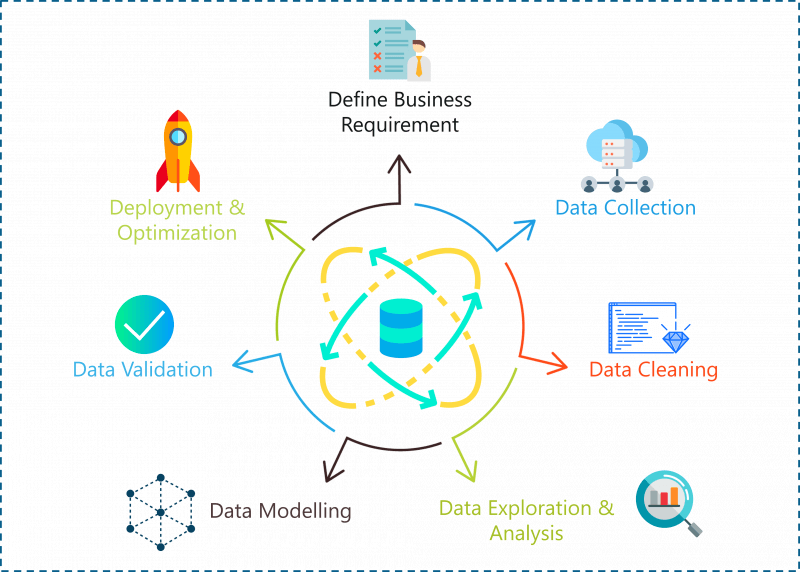
A problem statement in Data Science can be solved by following the below steps:

  1. Define Problem Statement/ Business Requirement
  2. Data Collection
  3. Data Cleaning
  4. Data Exploration & Analysis
  5. Data Modelling
  6. Deployment & Optimization
Data Science Project Life Cycle — Data Science Projects — Edureka

Let’s look at each of these steps in detail:

Step 1: Define Problem Statement

Before you even begin a Data Science project, you must define the problem you’re trying to solve. At this stage, you should be clear with the objectives of your project.

Step 2: Data Collection

Like the name suggests at this stage you must acquire all the data needed to solve the problem. Collecting data is not very easy because most of the time you won’t find data sitting in a database, waiting for you. Instead, you’ll have to go out, do some research and collect the data or scrape it from the internet.

Step 3: Data Cleaning

If you ask a Data Scientist what their least favorite process in Data Science is, they’re most probably going to tell you that it is Data Cleaning. Data cleaning is the process of removing redundant, missing, duplicate and unnecessary data. This stage is considered to be one of the most time-consuming stages in Data Science. However, in order to prevent wrongful predictions, it is important to get rid of any inconsistencies in the data.

Step 4: Data Analysis and Exploration

Once you’re done cleaning the data, it is time to get the inner Sherlock Holmes out. At this stage in a Data Science life-cycle, you must detect patterns and trends in the data. This is where you retrieve useful insights and study the behavior of the data. At the end of this stage, you must start to form hypotheses about your data and the problem you are tackling.

Step 5: Data Modelling

This stage is all about building a model that best solves your problem. A model can be a Machine Learning Algorithm that is trained and tested using the data. This stage always begins with a process called Data Splicing, where you split your entire data set into two proportions. One for training the model (training data set) and the other for testing the efficiency of the model (testing data set).

This is followed by building the model by using the training data set and finally evaluating the model by using the test data set.

Step 6: Optimization and Deployment:

This is the last stage of the Data Science life-cycle. At this stage, you must try to improve the efficiency of the data model, so that it can make more accurate predictions. The end goal is to deploy the model into production or production-like environment for final user acceptance. The users must validate the performance of the models and if there are any issues with the model then they must be fixed in this stage.

Now that you know how a problem can be solved using Data Science, let’s get to the fun part. In the following section, I will be providing you with five high-level Data Science projects that can get you hired in the top IT firms.

Data Science In R

Before we start coding, here’s a short disclaimer:

I'm going to be using the R language to run the entire Data Science workflow because R is a statistical language and it has over 8000 packages that make our lives easier.

Classification of 1994 Census Income Data

Problem Statement: To build a model that will predict if the income of any individual in the US is greater than or less than USD 50,000 based on the data available about that individual.

Data Set Description: This Census Income dataset was collected by Barry Becker in 1994 and given to the public site http://archive.ics.uci.edu/ml/datasets/Census+Income. This data set will help you understand how the income of a person varies depending on various factors such as the education background, occupation, marital status, geography, age, number of working hours/week, etc.

Here's a list of the independent or predictor variables used to predict whether an individual earns more than USD 50,000 or not:

  • Age
  • Work-class
  • Final-weight
  • Education
  • Education-num (Number of years of education)
  • Marital-status
  • Occupation
  • Relationship
  • Race
  • Sex
  • Capital-gain
  • Capital-loss
  • Hours-per-week
  • Native-country

The dependent variable is the "income-level" that represents the level of income. This is a categorical variable and thus it can only take two values:

  1. <=50k
  2. >=50k

Now that we've defined our objective and collected the data, it is time to start with the analysis.

Step 1: Import the data

Lucky for us, we found a data set online, so all we have to do is import the data set into our R environment, like so:

#Downloading train and test data
trainFile = "adult.data"; testFile = "adult.test"
 
if (!file.exists (trainFile))
download.file (url = "http://archive.ics.uci.edu/ml/machine-learning-databases/adult/adult.data",
destfile = trainFile)
 
if (!file.exists (testFile))
download.file (url = "http://archive.ics.uci.edu/ml/machine-learning-databases/adult/adult.test",
destfile = testFile)

In the above code snippet, we've downloaded both, the training data set and the testing data set.

If you take a look at the training data, you'll notice that the predictor variables are not labelled. Therefore, in the below code snippet, I've assigned variable names to each predictor variable and to make the data more readable, I've gotten rid of unnecessary white spaces.

#Assigning column names
colNames = c ("age", "workclass", "fnlwgt", "education",
"educationnum", "maritalstatus", "occupation",
"relationship", "race", "sex", "capitalgain",
"capitalloss", "hoursperweek", "nativecountry",
"incomelevel")
 
#Reading training data
training = read.table (trainFile, header = FALSE, sep = ",",
strip.white = TRUE, col.names = colNames,
na.strings = "?", stringsAsFactors = TRUE)

Now in order to study the structure of our data set, we call the str() method. This gives us a descriptive summary of all the predictor variables present in the data set:

#Display structure of the data
str (training)
> str (training)
'data.frame': 32561 obs. of 15 variables:
$ age : int 39 50 38 53 28 37 49 52 31 42 ...
$ workclass : Factor w/ 8 levels "Federal-gov",..: 7 6 4 4 4 4 4 6 4 4 ...
$ fnlwgt : int 77516 83311 215646 234721 338409 284582 160187 209642 45781 159449 ...
$ education : Factor w/ 16 levels "10th","11th",..: 10 10 12 2 10 13 7 12 13 10 ...
$ educationnum : int 13 13 9 7 13 14 5 9 14 13 ...
$ maritalstatus: Factor w/ 7 levels "Divorced","Married-AF-spouse",..: 5 3 1 3 3 3 4 3 5 3 ...
$ occupation : Factor w/ 14 levels "Adm-clerical",..: 1 4 6 6 10 4 8 4 10 4 ...
$ relationship : Factor w/ 6 levels "Husband","Not-in-family",..: 2 1 2 1 6 6 2 1 2 1 ...
$ race : Factor w/ 5 levels "Amer-Indian-Eskimo",..: 5 5 5 3 3 5 3 5 5 5 ...
$ sex : Factor w/ 2 levels "Female","Male": 2 2 2 2 1 1 1 2 1 2 ...
$ capitalgain : int 2174 0 0 0 0 0 0 0 14084 5178 ...
$ capitalloss : int 0 0 0 0 0 0 0 0 0 0 ...
$ hoursperweek : int 40 13 40 40 40 40 16 45 50 40 ...
$ nativecountry: Factor w/ 41 levels "Cambodia","Canada",..: 39 39 39 39 5 39 23 39 39 39 ...
$ incomelevel : Factor w/ 2 levels "<=50K",">50K": 1 1 1 1 1 1 1 2 2 2 ... ...

So, after importing and transforming the data into a readable format, we'll move to the next crucial step in Data Processing, which is Data Cleaning.

Step 2: Data Cleaning

The data cleaning stage is considered to be one of the most time-consuming tasks in Data Science. This stage includes removing NA values, getting rid of redundant variables and any inconsistencies in the data.

We'll begin the data cleaning by checking if our data observations have any missing values:

> table (complete.cases (training))
 
FALSE TRUE
2399 30162

The above code snippet indicates that 2399 sample cases have NA values. In order to fix this, let's look at the summary of all our variables and analyze which variables have the greatest number of null values. The reason why we must get rid of NA values is that they lead to wrongful predictions and hence decrease the accuracy of our model.

> summary  (training [!complete.cases(training),])
      age                   workclass        fnlwgt              education    educationnum  
 Min.   :17.00   Private         : 410   Min.   : 12285   HS-grad     :661   Min.   : 1.00  
 1st Qu.:22.00   Self-emp-inc    :  42   1st Qu.:121804   Some-college:613   1st Qu.: 9.00  
 Median :36.00   Self-emp-not-inc:  42   Median :177906   Bachelors   :311   Median :10.00  
 Mean   :40.39   Local-gov       :  26   Mean   :189584   11th        :127   Mean   : 9.57  
 3rd Qu.:58.00   State-gov       :  19   3rd Qu.:232669   10th        :113   3rd Qu.:11.00  
 Max.   :90.00   (Other)         :  24   Max.   :981628   Masters     : 96   Max.   :16.00  
                 NA's            :1836                    (Other)     :478                  
               maritalstatus           occupation           relationship                 race     
 Divorced             :229   Prof-specialty : 102   Husband       :730   Amer-Indian-Eskimo:  25  
 Married-AF-spouse    :  2   Other-service  :  83   Not-in-family :579   Asian-Pac-Islander: 144  
 Married-civ-spouse   :911   Exec-managerial:  74   Other-relative: 92   Black             : 307  
 Married-spouse-absent: 48   Craft-repair   :  69   Own-child     :602   Other             :  40  
 Never-married        :957   Sales          :  66   Unmarried     :234   White             :1883  
 Separated            : 86   (Other)        : 162   Wife          :162                            
 Widowed              :166   NA's           :1843                                                 
     sex        capitalgain       capitalloss       hoursperweek         nativecountry  
 Female: 989   Min.   :    0.0   Min.   :   0.00   Min.   : 1.00   United-States  
               Median :    0.0   Median :   0.00   Median :40.00   Canada                  
               Mean   :  897.1   Mean   :  73.87   Mean   :34.23   Philippines             
               3rd Qu.:    0.0   3rd Qu.:   0.00   3rd Qu.:40.00   Germany               
               Max.   :99999.0   Max.   :4356.00   Max.   :99.00   (Other)            
                                                                   NA's         : 583

From the above summary, it is observed that three variables have a good amount of NA values:

  1. Workclass - 1836
  2. Occupation - 1843
  3. Nativecountry - 583

These three variables must be cleaned since they are significant variables for predicting the income level of an individual.

#Removing NAs
TrainSet = training [!is.na (training$workclass) & !is.na (training$occupation), ]
TrainSet = TrainSet [!is.na (TrainSet$nativecountry), ]

Once we've gotten rid of the NA values, our next step is to get rid of any unnecessary variable that isn't essential for predicting our outcome. It is important to get rid of such variables because they only increase the complexity of the model without improving its efficiency.

One such variable is the 'fnlwgt' variable, which denotes the population totals derived from CPS by calculating "weighted tallies" of any particular socio-economic characteristics of the population.

This variable is removed from our data set since it does not help to predict our resultant variable:

#Removing unnecessary variables 
TrainSet$fnlwgt = NULL

So that was all for Data Cleaning, our next step is Data Exploration.

Step 3: Data Exploration

Data Exploration involves analyzing each feature variable to check if the variables are significant for building the model.

Exploring the age variable

#Data Exploration
#Exploring the age variable
 
> summary (TrainSet$age)
Min. 1st Qu. Median Mean 3rd Qu. Max.
17.00 28.00 37.00 38.44 47.00 90.00
 
#Boxplot for age variable
boxplot (age ~ incomelevel, data = TrainSet,
main = "Income levels based on the Age of an individual",
xlab = "Income Level", ylab = "Age", col = "salmon")
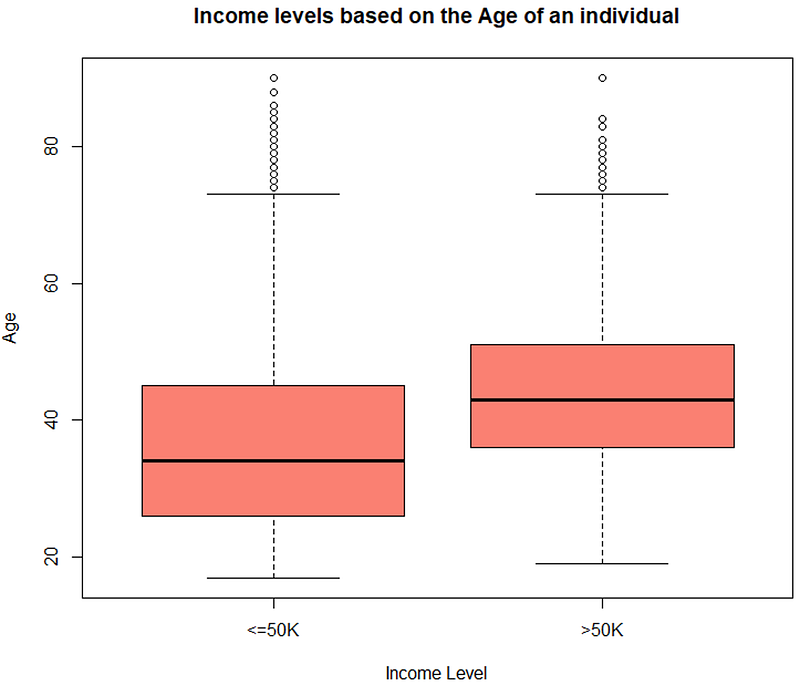
Box Plot — Data Science Projects — Edureka
#Histogram for age variable
incomeBelow50K = (TrainSet$incomelevel == "<=50K")
xlimit = c (min (TrainSet$age), max (TrainSet$age))
ylimit = c (0, 1600)
 
hist1 = qplot (age, data = TrainSet[incomeBelow50K,], margins = TRUE,
binwidth = 2, xlim = xlimit, ylim = ylimit, colour = incomelevel)
 
hist2 = qplot (age, data = TrainSet[!incomeBelow50K,], margins = TRUE,
binwidth = 2, xlim = xlimit, ylim = ylimit, colour = incomelevel)
 
grid.arrange (hist1, hist2, nrow = 2)
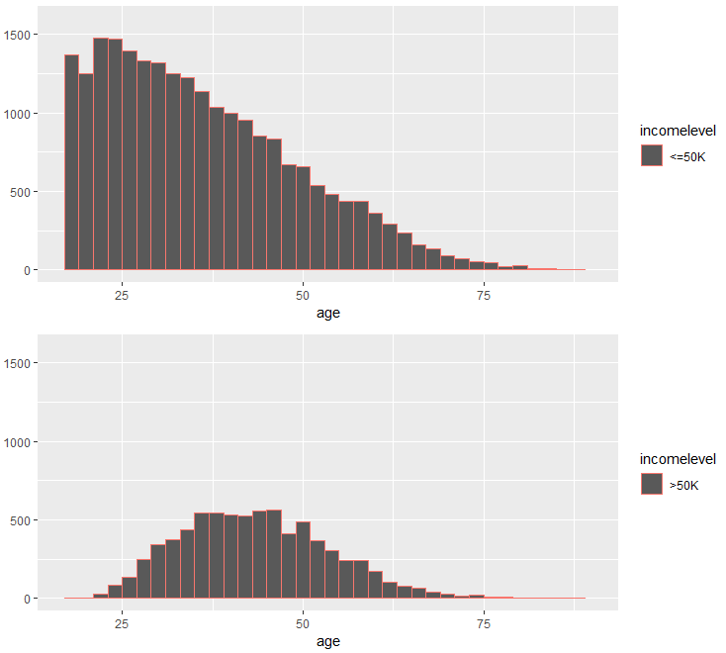
Histogram — Data Science Projects — Edureka

The above illustrations show that the age variable is varying with the level of income and hence it is a strong predictor variable.

Exploring the 'educationnum' variable

This variable denotes the number of years of education of an individual. Let's see how the 'educationnum' variable varies with respect to the income levels:

> summary (TrainSet$educationnum)
Min. 1st Qu. Median Mean 3rd Qu. Max.
1.00 9.00 10.00 10.12 13.00 16.00
 
#Boxplot for education-num variable
boxplot (educationnum ~ incomelevel, data = TrainSet,
main = "Years of Education distribution for different income levels",
xlab = "Income Levels", ylab = "Years of Education", col = "green")
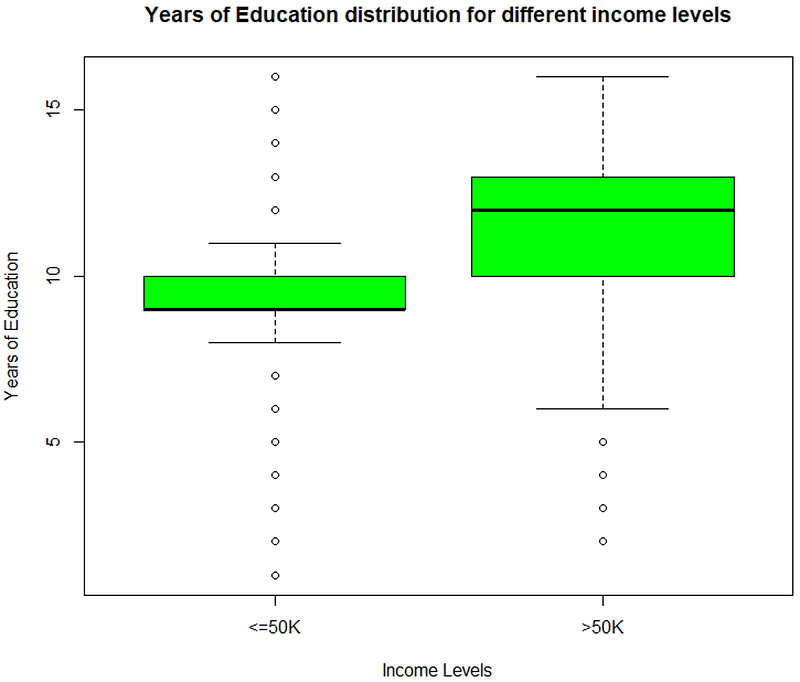
Data Exploration (educationnum) — Data Science Projects — Edureka

The above illustration depicts that the 'educationnum' variable varies for income levels <=50k and >50k, thus proving that it is a significant variable for predicting the outcome.

Exploring capital-gain and capital-loss variable

After studying the summary of the capital-gain and capital-loss variable for each income level, it is clear that their means vary significantly, thus indicating that they are suitable variables for predicting the income level of an individual.

> summary (TrainSet[ TrainSet$incomelevel == "<=50K", 
+                        c("capitalgain", "capitalloss")])
  capitalgain       capitalloss     
 Min.   :    0.0   Min.   :   0.00  
 1st Qu.:    0.0   1st Qu.:   0.00  
 Median :    0.0   Median :   0.00  
 Mean   :  148.9   Mean   :  53.45  
 3rd Qu.:    0.0   3rd Qu.:   0.00  
 Max.   :41310.0   Max.   :4356.00

Exploring hours/week variable

Similarly, the 'hoursperweek' variable is evaluated to check if it is a significant predictor variable.

#Evaluate hours/week variable
 
> summary (TrainSet$hoursperweek)
Min. 1st Qu. Median Mean 3rd Qu. Max.
1.00 40.00 40.00 40.93 45.00 99.00
 
boxplot (hoursperweek ~ incomelevel, data = TrainSet,
main = "Hours Per Week distribution for different income levels",
xlab = "Income Levels", ylab = "Hours Per Week", col = "salmon")
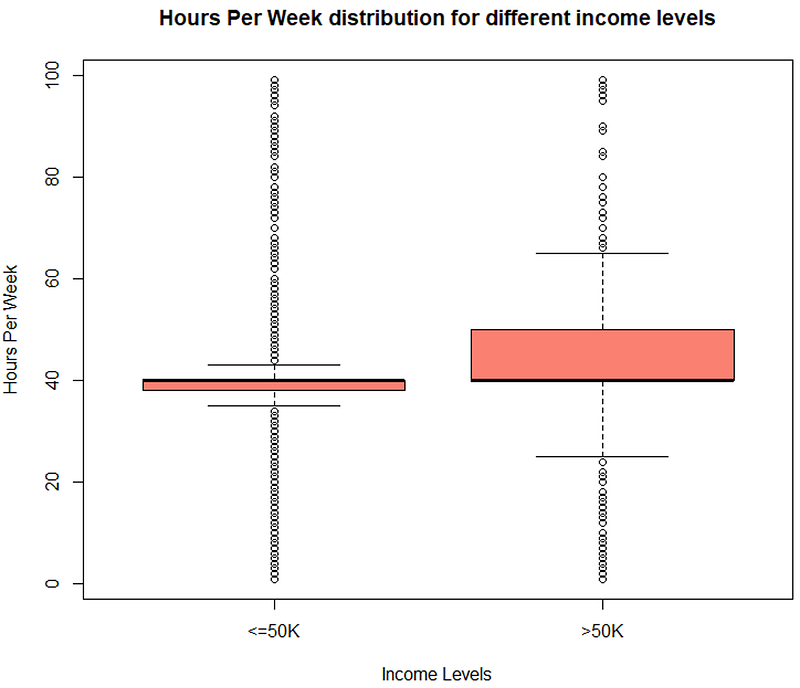
Data Exploration (hoursperweek) — Data Science Projects — Edureka

The boxplot shows a clear variation for different income levels which makes it an important variable for predicting the outcome.

Similarly, we'll be evaluating categorical variables as well. In the below section I've created qplots for each variable and after evaluating the plots, it is clear that these variables are essential for predicting the income level of an individual.

Exploring work-class variable

#Evaluating work-class variable
qplot (incomelevel, data = TrainSet, fill = workclass) + facet_grid (. ~ workclass)
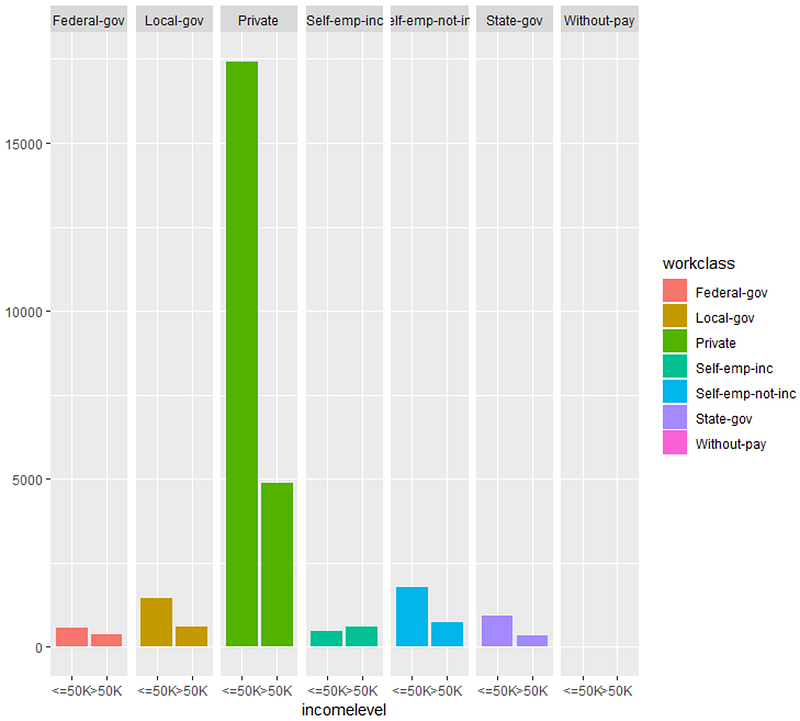
Data Exploration (workclass) — Data Science Projects — Edureka
#Evaluating occupation variable
qplot (incomelevel, data = TrainSet, fill = occupation) + facet_grid (. ~ occupation)
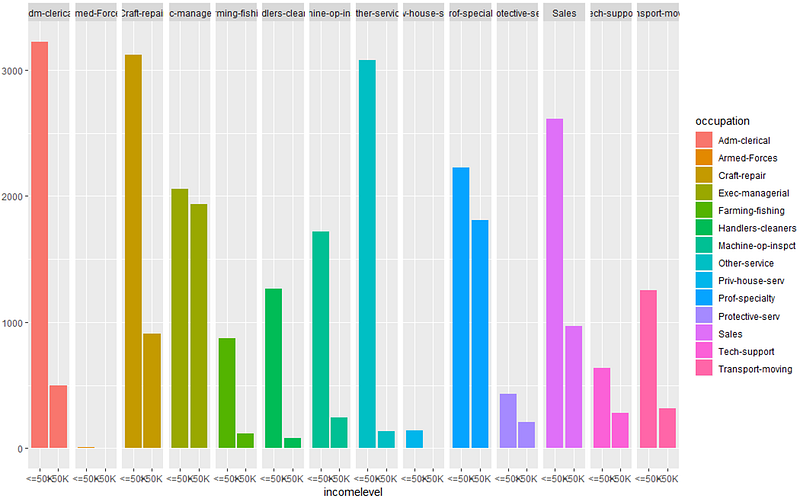
Data Exploration (occupation) — Data Science Projects — Edureka
#Evaluating marital-status variable
qplot (incomelevel, data = TrainSet, fill = maritalstatus) + facet_grid (. ~ maritalstatus)
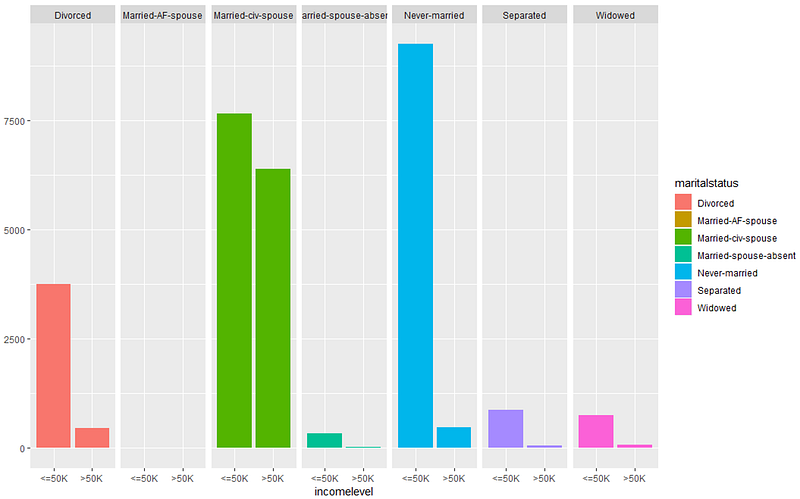
Data Exploration (martialstatus) — Data Science Projects — Edureka
#Evaluating relationship variable
qplot (incomelevel, data = TrainSet, fill = relationship) + facet_grid (. ~ relationship)
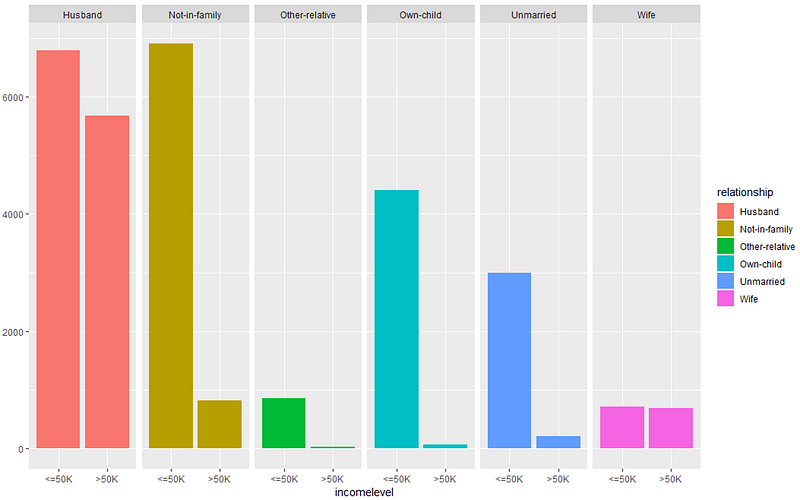
All these graphs show that these set of predictor variables are significant for building our predictive model.

All these graphs show that these set of predictor variables are significant for building our predictive model.

Step 4: Building A Model

So, after evaluating all our predictor variables, it is finally time to perform Predictive analytics. In this stage, we'll build a predictive model that will predict whether an individual earns above USD 50,000 or not based on the predictor variables that we evaluated in the previous section.

  1. Income level <= USD 50,000
  2. Income level > USD 50,000

To build this model I've made use of the boosting algorithm since we have to classify an individual into either of the two classes, i.e:

#Building the model
set.seed (32323)
 
trCtrl = trainControl(method = "cv", number = 10)
 
boostFit = train (incomelevel ~ age + workclass + education + educationnum +
maritalstatus + occupation + relationship +
race + capitalgain + capitalloss + hoursperweek +
nativecountry, trControl = trCtrl,
method = "gbm", data = TrainSet, verbose = FALSE)

Since we're using an ensemble classification algorithm, I've also implemented the Cross-Validation technique to prevent overfitting of the model.

Step 5: Checking the accuracy of the model

To evaluate the accuracy of the model, we're going to use a confusion matrix:

#Checking the accuracy of the model
 
> confusionMatrix (TrainSet$incomelevel, predict (boostFit, TrainSet))
Confusion Matrix and Statistics
 
Reference
Prediction <=50K >50K
<=50K 21404 1250 >50K 2927 4581
 
Accuracy : 0.8615
95% CI : (0.8576, 0.8654)
No Information Rate : 0.8067
P-Value [Acc > NIR] : < 2.2e-16
 
Kappa : 0.5998
 
Mcnemar's Test P-Value : < 2.2e-16
 
Sensitivity : 0.8797
Specificity : 0.7856
Pos Pred Value : 0.9448
Neg Pred Value : 0.6101
Prevalence : 0.8067
Detection Rate : 0.7096
Detection Prevalence : 0.7511
Balanced Accuracy : 0.8327
 
'Positive' Class : <=50K

The output shows that our model calculates the income level of an individual with an accuracy of approximately 86%, which is a good number.

So far, we used the training data set to build the model, now its time to validate the model by using the testing data set.

Step 5: Load and evaluate the test data set

Just like how we cleaned our training data set, our testing data must also be prepared in such a way that it does not have any null values or unnecessary predictor variables, only then can we use the test data to validate our model.

Start by loading the testing data set:

#Load the testing data set
testing = read.table (testFile, header = FALSE, sep = ",",
strip.white = TRUE, col.names = colNames,
na.strings = "?", fill = TRUE, stringsAsFactors = TRUE)

Next, we're studying the structure of our data set.

#Display structure of the data
> str (testing)
'data.frame': 16282 obs. of 15 variables:
$ age : Factor w/ 74 levels "|1x3 Cross validator",..: 1 10 23 13 29 3 19 14 48 9 ...
$ workclass : Factor w/ 9 levels "","Federal-gov",..: 1 5 5 3 5 NA 5 NA 7 5 ...
$ fnlwgt : int NA 226802 89814 336951 160323 103497 198693 227026 104626 369667 ...
$ education : Factor w/ 17 levels "","10th","11th",..: 1 3 13 9 17 17 2 13 16 17 ...
$ educationnum : int NA 7 9 12 10 10 6 9 15 10 ...
$ maritalstatus: Factor w/ 8 levels "","Divorced",..: 1 6 4 4 4 6 6 6 4 6 ...
$ occupation : Factor w/ 15 levels "","Adm-clerical",..: 1 8 6 12 8 NA 9 NA 11 9 ...
$ relationship : Factor w/ 7 levels "","Husband","Not-in-family",..: 1 5 2 2 2 5 3 6 2 6 ...
$ race : Factor w/ 6 levels "","Amer-Indian-Eskimo",..: 1 4 6 6 4 6 6 4 6 6 ...
$ sex : Factor w/ 3 levels "","Female","Male": 1 3 3 3 3 2 3 3 3 2 ...
$ capitalgain : int NA 0 0 0 7688 0 0 0 3103 0 ...
$ capitalloss : int NA 0 0 0 0 0 0 0 0 0 ...
$ hoursperweek : int NA 40 50 40 40 30 30 40 32 40 ...
$ nativecountry: Factor w/ 41 levels "","Cambodia",..: 1 39 39 39 39 39 39 39 39 39 ...
$ incomelevel : Factor w/ 3 levels "","<=50K.",">50K.": 1 2 2 3 3 2 2 2 3 2 ...

In the below code snippet we're looking for complete observations that do not have any null data or missing data.

> table (complete.cases (testing))
FALSE TRUE
1222 15060
> summary  (testing [!complete.cases(testing),])
      age                 workclass       fnlwgt               education    educationnum   
 20     : 73   Private         :189   Min.   :  13862   Some-college:366   Min.   : 1.000  
 19     : 71   Self-emp-not-inc: 24   1st Qu.: 116834   HS-grad     :340   1st Qu.: 9.000  
 18     : 64   State-gov       : 16   Median : 174274   Bachelors   :144   Median :10.000  
 21     : 62   Local-gov       : 10   Mean   : 187207   11th        : 66   Mean   : 9.581  
 22     : 53   Federal-gov     :  9   3rd Qu.: 234791   10th        : 53   3rd Qu.:10.000  
 17     : 35   (Other)         : 11   Max.   :1024535   Masters     : 47   Max.   :16.000  
 (Other):864   NA's            :963   NA's   :1         (Other)     :206   NA's   :1       
               maritalstatus           occupation          relationship                 race    
 Never-married        :562   Prof-specialty : 62                 :  1                     :  1  
 Married-civ-spouse   :413   Other-service  : 32   Husband       :320   Amer-Indian-Eskimo: 10  
 Divorced             :107   Sales          : 30   Not-in-family :302   Asian-Pac-Islander: 72  
 Widowed              : 75   Exec-managerial: 28   Other-relative: 65   Black             :150  
 Separated            : 33   Craft-repair   : 23   Own-child     :353   Other             : 13  
 Married-spouse-absent: 28   (Other)        : 81   Unmarried     :103   White             :976  
 (Other)              :  4   NA's           :966   Wife          : 78                           
     sex       capitalgain       capitalloss       hoursperweek         nativecountry 
       :  1   Min.   :    0.0   Min.   :   0.00   Min.   : 1.00   UnitedStates 
 Female:508   1st Qu.:    0.0   1st Qu.:   0.00   1st Qu.:20.00   Mexico    
              Mean   :  608.3   Mean   :  73.81   Mean   :33.49   South                 
              3rd Qu.:    0.0   3rd Qu.:   0.00   3rd Qu.:40.00   England                 
              Max.   :99999.0   Max.   :2603.00   Max.   :99.00   (Other)               
              NA's   :1         NA's   :1         NA's   :1       NA's         :274

From the summary it is clear that we have many NA values in the 'workclass', 'occupation' and 'nativecountry' variables, so let's get rid of these variables.

Removing NAs
TestSet = testing [!is.na (testing$workclass) & !is.na (testing$occupation), ]
TestSet = TestSet [!is.na (TestSet$nativecountry), ]
 
#Removing unnecessary variables
TestSet$fnlwgt = NULL

Step 6: Validate the model

The test data set is applied to the predictive model to validate the efficiency of the model. The following code snippet shows how this is done:

#Testing model
TestSet$predicted = predict (boostFit, TestSet)
table(TestSet$incomelevel, TestSet$predicted)
 
actuals_preds <- data.frame(cbind(actuals=TestSet$incomelevel, predicted=TestSet$predicted)) # make actuals_predicteds dataframe.
correlation_accuracy <- cor(actuals_preds)
head(actuals_preds)

The table is used to compare the predicted values to the actual income levels of an individual. This model can further be improved by introducing some variations in the model or by using an alternate algorithm.

So, we just executed an entire Data Science Project from scratch.

In the below section I've compiled a set of projects that will help you gain experience in data cleaning, statistical analysis, data modeling, and data visualization.

Consider this as your homework.

Data Science Projects For Resume

Walmart Sales Forecasting

Data Science plays a huge role in forecasting sales and risks in the retail sector. Majority of the leading retail stores implement Data Science to keep a track of their customer needs and make better business decisions. Walmart is one such retailer.

Problem Statement: To analyze the Walmart Sales Data set in order to predict department-wise sales for each of their stores.

Data Set Description: The data set used for this project contains historical training data, which covers sales details from 2010-02-05 to 2012-11-01. For the analysis of this problem, the following predictor variables are used:

  1. Store - the store number
  2. Dept - the department number
  3. Date - the week
  4. CPI - the consumer price index
  5. Weekly_Sales - sales for the given department in the given store
  6. IsHoliday - whether the week is a special holiday week

By studying the dependency of these predictor variables on the response variable, you can predict or forecast sales for the upcoming months.

Logic:

  1. Import the Data Set: The data set needed for this project can be downloaded from Kaggle.
  2. Data Cleaning: In this stage, you must make sure to get rid of all inconsistencies, such as missing values and any redundant variables.
  3. Data Exploration: At this stage, you can plot box-plots and qplots to understand the significance of each predictor variables. Refer to the Census Income Project to understand how graphs can be used to study the significance of each variable.
  4. Data Modelling: For this particular problem statement, since the outcome is a continuous variable (Number of sales), it is reasonable to build a Regression model. The Linear Regression algorithm can be used to solve such problems since it is specifically used to predict continuous dependent variables.
  5. Validate the model: At this stage, you should evaluate the efficiency of the data model by using the testing data set and finally calculate the accuracy of the model by using a confusion matrix.

Chicago Crime Analysis

With the increase in the number of crimes taking place in Chicago, law enforcement agencies are trying their best to understand the reason behind such actions. Analyses like these can not only help understand the reasons behind these crimes, but they can also prevent further crimes.

Problem Statement: To analyze and explore the Chicago Crime data set to understand trends and patterns that will help predict any future occurrences of such felonies.

Data Set Description: The dataset used for this project consists of every reported instance of a crime in the city of Chicago from 01/01/2014 to 10/24/2016.

For this analysis, the data set contains many predictor variables such as:

  1. ID - Identifier of the record
  2. Case Number - The Chicago Police Chain RD number
  3. Date - Date of the incident
  4. Description - Secondary description of the IUCR code
  5. Location - Location of the occurred incident

Logic:

Like any other Data Science project, the below-described series of steps are followed:

  1. Import the Data Set: The data set needed for this project can be downloaded from Kaggle.
  2. Data Cleaning: In this stage, you must make sure to get rid of all inconsistencies, such as missing values and any redundant variables.
  3. Data Exploration: You can begin this stage by translating the occurrence of crimes into plots on a geographical map of the city. Graphically studying each predictor variable will help you understand which variables are essential for building the model.
  4. Data Modelling: For this particular problem statement, since the nature of crimes varies, it is reasonable to build a clustering model. K-means is the most suitable algorithm for this analysis since it is easy to build clusters using k-means.
  5. Analyzing patterns: Since this problem statement requires you to draw patterns and insights about the crimes, this step mainly involves creating reports and drawing conclusions from the data model.
  6. Validate the model: At this stage, you should evaluate the efficiency of the data model by using the testing data set and finally calculate the accuracy of the model by using a confusion matrix.

Movie Recommendation Engine

Every successful Data Scientist has built at least one recommendation engine in his career. Personalized Recommendation engines are regarded as the holy grails of Data Science projects and that's why I've added this project in the blog.

Problem Statement: To analyze the Movie Lens data set in order to understand trends and patterns that will help to recommend new movies to users.

Data Set Description: The data set used for this project was collected by the GroupLens Research Project at the University of Minnesota.

The dataset consists of the following predictor variables:

  1. 100k ratings from 943 users on a set of 1682 movies.
  2. Each user has rated at least 20 movies
  3. User's details like age, gender, occupation, geography, etc.

By studying these predictor variables, a model can be built for recommending movies to users.

Logic:

  1. Import the Data Set: The data set needed for this project can be downloaded from Kaggle.
  2. Data Cleaning: In this stage, necessary cleaning and transformation are performed so that the model can predict an accurate outcome.
  3. Data Exploration: At this stage, you can evaluate how the movie genre has affected the ratings of a viewer. Similarly, you can evaluate the movie choice of a user based on his age, gender, and occupation. Graphically studying each predictor variable will help you understand which variables are essential for building the model.
  4. Data Modelling: For this problem statement, you can use the k-means clustering algorithm, to cluster users based on similar movie viewing patterns. You can also use association rule mining to study the correlation between users and their movie choices.
  5. Validate the model: At this stage, you should evaluate the efficiency of the data model by using the testing data set and finally calculate the accuracy of the model by using a confusion matrix.

Text Mining

Having a Text Mining project in your resume will definitely increase your chances of getting hired as a Data Scientist. It involves advanced analytics and data mining that will make you a skilled Data Scientist. A popular application of text mining is sentiment analysis, which is extremely useful in social media monitoring because it helps to gain an overview of the wider public opinion on certain topics.

Problem Statement: To perform pre-processing, text analysis, text mining and visualization on a set of documents using Natural Language Processing techniques.

Data Set Description: This data set contains scripts of the famous Star Wars Series from the Original Trilogy Episodes i.e., IV, V and VI.

Logic:

  1. Import the data set: For this project, you can find the Data set on Kaggle.
  2. Pre-processing: At this stage in a text mining process, you must get rid of inconsistencies such as, stop words, punctuations, whitespaces, etc. Processes such as lemmatization and data stemming can also be performed for better analysis.
  3. Build a Document-Term Matrix (DTM): This step involves the creation of a Document-Term Matrix (DTM). It is a matrix that lists the frequency of words in a document. On this matrix, text analysis is performed.
  4. Text Analysis: Text analysis involves analyzing word frequency for each word in the document and finding correlations between words in order to draw conclusions.
  5. Text Visualisation: Using histograms and word clouds to represent significant words is one of the important steps in text mining because it helps you understand the most essential words in the document.

So these were a few Data Science Projects to get you started. I've provided you with the blueprint to solve each of these use cases, all you have to do is follow the steps. Don't hesitate if you want to experiment and do your own thing.

Also, don't forget to share your implementation in the comment section, I would love to know how your solution turned out.

With this, we come to the end of this blog. If you have any queries regarding this topic, please leave a comment below and we'll get back to you.If you wish to check out more articles on the market’s most trending technologies like Python, DevOps, Ethical Hacking, then you can refer to Edureka’s official site.

Do look out for other articles in this series which will explain the various other aspects of Data Science.

1.Data Science Tutorial

2.Math And Statistics For Data Science

3.Linear Regression in R

4.Data Science Tutorial

5.Logistic Regression In R

6.Classification Algorithms

7.Random Forest In R

8.Decision Tree in R

9.Introduction To Machine Learning

10.Naive Bayes in R

11.Statistics and Probability

12.How To Create A Perfect Decision Tree?

13.Top 10 Myths Regarding Data Scientists Roles

14.Top 5 Machine Learning Algorithms

15.Data Analyst vs Data Engineer vs Data Scientist

16.Types Of Artificial Intelligence

17.R vs Python

18.Artificial Intelligence vs Machine Learning vs Deep Learning

19.Machine Learning Projects

20.Data Analyst Interview Questions And Answers

21.Data Science And Machine Learning Tools For Non-Programmers

22.Top 10 Machine Learning Frameworks

23.Statistics for Machine Learning

24.Random Forest In R

25.Breadth-First Search Algorithm

26.Linear Discriminant Analysis in R

27.Prerequisites for Machine Learning

28.Interactive WebApps using R Shiny

29.Top 10 Books for Machine Learning

30.Unsupervised Learning

31.10 Best Books for Data Science

32.Supervised Learning

Originally published at https://www.edureka.co on June 18, 2019.

Machine Learning
Data Science
Data Science Projects
Data Science Training
R
Recommended from ReadMedium