
Data Science Fundamentals (R): Import Data from text files — textreadr & readtext
We already talked about importing files from excel by using xlsx and readxl, but there are many file types other than excel such as txt, doc, pdf, and html, that’s why I am writing this article to introduce 2 useful packages when importing text files. They are textreadr and readtext.
Other import and export packages are discussed in series.
Package
textreadr
readtext
Functionality
textreadr: Read text documents into R
readtext: Import and handling for plain and formatted text files.
Description
textreadr: Generic function to read in a .pdf, .txt, .html, .rtf, .docx, or .doc file.
readtext: A set of functions for importing and handling text files and formatted text files with additional meta-data, such including .csv, .tab, .json, .xml, .xls, .xlsx, and others.
Demonstration
The input data involves English, Traditional Chinese, and Simplified Chinese text.
At the end of this demonstration, you will know the difference between using textreadr and readtext and what options should be specified to import data with different formats of context in R.
Function to test (default settings):
textreadr: read_document(file, skip = 0, remove.empty = TRUE, trim = TRUE, combine = FALSE, format = FALSE, …)
readtext: readtext(file, ignore_missing_files = FALSE, text_field = NULL, docvarsfrom = c(“metadata”, “filenames”, “filepaths”), dvsep = “_”, docvarnames = NULL, encoding = NULL, source = NULL, cache = TRUE, verbosity = readtext_options(“verbosity”), …)
Input file
Reference_Sample.txt
Reference_Sample.pdf
Reference_Sample.html
Reference_Sample.doc
Reference_Sample.docx
All data have similar content as below:

Code
####################
library(textreadr) #
####################
Sys.setlocale(category = "LC_ALL", locale = "Chinese")# read document pdf/ html/ doc/ docx
text_txt = read_document("Reference_Sample.txt")
text_pdf = read_document(file = "Reference_Sample.pdf")
text_html = read_document(file = "Reference_Sample.html")
text_doc = read_document(file = "Reference_Sample.doc") # cannot read Chinese
text_docx = read_document(file = "Reference_Sample.docx")
From the result, you can see that only data in docx, HTML, and pdf can display Traditional Chinese and Simplified Chinese text in UTF-8 code. The locale is set as “Chinese” so that those Chinese characters can also be shown.
Apart from using read_document, other functions can also be used for specific data format.
# read pdf
text_pdf2 = read_pdf(file = “Reference_Sample.pdf”)
# read html
text_html2 = read_html(file = “Reference_Sample.html”)# read microsoft word doc
text_doc2 = read_doc(file = “Reference_Sample.doc”)# read microsoft word docx
text_docx2 = read_docx(file = “Reference_Sample.docx”)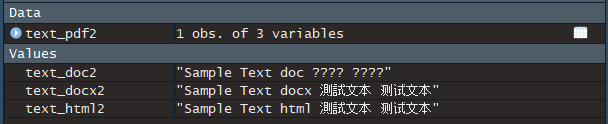
Again, Chinese text in doc cannot be imported.
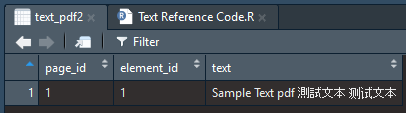
For read_pdf, it stores the data in a table form with extra information, i.e. page_id and element_id.
It is found that read_document may not be so user-friendly for importing txt file. There is another package, readtext, specially designed for reading text files.
###################
library(readtext) #
###################
text_txt3 = readtext(“Reference_Sample.txt”)text_pdf3 = readtext(file = “Reference_Sample.pdf”)text_html3 = readtext(file = “Reference_Sample.html”)text_doc3 = readtext(file = “Reference_Sample.doc”) # cannot read Chinesetext_docx3 = readtext(file = “Reference_Sample.docx”)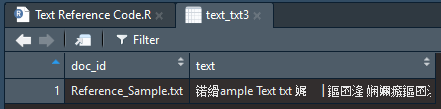
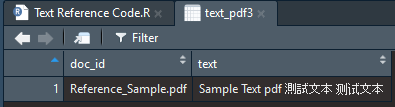
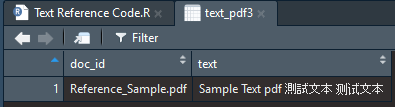
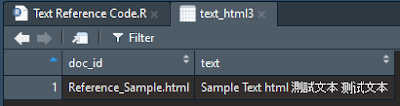
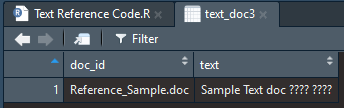
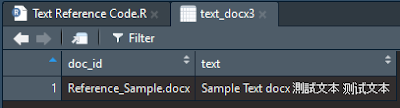
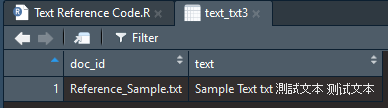
All data are imported in table form, but again, the context of doc and txt files cannot be fully displayed.
For txt file, “UTF-8-BOM” can be used to import Chinese text.
text_txt3 = readtext(“Reference_Sample.txt”, encoding = “UTF-8-BOM”) #only this encoding can display chinese
Summary
Both textreadr and readtext can import text files in most data types while there is a constraint of showing Chinese characters in using textreadr.
You can find other articles of data import and export in R here.
Words from the Editor
If you are interested to know more tricks and skills, you are welcome to browse our website: https://cydalytics.blogspot.com/
LinkedIn:
Carrie Lo — https://www.linkedin.com/in/carrielsc/
Yeung Wong — https://www.linkedin.com/in/yeungwong/
Other Articles
- Data Science Fundamentals (R): Import Data from Excel — readxl
- Data Science Fundamentals (R): Import & Export Data in Excel — xlsx
- Data Visualization Tips (Power BI) — Convert Categorical Variables to Dummy Variables
- Chinese Word Cloud with Different Shape (Python)
- Making a Game for Kids to Learn English and Have Fun with Python


