
Data Science Fundamentals (R): Import Data from Excel — readxl

There are many ways of importing and exporting files. We talked about xlsx last time and this time, we will go through readxl, similarly, there are some parameters that need to be set, especially when importing text.
Other import and export packages are discussed in series.
Package
readxl
Functionality
Read xls and xlsx files
Description
read_excel() calls excel_format() to determine if path is xls or xlsx, based on the file extension and the file itself, in that order. Use read_xls() and read_xlsx() directly if you know better and want to prevent such guessing.
Demonstration
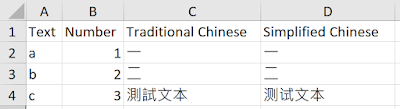
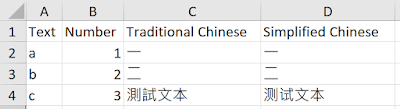
The input data involves English text, number, Traditional Chinese text, and Simplified Chinese text.
At the end of this demonstration, you will know what options should be specified to import data with different formats of context in R. One main difference between the use of xlsx and readxl, xlsx can only support the import of xlsx files, but readxl support both xlsx and xls files.
Function to test (default settings):
read_excel(path, sheet = NULL, range = NULL, col_names = TRUE, col_types = NULL, na = “”, trim_ws = TRUE, skip = 0, n_max = Inf, guess_max = min(1000, n_max))
read_xls(path, sheet = NULL, range = NULL, col_names = TRUE, col_types = NULL, na = “”, trim_ws = TRUE, skip = 0, n_max = Inf, guess_max = min(1000, n_max))
read_xlsx(path, sheet = NULL, range = NULL, col_names = TRUE, col_types = NULL, na = “”, trim_ws = TRUE, skip = 0, n_max = Inf, guess_max = min(1000, n_max))
Input file
Reference_Sample.xlsx
Reference_Sample.xls
Code
###############
library(readxl)
###############
getwd()
# read excel xls/ xlsx - method 1
xls_df = read_excel(path = "Reference_Sample.xls", sheet = "Sample_Sheet")
Same as using xlsx, if the locale is not defined, Chinese characters are displayed in UTF code. If you need to read the Chinese characters or specific characters in other languages, the setting of locale is necessary.
Sys.setlocale(category = "LC_ALL", locale = "Chinese")
# read excel xls/ xlsx - method 1
xls_df1 = read_excel(path = "Reference_Sample.xls", sheet = "Sample_Sheet")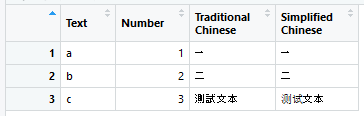
xlsx_df1 = read_excel(path = "Reference_Sample.xlsx", sheet = "Sample_Sheet")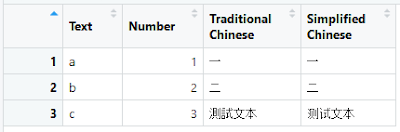
Both xlsx and xls files are imported in data frame structure and both Traditional Chinese and Simplified Chinese characters can be displayed successfully.
readxl also provides other functions to specifically import xlsx or xls files.
# read excel xls - method 2
xls_df2 = read_xls(path = "Reference_Sample.xls", sheet = "Sample_Sheet")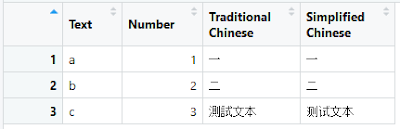
# read excel xlsx - method 3
xlsx_df2 = read_xlsx(path = "Reference_Sample.xlsx", sheet = "Sample_Sheet")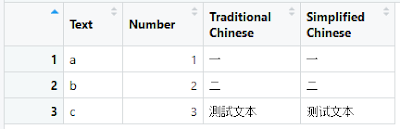
Both read_xls and read_xlsx can demonstrate same reading functionality as read_excel. As specified by the function’s name, read_xls can only read xls file while read_xlsx can only read xlsx file. If you do the things reversely, the following error appears.
xlsx_df3 = read_xlsx(path = "Reference_Sample.xls", sheet = "Sample_Sheet")Error in sheets_fun(path) : Evaluation error: Couldn’t find ‘’ in ‘Reference_Sample.xls’.
Summary
Compared to xlsx package, readxl can read both xlsx and xls files and there are fewer option settings. Only file path and sheet name are needed when using readxl. Among the 3 functions, read_excel, read_xls and read_xlsx, read_excel is applicable to both xlsx and xls files, thus, generally speaking, read_excel is suggested for reading excel files.
You can find other articles of data import and export in R here.
Words from the Editor
If you are interested to know more tricks and skills, you are welcome to browse our website: https://cydalytics.blogspot.com/
LinkedIn:
Carrie Lo — https://www.linkedin.com/in/carrielsc/
Yeung Wong — https://www.linkedin.com/in/yeungwong/
- Data Science Fundamentals (R): Import Data from text files — textreadr & readtext
- Data Science Fundamentals (R): Import & Export Data in Excel — xlsx
- Data Visualization Tips (Power BI) — Convert Categorical Variables to Dummy Variables
- Chinese Word Cloud with Different Shape (Python)
- Making a Game for Kids to Learn English and Have Fun with Python


