Data orchestration using Prefect and PySpark
Data coordination and parallelism in Python

A data system stack is made up of various components, like workflow orchestrators. If you search Google, you can find tools like Kestra, Airflow, Argo, Luigi, Oozie, Dagster, Mage-ai, Kubeflow, and Prefect that can help you as a data pipeline orchestrator. The list could go on, and each one has advantages and downsides that should be carefully considered during the decision-making process. In this post, I’ll look into how Prefect 2 may be used with the well-known Spark via the PySpark API in a local containerized development environment.
Case study
To show how to use Prefect and Pyspark in a local Docker environment, we will use an interesting exercise based on the below post written by Miel Verkerken, that showcases how to use Spark for matching strings by using fuzzy-based distance, specifically Jacard Distance.
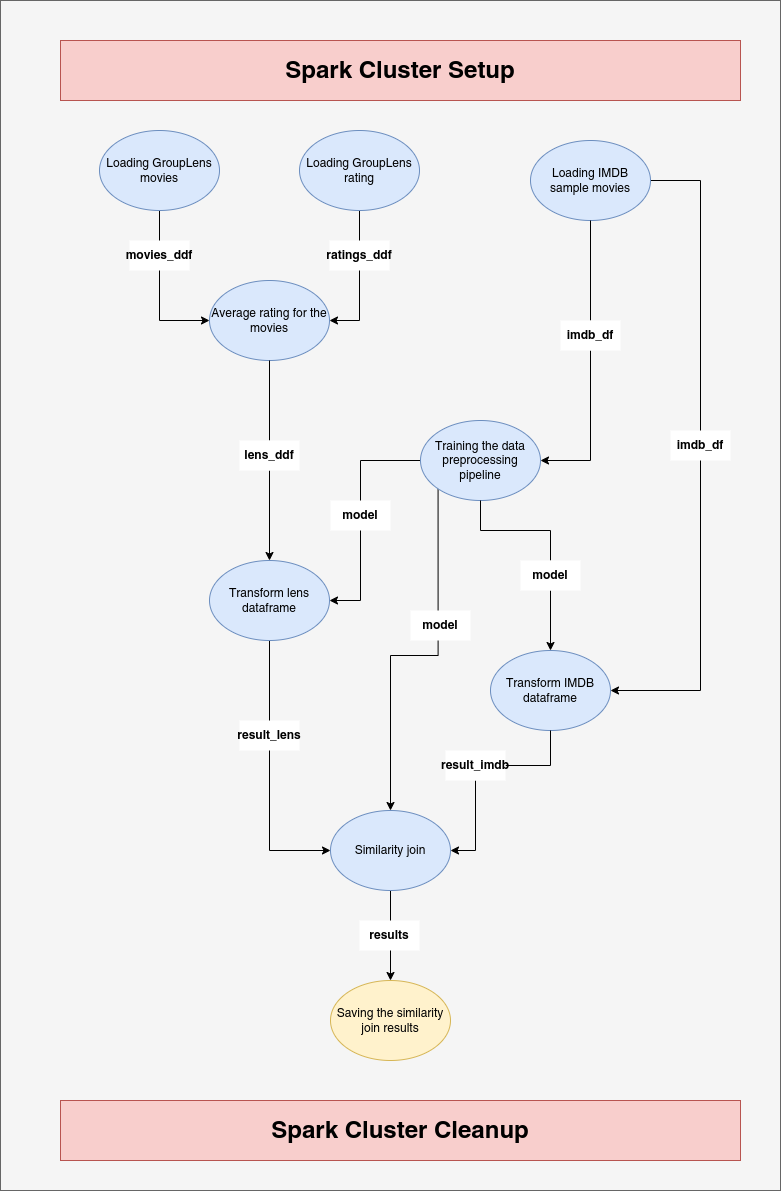
Miel Verkerken sought to match movie datasets from GroupLens and IMDB and compare the ratings for each dataset. Figure 1 shows a directed acyclic graph (DAG) with nodes (in bright blue). The DAG shows the data workflow steps needed to compare the ratings of both datasets. The blue nodes in the DAG are the workflow tasks that Prefect will orchestrate. Figure 1 also shows that for each operation, the Prefect workflow needs to create a Spark cluster and then end the cluster session.
In the public GitHub repository below, readers can see all the files and scripts used for this post.
Local development environment configuration
Our development environment will be contained within a Docker container. So, we'll use the Dockerfile in the code snippet below to set up an automated build that runs a series of commands from the command line. Some noteworthy points include:
- We will create a user and a group, and then run some commands that will allow us to write code and create files/folders both within the container and on our local machine, resulting in a unified development environment.
- Because we are using Spark 3.1.1, we must use the same PySpark version in the requirements.txt.
- Because we will be developing in a Docker container, we will use “/bin/sh” as our entrypoint to configure the executable that will always run once the container is started so that the container does not exit immediately.
Adding connections to different services, like a PostgreSQL database, could help your application grow. As a result, using Docker compose may be more convenient. The Docker compose file that we require for our case study is shown in the code snippet below. Crucially, set “stdin_open” and “tty” to true to make your container service interactive. Also, select a read-write volume.
Now that our Dockefile and Docker compose files are complete, we will construct our image, including the “ — no-cache” option to rebuild the fresh image without using the previous image’s cache.
docker-compose build --no-cache
Now, let’s run our “medium_post” service, remembering to use “--rm” to automatically remove containers when they finish, preventing orphaned containers from taking up too much disk space, and “-d” to run the container in the background.
docker-compose run --rm -d medium_postLet’s create a group on our local system using the identical group ID that we did in the Docker container. Our machine user will be added to this group, and we will be granted access to change scripts and add or remove files and folders on our host system.
sudo groupadd --g 1024 groupcontainer
sudo usermod -a -G groupcontainer $USER
sudo chown -R :1024 .
sudo chmod 777 -R .
Coding the pipeline
We can write the code for our pipeline now that we have configured our development environment. Our Python application is made up of only two simple files. The first file, “pipeline_tasks.py”, contains the Prefect tasks as well as the code for configuring and deactivating the Spark cluster. The second file, “main.py”, contains the core code that allows Prefect to call each data workflow task and start the Spark cluster. Let’s go further into these files.
pipeline_tasks.py
Setting up Spark cluster
The code responsible for starting up and cleaning up the Spark cluster is provided below. If you are familiar with Prefect 1 or a newcomer, you will notice that Prefect 2 interacts differently with resources such as MySQL, PostgreSQL, and Spark. In Prefect 2, you leverage functional programming and can communicate with Spark services directly through the context manager (see link to check out the difference).
Pipeline tasks
The code below depicts the several jobs that comprise the DAG presented in Figure 1. Prefect 2, like Prefect 1, wraps the functions in charge of the tasks with Python decorators. Each function with the “@task” decorator in the code corresponds to a node in Figure 1. To help readers relate the code to Figure 1, the decorator’s attribute “name” is the same as the one seen in Figure 1. As you can see, the workflow is made up of nine distinct tasks. You can also use helper functions to be used by the Prefect tasks to avoid repetitive code.
main.py (data workflow)
The main file provides the Spark setup parameters that are supplied into the “get_spark_session” method, which sets up and cleans up the Spark cluster. All of the task functions in this file are called from the “pipeline_tasks” module and used by the Prefect orchestrator. The Prefect flow orchestrates all nine tasks by wrapping the “data_pipeline” method with the “@flow” decorator. The decorator makes use of the attribute name with the value “Medium Data Pipeline Flow,” which represents the name of the workflow. As you can see, the flow makes use of a parameter called “threshold,” whose default value is 1. This parameter represents the threshold for the Jaccard distance value to be regarded reliable in our pipeline output dataset. You can be more stringent and enter a lower value for this option than the default.
Execution and results
I use VS Studio code to attach to the Docker container as part of our development environment. The explanation behind this is beyond the scope of this post, but you can find it at the following link. We can now start the application by running the command below. If you want to adjust the value of the “threshold” parameter, use the “ — threshold” or “-t” flags.
python main.py
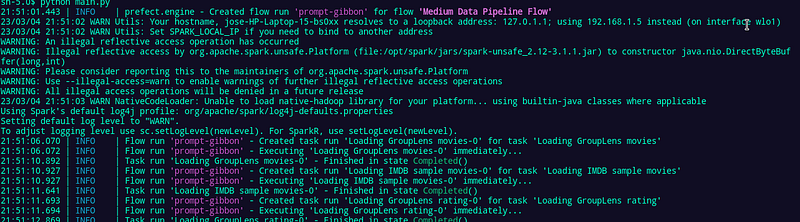
Figure 2 shows the command line output after running the Python program. The workflow’s name, “Medium Data Pipeline Flow,” is highlighted in purple. The report reveals when a task is created that is heavily reliant on the dependencies discovered by Prefect between the several tasks. For newcomers, I’d like to clarify that Prefect does not execute all tasks in sequence; instead, it can determine whether one task depends on the output of another, allowing Prefect to execute tasks in either sequence or parallel, and trigger downstream tasks once the task on which they rely is completed successfully.
In Figure 3, readers can see an intermediate result that corresponds to the jaccard distances calculated by the Spark machine learning module. Note the “processing_data” function in the “workflow_tasks.py” file, which performs common preprocessing stages in natural language processing (NLP).
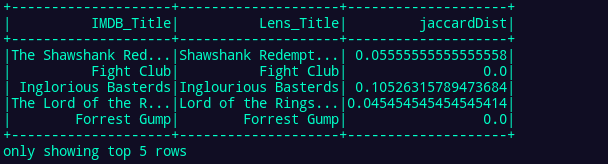
Figure 4 shows a rating comparison between GroupLens and IMDB, which corresponds to the desired outcome of the process created by combining Prefect orchestration and Spark data parallelism.
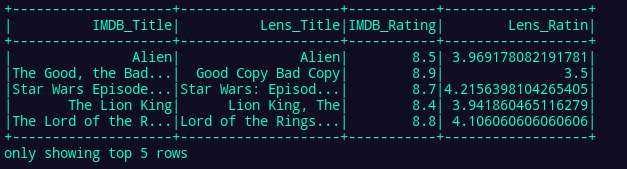
Figure 5 shows the output of Prefect after it has finished executing the workflow. If the workflow is properly completed, the printed message will say “Finished in state Completed(‘All states completed.’)”.

Conclusions
In this post, we explored how to utilize Docker to create a unified development environment that integrates Prefect’s workflow orchestration features with the parallel computing capability of Spark. We used a real-world case study of matching strings, which is common in many data projects. In following postings, we might go into Prefect to explore the Prefect UI and schedulers for triggering data workflows and jobs. We may also examine integrating Spark streaming with Prefect for quasi-streaming data processing.
If you enjoy my posts, follow me on Medium to stay tuned for more thought-provoking content, clap this publication 👏, and share this material with your colleagues 🚀…