
Custom Lambda Runtimes
ACM.304 Overview of a custom Lambda runtime to execute bash scripts deployed in a container in Lambda
~~~~~~~~~~~~~~~~~~~~~~~~~~~~~~~~~~~~~~~~~~~~~~~~~~~~~
⚙️ Check out my series on Automating Cybersecurity Metrics | Code.
🔒 Related Stories: Lambda | Container Security | Application Security
💻 Free Content on Jobs in Cybersecurity | ✉️ Sign up for the Email List
~~~~~~~~~~~~~~~~~~~~~~~~~~~~~~~~~~~~~~~~~~~~~~~~~~~~~
I explained why we need Language specific runtimes for Lambda in the last post.
In this post, I want to continue on with that last thought — using the AWS tutorial to create a runtime for Bash in a container that can run in a Lambda function.
I’ll be basing my Docker container off the prior one we’ve been using but first of all, I’m going to use Arm Alpine Linux and skip Python. I think I will not need the included libraries in the Dockerfile, but we’ll find out. Recall that everything needs to be compiled and work on the same architecture as I explained in this post.
I’ll be basing the custom runtime off this tutorial.
However, that tutorial is not written for running a function in a container and seems to be incomplete.
Steps to create a custom Lambda Runtime
Here are the steps to create a custom runtime.
Specify the custom runtime in the Lambda configuration — or image
If you’re creating a Lambda function that uses a zip file or adds the code directly to your CloudFormation template, you would set the runtime to the value: provided.al2.
If using a container, Lambda is going to execute the runtime specified by the Entrypoint as explained in the last post. Recall that we passed in a package type of image for a container and did not have to specify the runtime.
Create a bootstrap executable file — or entry point for container
If a custom runtime is specified for a non-container Lambda function, Lambda looks for a file named bootstrap. The file can be the runtime or specify another file that is the runtime.
Since we are running a container, the entry point is essentially the bootstrap file. That’s what the Lambda function is going to execute and it needs to execute a runtime that does what Lambda expects.
The runtime code is responsible for:
- Completing some initialization tasks. The initialization tasks run once per instance of the function to prepare the environment to handle invocations.
- Processing invocation events in a loop until it’s shut down
I’m pulling all this from the documentation but trying to simplify it a bit and explain how it’s going to work in a container, since it’s a bit different from the tutorial I’m referencing.
Initialization tasks that a custom runtime must complete
From the documentation:
Retrieve settings
Read environment variables to get details about the function and environment.
Variables include:
_HANDLER — The location to the handler, from the function’s configuration. The format is usually file.method, where file is the name of the file without an extension, and method is the name of a method or function that’s defined in the file.
LAMBDA_TASK_ROOT — The directory that contains the function code.
AWS_LAMBDA_RUNTIME_API — The host and port of the runtime API.
Set other variables as needed
See documentation for a full list of runtime variables that you can set that Lambda will use.
Initialize the function
Load the handler file and run any global or static code that it contains.
Handle errors
If an error occurs, call the initialization error API and exit immediately.
Processing tasks
Get an event
Call the next invocation API to get the next event. The response body contains the event data. Response headers contain the request ID and other information.
Propagate the tracing header
If you’re using X-ray, set the tracing header. I haven’t written about X-ray yet and not using it here.
Create a context object
Create an object with context information from environment variables and headers in the API response.
Invoke the function handler
Pass the event and context object to the handler.
Handle the response
Call the invocation response API to post the response from the handler.
Handle errors
If an error occurs, call the invocation error API.
Cleanup
Release unused resources, send data to other services, or perform additional tasks before getting the next event.
Learning by Example
Sometimes the easiest way to learn something new is to look at an example. Thankfully AWS has an example and it happens to be in Bash. Yay!
They provide this bootstrap file, which is essentially doing what a Bash Lambda Runtime needs to do
#!/bin/sh

set -euo pipefail

# Initialization - load function handler
source $LAMBDA_TASK_ROOT/"$(echo $_HANDLER | cut -d. -f1).sh"

# Processing
while true
do
  HEADERS="$(mktemp)"
  # Get an event. The HTTP request will block until one is received
  EVENT_DATA=$(curl -sS -LD "$HEADERS" "http://${AWS_LAMBDA_RUNTIME_API}/2018-06-01/runtime/invocation/next")

  # Extract request ID by scraping response headers received above
  REQUEST_ID=$(grep -Fi Lambda-Runtime-Aws-Request-Id "$HEADERS" | tr -d '[:space:]' | cut -d: -f2)

  # Run the handler function from the script
  RESPONSE=$($(echo "$_HANDLER" | cut -d. -f2) "$EVENT_DATA")

  # Send the response
  curl "http://${AWS_LAMBDA_RUNTIME_API}/2018-06-01/runtime/invocation/$REQUEST_ID/response"  -d "$RESPONSE"
done
In the above script it’s using source to include the script that has the handler function in it. If you’ve been following along with this series you know that I use source a lot and what it does. It’s essentially inserting the code in the script as if it is in this file.
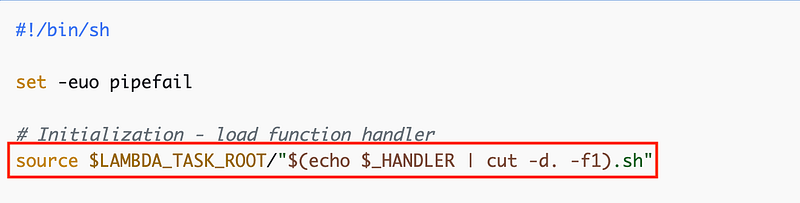
The above comment says that sourcing the file is “#initialization”. We have some more magic variables in this code. The tutorial doesn’t show where LAMBDA_TASK_ROOT and HANDLER get initialized. I’m going to presume that is specific to running a Lambda function without a container because I don’t see those specific names in our container and I don’t see whomever wrote this tutorial initializing the values. We can just use the variables defined in our Dockerfile as is as that seems to work.
What’s in that file? It’s the function that will be executed by the Lambda function. This is a sample handler and we can replace this with our own code.
function handler () {
  EVENT_DATA=$1
  echo "$EVENT_DATA" 1>&2;
  RESPONSE="Echoing request: '$EVENT_DATA'"

  echo $RESPONSE
}
Now the tutorial is putting all this in a zip file, but we’re going to replace app.py in the Dockerfile we’ve been testing with the above function. We’ll replace the contents of entry.sh with the custom Bash Lambda Runtime code above with a few adjustments to match our Dockerfile configuration.
We’ve got some other magic variables in the runtime code. I’m not sure where mktemp is initialized. We’ll have to see if we need that.

Next the script is requesting EVENT_DATA from the lambda runtime. We have another magic variable — AWS_LAMBDA_RUNTIME_API. We’ll need to set that appropriately.

Then the code parses the request ID out of the response.

Next, the code calls the handler function above, echoing out the response from the function and passing in the EVENT_DATA retrieved from the Lambda invocation API call above.

Next the runtime client code sends the response from the function back to Lambda via an API call.

As noted by the tutorial, this code is not complete. It does not handle errors properly at all. I really wish AWS would publish a complete example, with error handling, as some people might copy and use this as is.
Once we get that working we can upload the container to ECR and run it as we did before.
That’s all theoretical at the moment. I’ll try it out in upcoming posts.
Follow for updates.
Teri Radichel | © 2nd Sight Lab 2024
About Teri Radichel:
~~~~~~~~~~~~~~~~~~~~
⭐️ Author: Cybersecurity for Executives in the Age of Cloud
⭐️ Presentations: Presentations by Teri Radichel
⭐️ Recognition: SANS Award, AWS Security Hero, IANS Faculty
⭐️ Certifications: SANS ~ GSE 240
⭐️ Education: BA Business, Master of Software Engineering, Master of Infosec
⭐️ Company: Penetration Tests, Assessments, Phone Consulting ~ 2nd Sight Lab
Need Help With Cybersecurity, Cloud, or Appication Security?
~~~~~~~~~~~~~~~~~~~~~~~~~~~~~~~~~~~~~~~~~~~~~~~~~~~~~~~~~~~~~
🔒 Request a penetration test or security assessment
🔒 Schedule a consulting call
🔒 Cybersecurity Speaker for PresenationFollow for more stories like this:
~~~~~~~~~~~~~~~~~~~~~~~~~~~~~~~~~~~~~~~~~~~~~~~~~~~~~~~~~~~~~
❤️ Medium: Teri Radichel
❤️ Sign Up For Email
❤️ Twitter: @teriradichel
❤️ Mastodon: @[email protected]
❤️ Facebook: 2nd Sight Lab
❤️ YouTube: @2ndsightlab