avatarCesar William Alvarenga

Free AI web copilot to create summaries, insights and extended knowledge, download it at here

3171

Abstract

support to some frameworks components (React, Vue, and Angular).</p><h2 id="3bac">Getting Started</h2><p id="26c2">First, we will execute the following command lines.</p><div id="de2d"><pre><span class="hljs-meta prompt_"> </span><span class="language-bash"><span class="hljs-built_in">mkdir</span> my-sdk &amp;&amp; <span class="hljs-built_in">cd</span> <span class="hljs-variable">_</span></span> <span class="hljs-meta prompt_">$ </span><span class="language-bash">npx lerna init</span></pre></div><p id="6831"><code>npx lerna init</code> will create the Lerna configuration file as well as the <code>package.json</code> file and the <code>packages</code> folder:</p><div id="5acd"><pre>. ├── lerna.<span class="hljs-keyword">json </span>├── package.<span class="hljs-keyword">json </span>└── packages</pre></div><p id="eb31">We’ll modify the <code>lerna.json</code> and <code>package.json</code> files to support <a href="https://classic.yarnpkg.com/en/docs/workspaces/">Yarn Workspaces</a> (available since [email protected]+).</p><p id="aa67">For the <code>lerna.json</code> file will add the following properties:</p><ul><li><code>"npmClient: "yarn"</code> : to run all commands with yarn</li><li><code>"useWorkspaces": true</code> : to enable integration with workspaces</li></ul> <figure id="32ef"> <div> <div>

            <iframe class="gist-iframe" src="/gist/cesarwbr/09e77e2cfd7a33973c31d7fee1adbf28.js" allowfullscreen="" frameborder="0" height="undefined" width="undefined">
          </div>
        </div>
    </figure></iframe></div></div></figure><p id="311c">For the <code>package.json</code> file will add the following property:</p><ul><li><code>"workspaces": ["packages/*"]</code> : where the modules/packages are located</li></ul>
    <figure id="ba9e">
        <div>
          <div>
            
            <iframe class="gist-iframe" src="/gist/cesarwbr/ecff2d1d357f1ce664196f2acfb6afd4.js" allowfullscreen="" frameborder="0" height="undefined" width="undefined">
          </div>
        </div>
    </figure></iframe></div></div></figure><h1 id="834a">Creating the Packages</h1><p id="b11f">Now it’s time to create our packages that will be orchestrated by Lerna and Yarn. In this example, we will create four packages: <code>core</code>, <code>react</code>, <code>vue</code>, and <code>angular</code>.</p><div id="b65b"><pre><span class="hljs-meta prompt_">$ </span><span class="language-bash"><span class="hljs-built_in">mkdir</span> -p packages/{core,react,vue,angular}</span></pre></div><p id="0da6">Now we have this structure:</p><div id="19a1"><pre>.

├── lerna.<span class="hljs-keyword">json </span>├── package.<span class="hljs-keyword">json </span>└── packages ├── angular ├── core ├── react └── vue</pre></div><p id="b85d">The <code>core</code> folder will contain our shared code between our packages. We can have our server integrations, interface definitions, base classes, and utilities for building the SDK components.</p><p id="d7f1">The other folders will have our components’ particular behavior. Each package will ha

Options

ve the <code>package.json</code> file with its dependencies.</p><p id="7e96">For instance, you can follow these articles to create the component for each framework in this example.</p><ul><li><a href="https://angular.io/guide/creating-libraries">https://angular.io/guide/creating-libraries</a></li><li><a href="https://github.com/transitive-bullshit/create-react-library">https://github.com/transitive-bullshit/create-react-library</a></li><li><a href="https://vuejs.org/v2/cookbook/packaging-sfc-for-npm.html">https://vuejs.org/v2/cookbook/packaging-sfc-for-npm.html</a></li></ul><blockquote id="7db6"><p><b>Pro tip</b>: remove all <code>node_modules</code> folders inside the packages and then run <code>yarn install</code> in the root folder. It will install the dependencies for all packages. We will only have a <code>node_modules</code> folder inside a package, whether we have a version conflict between the packages dependencies.</p></blockquote><h1 id="9948">Testing and Building All Packages</h1><p id="c00c">Now that we have all packages created, we can build our whole repo. We will use Lerna to execute the scripts inside our packages.</p><p id="6ecf">First, we need to create a build script inside each package.json. For example, if you followed the instructions to create a React lib above the build and test script inside the <code>packages/react/package.json</code> must be:</p><div id="0f55"><pre>{</pre></div><div id="7e89"><pre> <span class="hljs-string">"name"</span>: <span class="hljs-string">"my-sdk-component"</span>, <span class="hljs-string">"version"</span>: <span class="hljs-string">"1.0.0"</span>, <span class="hljs-string">...</span> <span class="hljs-string">"scripts"</span>: { <span class="hljs-string">"build"</span>: <span class="hljs-string">"microbundle-crl --no-compress --format modern,cjs"</span>, <span class="hljs-string">"test"</span>: <span class="hljs-string">"run-s test:unit test:lint test:build"</span>, <span class="hljs-string">...</span> }, <span class="hljs-string">...</span> }</pre></div><p id="6dac">To run all the packages tests and build them, we will define theses scripts in our root <code>package.json</code>.</p> <figure id="72ca"> <div> <div>

            <iframe class="gist-iframe" src="/gist/cesarwbr/7e0ead645d5cc4552dd42b2b7a6831cc.js" allowfullscreen="" frameborder="0" height="undefined" width="undefined">
          </div>
        </div>
    </figure></iframe></div></div></figure><p id="9a19">Now to test and build your entire repo just run:</p><div id="2353"><pre><span class="hljs-meta prompt_">$ </span><span class="language-bash">yarn <span class="hljs-built_in">test</span></span>

<span class="hljs-meta prompt_">$ </span><span class="language-bash">yarn build</span></pre></div><h1 id="60b8">Conclusion</h1><p id="3c6d">Now we know how to create, test, and build our monorepo. <a href="https://readmedium.com/how-to-set-up-github-actions-to-publish-a-monorepo-to-npm-f881e10f01d9">In the next article</a>, I’ll show you how to publish those packages using the GitHub Actions CI/CD.</p></article></body>

Creating, Testing and Building a Monorepo With Lerna and Yarn
I showed you the best practices to create a JavaScript SDK in last article. One of the best practices that I described was the importance of controlling the package’s version and share the codebase between them.

In this article, I’ll show how monorepo can help you to achieve those principles.

What is Monorepo?

In a nutshell, monorepo is a strategy where you will have all the application’s code in the same repository.

There are some cases that a monorepo fits well. For example, when you have an application with a mobile app, backend, frontend, and so on. With monorepo, we will have a folder for each of these parts and share code between them.

Another suitable case for this strategy is when you are creating a lib. The Angular framework is a famous example of that and uses this project structure.
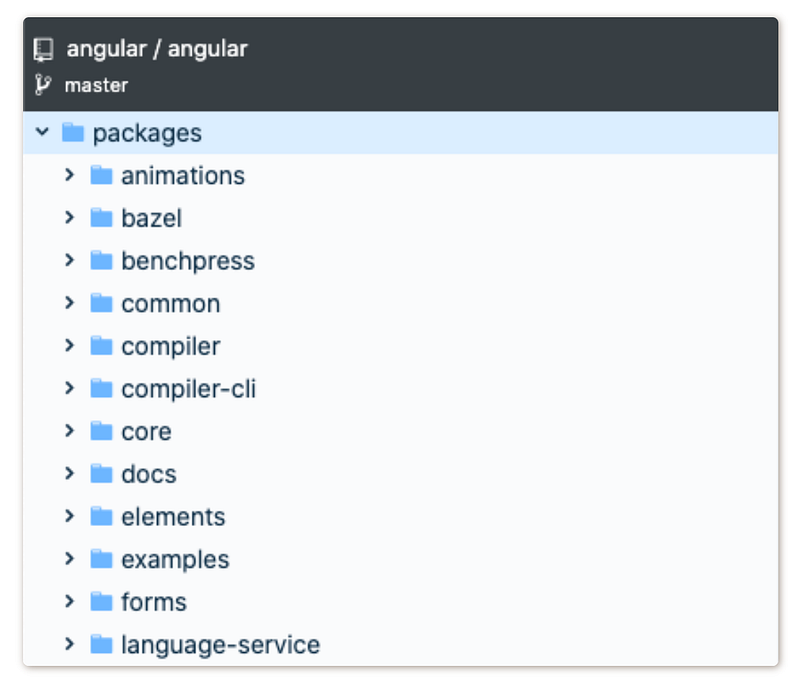
Angular repo on GitHub

The project has a well-done decoupling with a lean core separated from the other modules as animations, forms, router, etc. In this Angular project in specific, all the modules have the same version number.

But with monorepo, you can have unique versions for each module as well.
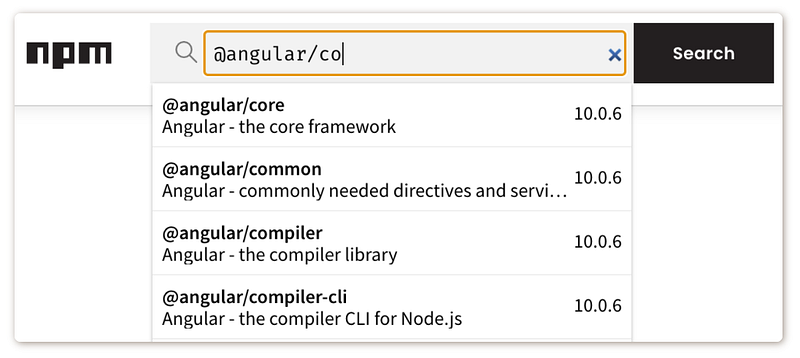
Angular packages on NPM

After publishing this monorepo to NPM, we will have separate packages for each model.

Three Main Benefits

  • ♻️ Ease of code reuse — When we have a project with many modules, but with the same codebase, it is good to have all these modules altogether in a monorepo. For example, an SDK that has a package for different frameworks’ components.
  • 📦 Simplified dependency management — In a multiple repository environment where many projects depend on a third-party dependency, that dependency might be downloaded or built many times. In a monorepo, the build can be easily optimized, as referenced dependencies all exist in the same codebase. You can achieve it using Yarn Workspaces.
  • 🚀 Unified versioning — We have one source of truth for all packages. It’s a good practice when you have an API with sub-modules, it will allow you to identify whether the module you are using came from the same codebase. For example, when a new version of Angular (core package) is published, all “sub-packages” will have the same version.

Let’s Create Our Monorepo

For our example, I will create an SDK that has support to some frameworks components (React, Vue, and Angular).

Getting Started

First, we will execute the following command lines.

$ mkdir my-sdk && cd $_
$ npx lerna init

npx lerna init will create the Lerna configuration file as well as the package.json file and the packages folder:

.
├── lerna.json
├── package.json
└── packages

We’ll modify the lerna.json and package.json files to support Yarn Workspaces (available since [email protected]+).

For the lerna.json file will add the following properties:

  • "npmClient: "yarn" : to run all commands with yarn
  • "useWorkspaces": true : to enable integration with workspaces

For the package.json file will add the following property:

  • "workspaces": ["packages/*"] : where the modules/packages are located

Creating the Packages

Now it’s time to create our packages that will be orchestrated by Lerna and Yarn. In this example, we will create four packages: core, react, vue, and angular.

$ mkdir -p packages/{core,react,vue,angular}

Now we have this structure:

.
├── lerna.json
├── package.json
└── packages
    ├── angular
    ├── core
    ├── react
    └── vue

The core folder will contain our shared code between our packages. We can have our server integrations, interface definitions, base classes, and utilities for building the SDK components.

The other folders will have our components’ particular behavior. Each package will have the package.json file with its dependencies.

For instance, you can follow these articles to create the component for each framework in this example.

Pro tip: remove all node_modules folders inside the packages and then run yarn install in the root folder. It will install the dependencies for all packages. We will only have a node_modules folder inside a package, whether we have a version conflict between the packages dependencies.

Testing and Building All Packages

Now that we have all packages created, we can build our whole repo. We will use Lerna to execute the scripts inside our packages.

First, we need to create a build script inside each `package.json`. For example, if you followed the instructions to create a React lib above the build and test script inside the packages/react/package.json must be:

{
  "name": "my-sdk-component",
  "version": "1.0.0",
  ...
  "scripts": {
    "build": "microbundle-crl --no-compress --format modern,cjs",
    "test": "run-s test:unit test:lint test:build",
    ...
  },
  ...
}

To run all the packages tests and build them, we will define theses scripts in our root package.json.

Now to test and build your entire repo just run:

$ yarn test
$ yarn build

Conclusion

Now we know how to create, test, and build our monorepo. In the next article, I’ll show you how to publish those packages using the GitHub Actions CI/CD.

Yarn Workspace
Lerna
JavaScript
Git
NPM
Recommended from ReadMedium