
How to use AWS DocumentDB
Let’s create an AWS DocumentDB cluster, a fully managed MongoDB solution!

This article is part of a series 😃. It’s up to you how you want to proceed, either reading this whole thing first and coming back after you need too or starting from the beginning.
- Part 1: SSH Tunnel — AWS EC2
- Part 2: Creating an AWS EC2 instance
- Part 3: Fully Managed MongoDB — DocumentDB
- Part 4: Creating an AWS DocumentDB cluster
Let’s create a cluster!
Open up the AWS console and let’s get cracking.
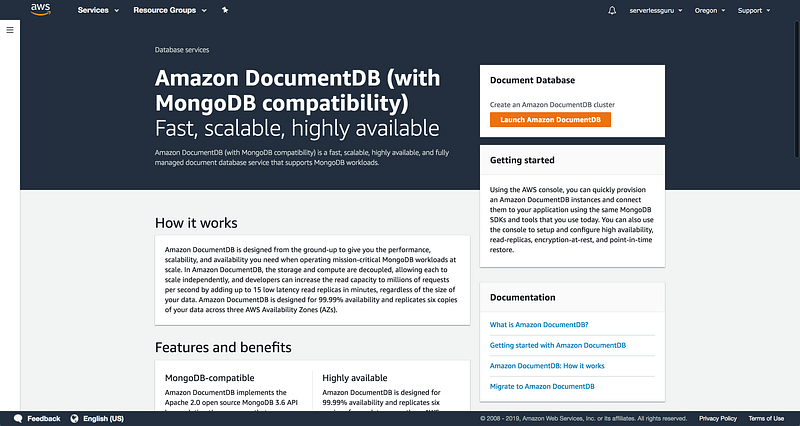
First let’s select Parameter Groups and turn off some additional security for demo purposes.
NOTE: Do this step before creating the DocumentDB Cluster
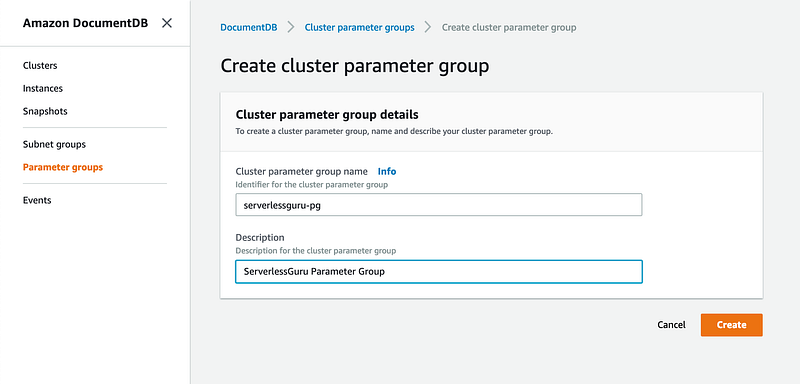
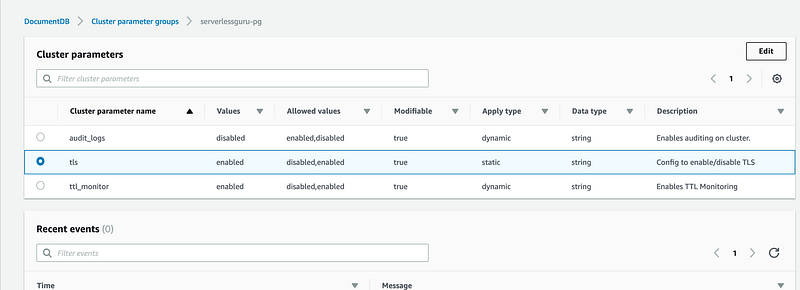
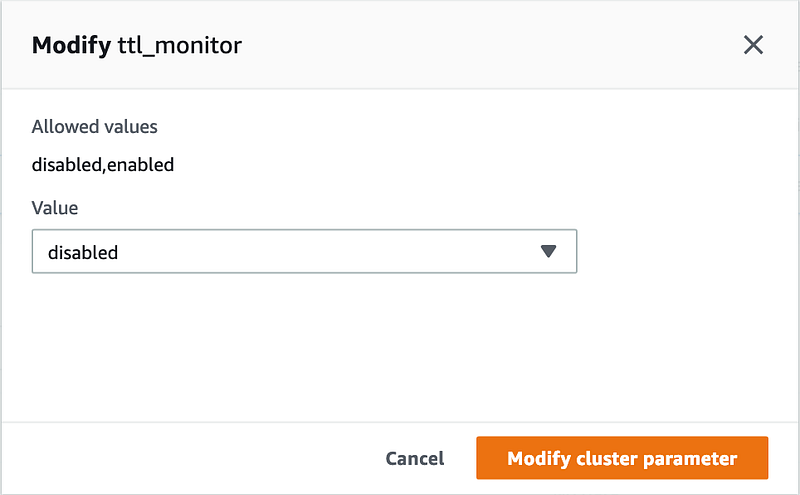
Once you create the Parameter Group, click on TLS and TTL_Monitor and flip the switch to disabled.
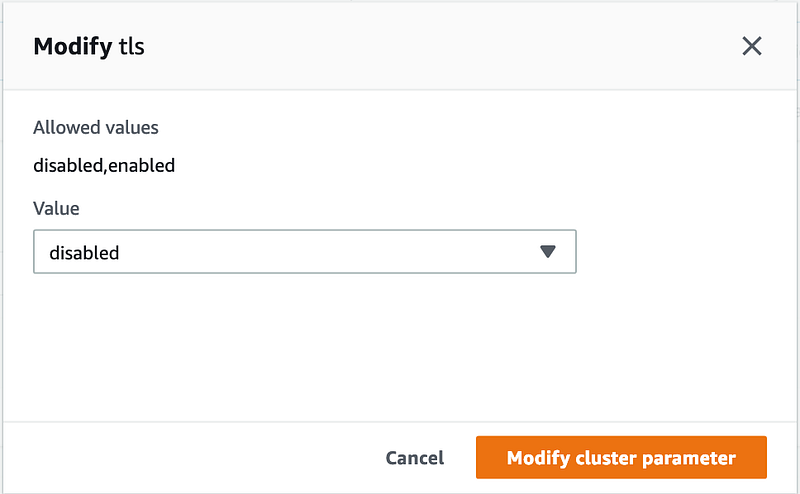
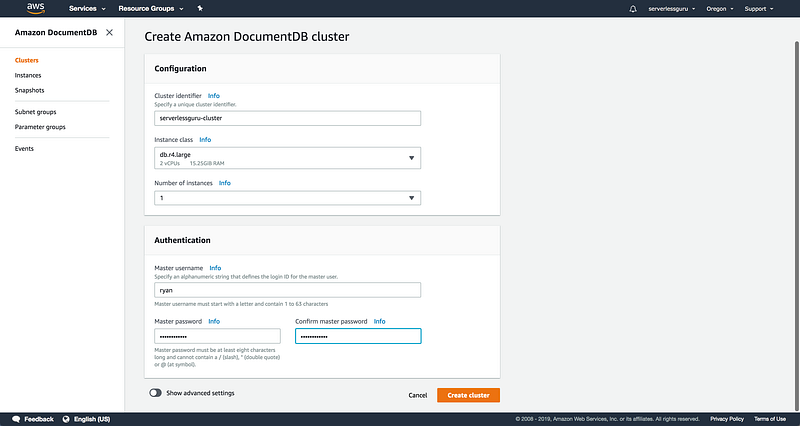
Time to launch an Amazon DocumentDB Cluster.
Note: Set Instance Class as db.r4.large and Number of Instances to 1. These are the cheapest settings that DocumentDB currently supports.
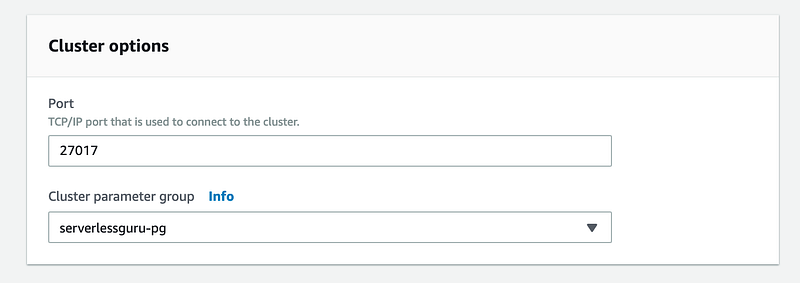
Click Show Advanced Settings, we need to add our new Parameter Group to the DocumentDB cluster we are creating.
Easy enough. Now hit Create Cluster.
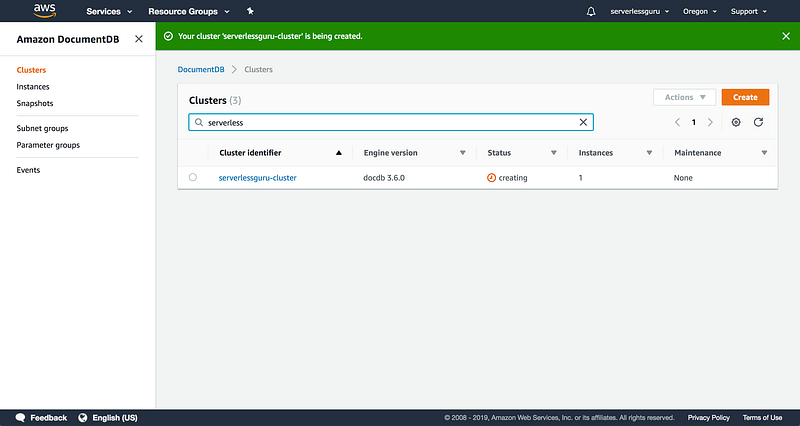
Perfect 🎉. Now we have a DocumentDB cluster spinning up. When the cluster is finished creating we should be able to connect to the new cluster and go from there, right?
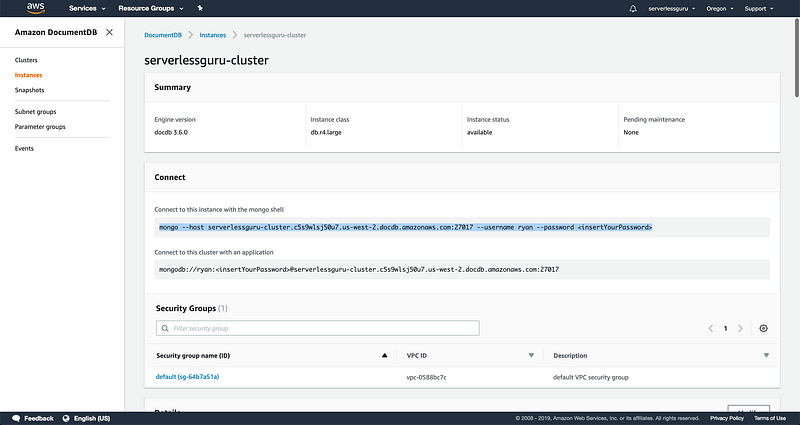
Let’s try to connect.
$~: mongo --host serverlessguru-cluster.cluster-c5s9wlsj50u7.us-west-2.docdb.amazonaws.com:27017 --username ryan --password password92!MongoDB shell version v4.0.4connecting to: mongodb://serverlessguru-cluster.cluster-c5s9wlsj50u7.us-west-2.docdb.amazonaws.com:27017/2019-02-20T08:13:14.565-0800 E QUERY [js] Error: couldn't connect to server serverlessguru-cluster.cluster-c5s9wlsj50u7.us-west-2.docdb.amazonaws.com:27017, connection attempt failed: SocketException: Error connecting to serverlessguru-cluster.cluster-c5s9wlsj50u7.us-west-2.docdb.amazonaws.com:27017 (172.31.39.19:27017) :: caused by :: Connection refused :connect@src/mongo/shell/mongo.js:257:13@(connect):1:6exception: connect failedLooks like we can’t connect. Why is this?
Currently, DocumentDB does not support public endpoints meaning we can not directly connect to our cluster from our laptop. What do we do? Setup an SSH Tunnel, cool let’s do that.
SSH Tunnel
Setup an SSH Tunnel
To keep the articles modular, I’ve created a separate article which focuses on what a SSH Tunnel does and how to create an EC2 instance on AWS which we will use as our SSH Tunnel. This same setup will allow us to connect to our DocumentDB database.
Create the SSH Tunnel Connection
Now that we have the SSH Tunnel setup with an AWS EC2 instance. Let’s now jump into using that SSH Tunnel to make a connection to our newly created private DocumentDB database.
$~: ssh -i ~/.ssh/sshtunnel.pem -N -L 27017:serverlessguru-cluster.cluster-c5s9wlsj50u7.us-west-2.docdb.amazonaws.com:27017 ec2-user@12.345.56.78Open new terminal tab and connect to DocumentDB:
Now we can simply make a connection to 127.0.0.1:27017 and we will be connecting directly to our private DocumentDB database! 💥 💥
$~: mongo --host 127.0.0.1:27017 --username ryan --password password92!MongoDB shell version v4.0.4connecting to: mongodb://127.0.0.1:27017/Implicit session: session { "id" : UUID("7c5269c9-d01c-476b-98d8-947a543b9c01") }MongoDB server version: 3.6.0WARNING: shell and server versions do not matchrs0:PRIMARY>Some MongoDB things:
Since we did all this work let’s actually run some commands against our awesome new DocumentDB instance. ✨
Create Database and Collection:
rs0:PRIMARY> use testdb
switched to db testdb
rs0:PRIMARY> db.createCollection('users')
{ "ok" : 1 }
Insert data:
rs0:PRIMARY> db.users.insert({ 'name': 'ryan', 'age': 24, 'favorite_color': 'green'})
WriteResult({ "nInserted" : 1 })
rs0:PRIMARY> db.users.insert({ 'name': 'Fim', 'age': 28, 'favorite_color': 'red'})
WriteResult({ "nInserted" : 1 })
View data:
rs0:PRIMARY> db.users.find({})
{ "_id" : ObjectId("5c6ed09625a02f3affd41ec8"), "name" : "ryan", "age" : 24, "favorite_color" : "green" }
{ "_id" : ObjectId("5c6ed0b625a02f3affd41ec9"), "name" : "Fim", "age" : 28, "favorite_color" : "red" }
Fantastic! We’ve done a lot. I hope that you’re now more prepared to go out and tackle other similar problems 😄.
What does Serverless Guru do?
Serverless Guru helps companies build scalable and cost-effective applications on the cloud. We help train companies on how to leverage IAC, serverless, and cloud-native services. We help migrate existing applications to the cloud and optimize existing applications on the cloud to be more cost-effective. We are a Serverless development partner and an AWS Consulting partner.
What did we miss?
When you leave your answer make sure to either comment below or tweet your answer to @serverlessgurux on Twitter.

Ryan Jones
Founder — Serverless Guru
LinkedIn — @ryanjonesirl
Twitter — @ryanjonesirl
Thanks for reading 😃
If you would like to learn more about Serverless Guru, please follow us on Medium, Twitter, Instagram, Facebook, or LinkedIn!


