avatarAmanda Quint

Free AI web copilot to create summaries, insights and extended knowledge, download it at here

3655

Abstract

iness applications EventBridge Schedule is free.</p><h1 id="ebbe">Implementing EventBridge Scheduler in CDK</h1><p id="aa98">At the time of writing (March 2023, CDK version 2.68.0), EventBridge Scheduler does not have a custom (L2) construct. There is a GitHub issue for a new construct underway <a href="https://github.com/aws/aws-cdk-rfcs/issues/474">here</a>, but this doesn’t mean that you can’t use EventBridge Scheduler in your IaC in the meantime!</p><blockquote id="b309"><p><b>Update March 2024: </b>The L1 construct below will still work, but there is an updated version of this article using L2 constructs available <a href="https://aws.plainenglish.io/creating-an-amazon-eventbridge-scheduler-with-cdk-l2-constructs-updated-for-2024-6d64166869c3">here</a>.</p></blockquote><h2 id="78e7">CfnResource</h2><p id="1897"><a href="https://docs.aws.amazon.com/cdk/api/v2/docs/aws-cdk-lib.aws_apigateway.CfnResource.html">CfnResource</a> is a base-level (L1) construct that can be used to basically write CloudFormation in CDK. Although it’s generally <i>nicer</i> to be able to use the higher-level (L2) constructs dedicated to a service, CfnResource is a handy way to implement settings and services that don’t have those dedicated L2 constructs.</p><h2 id="b69f">Implementing EventBridge Scheduler Using CfnResource</h2><p id="3289">To implement Scheduler in CDK, you should also reference its <a href="https://docs.aws.amazon.com/AWSCloudFormation/latest/UserGuide/aws-resource-scheduler-schedule.html">CloudFormation documentation</a> in order to reference the various properties and settings available and note what’s required.</p><div id="b24e"><pre><span class="hljs-comment">// EventBridge Scheduler</span> <span class="hljs-keyword">const</span> myScheduler = <span class="hljs-keyword">new</span> cdk.<span class="hljs-title class_">CfnResource</span>(<span class="hljs-variable language_">this</span>, <span class="hljs-string">"myScheduler"</span>, { <span class="hljs-attr">type</span>: <span class="hljs-string">"AWS::Scheduler::Schedule"</span>, <span class="hljs-attr">properties</span>: { <span class="hljs-title class_">Name</span>: <span class="hljs-string">"myTestEventBridgeScheduler"</span>, <span class="hljs-title class_">Description</span>: <span class="hljs-string">"Runs a lambda every weekday at 6 AM EST"</span>, <span class="hljs-title class_">FlexibleTimeWindow</span>: { <span class="hljs-title class_">Mode</span>: <span class="hljs-string">"OFF"</span> }, <span class="hljs-title class_">ScheduleExpression</span>: <span class="hljs-string">"cron(0 6 ? * MON-FRI *)"</span>, <span class="hljs-title class_">ScheduleExpressionTimezone</span>: <span class="hljs-string">"America/New_York"</span>, <span class="hljs-title class_">Target</span>: { <span class="hljs-title class_">Arn</span>: myTestLambda.<span class="hljs-property">functionArn</span>, <span class="hljs-title class_">RoleArn</span>: schedulerRole.<span class="hljs-property">roleArn</span>, }, },</pre></div><p id="a747">In this case, I’ve defined an EventBridge Scheduler that will run every weekday at 6 am EST. It will invoke <code>myTestLambda</code> — which would have been defined elsewhere in my CDK code — for more information on deploying Lambda functions with CDK, see <a href="https://levelup.gitconnected.com/getting-started-with-aws-cloud-development-kit-cdk-490b2831a0ec">here</a>.</p><p id="2197">Note that the <code>Target</code> also requires a <code>RoleArn</code> — the IAM role that EventBridge Scheduler will use when it invokes the target. To that end, we’ll also need to define a new role, with a policy t

Options

hat allows our EventBridge Scheduler to invoke our Lambda function:</p><div id="e53b"><pre><span class="hljs-keyword">const</span> schedulerRole = <span class="hljs-keyword">new</span> iam.<span class="hljs-title class_">Role</span>(<span class="hljs-variable language_">this</span>, <span class="hljs-string">"schedulerRole"</span>, { <span class="hljs-attr">assumedBy</span>: <span class="hljs-keyword">new</span> iam.<span class="hljs-title class_">ServicePrincipal</span>(<span class="hljs-string">"scheduler.amazonaws.com"</span>), });

<span class="hljs-keyword">const</span> invokeLambdaPolicy = <span class="hljs-keyword">new</span> iam.<span class="hljs-title class_">Policy</span>(<span class="hljs-variable language_">this</span>, <span class="hljs-string">"invokeLambdaPolicy"</span>, { <span class="hljs-attr">document</span>: <span class="hljs-keyword">new</span> iam.<span class="hljs-title class_">PolicyDocument</span>({ <span class="hljs-attr">statements</span>: [ <span class="hljs-keyword">new</span> iam.<span class="hljs-title class_">PolicyStatement</span>({ <span class="hljs-attr">actions</span>: [<span class="hljs-string">"lambda:InvokeFunction"</span>], <span class="hljs-attr">resources</span>: [myTestLambda.<span class="hljs-property">functionArn</span>], <span class="hljs-attr">effect</span>: iam.<span class="hljs-property">Effect</span>.<span class="hljs-property">ALLOW</span>, }), ], }), }); schedulerRole.<span class="hljs-title function_">attachInlinePolicy</span>(invokeLambdaPolicy);</pre></div><p id="2c1f">Then, reference <code>schedulerRole.roleArn</code> in the Scheduler’s Target as shown above.</p><blockquote id="7daa"><p>Note: If you deploy any resources to test this out don’t forget to delete them when you’re finished!</p></blockquote><h2 id="be75">Other CDK Resources</h2><p id="78f9">Here are a few other resources that may come in handy when working with AWS CDK:</p><ul><li><a href="https://docs.aws.amazon.com/cdk/api/v2/docs/aws-construct-library.html">The official AWS Reference</a> contains documentation on all the constructs</li><li><a href="https://constructs.dev/">Construct Hub </a>contains other open-source constructs</li><li>Also, please check other articles I wrote on CDK: <a href="https://readmedium.com/getting-started-with-aws-cloud-development-kit-cdk-490b2831a0ec">Getting Started with AWS Cloud Development Kit (CDK)</a> and <a href="https://readmedium.com/managing-secrets-with-aws-cloud-development-kit-cdk-25ec1e80dfc3">Managing Secrets With AWS Cloud Development Kit (CDK)</a></li></ul><p id="42a3"><i>I enjoy writing about software development, project management, and my journey in the AWS Cloud. If you’d like to read more, please consider following me here on Medium, <a href="https://twitter.com/acquint">Twitter</a>, or <a href="https://www.linkedin.com/in/amanda-quint-6b699878/">LinkedIn</a>.</i></p><p id="88b1"><i>More content at <a href="https://plainenglish.io/"><b>PlainEnglish.io</b></a>.</i></p><p id="8b9e"><i>Sign up for our <a href="http://newsletter.plainenglish.io/"><b>free weekly newsletter</b></a>. Follow us on <a href="https://twitter.com/inPlainEngHQ"><b>Twitter</b></a></i>, <a href="https://www.linkedin.com/company/inplainenglish/"><b><i>LinkedIn</i></b></a><i>, <a href="https://www.youtube.com/channel/UCtipWUghju290NWcn8jhyAw"><b>YouTube</b></a>, and <a href="https://discord.gg/GtDtUAvyhW"><b>Discord</b></a><b>.</b></i></p><p id="af36"><b><i>Interested in scaling your software startup</i></b><i>? Check out <a href="https://circuit.ooo?utm=publication-post-cta"><b>Circuit</b></a>.</i></p></article></body>

Creating an Amazon EventBridge Scheduler with CDK

Schedule your workflows using Infrastructure as Code

Photo by 2H Media on Unsplash

Update March 2024: Most of the information in this article is still relevant, but there is an updated version using L2 constructs available here.

Amazon’s EventBridge Scheduler is a fairly new addition to the EventBridge service, released in November 2022. You can create a one-time or recurring schedule that invokes other AWS services in turn, making it easy to trigger workflows.

AWS Cloud Development Kit (CDK) is a framework that allows engineers to define their infrastructure as code (IaC) in a familiar programming language instead of having to manage their infrastructure manually or write raw CloudFormation.

Why EventBridge Scheduler?

Consider a job that needs to run before every workday — querying and transforming data from the day before and making sure that its output is available when people start work the next morning. In that case, you could use EventBridge Scheduler to create a schedule that runs every morning, Monday through Friday, at 6 am. Depending on how you needed to process your data, you could use this schedule to invoke a Lambda function, Step Functions state machine, AWS Batch job, or even a SageMaker pipeline — EventBridge Scheduler can currently target over 200 AWS services.

Or maybe you need to dynamically schedule jobs to run at a specific date and time, such as sending a reminder email to a user 3 days after they’ve taken a certain action. Prior to Scheduler, this could be done with Lambda, DynamoDB, and EventBridge rules (as seen here), but EventBridge Schedule now makes this easy.

EventBridge Scheduler lets you schedule your jobs at a certain date and time (either one-time or recurring), or by using a rate-based schedule, where a job needs to run every 20 minutes or every 3 days. For recurring schedules, Scheduler uses cron expressions, which can initially be a bit confusing. You can learn more about using them in EventBridge Scheduler here, and use helpful third-party tools like crontab guru.
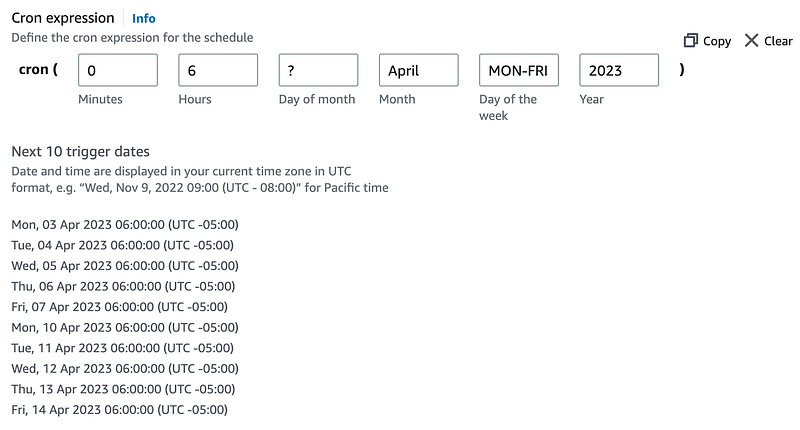
Example of a schedule using a cron expression that will run every weekday in April at 6 am EST.

Pricing

EventBridge Scheduler is part of AWS’s Free Tier, offering up to 14,000,000 free invocations a month. After that, Scheduler innovations are $1.00/million per month. While some enterprise workflows will definitely hit these limits, for many personal and business applications EventBridge Schedule is free.

Implementing EventBridge Scheduler in CDK

At the time of writing (March 2023, CDK version 2.68.0), EventBridge Scheduler does not have a custom (L2) construct. There is a GitHub issue for a new construct underway here, but this doesn’t mean that you can’t use EventBridge Scheduler in your IaC in the meantime!

Update March 2024: The L1 construct below will still work, but there is an updated version of this article using L2 constructs available here.

CfnResource

CfnResource is a base-level (L1) construct that can be used to basically write CloudFormation in CDK. Although it’s generally nicer to be able to use the higher-level (L2) constructs dedicated to a service, CfnResource is a handy way to implement settings and services that don’t have those dedicated L2 constructs.

Implementing EventBridge Scheduler Using CfnResource

To implement Scheduler in CDK, you should also reference its CloudFormation documentation in order to reference the various properties and settings available and note what’s required.

// EventBridge Scheduler
const myScheduler = new cdk.CfnResource(this, "myScheduler", {
 type: "AWS::Scheduler::Schedule",
 properties: {
  Name: "myTestEventBridgeScheduler",
  Description: "Runs a lambda every weekday at 6 AM EST",
  FlexibleTimeWindow: { Mode: "OFF" },
  ScheduleExpression: "cron(0 6 ? * MON-FRI *)",
  ScheduleExpressionTimezone: "America/New_York",
  Target: {
    Arn: myTestLambda.functionArn,
    RoleArn: schedulerRole.roleArn,
  },
},

In this case, I’ve defined an EventBridge Scheduler that will run every weekday at 6 am EST. It will invoke myTestLambda — which would have been defined elsewhere in my CDK code — for more information on deploying Lambda functions with CDK, see here.

Note that the Target also requires a RoleArn — the IAM role that EventBridge Scheduler will use when it invokes the target. To that end, we’ll also need to define a new role, with a policy that allows our EventBridge Scheduler to invoke our Lambda function:

const schedulerRole = new iam.Role(this, "schedulerRole", {
 assumedBy: new iam.ServicePrincipal("scheduler.amazonaws.com"),
});

const invokeLambdaPolicy = new iam.Policy(this, "invokeLambdaPolicy", {
 document: new iam.PolicyDocument({
  statements: [
    new iam.PolicyStatement({
      actions: ["lambda:InvokeFunction"],
      resources: [myTestLambda.functionArn],
      effect: iam.Effect.ALLOW,
    }),
  ],
 }),
});
schedulerRole.attachInlinePolicy(invokeLambdaPolicy);

Then, reference schedulerRole.roleArn in the Scheduler’s Target as shown above.

Note: If you deploy any resources to test this out don’t forget to delete them when you’re finished!

Other CDK Resources

Here are a few other resources that may come in handy when working with AWS CDK:

I enjoy writing about software development, project management, and my journey in the AWS Cloud. If you’d like to read more, please consider following me here on Medium, Twitter, or LinkedIn.

More content at PlainEnglish.io.

Sign up for our free weekly newsletter. Follow us on Twitter, LinkedIn, YouTube, and Discord.

Interested in scaling your software startup? Check out Circuit.

AWS
Web Development
Softare Development
Programming
Women In Tech
Recommended from ReadMedium