avatarTeri Radichel

Free AI web copilot to create summaries, insights and extended knowledge, download it at here

3516

Abstract

e that it has KeyPairType in the last column, meaning you can create policies that restrict actions based on that value.</p><figure id="ec00"><img src="https://cdn-images-1.readmedium.com/v2/resize:fit:800/1*jnkzHh5GccXONl--CJqhNw.png"><figcaption></figcaption></figure><p id="aed1">The documentation says that the CreateKeyPair action is for RSA keys but I presume that is also for keys that use other algorithms, since it includes the <b><i>KeyPairType</i></b> as a <b><i>ConditionKey</i></b>.</p><p id="cf78">We used the <b><i>KeyType</i></b> in the last post where we were restricting use of an allowed algorithm in our CloudFormation template.</p><figure id="9f6b"><img src="https://cdn-images-1.readmedium.com/v2/resize:fit:800/1*f35WLhWWzsBOZqnfaMZ-jg.png"><figcaption></figcaption></figure><p id="4568">The key pair type can be set to one of two algorithms at the time of this writing:</p><figure id="cd2f"><img src="https://cdn-images-1.readmedium.com/v2/resize:fit:800/1*OU6qDSsDWtHZVYvb7msLEQ.png"><figcaption></figcaption></figure><p id="4905">Is that the same thing? I presume it is. I’m not sure what else it would be. But the documentation is not exactly clear on this point:</p><figure id="3291"><img src="https://cdn-images-1.readmedium.com/v2/resize:fit:800/1*rgWsaX7S9djEP_suUCIWuQ.png"><figcaption></figcaption></figure><p id="3c52">Would be nice if they listed acceptable values with condition keys where appropriate and aligned the names with the names in CloudFormation. <i>#awswishlist</i></p><p id="2d31">I showed you how to create <b>Service Control Policies (SCP) </b>in CloudFormation and how to apply them to your organization in many other posts so I’m not going to repeat all that here right now, as I have other things to get done.</p><div id="adcb" class="link-block"> <a href="https://readmedium.com/aws-iam-932d6a043b7"> <div> <div> <h2>AWS IAM</h2> <div><h3>Stories on AWS IAM by Teri Radichel. The Code.</h3></div> <div><p>medium.com</p></div> </div> <div> <div style="background-image: url(https://miro.readmedium.com/v2/resize:fit:320/1*CcF9nyBH9vzZbcHC3bhViA.png)"></div> </div> </div> </a> </div><p id="9b21">Use the methods I already showed you to create an SCP in CloudFormation and add a condition on the CreateKeyPair action that limits users to using the <b><i>ed25519</i></b> algorithm.</p><div id="1ffc" class="link-block"> <a href="https://readmedium.com/adding-conditions-to-aws-iam-policies-c30e1e687fa0"> <div> <div> <h2>Adding Conditions to AWS IAM, Resource, and Trust Policies</h2> <div><h3>ACM.17 Details of policy evaluation and adding MFA to our batch job policies</h3></div> <div><p>medium.com</p></div> </div> <div> <div style="background-image: url(https://miro.readmedium.com/v2/resize:fit:320/1*Hq6MpFeQVAzQXJbp8zriBw.png)"></div> </div> </div> </a> </div><p id="a6f7">That algorithm is currently preferred over RSA due to the recent vulnerability described in this post.</p><div id="dd8f" class="link-block"> <a href="https://readmedium.com/what-to-do-about-a-recently-discovered-ssh-vulnerability-f390d618a605"> <div> <div> <h2>What to Do About a Recently

Options

Discovered SSH Vulnerability</h2> <div><h3>ACM.382 How to protect your SSH connections</h3></div> <div><p>medium.com</p></div> </div> <div> <div style="background-image: url(https://miro.readmedium.com/v2/resize:fit:320/1*t7Wl3_JWj2QojpSTBDbkUw.png)"></div> </div> </div> </a> </div><p id="8555">However, if you are using Windows hosts, they require RSA at the time of this writing. You have a few options. You could put your Windows and Linux hosts in different accounts and apply the SCP to certain accounts or OUs. You could also try to craft a policy based on the type of EC2 instance that the user is deploying but that feels a bit more error prone to create and maintain.</p><p id="2140">The other thing to note is that there are a lot of other actions above that involve EC2 key pairs. You can restrict those actions as well but be aware that things might break. You might first test this in a sandbox environment. Then warn developers that they are going to be required to use only approved algorithms and give them a deadline to change their existing keys.</p><p id="a20a">Also — help them find non-compliant resources! Create a report based on resources in your account and CloudTrail events to find people and resources who are still using non-compliant resources.</p><p id="f08f">Once you’re certain all resources and users have switched over in your non-production environments, then tackle production — carefully. This is where it would be useful if AWS had a report only option for Service Control Policies that reported issues in a non-blocking manner. But since we don’t have that, you’ll have to create your own reports to see what’s out there before you roll out your SCP.</p><p id="8cb0">Back to what I was working on prior to this vulnerability report.</p><p id="bb56">Follow for updates.</p><p id="4a3a">Teri Radichel | <i>© <a href="https://2ndsightlab.com/?source=post_page---------------------------">2nd Sight Lab</a> 2023</i></p><div id="8b5f"><pre><span class="hljs-section">About Teri Radichel:

⭐️ Author: Cybersecurity Books
⭐️ Presentations: Presentations by Teri Radichel
⭐️ Recognition: SANS Award, AWS Security Hero, IANS Faculty
⭐️ Certifications: SANS ~ GSE 240
⭐️ Education: BA Business, Master of Software Engineering, Master of Infosec
⭐️ Company: Penetration Tests, Assessments, Phone Consulting ~ 2nd Sight Lab</pre></div><div id="caae"><pre><span class="hljs-section">Need Help With Cybersecurity, Cloud, or Application Security?
~~~~~~~~~~~~~~~~~~~~~~~~~~~~~~~~~~~~~~~~~~~~~~~~~~~~~~~~~~~~~</span>
🔒 Request a penetration test or security assessment
🔒 Schedule a consulting call
🔒 Cybersecurity Speaker for Presentation</pre></div><div id="5a42"><pre>Follow <span class="hljs-keyword">for</span> more stories like <span class="hljs-keyword">this</span>:

❤️ Sign Up my Medium Email List ❤️ Twitter: <span class="hljs-meta">@teriradichel</span> ❤️ LinkedIn: https:<span class="hljs-comment">//www.linkedin.com/in/teriradichel</span> ❤️ Mastodon: <span class="hljs-meta">@teriradichel</span><span class="hljs-meta">@infosec</span>.exchange ❤️ Facebook: 2nd Sight Lab ❤️ YouTube: @2ndsightlab</pre></div><figure id="faf5"><img src="https://cdn-images-1.readmedium.com/v2/resize:fit:800/0*H9Ew1KCl-29nZiPR.jpeg"><figcaption></figcaption></figure></article></body>

Creating a Service Control Policy To Limit SSH Key Algorithms

ACM.384 Using an SCP with Conditions on the KeyPairType to restrict allowed algorithms when taking actions involving EC2 Key Pairs

~~~~~~~~~~~~~~~~~~~~~~~~~~~~~~~~~~~~~~~~~~~~~~~~~~~~~~~

⚙️ Check out my series on Automating Cybersecurity Metrics | Code.

🔒 Related Stories: AWS | EC2 OS Security | AWS Security | Encryption

💻 Free Content on Jobs in Cybersecurity | ✉️ Sign up for the Email List

~~~~~~~~~~~~~~~~~~~~~~~~~~~~~~~~~~~~~~~~~~~~~~~~~~~~~~~

In the last post I showed how to use CloudFormation to create an EC2 key pair — with some serious caveats.

In this post I’m going to explain how to create a Service Control Policy that restricts creation and use of EC2 KeyPairs to an approved algorithm.

To understand what we need to restrict and what is possible we need to take a look at the EC2 actions and condition keys.

The documentation has the condition keys we can use to restrict an action in the last column of the actions table:

If you look at the CreateKeyPair action you can see that it has KeyPairType in the last column, meaning you can create policies that restrict actions based on that value.

The documentation says that the CreateKeyPair action is for RSA keys but I presume that is also for keys that use other algorithms, since it includes the KeyPairType as a ConditionKey.

We used the KeyType in the last post where we were restricting use of an allowed algorithm in our CloudFormation template.
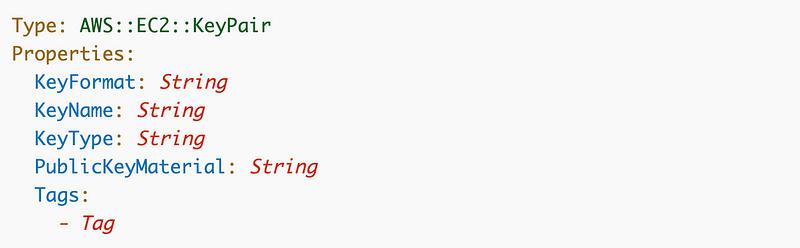
The key pair type can be set to one of two algorithms at the time of this writing:
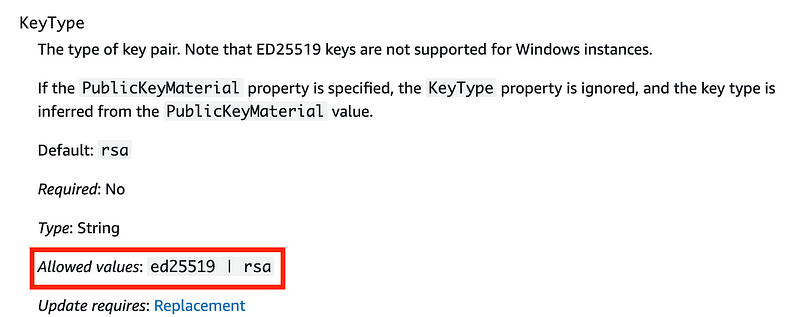
Is that the same thing? I presume it is. I’m not sure what else it would be. But the documentation is not exactly clear on this point:

Would be nice if they listed acceptable values with condition keys where appropriate and aligned the names with the names in CloudFormation. #awswishlist

I showed you how to create Service Control Policies (SCP) in CloudFormation and how to apply them to your organization in many other posts so I’m not going to repeat all that here right now, as I have other things to get done.

Use the methods I already showed you to create an SCP in CloudFormation and add a condition on the CreateKeyPair action that limits users to using the ed25519 algorithm.

That algorithm is currently preferred over RSA due to the recent vulnerability described in this post.

However, if you are using Windows hosts, they require RSA at the time of this writing. You have a few options. You could put your Windows and Linux hosts in different accounts and apply the SCP to certain accounts or OUs. You could also try to craft a policy based on the type of EC2 instance that the user is deploying but that feels a bit more error prone to create and maintain.

The other thing to note is that there are a lot of other actions above that involve EC2 key pairs. You can restrict those actions as well but be aware that things might break. You might first test this in a sandbox environment. Then warn developers that they are going to be required to use only approved algorithms and give them a deadline to change their existing keys.

Also — help them find non-compliant resources! Create a report based on resources in your account and CloudTrail events to find people and resources who are still using non-compliant resources.

Once you’re certain all resources and users have switched over in your non-production environments, then tackle production — carefully. This is where it would be useful if AWS had a report only option for Service Control Policies that reported issues in a non-blocking manner. But since we don’t have that, you’ll have to create your own reports to see what’s out there before you roll out your SCP.

Back to what I was working on prior to this vulnerability report.

Follow for updates.

Teri Radichel | © 2nd Sight Lab 2023

About Teri Radichel:
~~~~~~~~~~~~~~~~~~~~
⭐️ Author: Cybersecurity Books
⭐️ Presentations: Presentations by Teri Radichel
⭐️ Recognition: SANS Award, AWS Security Hero, IANS Faculty
⭐️ Certifications: SANS ~ GSE 240
⭐️ Education: BA Business, Master of Software Engineering, Master of Infosec
⭐️ Company: Penetration Tests, Assessments, Phone Consulting ~ 2nd Sight Lab
Need Help With Cybersecurity, Cloud, or Application Security?
~~~~~~~~~~~~~~~~~~~~~~~~~~~~~~~~~~~~~~~~~~~~~~~~~~~~~~~~~~~~~
🔒 Request a penetration test or security assessment
🔒 Schedule a consulting call
🔒 Cybersecurity Speaker for Presentation
Follow for more stories like this:
~~~~~~~~~~~~~~~~~~~~~~~~~~~~~~~~~~~~~~~~~~~~~~~~~~~~~~~~~~~~~ 
❤️ Sign Up my Medium Email List
❤️ Twitter: @teriradichel
❤️ LinkedIn: https://www.linkedin.com/in/teriradichel
❤️ Mastodon: @teriradichel@infosec.exchange
❤️ Facebook: 2nd Sight Lab
❤️ YouTube: @2ndsightlab

AWS
Service Control Policy
Keypair
Ssh
Algorithm
Recommended from ReadMedium