avatarTeri Radichel

Free AI web copilot to create summaries, insights and extended knowledge, download it at here

6812

Abstract

id="52e1"><b>When you have to use a role</b></p><p id="a963">If you have some automation responding to events without human interaction, then you will need to use an IAM role or some other form of non-MFA credentials. Of course, you can require MFA on a prior event that triggers the chain of events that led to the automation. That’s what we are going to try to do in this blog series with batch jobs.</p><div id="87e4" class="link-block"> <a href="https://readmedium.com/creating-an-aws-batch-job-that-requires-mfa-23061658975d"> <div> <div> <h2>Creating an AWS Batch Job That Requires MFA</h2> <div><h3>ACM.5 Series on my attempt to create an AWS Batch job that requires MFA</h3></div> <div><p>medium.com</p></div> </div> <div> <div style="background-image: url(https://miro.readmedium.com/v2/resize:fit:320/1*Am5uABy5JLcIrapuRy_o2g.png)"></div> </div> </div> </a> </div><p id="26a3">This is not a typical implementation, by the way. It’s pretty much an experiment just because I want to see if I can make it work and consider any downsides to my approach.</p><p id="e417"><b>Add ec2 to our service role template</b></p><figure id="2722"><img src="https://cdn-images-1.readmedium.com/v2/resize:fit:800/1*aWWgMI5xcV_q_6-yoNfpTA.png"><figcaption></figcaption></figure><p id="4e60">Use the function we created for deploying service roles to deploy a new EC2 role — in this case named EC2AppDeployRole:</p><figure id="7b37"><img src="https://cdn-images-1.readmedium.com/v2/resize:fit:800/1*usktNK0z5nzEp2387YUXEg.png"><figcaption></figcaption></figure><p id="854e">That deploys the role and trust policy but no permissions:</p><figure id="6ee4"><img src="https://cdn-images-1.readmedium.com/v2/resize:fit:800/1*-kVNUBN7OG-YO_gzYbA8ug.png"><figcaption></figcaption></figure><p id="20f0">We can use the existing AppDeployment Group Role Policies for this role.</p><p id="7834">We have two policies applied to the AppDeploymentGroup and we can simply add this role to those policy templates.</p><p id="ebf6"><i>AppDeploymentGroupRolePolicy.yaml</i></p><figure id="6c77"><img src="https://cdn-images-1.readmedium.com/v2/resize:fit:800/1*nq_bGsP9Ai9Y8clmwjHgbA.png"><figcaption></figcaption></figure><p id="1b7a"><i>AppDeploymentGroupRoleKMSPolicy.yaml</i></p><figure id="25ba"><img src="https://cdn-images-1.readmedium.com/v2/resize:fit:800/1*0iTMN6WwF--3kfQ9Ff7FHA.png"><figcaption></figcaption></figure><p id="e468">Once deployed you should see two policies associated with the IAM role:</p><figure id="2f6b"><img src="https://cdn-images-1.readmedium.com/v2/resize:fit:800/1*E8tJtMva1VDgO8YGbujEzA.png"><figcaption></figcaption></figure><p id="4a45"><b>Add an instance profile to our AppDeployment role template</b></p><p id="edbf">Now we need to add the EC2 instance role profile via a CloudFormation template. Where should we create this role profile? Should it be created by the AppDeployment role or should we have the IAM administrators create it? As always there’s no one right answer but in this POC we are going to let the IAM administrators define which roles can be used with EC2 instances. These role profiles will be defined in the IAM directory and the template will be deployed by IAM administrators.</p><figure id="4159"><img src="https://cdn-images-1.readmedium.com/v2/resize:fit:800/1*pzLerMU_KCdEv9Em9jwe0w.png"><figcaption></figcaption></figure><p id="903d">We really only need two properties: The name and the roles. Path is an optional identifier. Here’s our template which we are once again keeping generic so we can reuse it.</p><figure id="877a"><img src="https://cdn-images-1.readmedium.com/v2/resize:fit:800/1*mEB-glqRsw9pq0FKJHTOrA.png"><figcaption></figcaption></figure><p id="bff3">We’ll create a common function to deploy the profile:</p><figure id="4f72"><img src="https://cdn-images-1.readmedium.com/v2/resize:fit:800/1*2wybS_2j92QlOBtZdGQhJA.png"><figcaption></figcaption></figure><p id="0b93">Call the function from the deploy.sh script using the role name we just deployed.</p><figure id="20a9"><img src="https://cdn-images-1.readmedium.com/v2/resize:fit:800/1*_PEXBxqyCJoWuyGc_BQbTg.png"><figcaption></figcaption></figure><p id="1d1d">Now you can see that this role has an Instance Profile:</p><figure id="0125"><img src="https://cdn-images-1.readmedium.com/v2/resize:fit:800/1*hCbiny-Qpj9gMimqRTkC-g.png"><figcaption></figcaption></figure><p id="6873"><b>Assign the role to the EC2 instance in the EC2 CloudFormation template</b></p><p id="ef55">We can assign the role to the instance now using the IAMInstanceProfile property:</p><figure id="bbd8"><img src="https://cdn-images-1.readmedium.com/v2/resize:fit:800/1*ZHJHdeTq1E1APgqz5kbgxw.png"><figcaption></figcaption></figure><p id="bfb6">We can use the output export to ensure that only valid CloudFormation exports are used for role profiles:</p><figure id="cfa5"><img src="https://cdn-images-1.readmedium.com/v2/resize:fit:800/1*NvhmR_-RETNkyv_cxyYYKw.png"><figcaption></figcaption></figure><figure id="f9d4"><img src="https://cdn-images-1.readmedium.com/v2/resize:fit:800/1*wcRolSlWOyoVifHIpV-UyA.png"><figcaption></figcaption></figure><p id="e645">OK here’s where some funky CloudFormation things happened again. There’s always something.</p><p id="c995">First of all, when adding that line to associate the IAM profile I got the following error in CloudFormation which says this user does not have runInstances permissions:</p><figure id="dbc6"><img src="https://cdn-images-1.readmedium.com/v2/resize:fit:800/1*BLntuV5uISEohJnNAHxCaw.png"><figcaption></figcaption></figure><figure id="a6ca"><img src="https://cdn-images-1.readmedium.com/v2/resize:fit:800/1*OYftnRQp9dNqqkxzv1lKHg.png"><figcaption></figcaption></figure><p id="d9f9">Now, I know this user and group had this permission the last time I deployed this VM and I didn’t change anything. To confirm, I deleted the new line I just added above.</p><p id="1cf9">Then I got an error saying a new resource could not be created due to the existing EIP association. Hmm. That could be a problem but I’m ignoring it for now. I deleted the association and deployed again.</p><p id="a089">Now I get a different error message that is the actual problem:</p><figure id="85ee"><img src="https://cdn-images-1.readmedium.com/v2/resize:fit:800/1*ENf5NaDwqz23t1QmOJzw6g.png"><figcaption></figcaption></figure><p id="54fc">That makes more sense and is appropriate. Seems like a CloudForamtion bug there. In any case, we need to add that permission to our AppDeploy Role Policy. While I’m at it I’m going to allow all Ec2 Instance Profile actions:</p><figure id="d119"><img src="https://cdn-images-1.readme

Options

dium.com/v2/resize:fit:800/13iyZnWDPjs78IF_51YHnzA.png"><figcaption></figcaption></figure><p id="5e9d">Deploy that policy and then try the VM deployment again.</p><p id="0305">I got an error about a different action. Initially I thought it was related to the * at the end of the action above but that was not it.</p><p id="5958">I break down and decode the associated error message using these steps:</p><div id="2ca7" class="link-block"> <a href="https://readmedium.com/decoding-aws-error-messages-db0e0cbecf0d"> <div> <div> <h2>Decoding AWS Error Messages</h2> <div><h3>Sometimes you’ll get an encoded error message in the AWS console. That’s because there are ways for attackers to insert…</h3></div> <div><p>medium.com</p></div> </div> <div> <div style="background-image: url(https://miro.readmedium.com/v2/resize:fit:320/1*4oxP4LXk8l8c3mpRvO7ejg.png)"></div> </div> </div> </a> </div><p id="acb7">As it turns out the reported action that is reported as not allowed in CloudFormation is not the action in the encoded message. It says the action is IAM:PassRole. This seems like another CloudFormation bug.</p><p id="8fc2">Our policy has permission for the IAM::PassRole action but only for a specific role:</p><figure id="af6f"><img src="https://cdn-images-1.readmedium.com/v2/resize:fit:800/1*i92cOhCp7Y8TXUTTI1mr2Q.png"><figcaption></figcaption></figure><p id="4422">We need to add our new EC2 Role.</p><figure id="b95f"><img src="https://cdn-images-1.readmedium.com/v2/resize:fit:800/1*cVH6S-8JgoXNiO740xxBtA.png"><figcaption></figcaption></figure><p id="c885">Deploy the policy again. Try the VM deployment again.</p><p id="f697">Still not correct. We have to use the role ARN in this case, not the Instance Profile ARN. Hint: look at the role IAM:PassRole is trying to use in the error message. Copy and paste to save yourself some hassle.</p><figure id="cd6a"><img src="https://cdn-images-1.readmedium.com/v2/resize:fit:800/1*RBRlznyNH1Ym-78uOi7SaQ.png"><figcaption></figcaption></figure><p id="5014">Deploy the policy again. Try the VM deployment again.</p><p id="8cfb">I kept getting errors so I ended up hardcoding all the actions related to instance profiles:</p><div id="ef02" class="link-block"> <a href="https://docs.aws.amazon.com/service-authorization/latest/reference/list_amazonec2.html"> <div> <div> <h2>Actions, resources, and condition keys for Amazon EC2</h2> <div><h3>Amazon EC2 (service prefix: ec2) provides the following service-specific resources, actions, and condition context keys…</h3></div> <div><p>docs.aws.amazon.com</p></div> </div> <div> <div style="background-image: url(https://miro.readmedium.com/v2/resize:fit:320/)"></div> </div> </div> </a> </div><p id="2aab">This works:</p><figure id="32be"><img src="https://cdn-images-1.readmedium.com/v2/resize:fit:800/1*ZDIsi90l_9Enn6DDNk9CWw.png"><figcaption></figcaption></figure><p id="efa5">Finally. That took way too long for something that should be simple.</p><p id="0530">Return to the Network folder and redeploy the EIP association.</p><p id="b9ff"><b>Verify the AWS CLI exists or install it on the EC2 instance</b></p><p id="f256">Start and log into the Developer VM we just updated.</p><p id="62cd">Follow the steps to download the GitHub repository. If I have time I’ll show you how to create an AMI so you don’t have to do that over and over again. Remember we set up our network to allow access to GitHub in a prior post using a prefix list.</p><div id="527a"><pre>sudo yum install git git <span class="hljs-keyword">clone</span> <span class="hljs-title">[repo</span>]</pre></div><p id="5ac6">Run the following command to validate the AWS CLI is installed.</p><div id="cfca"><pre>aws <span class="hljs-comment">--version</span></pre></div><figure id="e048"><img src="https://cdn-images-1.readmedium.com/v2/resize:fit:800/1*7SNiqDcwY2gE-6qsYbdlQA.png"><figcaption></figcaption></figure><p id="3fec">run aws configure to define the region in which you want to run your commands. I’m presuming you are familiar with this but if not review the AWS CLI installation and configuration documentation.</p><figure id="2b61"><img src="https://cdn-images-1.readmedium.com/v2/resize:fit:800/1*UdbzWTu-OBLmPO0jIbVVXA.png"><figcaption></figcaption></figure><p id="8554">Now recall that our deployment role has permission to deploy specific CloudFormation stacks. I added permission to the AppDeploy role for DescribeStacks for any resource “” to make it easier to test this particular functionality. After doing that the user can run this command:</p><div id="1137"><pre><span class="hljs-attribute">aws cloudformation describe-stacks</span></pre></div><p id="f432">It does not work. Why does not work?</p><p id="3d6f">We’ll look at that in the next post. We’re going to troubleshoot our VPC Endpoint and look at required DNS settings for private connections.</p><p id="a0b1">Follow for updates.</p><p id="4a3a">Teri Radichel | <i>© <a href="https://2ndsightlab.com/?source=post_page---------------------------">2nd Sight Lab</a> 2022</i></p><div id="8b5f"><pre><span class="hljs-section">About Teri Radichel:

⭐️ Author: Cybersecurity Books
⭐️ Presentations: Presentations by Teri Radichel
⭐️ Recognition: SANS Award, AWS Security Hero, IANS Faculty
⭐️ Certifications: SANS ~ GSE 240
⭐️ Education: BA Business, Master of Software Engineering, Master of Infosec
⭐️ Company: Penetration Tests, Assessments, Phone Consulting ~ 2nd Sight Lab</pre></div><div id="caae"><pre><span class="hljs-section">Need Help With Cybersecurity, Cloud, or Application Security?
~~~~~~~~~~~~~~~~~~~~~~~~~~~~~~~~~~~~~~~~~~~~~~~~~~~~~~~~~~~~~</span>
🔒 Request a penetration test or security assessment
🔒 Schedule a consulting call
🔒 Cybersecurity Speaker for Presentation</pre></div><div id="5a42"><pre>Follow <span class="hljs-keyword">for</span> more stories like <span class="hljs-keyword">this</span>:

❤️ Sign Up my Medium Email List ❤️ Twitter: <span class="hljs-meta">@teriradichel</span> ❤️ LinkedIn: https:<span class="hljs-comment">//www.linkedin.com/in/teriradichel</span> ❤️ Mastodon: <span class="hljs-meta">@teriradichel</span><span class="hljs-meta">@infosec</span>.exchange ❤️ Facebook: 2nd Sight Lab ❤️ YouTube: @2ndsightlab</pre></div><figure id="faf5"><img src="https://cdn-images-1.readmedium.com/v2/resize:fit:800/0*H9Ew1KCl-29nZiPR.jpeg"><figcaption></figcaption></figure></article></body>

Creating a Role for an EC2 Instance with CloudFormation

ACM.107 Using an IAM Role Profile with an EC2 Instance for short-term rotating credentials

Part of my series on Automating Cybersecurity Metrics. IAM. The Code.

Free Content on Jobs in Cybersecurity | Sign up for the Email List

In the last post we created a VPC endpoint for CloudFormation so we can access the AWS service from a private network. The post also showed you when you might not actually be using a private network when you have a VPC Endpoint configured.

In this post we want to test our VPC endpoint, but before we can do that we need some credentials on the VM that we want to use to test CloudFormation.

We’re going to create a role in this post that we can assign to this instance to perform CloudFormation actions. We’re going to use our AppDeploy role and modify it so it can be assigned to an EC2 instance.

This role will look similar to other roles we created with one exception. To enable the ability to associate this role with an EC2 instance we need to create an instance profile.

Instance Profiles in the AWS Console

When you assign a role to an EC2 instance in the AWS console you don’t need to create the instance profile. You can right click on an instance to assign a role to an instance, or do the same thing from the actions menu.
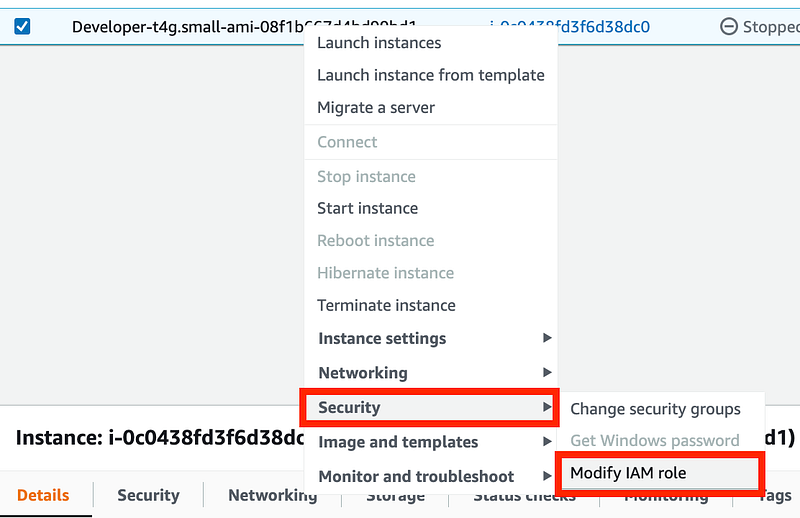
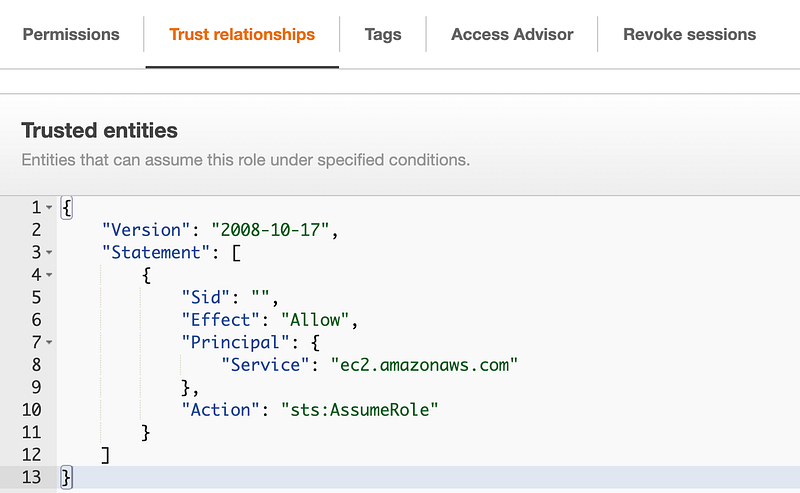
The roles you see on the next screen will be any roles that have a trust policy that allows EC2 to use that role. I explained what trust policies are here:
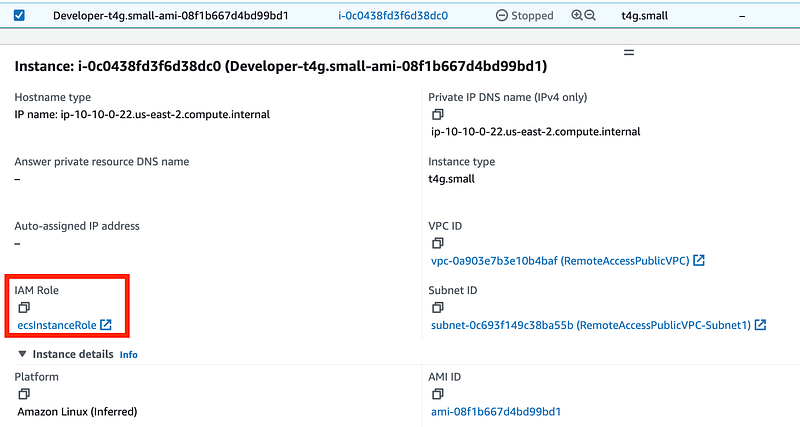
You can see the assigned role on the EC2 dashboard instance details.
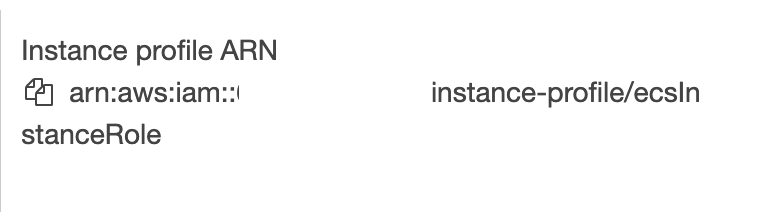
An instance profile gets added to roles you create in the console for EC2 instances automatically by AWS.
Role profiles in CloudFormation

In CloudFormation you need to explicitly define the role profile:

We are going to add an instance profile and a trust policy to the AppDeploy role we created and test it out. When you create a server to deploy applications for you, they generally run with a role. Using a role instead of long term developer credentials is preferred when using automation that is not initiated by humans. In other words, a server is running unattended and taking actions as required to perform some task.

Why use an AWS IAM Role on an EC2 instance instead of developer credentials?

If you use an AWS access key id and secret access key id in that scenario, any attacker who gets the credentials can use them on any other machine for as long as those credentials are valid. Recall that we cannot enforce MFA with long term credentials except for role assumption.

When you use an AWS role, credentials are still present. However, they get rotated frequently. If an attacker steals them, they will be good for a shorter period of time. Additionally, if you use AWS GuardDuty, it will detect when role credentials are used outside your AWS account.

MFA can trump IAM roles

Using IAM roles on EC2 instances is a best practice — however that also assumes you are not enforcing MFA. If you require users to assume a role via MFA to take actions then that is probably as good or better than an IAM role The role assumption will likely have a similar session length (and you can control that to make it longer or shorter) and cannot be initiated without a second factor, unlike a role always available on an EC2 instance.

We’ve looked at scenarios throughout this series where you can and cannot enforce MFA in IAM policies. You’ll need to be careful to understand when MFA is not actually enforced. For example, we looked at weaknesses in policies when using ifexists and the fact that the AWS documentation at the time that blog post was written was possibly be misleading on that point. It may have been updated since.

When you have to use a role

If you have some automation responding to events without human interaction, then you will need to use an IAM role or some other form of non-MFA credentials. Of course, you can require MFA on a prior event that triggers the chain of events that led to the automation. That’s what we are going to try to do in this blog series with batch jobs.

This is not a typical implementation, by the way. It’s pretty much an experiment just because I want to see if I can make it work and consider any downsides to my approach.

Add ec2 to our service role template
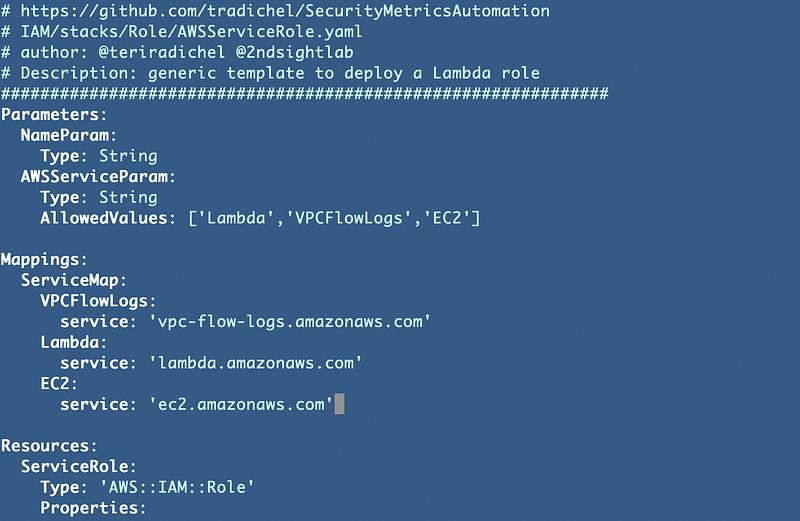
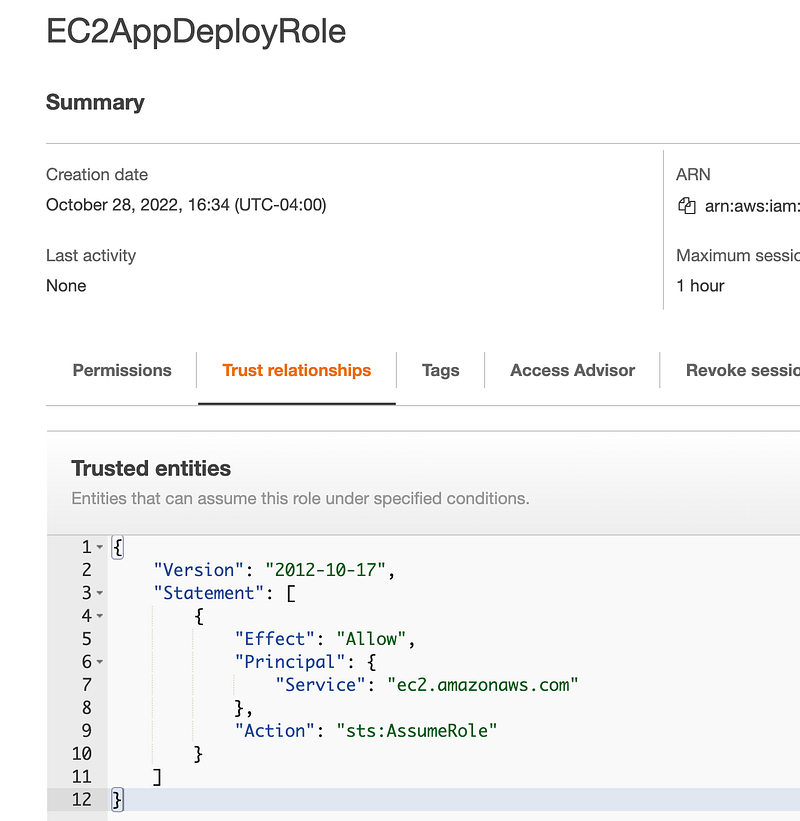
Use the function we created for deploying service roles to deploy a new EC2 role — in this case named EC2AppDeployRole:

That deploys the role and trust policy but no permissions:
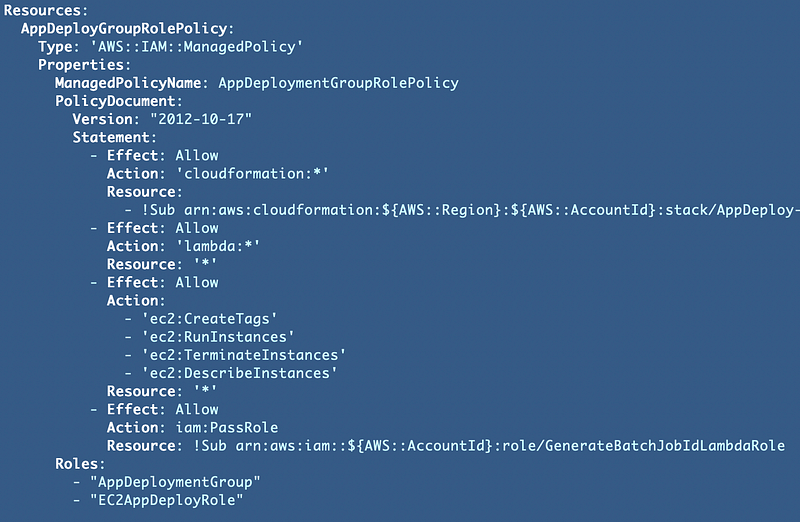
We can use the existing AppDeployment Group Role Policies for this role.

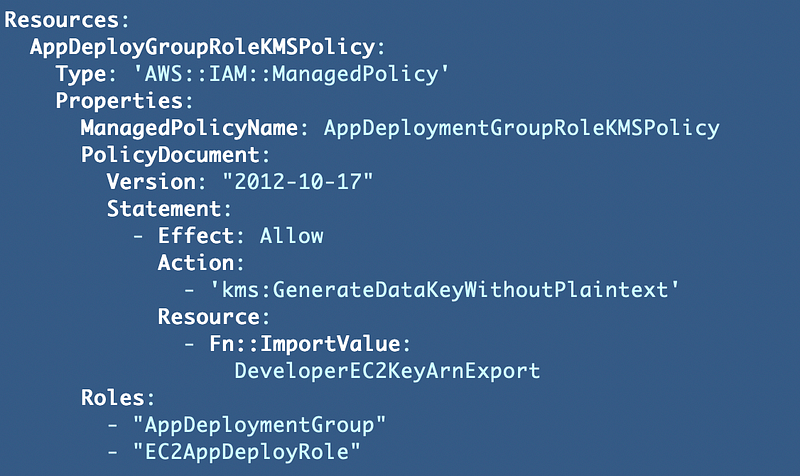
We have two policies applied to the AppDeploymentGroup and we can simply add this role to those policy templates.

AppDeploymentGroupRolePolicy.yaml
AppDeploymentGroupRoleKMSPolicy.yaml
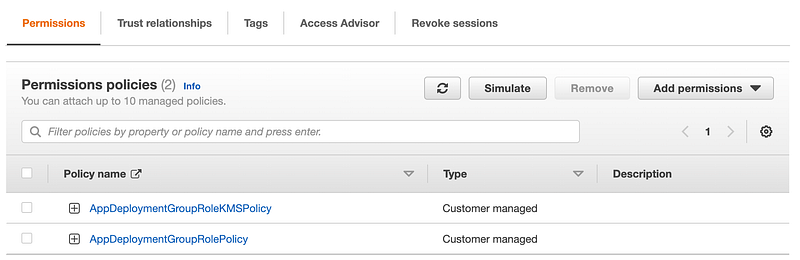
Once deployed you should see two policies associated with the IAM role:
Add an instance profile to our AppDeployment role template

Now we need to add the EC2 instance role profile via a CloudFormation template. Where should we create this role profile? Should it be created by the AppDeployment role or should we have the IAM administrators create it? As always there’s no one right answer but in this POC we are going to let the IAM administrators define which roles can be used with EC2 instances. These role profiles will be defined in the IAM directory and the template will be deployed by IAM administrators.
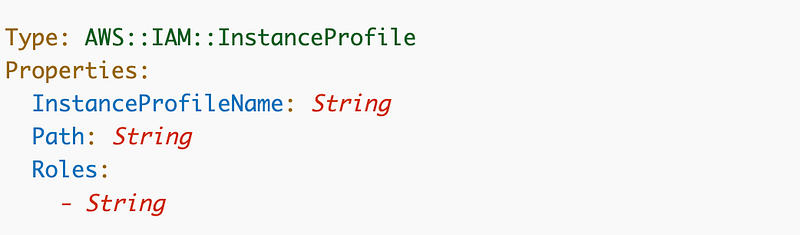
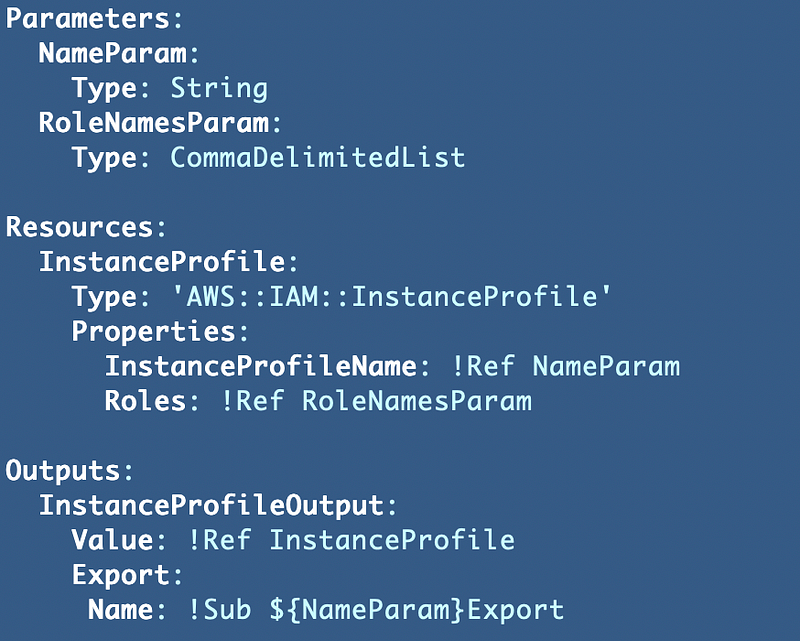
We really only need two properties: The name and the roles. Path is an optional identifier. Here’s our template which we are once again keeping generic so we can reuse it.
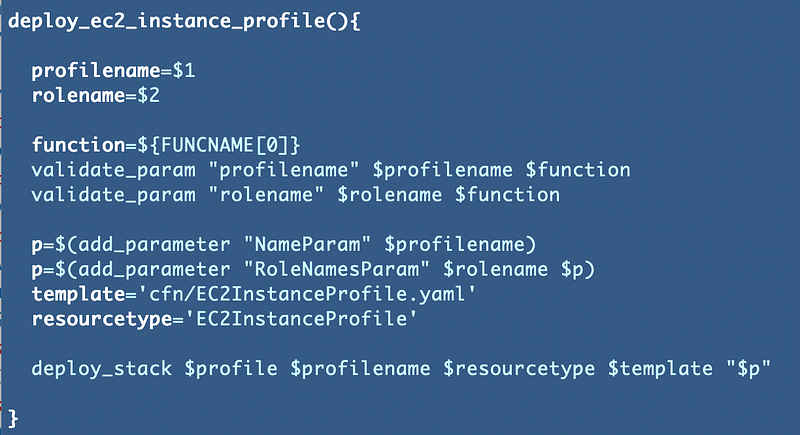
We’ll create a common function to deploy the profile:
Call the function from the deploy.sh script using the role name we just deployed.

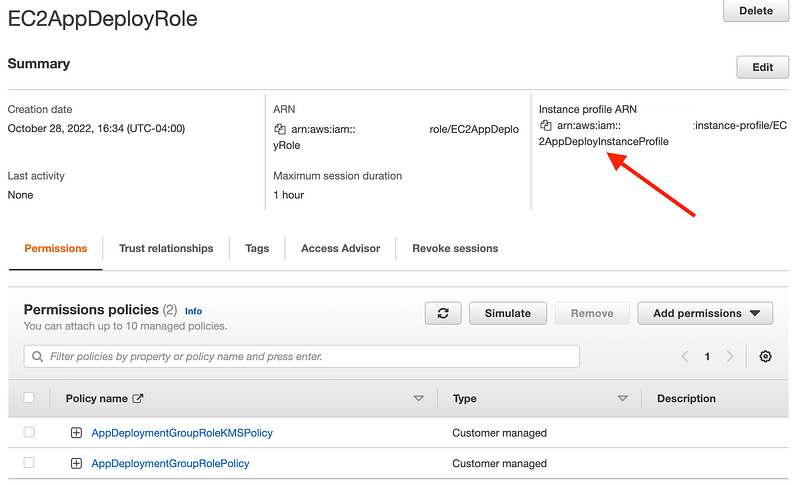
Now you can see that this role has an Instance Profile:
Assign the role to the EC2 instance in the EC2 CloudFormation template

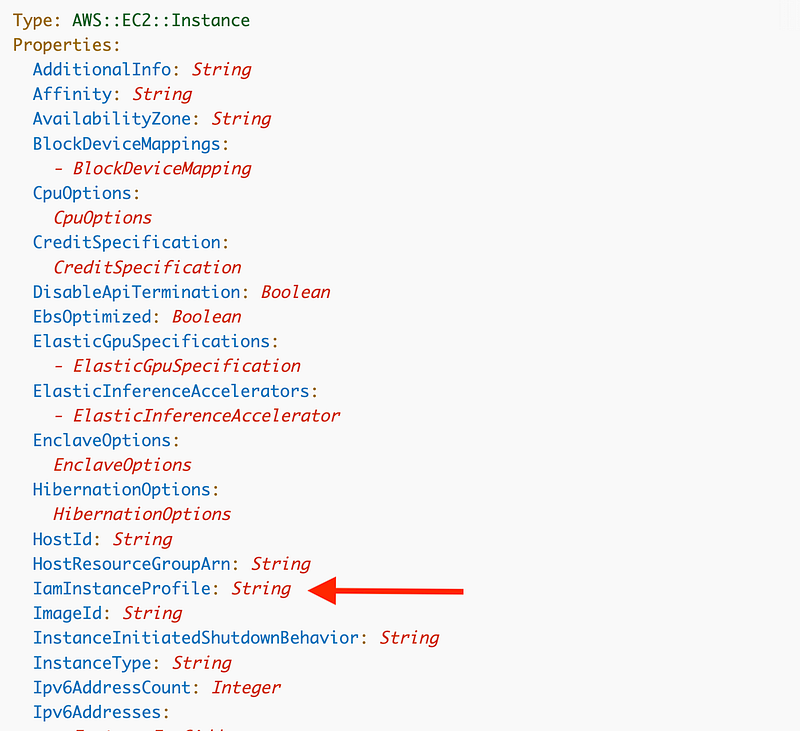
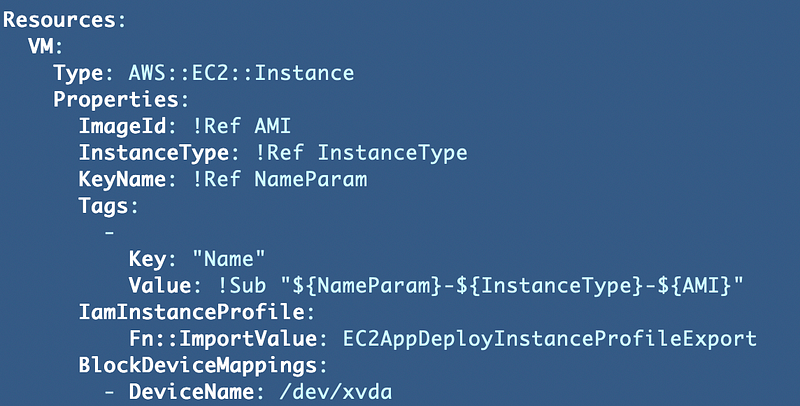
We can assign the role to the instance now using the IAMInstanceProfile property:
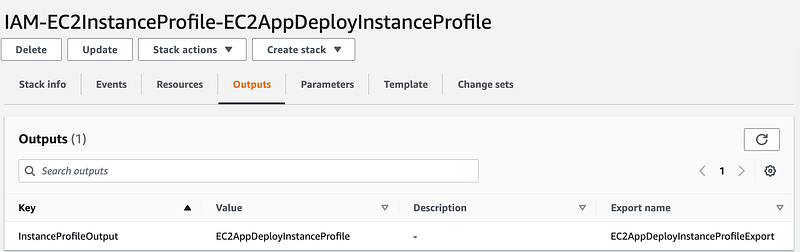
We can use the output export to ensure that only valid CloudFormation exports are used for role profiles:
OK here’s where some funky CloudFormation things happened again. There’s always *something*.

First of all, when adding that line to associate the IAM profile I got the following error in CloudFormation which says this user does not have runInstances permissions:
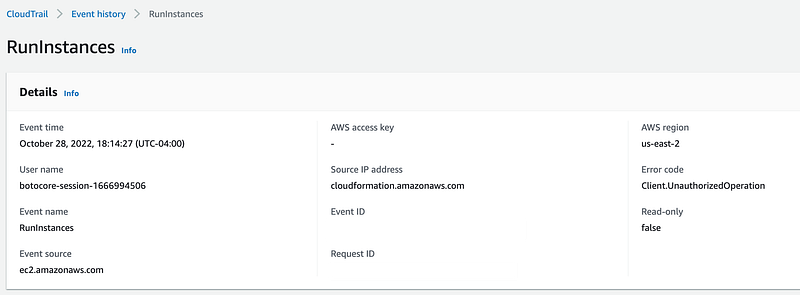

Now, I know this user and group had this permission the last time I deployed this VM and I didn’t change anything. To confirm, I deleted the new line I just added above.

Then I got an error saying a new resource could not be created due to the existing EIP association. Hmm. That could be a problem but I’m ignoring it for now. I deleted the association and deployed again.

Now I get a different error message that is the actual problem:
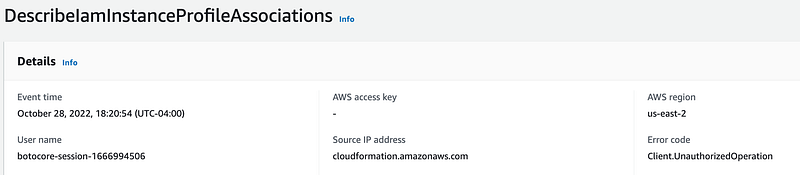
That makes more sense and is appropriate. Seems like a CloudForamtion bug there. In any case, we need to add that permission to our AppDeploy Role Policy. While I’m at it I’m going to allow all Ec2 Instance Profile actions:
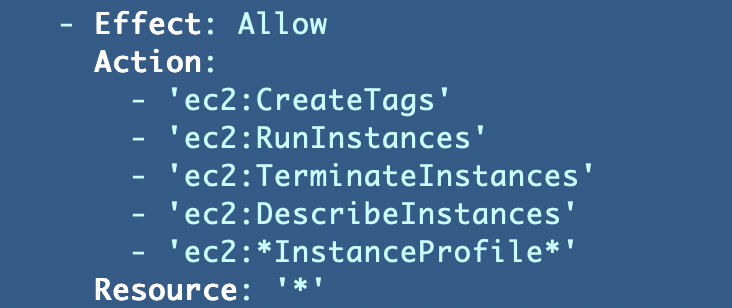
Deploy that policy and then try the VM deployment again.

I got an error about a different action. Initially I thought it was related to the * at the end of the action above but that was not it.

I break down and decode the associated error message using these steps:

As it turns out the reported action that is reported as not allowed in CloudFormation is not the action in the encoded message. It says the action is IAM:PassRole. This seems like another CloudFormation bug.

Our policy has permission for the IAM::PassRole action but only for a specific role:

We need to add our new EC2 Role.

Deploy the policy again. Try the VM deployment again.

Still not correct. We have to use the role ARN in this case, not the Instance Profile ARN. Hint: look at the role IAM:PassRole is trying to use in the error message. Copy and paste to save yourself some hassle.

Deploy the policy again. Try the VM deployment again.

I kept getting errors so I ended up hardcoding all the actions related to instance profiles:

This works:
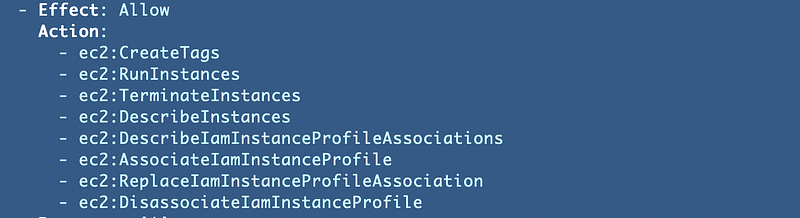
Finally. That took way too long for something that should be simple.

Return to the Network folder and redeploy the EIP association.

Verify the AWS CLI exists or install it on the EC2 instance

Start and log into the Developer VM we just updated.

Follow the steps to download the GitHub repository. If I have time I’ll show you how to create an AMI so you don’t have to do that over and over again. Remember we set up our network to allow access to GitHub in a prior post using a prefix list.

sudo yum install git
git clone [repo]

Run the following command to validate the AWS CLI is installed.

aws --version

run aws configure to define the region in which you want to run your commands. I’m presuming you are familiar with this but if not review the AWS CLI installation and configuration documentation.

Now recall that our deployment role has permission to deploy specific CloudFormation stacks. I added permission to the AppDeploy role for DescribeStacks for any resource “*” to make it easier to test this particular functionality. After doing that the user can run this command:

aws cloudformation describe-stacks

It does not work. Why does not work?

We’ll look at that in the next post. We’re going to troubleshoot our VPC Endpoint and look at required DNS settings for private connections.

Follow for updates.

Teri Radichel | © 2nd Sight Lab 2022

About Teri Radichel:
~~~~~~~~~~~~~~~~~~~~
⭐️ Author: Cybersecurity Books
⭐️ Presentations: Presentations by Teri Radichel
⭐️ Recognition: SANS Award, AWS Security Hero, IANS Faculty
⭐️ Certifications: SANS ~ GSE 240
⭐️ Education: BA Business, Master of Software Engineering, Master of Infosec
⭐️ Company: Penetration Tests, Assessments, Phone Consulting ~ 2nd Sight Lab
Need Help With Cybersecurity, Cloud, or Application Security?
~~~~~~~~~~~~~~~~~~~~~~~~~~~~~~~~~~~~~~~~~~~~~~~~~~~~~~~~~~~~~
🔒 Request a penetration test or security assessment
🔒 Schedule a consulting call
🔒 Cybersecurity Speaker for Presentation
Follow for more stories like this:
~~~~~~~~~~~~~~~~~~~~~~~~~~~~~~~~~~~~~~~~~~~~~~~~~~~~~~~~~~~~~ 
❤️ Sign Up my Medium Email List
❤️ Twitter: @teriradichel
❤️ LinkedIn: https://www.linkedin.com/in/teriradichel
❤️ Mastodon: @teriradichel@infosec.exchange
❤️ Facebook: 2nd Sight Lab
❤️ YouTube: @2ndsightlab

Instanceprofile
Cloudformation
Ec2
Cloudsecurity
Iam
Recommended from ReadMedium