avatarTeri Radichel

Free AI web copilot to create summaries, insights and extended knowledge, download it at here

1775

Abstract

and paste the encoded message here"</span></pre></div><p id="145f">Then run the sts command to decode the value like this:</p><div id="8807"><pre>aws sts decode-authorization-<span class="hljs-keyword">message</span> --encoded-<span class="hljs-keyword">message</span> <span class="hljs-string">"msg"</span> --<span class="hljs-keyword">output</span> text</pre></div><p id="2456">I still find that a bit hard to read so I actually add some additional sed commands at the end to weed out some of the JSON formatting.</p><div id="800c"><pre>aws sts decode-authorization-<span class="hljs-keyword">message</span> --encoded-<span class="hljs-keyword">message</span> <span class="hljs-string">"msg"</span> --<span class="hljs-keyword">output</span> text | sed <span class="hljs-string">'s/,/\n\r/g'</span> | sed <span class="hljs-string">'s/{//g'</span> | sed <span class="hljs-string">'s/}//g'</span> | sed <span class="hljs-string">'s/"//g'</span></pre></div><p id="512b">Then at least it’s a bit more readable:</p><figure id="bbb7"><img src="https://cdn-images-1.readmedium.com/v2/resize:fit:800/1*XID22taA29-0WzpLh5oA9g.png"><figcaption></figcaption></figure><p id="1645">Whether it’s helpful or not — you can decide for yourself :) I’m writing about this particular output in my other blog series:</p><div id="290f" class="link-block"> <a href="https://readmedium.com/automating-cybersecurity-metrics-890dfabb6198"> <div> <div> <h2>Automating Cybersecurity Metrics (ACM)</h2> <div><h3>A series of blog posts on cybersecurity metrics and security automation</h3></div> <div><p>medium.com</p></div> </div> <div> <div style="background-image: url(

Options

https://miro.readmedium.com/v2/resize:fit:320/1*L9lEIsaWt6xm2Op2ww-G5w.png)"></div> </div> </div> </a> </div><p id="619e">Follow for updates.</p><p id="4a3a">Teri Radichel | <i>© <a href="https://2ndsightlab.com/?source=post_page---------------------------">2nd Sight Lab</a> 2022</i></p><div id="8b5f"><pre><span class="hljs-section">About Teri Radichel:

⭐️ Author: Cybersecurity Books
⭐️ Presentations: Presentations by Teri Radichel
⭐️ Recognition: SANS Award, AWS Security Hero, IANS Faculty
⭐️ Certifications: SANS ~ GSE 240
⭐️ Education: BA Business, Master of Software Engineering, Master of Infosec
⭐️ Company: Penetration Tests, Assessments, Phone Consulting ~ 2nd Sight Lab</pre></div><div id="caae"><pre><span class="hljs-section">Need Help With Cybersecurity, Cloud, or Application Security?
~~~~~~~~~~~~~~~~~~~~~~~~~~~~~~~~~~~~~~~~~~~~~~~~~~~~~~~~~~~~~</span>
🔒 Request a penetration test or security assessment
🔒 Schedule a consulting call
🔒 Cybersecurity Speaker for Presentation</pre></div><div id="46f6"><pre>Follow <span class="hljs-keyword">for</span> more stories like <span class="hljs-keyword">this</span>:

❤️ Sign Up my Medium Email List ❤️ Twitter: <span class="hljs-meta">@teriradichel</span> ❤️ LinkedIn: https:<span class="hljs-comment">//www.linkedin.com/in/teriradichel</span> ❤️ Mastodon: <span class="hljs-meta">@teriradichel</span><span class="hljs-meta">@infosec</span>.exchange ❤️ Facebook: 2nd Sight Lab ❤️ YouTube: @2ndsightlab</pre></div><figure id="550c"><img src="https://cdn-images-1.readmedium.com/v2/resize:fit:800/1*4oxP4LXk8l8c3mpRvO7ejg.png"><figcaption></figcaption></figure></article></body>

Decoding AWS Error Messages

~~~~~~~~~~~~~~~~~~~~~~~~~~~~~~~~~~~~~~~~~~~~~~~~~~~~~~~~~

⚙️ Check out my series on Automating Cybersecurity Metrics. The Code.

🔒 Related Stories: AWS Security | Application Security | CloudFormation

💻 Free Content on Jobs in Cybersecurity | ✉️ Sign up for the Email List

~~~~~~~~~~~~~~~~~~~~~~~~~~~~~~~~~~~~~~~~~~~~~~~~~~~~~~~~~
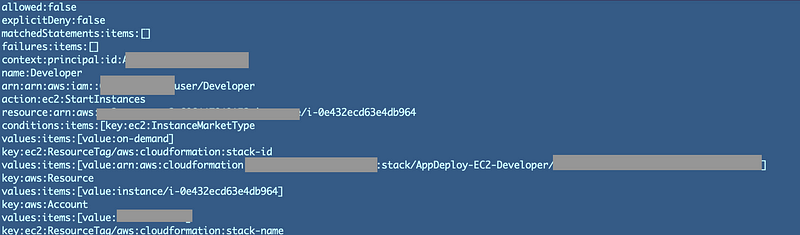
Sometimes you’ll get an encoded error message in the AWS console. That’s because there are ways for attackers to insert code in these messages potentially that could execute in your browser.

Great but how do you view the message? You have to decode it. But you don’t decode it with base64 or some other command line tool, you use the AWS CLI and the sts decode-authorization-message command.

First of all save your message to a variable like this:

msg="copy and paste the encoded message here"

Then run the sts command to decode the value like this:

aws sts decode-authorization-message --encoded-message "$msg" --output text

I still find that a bit hard to read so I actually add some additional sed commands at the end to weed out some of the JSON formatting.

aws sts decode-authorization-message --encoded-message "$msg" --output text | sed 's/,/\n\r/g' | sed 's/{//g' | sed 's/}//g' | sed 's/"//g'

Then at least it’s a bit more readable:
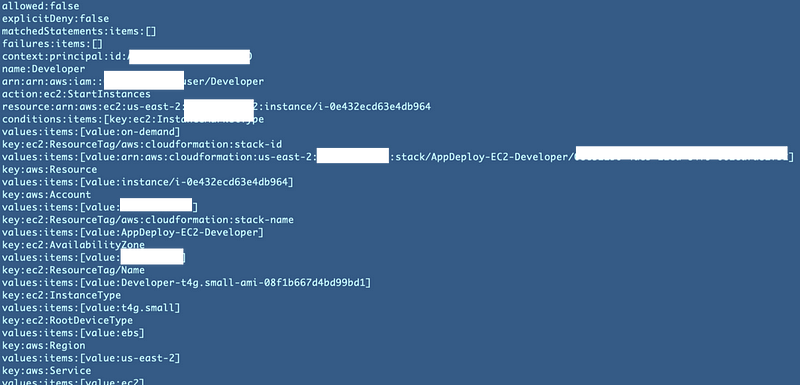
Whether it’s helpful or not — you can decide for yourself :) I’m writing about this particular output in my other blog series:

Follow for updates.

Teri Radichel | © 2nd Sight Lab 2022

About Teri Radichel:
~~~~~~~~~~~~~~~~~~~~
⭐️ Author: Cybersecurity Books
⭐️ Presentations: Presentations by Teri Radichel
⭐️ Recognition: SANS Award, AWS Security Hero, IANS Faculty
⭐️ Certifications: SANS ~ GSE 240
⭐️ Education: BA Business, Master of Software Engineering, Master of Infosec
⭐️ Company: Penetration Tests, Assessments, Phone Consulting ~ 2nd Sight Lab
Need Help With Cybersecurity, Cloud, or Application Security?
~~~~~~~~~~~~~~~~~~~~~~~~~~~~~~~~~~~~~~~~~~~~~~~~~~~~~~~~~~~~~
🔒 Request a penetration test or security assessment
🔒 Schedule a consulting call
🔒 Cybersecurity Speaker for Presentation
Follow for more stories like this:
~~~~~~~~~~~~~~~~~~~~~~~~~~~~~~~~~~~~~~~~~~~~~~~~~~~~~~~~~~~~~ 
❤️ Sign Up my Medium Email List
❤️ Twitter: @teriradichel
❤️ LinkedIn: https://www.linkedin.com/in/teriradichel
❤️ Mastodon: @teriradichel@infosec.exchange
❤️ Facebook: 2nd Sight Lab
❤️ YouTube: @2ndsightlab

Error Message
Decode
Encoded
AWS
Console
Recommended from ReadMedium