
Create Your First Fully Cross-Platform Mobile App With Compose Multiplatform 1/4 — Introduction
Build a cross-platform iOS and Android app using the Jetpack Compose API with a single codebase
While I love developing mobile apps for Android, it always bothered me that I could only build apps for this single ecosystem using the native Android toolset.
To create an additional iOS version of my Android apps while also being able to use the native iOS toolset, I always had to create an entirely separate codebase next to my Android app.
In the past, we used XML for building those Android apps and UIKit for iOS apps. That said, we now have access to modern, declarative toolkits that are becoming increasingly similar. Therefore, the mental and physical switch when working with both of these frameworks became more accessible and straightforward.
Looking at an article by Mohit Sarveiya from 2021, who compared Jetpack Compose with SwiftUI, many concepts back then were already the same besides a slightly different syntax. These similarities to the mental model you need to have when developing applications in general with a declarative UI approach allow us developers to switch almost seemingly between those frameworks.
This is not exclusive to mobile frameworks. The influence of the React framework on Jetpack Compose, for example, is not only a feeling. As Jim Sproch, the inventor of Jetpack Compose, states in one of his tweets, where he responds to a user who mentions those similarities, many influences come from his work on this framework.:
We can make the most of those benefits even if we can spare writing the business logic for both native frameworks and concentrate on writing the UI code alone. With the introduction of Kotlin Multiplatform (KMP) this approach had been available for the first time.
Even though both apps should cover the same business logic, it is often the case that the actual native implementation in both frameworks differs significantly. This circumstance means that different sources of error can quickly occur, inevitably leading to a potentially wide variety of bugs.
With Kotlin Multiplatform, the business logic for the iOS and Android side can be mostly unified with native Kotlin code. From the perspective of a native Android developer, to build an iOS equivalent of your Android app with KMP, you mostly only need to learn how the syntax of SwiftUI differs from Jetpack Compose.
Nevertheless, while Kotlin Multiplatform did the right thing and made it possible to rely on the respective native platform tools, a gap still had to be filled to become a fully cross-platform framework. While it was nice that you could write the UI code with your individual platform frameworks, it was more a requirement than a nice-to-have feature.
Many projects are on a low budget, sparsity of developers, or the stakeholders want to avoid potential bugs through two utterly different UI implementations.
In those cases, a fully cross-platform framework like Flutter would always win the decision compared to Kotlin Multiplatform.
JetBrains noticed this lack (or even had it in mind initially) and addressed it by introducing Compose Multiplatform for desktop and web applications some time ago. This framework allows using the Jetpack Compose API for UI cross-platform development with Kotlin Multiplatform, as the name suggests.
However, while Jetpack Compose slowly became the primary promoted UI toolset for Android, there was a need for supporting cross-platform development for both leading mobile platforms.
Recently, JetBrains announced the alpha version of Compose Multiplatform for iOS, which I will take up in this article and guide you through your first fully cross-platform project with Kotlin Multiplatform.
Below, you can find the table of contents for this article series.
Part 2 of the series will follow tomorrow, the rest will be published in the following days.
- Introduction (you are here)
- Dependency Injection and Database
- Use Cases and view models
- Navigation system and Compose Multiplatform UI code
1 What will we build in this article series
A note-taking app is a classic example of what you build when starting with mobile app development.
Based on that, we will build a simple CRUD (Create-Read-Update-Delete) application but will focus on the “create” and “read” functionality for taking notes.
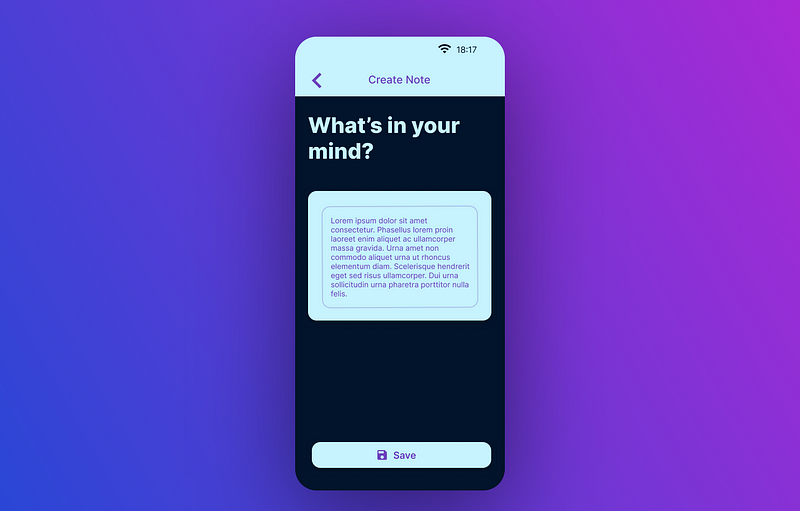
As you can see, see the screen for creating a note. Nothing special, just an input field and a button to save our notes. Additionally, we have a toolbar that will lead us back to the previous screen. This implies that we will need some navigation later on.
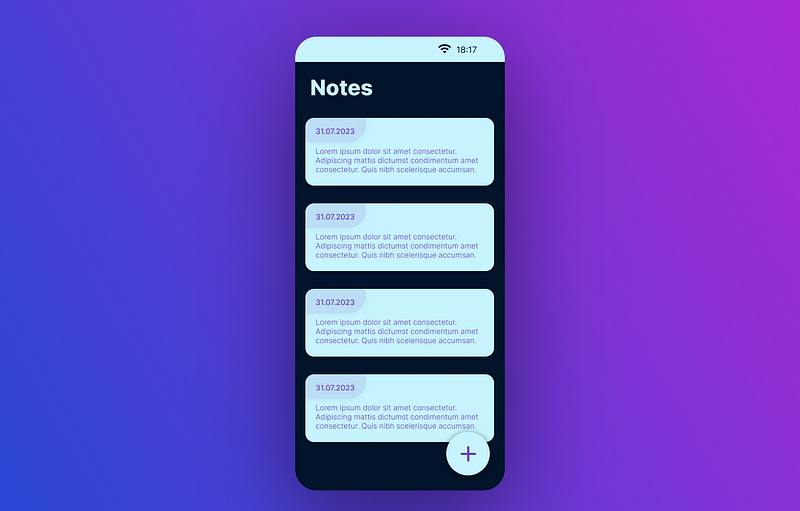
In the second screenshot from Figma, you can see the notes overview. Besides a scrollable list of our notes, you can see a floating action button in the bottom right corner that will lead to our notes creation.
To implement the respective functionality, we will, therefore, go bottom-up and:
- Create a database with SQLDelight for KMP, which allows us to store our notes across app sessions.
- Create use cases for our business logic, saving and reading our notes.
- Creating a simple navigation system and view models at the application layer that manage our UI state and act negotiators to the domain layer.
- Creating the actual screens on the UI layer with Compose Multiplatform.
Because I don’t want to get an article too long, I will separate the process into four further pieces. Each represents one step in the process, while this article you are reading is the starting point.
2 Setup
If you read my article series about Kotlin Multiplatform, you will know how to set up your project and the KMP architecture.
Make sure that your machine fulfills all requirements by installing and running KDoctor. This tool will help you to set up the Kotlin Multiplatform environment for mobile app development (Note that KDoctor can only run from a MacOS device).
That being said, in the further process of this article, we will focus on the Compose Multiplatform part. Assuming you already have experience setting up a basic Kotlin Multiplatform project, we will start with a template project for Android and iOS development from the official Compose Multiplatform GitHub repository.
As the term "template" suggests, a template repository enables you to create a new repository with an identical directory setup and all the files in the original repository.
Creating our project
Start by logging into your GitHub account and opening the Compose Multiplatform iOS Android Template page. Click “Use this template” → “Create a new Repository.”
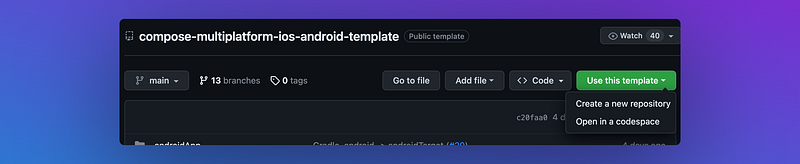
Afterward, you can create a private or public repository based on the template repository. Going this way, we have the advantage that you won’t need to start from tabula rasa and can directly start developing your first Compose Multiplatform app without going through further setup steps and additional Gradle configurations.
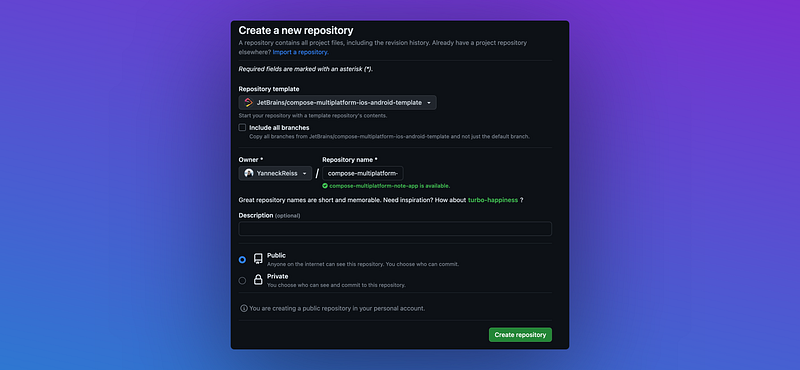
After creating our repository, we can perform an ordinary Git checkout with the Git tool of our choice, like the integrated IDE version control system, GitKraken, or just the command line.
5 Adding our first dependencies
In the template project, some of the dependency versions are set in the gradle.properties file at the root project level so that the same dependency version can be applied easily cross-module. Of course, you can change this to your preferred method of declaring dependencies.
Inside the gradle.properties tweak and update the compose version number and the Android target, and compile the SDK version. Set those values at least to the following to overcome some bugs in a later step of this series:
#Android
..
android.compileSdk=34
android.targetSdk=34

#Versions
..
compose.version=1.5.0-beta02
Next, go into the build.gradle.kts file in the shared folder (shared/commonMain/build.gradle.kts) and add the dependencies, you can see in the code block below, to the commonMain source set:
    sourceSets {
        val commonMain by getting {
            dependencies {
                ..
                implementation("org.jetbrains.kotlinx:kotlinx-datetime:0.4.0")
                implementation("org.jetbrains.kotlinx:kotlinx-collections-immutable:0.3.5")
                implementation("com.rickclephas.kmm:kmm-viewmodel-core:1.0.0-ALPHA-13")
            }
        }
The dependencies added here are responsible for the following:
- KotlinX DateTime: Multiplatform Kotlin library for working with date and time with some similar APIs to the
java.timepackage. - KotlinX Immutable Collections Library: Multiplatform Kotlin library for persistent collections for Kotlin. This is useful when working with lists in Jetpack Compose because the regular
List collections may not be seen as stable. - KMM ViewModel library: What this library is about will be talked about in the third part of this article series. To keep it simple, it’s a view model implementation for Kotlin Multiplatform.
With these dependencies in place, we added support for various time classes, fixed potential stability issues for the Compose Multiplatform code, and the possibility of sharing our view model code across Android and iOS.
4 Conclusion
In this article, we briefly examined the current state of mobile app development for iOS and Android simultaneously and highlighted the similarities among the leading native UI frameworks.
We then discussed the Kotlin Multiplatform framework, its place in the mobile app development world, and how it recently started fulfilling the need for cross-platform-ui support for mobile apps.
With this article having read to this point, I wish you fun on the journey through the further parts of this series to get a first view of Compose Multiplatform as a practical example.
Click here to get to the second part of this article series.
Note, however, when following along, that you will only be able to build and run the iOS app with a MacOS device. You can follow the article series with a Windows or Linux machine, but unfortunately, you can only build for Android.
This is a requirement that has been introduced through Apple.
I hope you had some takeaways. Clap if you liked my article, subscribe to get notified via e-mail, and follow for more!


