
Create pfSense Aliases To Block API Calls And Data Leaks to Unwanted AWS Regions
What are all those STS calls to Australia, Europe, Asia, and South Africa?
~~~~~~~~~~~~~~~~~~~~~~~~~~~~~~~~~~~~~~~~~~~~~~~~~~~~~~~~~
⚙️ Check out my series on Automating Cybersecurity Metrics. The Code.
🔒 Related Stories: Network Security | AWS Security | Cloud Security
💻 Free Content on Jobs in Cybersecurity | ✉️ Sign up for the Email List
~~~~~~~~~~~~~~~~~~~~~~~~~~~~~~~~~~~~~~~~~~~~~~~~~~~~~~~~~
Warning: What I am about to do will break stuff like the global EC2 dashboard. You also will need a firewall that can handle all these rules — so you might not want to apply this on a low end firewall or a firewall processing data for an entire enterprise network. Please don’t without careful testing first if you choose to do that.
But by doing this you can see, for example, what parts of the AWS console are coming from regions outside the regions which you wish to be operating in using the block list below. You can block STS calls to regions you don’t expect to be making STS requests in. You will need to include us-east-1 if you are in the US and probably most of the world no matter what. But you can block parts of the world where you are not expecting to make API calls and don’t want your data leaking to those parts of the world.
You can also see inbound scanners coming from AWS like this:

Little Snitch has this map you can use where you can see where your traffic is being sent all over the world. I was looking at this map and I can see that there’s some traffic going to Hong Kong. What is that? So I double clicked on the HK icon and I can see that traffic was from Google Chrome.
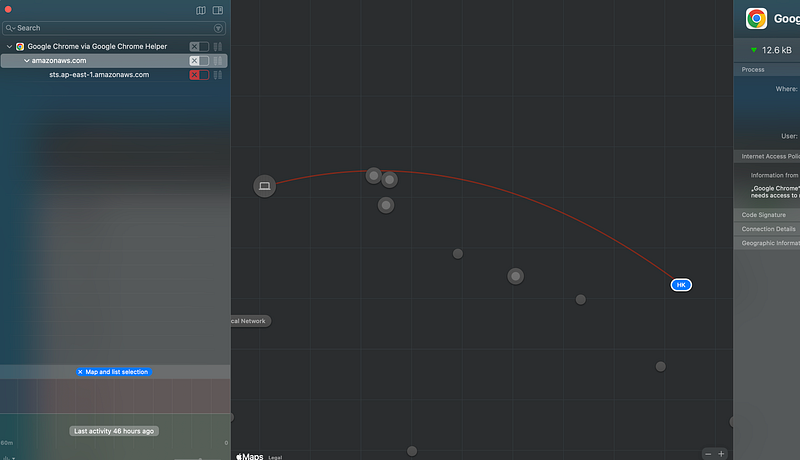
When I look at the details I can see that traffic was a call to the STS endpoint in Hong Kong.
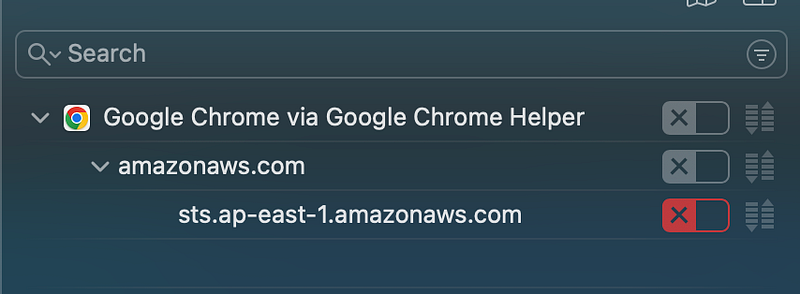
What if you don’t want any STS calls going outside of the US for compliance or other reasons? Well, if you’ve been following along I’ve been using pfSense and regardless of what the AWS Console is doing, you can block those outbound connections using a pfSense Alias with a list of endpoints.
You can also create an alias to block AWS Network ranges you don’t want to be contacting, though that may break some things. In my case I have my work computer segregated from other IOT devices that might need to make those calls. For example, I use a UDM Pro and it might need to reach out to Europe where it’s manufactured for some reason, though I know they mostly use AWS and probably direct US customers to US endpoints. You’ll have to inspect your own traffic to figure out what works and what breaks.
But here’s how you can create the lists to import as pfSense aliases.
sed, cat, cut, curl
I’m going to use cat (to output a file), curl to download the ip list, sed, and cut below to parse some data to create some alias lists to import into pfSense. If you’re not familiar here’s how they work:
Create an Alias for disallowed STS endpoints
Copy the list off this page.
Use the cut and sed commands to create a list of endpoints only including the ones you want. Something like this:
cat aws-sts-endpoints.txt | grep .com | grep -v us- | sed 's|\t|,|g' | cut -d "," -f3 > aws-sts-endpoints.txt Create a pfSense alias for that list.
Add a float rule denying access to those domains, or add the rule to a specific interface. I explain how I set up and use pfSense on a home network in these posts.
> Firewall > Aliases
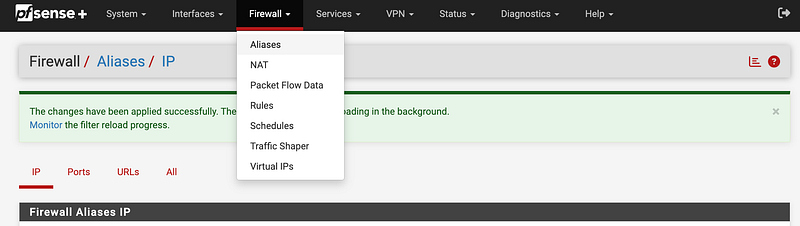
> Click Import

Enter a Name, Description if you like, and paste in the IPs you want to block (or allow).
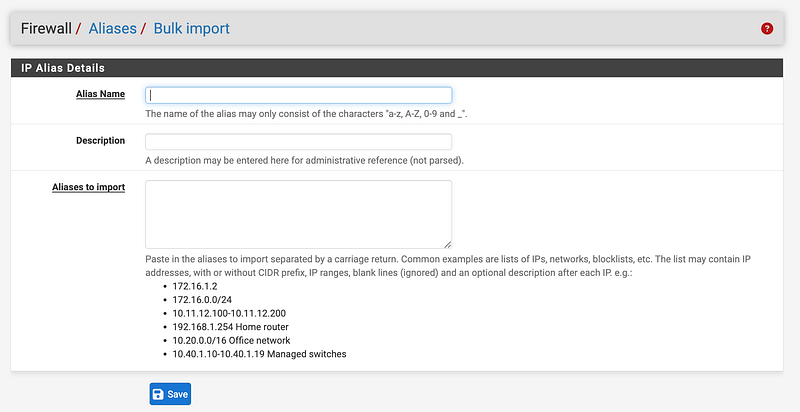
Create an Alias for IP ranges in disallowed regions
Here’s the list of AWS IP ranges.
Get IP file using curl:
curl https://ip-ranges.amazonaws.com/ip-ranges.json > aws-ips.json
Cat a list of non-us regions (change to your liking if you are in some other country) into regions.txt.
cat aws-ips.json | grep region | sort | uniq | sed 's|"||g' | \
  sed 's|region: ||g' | sed 's|,||g' | grep -v us- > regions.txt
Create a file named parse.txt or whatever and add something like this:
#!/bin/bash -e

while read r
do
    cat aws-ips.json | grep "region" -B1 | grep $r -B1 | grep ip \
     | sed 's|"ipv6_prefix":||g' | sed 's|[", ]||g' | \
     sed 's|ip_prefix:||g' | sort | uniq
done < regions.txt
Execute that to get a list of ips. This is a partial list.
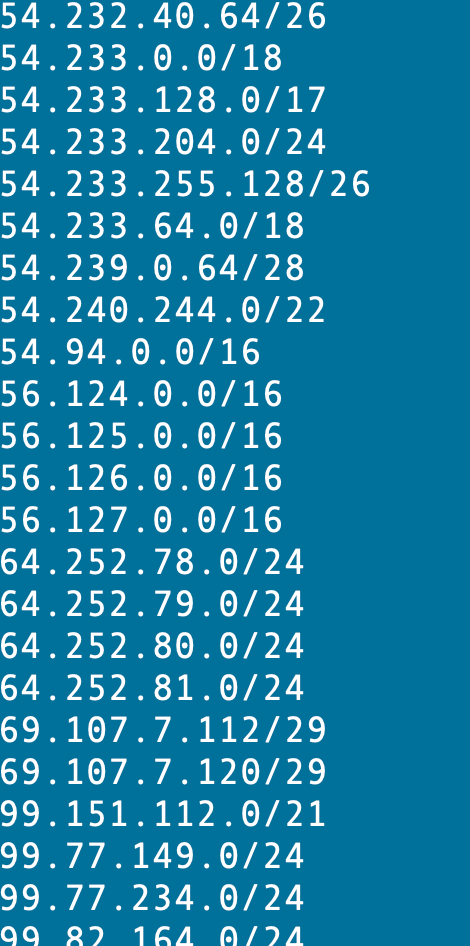
There’s one other thing I can do since I block IPv6 separately. I can take all those out. This seems to work:
./parse.sh | grep -v :: | grep -v 000 | grep -v 2600 | grep -v 2a05 I can add that to my parse script:
#!/bin/bash -e

while read r
do
    cat aws-ips.json | grep "region" -B1 | grep $r -B1 | grep ip \
     | sed 's|"ipv6_prefix":||g' | sed 's|[", ]||g' |  \
     grep -v :: | grep -v 000 | grep -v 2600 | grep -v 2a05 | \
     sed 's|ip_prefix:||g' | sort | uniq
done < regions.txt
Output to file:
./parse.sh > aws-disallowed-region-networks.txtNow you can import that file into an alias in pfSense and create a rule to block access to those IP ranges.
Concatenating IP ranges
There’s one other thing I’d like to add at some point which is to consolidate continuous rules. For example, take these IPs:
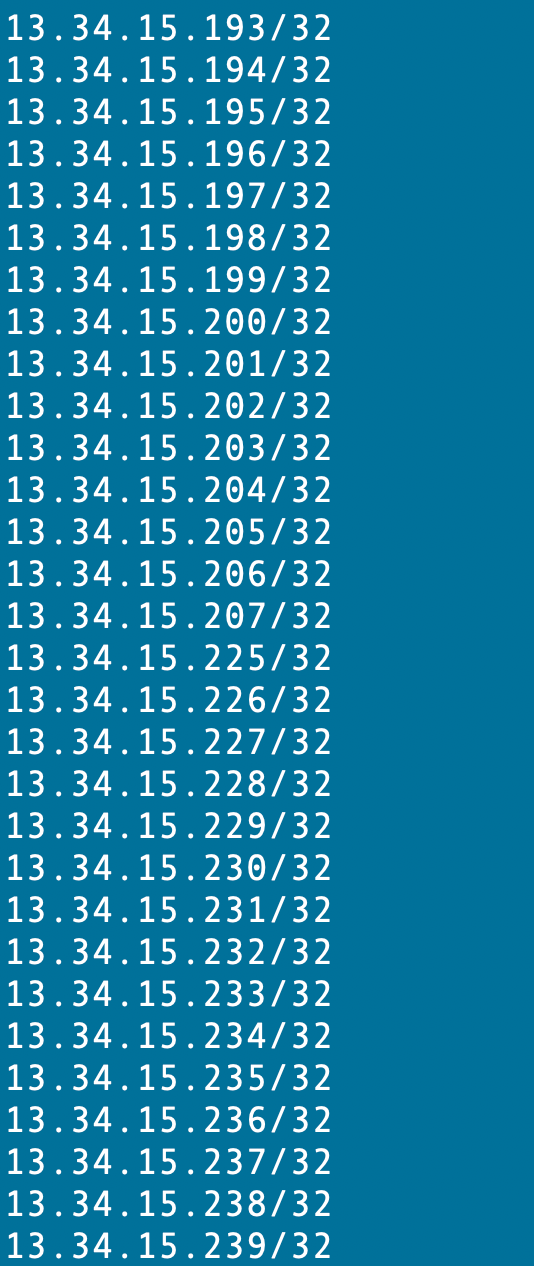
Head up to the ARIN calculator and you can see that we can shorten this list a bit:
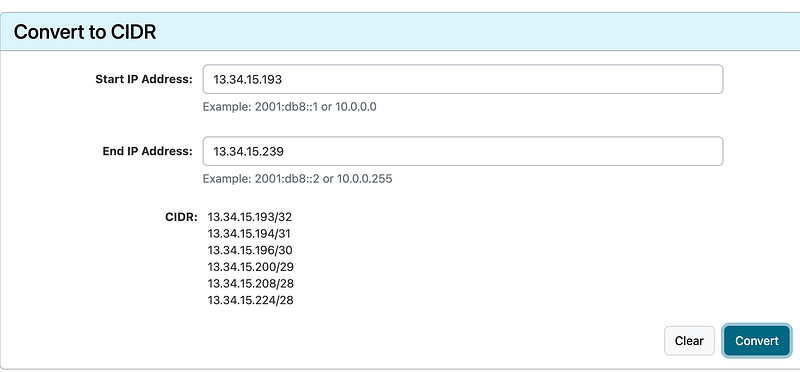
I explained that in this post:
And have a wishlist item out to AWS on that:
But really, looking at this list with the US ranges pulled out I see that there’s only some optimization because the IPs for various regions were not assigned in a contiguous manner. It might help if you wanted to group IP addresses by services but I didn’t check that. It seems like geolocation is more important than services, however, when it comes to security. But I imagine a block of IPs are allocated for a service rather than a region which led to the way things are. Having managed IP ranges in the past — it’s tricky.
Although at first glance I don’t see a lot of optimization we can give it a try. I wrote some code to concatenate ranges at Capital One but didn’t keep anything I wrote for them. I could rewrite it but just to see if it’s worth the time I plugged the list into an online concatenation tool. Who knows if this has bugs it. We could compare by testing various sites that do this and see if they come up with the same list.
Unfortunately the list is too long so I would have to do it in pieces but it seems to work. The 13.0.0.0/8 range IPs went from 1581 to 438. That’s still going to be a lot of rules but much better.
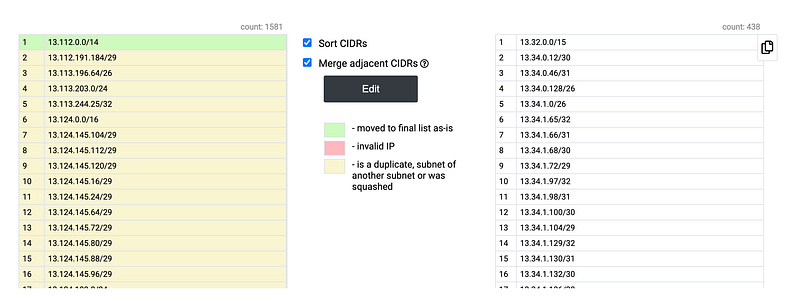
Visit this site at your own risk. I am not necessarily recommending it as it is the first thing that popped up in Google.
What was the final count? I went from 4920 rules to 1141 rules.

Here’s another approach. Here’s a region I know I want to allow:
r='us-east-1'

cat aws-ips.json | grep "region" -B1 | grep $r -B1 | grep ip \
     | sed 's|"ipv6_prefix":||g' | sed 's|[", ]||g' |  \
     grep -v :: | grep -v 000 | grep -v 2600 | grep -v 2a05 | \
     sed 's|ip_prefix:||g' | sort | uniq
Well, that’s still 487 IP addresses. I was thinking that list would be shorter and could immediately pass these IPs but that’s still a lot of IP addresses.
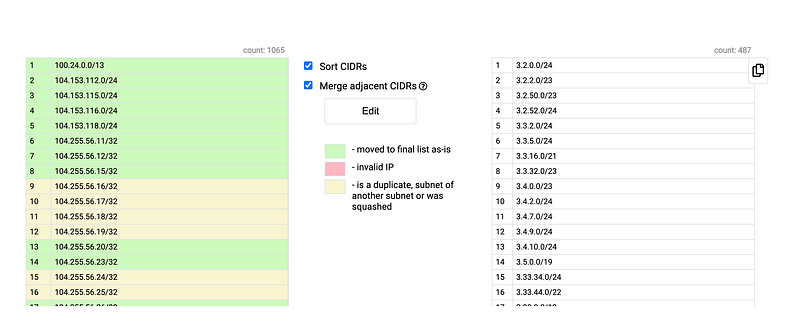
No matter how you slice it, the non-contiguous IP ranges are very hard for firewalls to deal with — and IPv6 is just going to make it worse. Perhaps there are only a few regions you really, really want to disallow and you limit your block list to that. You’ll have to test the impact of these rules on your firewall and decide.
GLOBAL
Oops, I forgot GLOBAL ranges in the list above. That might help shorten our list. Let’s try that again but excluding GLOBAL from the deny list. I can also run both scripts in parse.sh:
#!/bin/bash -e

cat aws-ips.json | grep region | sort | uniq | sed 's|"||g' | \
  sed 's|region: ||g' | sed 's|,||g' | grep -v us- | grep -v 'GLOBAL' \
  > regions.txt

while read r
do
    cat aws-ips.json | grep "region" -B1 | grep $r -B1 | grep ip \
     | sed 's|"ipv6_prefix":||g' | sed 's|[", ]||g' |  \
     grep -v :: | grep -v 000 | grep -v 2600 | grep -v 2a05 | \
     sed 's|ip_prefix:||g' | sort | uniq
done < regions.txt
Unfortunately that made our IP list even less contiguous and the number of rules went up:

Keeping the lists up to date
Of course, things can change. You’ll likely want to automate this process or have a routine for keeping these lists up to date.
Also be aware of the following bug I just found that seems to break the rules.
Always test your rules and make sure your configuration is working as expected.
Results
In my case, most things worked fine but the way the AWS global EC2 page is written doesn’t work. Instead of grabbing and send the results back through an endpoint from the region your in it’s directly calling endpoints all over the world. Wish they would change that. I don’t use that on my home laptop.
I found one feature related to cost on my home page doesn’t work and there are two fields in the user list that take a long time to load.
I haven’t tested that much yet but that’s what I found so far.
Follow for updates.
Teri Radichel | © 2nd Sight Lab 2023
About Teri Radichel:
~~~~~~~~~~~~~~~~~~~~
⭐️ Author: Cybersecurity Books
⭐️ Presentations: Presentations by Teri Radichel
⭐️ Recognition: SANS Award, AWS Security Hero, IANS Faculty
⭐️ Certifications: SANS ~ GSE 240
⭐️ Education: BA Business, Master of Software Engineering, Master of Infosec
⭐️ Company: Penetration Tests, Assessments, Phone Consulting ~ 2nd Sight Lab
Need Help With Cybersecurity, Cloud, or Application Security?
~~~~~~~~~~~~~~~~~~~~~~~~~~~~~~~~~~~~~~~~~~~~~~~~~~~~~~~~~~~~~
🔒 Request a penetration test or security assessment
🔒 Schedule a consulting call
🔒 Cybersecurity Speaker for PresentationFollow for more stories like this:
~~~~~~~~~~~~~~~~~~~~~~~~~~~~~~~~~~~~~~~~~~~~~~~~~~~~~~~~~~~~~
❤️ Sign Up my Medium Email List
❤️ Twitter: @teriradichel
❤️ LinkedIn: https://www.linkedin.com/in/teriradichel
❤️ Mastodon: @teriradichel@infosec.exchange
❤️ Facebook: 2nd Sight Lab
❤️ YouTube: @2ndsightlab


