Consul in Kubernetes — Pushing to Production
Consul cluster in Kubernetes, Making it Production Ready
Introduction
HashiCorp Consul is used as K/V store in my Kubernetes clusters. The system architecture looks like below, as described in my previous articles about Traefik as Ingress Controller and highly available Vault cluster.
As the storage back-end, the performance, stability and availability of Consul is very important to for the Traefik cluster and Vault cluster being highly available.
In this article I describe my recent approaches to make the Consul cluster in Kubernetes as production-ready as possible. I have 3 goals:
- In daily operation, Consul shall be stable without leader loss.
- In Consul cluster rolling update, Consul shall not cause disruption to Traefik and Vault.
- In case of whole cluster reboot, Consul/Traefik/Vault shall not have service interruption.
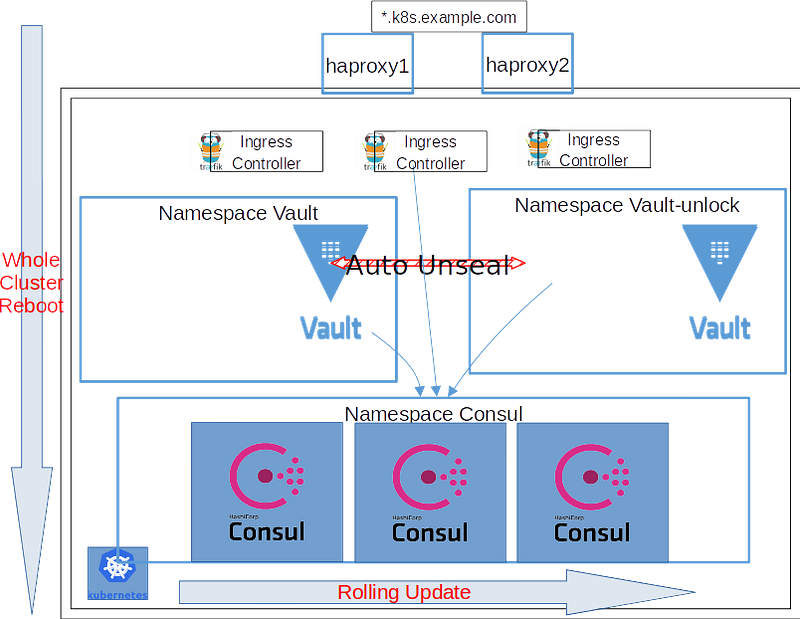
As Consul is so powerful and complex, I will only limit to scenario of single data-center in Kubernetes, used as K/V store. This means I won’t deploy everything about Consul on the cluster, but only the ‘server’ part out of ‘client/server/connect/mesh/catalog’.
Existing Guides
There are already lots of information about Consul.
- Official guide -Run Consul on Kubernetes
The official guide provides very good architecture diagram and introduction. The examples are good start points and far from serious usage.
- Official helm chart (github link)
This is official helm. As it stated it’s very new and not well suited for production with the default values. It’s a heavy chart including everything offered from Consul. Also it uses consul-k8s tool as helper to lift some configuration work. It need lots of tailor and trying the combinations of value settings to suit my usage.
- Bitnami Consul Helm Chart
This helm chart is good example of Consul server cluster. It looks like it does not consider TLS or ACL.
- HashiCorp Consul document and lessons
The instructions are so helpful to understand the factors for production usage. They mostly focus on the practice on host-based deployment.
I basically look for the methods from these lessons and apply them into the my Kubernetes yaml files.
Source Code
github linkIn this article I will discuss below
- ACL
- Performance tuning
- Backup
Without ACL, the data in Consul is wide open to any Pod within the Kubernetes cluster. Performance tuning is must have to avoid leader lost which leads to outage. Backup the whole Consul data with a cronjob makes it easy to have backups ready for disaster recovery.
Steps to improve Consul cluster
As there is already running Consul cluster in my setup, to enable ACL I go through these steps, following this instruction.
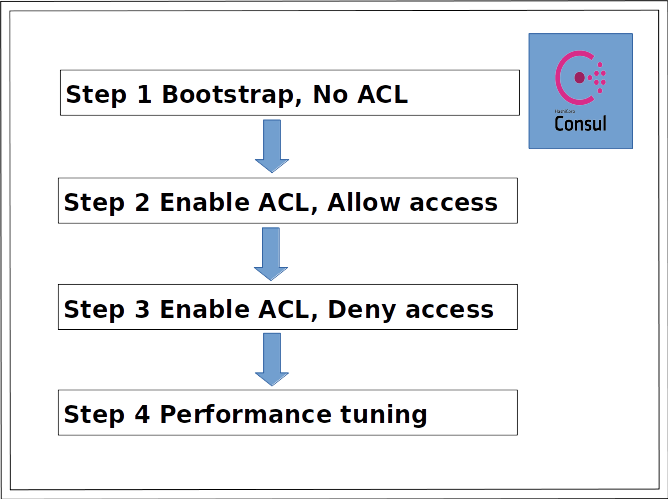
It’s perfectly fine to start from Step 1 without existing Consul cluster. Just follow the README.md in the source code.
- Step 1
Bootstrap Consul.
Move consul configurations into a configmap.
$ kubectl -n consul create configmap consul --from-file=config.json=config/01_no_acl_config.json -o yaml --dry-run | kubectl replace -f -$ kubectl apply -f 01consul_statefulset_noacl.yml- Step 2
Enable ACL in Consul, but set default_policy=allow
Make use of auto-join. Reference
# create serviceaccount to make use of auto-join
$ kubectl apply -f consul_serviceaccount.yml
$ kubectl -n consul create configmap consul --from-file=config.json=config/02_acl_allow_config.json -o yaml --dry-run | kubectl replace -f -$ kubectl apply -f 02consul_statefulset_acl_allow.ymlAfter above steps , ACL system is enabled. I can get a “master token” to use in next step to create other ACL rules. Below the value “SecretID” is the master token.
$ kubectl -n consul port-forward consul-0 8500 &$ consul acl bootstrap
Handling connection for 8500
AccessorID: efaedec9-9d61-486f-b940-f88ed18e97ef
SecretID: f4bb2fec-9432-471a-871f-a1fc9b6efdf0
Description: Bootstrap Token (Global Management)
Local: false
Create Time: 2019-xx-xx xx:xx:xx.691213443 +0000 UTC
Policies:
00000000-0000-0000-0000-000000000001 - global-managementWith the master token, continue to create the ACL rules listed in acl/ folder.
# set master token in ENV to create other ACLs
export CONSUL_HTTP_TOKEN=f4bb2fec-9432-471a-871f-a1fc9b6efdf0
# cd acl/, follow the README there. For example:$ consul acl policy create -name "agent" \
-description "This is an policy for agent to access consul" \
-rules @agent.hcl
Handling connection for 8500
ID: 3c95f837-0e92-1565-90e8-576e6c009873
Name: agent
Description: This is an policy for agent to access consul
Datacenters:
Rules:
# agent-policy.hcl contains the following:
node_prefix "" {
policy = "write"
}
service_prefix "" {
policy = "read"
}agent_prefix "" {
policy = "write"
}$ consul acl role create -name "agent" -policy-name="agent"
Handling connection for 8500
ID: c3eab755-c933-8337-c94f-077e2a252d44
Name: agent
Description:
Policies:
3c95f837-0e92-1565-90e8-576e6c009873 - agent$ consul acl token create -description "agent token" \
-policy-name "agent" \
-role-name "agent"
Handling connection for 8500
AccessorID: 3d9710b3-5658-3c94-27ef-dc818185df27
SecretID: f86b948d-ef1f-4d0b-8e85-5f121ca596a6
Description: agent token
Local: false
Create Time: 2019-xx-xx xx:xx:xx.426335984 +0000 UTC
Policies:
3c95f837-0e92-1565-90e8-576e6c009873 - agent
Roles:
c3eab755-c933-8337-c94f-077e2a252d44 - agentWith all the ACL rules created, collect all the tokens.
The value of a token could be retrieved by command “consul acl token read -id xxxx”
$ consul acl token list
Handling connection for 8500
AccessorID:       3d9710b3-5658-3c94-27ef-dc818185df27
Description:      agent token
Local:            false
Create Time:      2019-12-31 05:07:25.426335984 +0000 UTC
Legacy:           false
Policies:
   3c95f837-0e92-1565-90e8-576e6c009873 - agent
Roles:
c3eab755-c933-8337-c94f-077e2a252d44 - agentAccessorID: efaedec9-9d61-486f-b940-f88ed18e97ef
Description: Bootstrap Token (Global Management)
Local: false
Create Time: 2019-12-30 21:01:43.691213443 +0000 UTC
Legacy: false
Policies:
00000000-0000-0000-0000-000000000001 - global-managementAccessorID: 886e7137-5f6d-659c-6383-461ab1d685b6
Description: vault token
Local: false
Create Time: 2019-12-31 05:20:23.983220139 +0000 UTC
Legacy: false
Policies:
e99fc058-2f58-52a1-32d2-e43719c2e7e7 - vault
Roles:
cb845f44-0565-1af9-6e8f-8ac00ed8038f - vaultAccessorID: 6289d5cb-33a6-caa0-ba9a-523d3697ec73
Description: traefik token
Local: false
Create Time: 2019-12-31 05:19:33.580702699 +0000 UTC
Legacy: false
Policies:
e6714ee1-8c10-5240-0b48-c2360f9ff97e - traefik
Roles:
8d97d4cf-45b0-ae09-deec-5ed7ba9dbb1e - traefikAccessorID: 00000000-0000-0000-0000-000000000002
Description: Anonymous Token
Local: false
Create Time: 2019-12-30 20:38:11.62075125 +0000 UTC
Legacy: false
Policies:
0cb53134-ddfa-ef06-affd-4bbb624e6e2c - anonymousAccessorID: 46f0bb3b-65e5-54d6-cc85-1fc33eefd66b
Description: vault-unlock token
Local: false
Create Time: 2019-12-31 05:20:57.44277676 +0000 UTC
Legacy: false
Policies:
3223d12d-e973-e91e-cdc6-a9e5a4789ce5 - vault-unlock
Roles:
2503c09e-dce1-ce2d-1387-3db55cae09cc - vault-unlock- Step 3
Switch Consul default_policy=deny
Use the generated tokens in Consul/Vault/Traefik Pods.
# use the "agent token" and "management token" created previously
$ ACL_TOKENS_AGENT=<token_vaule f86b948d-ef1f-4d0b-8e85-5f121ca596a6>; kubectl -n consul create secret generic tokens --from-literal="acl.tokens.agent=${ACL_TOKENS_AGENT}"
$ kubectl -n consul create configmap consul --from-file=config.json=config/03_acl_deny_config.json -o yaml --dry-run | kubectl replace -f -$ kubectl apply -f 03consul_statefulset_acl_deny.yml# Modify traefik cluster by giving traefik token
$ kubectl apply -f traefik_kv.yaml# Modify vault and vault-unlock cluster by giving the corresponding token
$ kubectl -n vault create configmap consul --from-file=config/consul.json -o yaml --dry-run | kubectl replace -f -$ kubectl apply -f vault_deployment.yml- Step 4
Performance tuning.
After step 3, the ACL system is in place. There are some problems that I noticed in previous steps and try to resolve them in step 4 by tuning some performance parameters. Refer to below “Problems observed and resolved” section.
Also resource requests are added.
$ kubectl -n consul create configmap consul --from-file=config/config.json -o yaml --dry-run | kubectl replace -f -$ kubectl apply -f consul_statefulset.ymlWith these changes, I believe the Consul cluster is stable.
- In daily operation, there is little to none logs from consul server containers and client containers
- In Consul cluster rolling update, Vault cluster has no outage time. In consul-vault-agent container, there is one “EOF” error for each time the Consul changes leader. There isn’t “no cluster leader” error.
- In case of whole cluster reboot(described in this article), external monitor doesn’t see outage from Traefik Ingress cluster. 1 second of Vault cluster outage is observed for each reboot cycle. Refer to below “Method of monitoring” section.
Automatic backup
Consul already has a powerful“snapshot agent” feature in its Enterprise version to provide automatic backup.
In my cluster, I implemented a basic backup plan with a cronjob to do hourly snapshot and send over to S3 storage via restic.
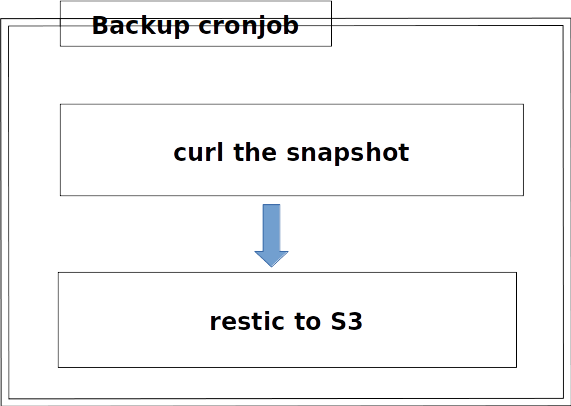
It’s a 2 steps backup. First step is to use curl to retrieve a snapshot file via Consul’s snapshot API. Second step is to use restic to backup the snapshot file to remote. In my case, I use S3 storage. But it’s easy to adapt for any restic supported back end, as listed here.
To backup to S3, restic need 4 secret parameters. Refer to the document for other back ends.
- AWS_ACCESS_KEY_ID
- AWS_SECRET_ACCESS_KEY
- RESTIC_REPOSITORY
- RESTIC_PASSWORD
The backup is done hourly, with policy to keep “the last 24 hourly, 7 daily, 4 weekly, 6 monthly snapshots”. Refer to “consul_backup_cronjob.yml”.
# Create restic secret
AWS_ACCESS_KEY_ID=<aws_access_key> ;AWS_SECRET_ACCESS_KEY=<aws_secret_key>; RESTIC_REPOSITORY=<restic_repository>; RESTIC_PASSWORD=<restic_password>; kubectl -n consul create secret generic restic-secrets --from-literal="AWS_ACCESS_KEY_ID=${AWS_ACCESS_KEY_ID=}" --from-literal="AWS_SECRET_ACCESS_KEY=${AWS_SECRET_ACCESS_KEY=}" --from-literal="RESTIC_REPOSITORY=${RESTIC_REPOSITORY}" --from-literal="RESTIC_PASSWORD=${RESTIC_PASSWORD}"
# Run a test to confirm the backup works
$ kubectl apply -f consul_backup_job.yml# Check the curl container which takes snapshot
$ kubectl -n consul logs -f consul-backup-job-jttwn -c curl
Thu Jan 2 20:18:51 UTC 2020 this is init container curl
Thu Jan 2 20:18:51 UTC 2020 get snapshot now
...
-rw-r--r-- 1 1000 1000 122062 Jan 2 20:18 consul-backup-20-18-51.snap
Thu Jan 2 20:18:53 UTC 2020 get snapshot done# check restic container which send snapshot to s3
$ kubectl -n consul logs -f consul-backup-job-jttwn -c restic
Thu Jan 2 20:18:55 UTC 2020 this is container restic
-rw-r--r-- 1 1000 1000 122062 Jan 2 20:18 consul-backup-20-18-51.snapFatal: unable to open config file: Stat: The specified key does not exist.
Is there a repository at the following location?
s3:https://us-east-1.xxxx.com/<bucket_name>/<cluster_name>/<consul_namespace>
restic repository does not exist
created restic repository 86eb7b993f at s3:https://us-east-1.xxxx.com/<bucket_name>/<cluster_name>/<consul_namespace>Please note that knowledge of your password is required to access
the repository. Losing your password means that your data is
irrecoverably lost. Thu Jan 2 20:19:02 UTC 2020 backup now
Files: 1 new, 0 changed, 0 unmodified
Dirs: 0 new, 0 changed, 0 unmodified
Added to the repo: 119.530 KiBprocessed 1 files, 119.201 KiB in 0:00
snapshot 55016574 savedThu Jan 2 20:19:06 UTC 2020 backup is donenow do prune
Applying Policy: keep the last 24 hourly, 7 daily, 4 weekly, 6 monthly snapshots
keep 1 snapshots:
ID Time Host Tags Reasons Paths
-------------------------------------------------------------------------------------------
55016574 2020-01-02 20:19:02 consul-backup-job-jttwn consul hourly snapshot /data
-------------------------------------------------------------------------------------------
1 snapshotsThu Jan 2 20:19:07 UTC 2020 prune is done# If the test is ok, install the cronjob
$ kubectl apply -f consul_backup_cronjob.ymlFuture improvement: To retrieve all the secrets used in the backup from Vault.
Method of debugging
There is recommended vault from document that raft_multiplier should be 1 for production. But I don’t see explicit values for leave_drain_time and rpc_hold_timeout. Related discussion is in this issue. I eventually chose 10 seconds/7 seconds for my setup. But I think this really depends on the actual environment.
It’s quite time consuming to tune the performance parameters. In the procedure, I modify consul_statefulset.yml very little to trigger a rolling update, normally the vaule “readinessProbe/periodSeconds”
          readinessProbe:
            exec:
            failureThreshold: 2
            initialDelaySeconds: 120
            periodSeconds: 4 <-- modify to 4/5 back and forth
            successThreshold: 2
            timeoutSeconds: 5
Method of monitoring
- Monitor the logs from Consul/Vault while the consul cluster is doing rolling update.
# use a combination of these methods# stern has a limitation that it shows logs from the pods when the command is issued. To renew the pod list, issue the command again.
$ stern -n consul consul# use kubectl logs -f directly
$ kubectl -n consul logs -f consul-2 -c consul
$ kubectl -n consul logs -f consul-1 -c consul
$ kubectl -n consul logs -f consul-0 -c consul$ kubectl -n vault logs -f vault-688f9f9697-qrqgj -c consul-vault-agent# Use kibana/elasticsearch, use query criteria
"kubernetes.namespace_name : consul or kubernetes.namespace_name : vault"Link for tool stern
- Monitor the Vault service from external to check its availability every second with statping. I described my setup in this article.
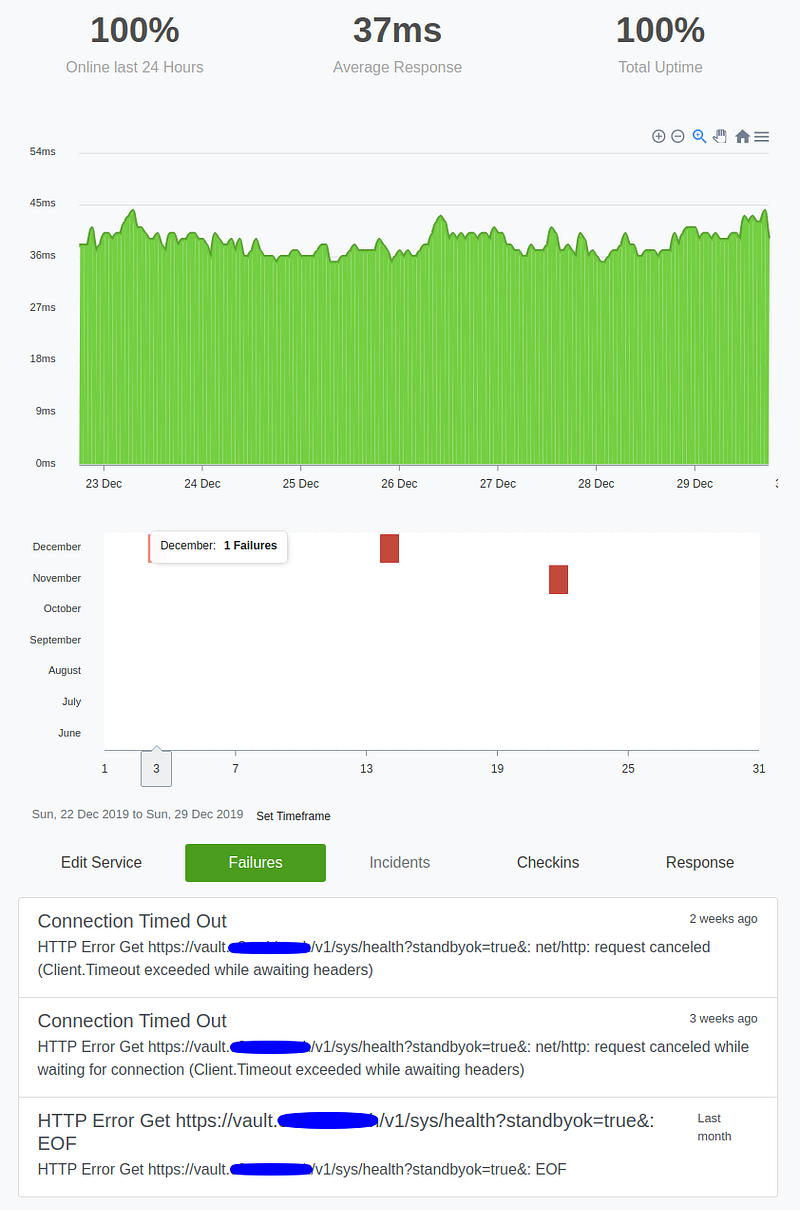
This screenshot shows the Vault service status after I implemented the Consul pushing-for-production changes.
There was exactly 1 second of service outage for each round of whole Kubernetes reboot cycle.
Problems observed and resolved
Consul client side
RPC connection lost from consul client to consul server when the consul leader shuts down. Eventually I believe this EOF error is as expected and causes no harm.
[ERR] consul: "KVS.Get" RPC failed to server 10.0.181.114:8300: rpc error making call: rpc error making call: EOF
[ERR] http: Request GET /v1/kv/vault/core/lock?consistent=&index=3779490, error: rpc error making call: rpc error making call: EOF from=127.0.0.1:56156
Client get “no cluster leader” when Consul is doing rolling update. This could be resolved by tuning performance parameter raft_multiplier=1.
# from traefik
[ERR] http: Request GET /v1/kv/traefik?recurse=&wait=15000ms, error: No cluster leader from=10.0.255.36:52518
[ERR] agent: Coordinate update error: No cluster leader
# from Vault
[ERR] consul: "KVS.Get" RPC failed to server 10.0.3.185:8300: rpc error making call: No cluster leader
[ERR] http: Request GET /v1/kv/vault-unlock/core/upgrade/1, error: rpc error making call: No cluster leader from=127.0.0.1:42226Consul server side
When a new pod is created to replace the old one, there is name conflict. This is because the newly created Pod is reusing the same name as the old one, but with a different IP address. There must be cache mechanism somewhere…
2019/12/27 06:44:45 [ERR] memberlist: Conflicting address for consul-0.dc1. Mine: 10.0.3.124:8302 Theirs: 10.0.0.192:8302
    2019/12/27 06:44:45 [WARN] serf: Name conflict for 'consul-0.dc1' both 10.0.3.124:8302 and 10.0.0.192:8302 are claiming
    2019/12/27 06:44:45 [INFO] serf: EventMemberJoin: consul-0 10.0.0.192
    2019/12/27 06:44:45 [INFO] consul: Adding LAN server consul-0 (Addr: tcp/10.0.0.192:8300) (DC: dc1)
    2019/12/27 06:44:45 [ERR] memberlist: Conflicting address for consul-0.dc1. Mine: 10.0.3.124:8302 Theirs: 10.0.0.192:8302
    2019/12/27 06:44:45 [WARN] serf: Name conflict for 'consul-0.dc1' both 10.0.3.124:8302 and 10.0.0.192:8302 are claiming
By experiments, the error would be gone if we delay the creation of the new pod. So I added a 60 seconds delay.
      containers:
        - name: consul-exporter
          lifecycle:
            preStop:
              exec:
                command: [
                    "sh", "-c",
                    "sleep 60"
                  ]
Some side notes:
How leave_drain_time works?
# how leave_drain_time works
consul-1 consul     2019/12/29 19:34:34 [INFO] consul: server starting leave
...
consul-1 consul     2019/12/29 19:34:42 [INFO] consul: Waiting 7s to drain RPC traffic
...
consul-1 consul     2019/12/29 19:34:50 [INFO] agent: Requesting shutdown
consul-1 consul     2019/12/29 19:34:50 [INFO] consul: shutting down server
References
- Official Helm chart
- Consul document — ACL
- Consul document — Cloud auto join
- Consul document — Agent configuration
- Consul document — Server performance
Thanks for reading.


