Measure and Improve High Availability of Kubernetes Cluster During Reboot
How to reboot Kubernetes Cluster and how highly available it is during the reboot?
My previous article describes the structure of a highly available Kubernetes cluster that I build. There are cases that the cluster need reboot to apply security patches to the host system, or to the Kubernetes components.
So how to safely reboot the cluster? And what’s the impact of the reboot for the services running on the cluster?
In this article I write down my way to do safe reboot for the cluster, and the method to measure the impact of the reboot to the services running on the cluster, e.g. how highly available the cluster is during the reboot. I also try to improve the availability.
Measure the availability
To do the measurement, I start a simple “whoami” service on the cluster with 5 replicas. Use a test Ingress to provide external access.
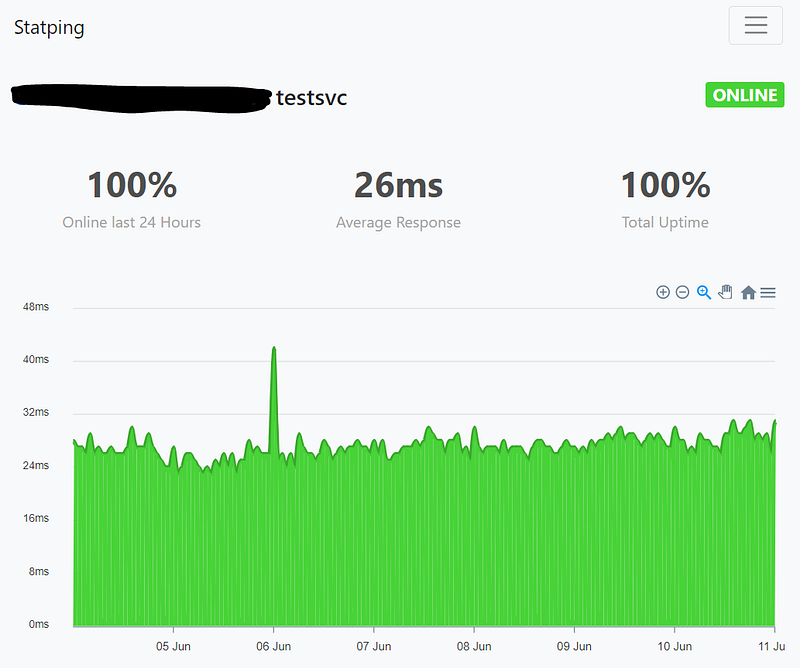
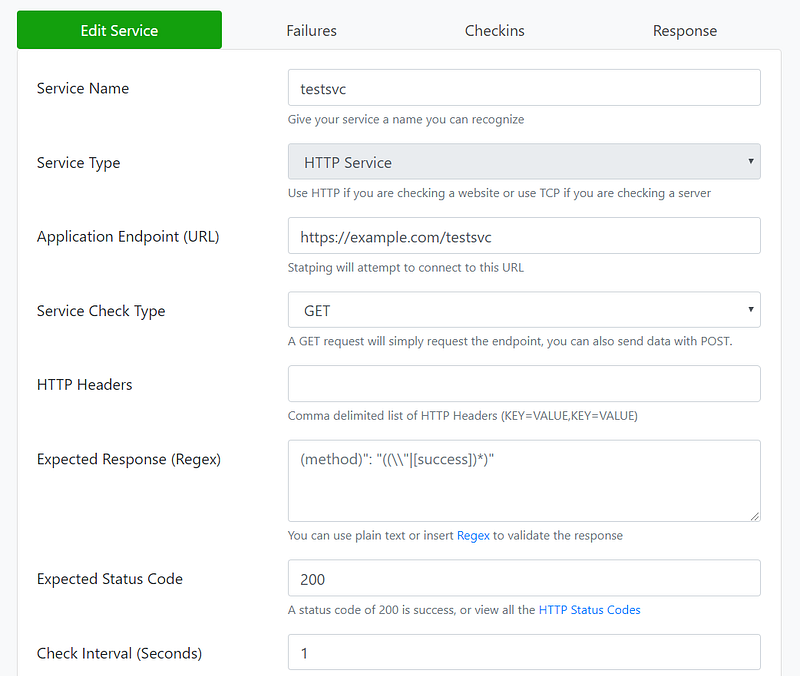
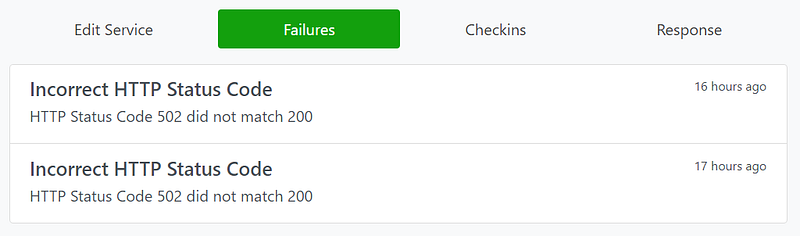
To monitor the service, I start a statping site to access the test service every 1 second and statping will log all instances of failed access. In case you’ve not heard of statping, head to its github page to see quick demo.
My first reboot plan
This Kubernetes document describe how to do maintenance for a single node. I just expand it to the whole clusters.
Reboot Ha-proxy(s) — Reboot masters — Reboot workers
Below is the pseudo code. It’s written with fabric framework.
I run it on a “bastion host” which has full access to all the hosts of the cluster.
# loop through all the hosts in the cluster
for host in hosts:
    # drain the node, set timeout as 120 seconds
    local("timeout 120 kubectl drain %s --ignore-daemonsets --delete-local-data&  wait $!" % (host))
    # reboot the host, timeout 900 seconds
    reboot(wait=900)
    # after reboot, allow 30 seconds for kubelet to start
    local("sleep 30s")
    # uncordon the node
    local("kubectl uncordon %s" % (host))
    # allow 300 seconds for the node to recover
    local("sleep 300s")
For the hosts running haproxy, “kubectl” commands are simply ignored.
In the whole reboot sequences for the 8-hosts highly available cluster, statping recorded 10 failed access.
First improvement — Control haproxy backend
I noticed the 10 failed access somehow match the time when the masters get rebooted. And the masters are the place where I run Ingress Controller which forward the external access traffic to internal service.
At the time of the Ingress Controller being rebooted, the haproxy need a little while to detect that the Ingress Controller is gone. If the traffic is forwarded to the rebooting Ingress Controller, the access could fail.
So if I disable the backend Ingress Controller from haproxy before the reboot, and enable after the reboot, I assume this type of access failure should disappear.
def isIngressController(host):
    # The node running Ingress Controller has a label "node-role.kubernetes.io/ingress-controller="
    result = local("kubectl get node %s --show-labels | grep node-role.kubernetes.io/ingress-controller=" % (host))
# loop through all the hosts in the cluster
for host in hosts:
# Check if this host is Ingress Controller
isIngress = isIngressController(host)
# If it is, disable it from haproxy backend
if isIngress:
disableHaBackend(host) # drain the node, set timeout as 120 seconds
local("timeout 120 kubectl drain %s --ignore-daemonsets --delete-local-data& wait $!" % (host))
# reboot the host, timeout 900 seconds
reboot(wait=900)
# after reboot, allow 30 seconds for kubelet to start
local("sleep 30s")
# uncordon the node
local("kubectl uncordon %s" % (host))
# allow 300 seconds for the node to recover
local("sleep 300s") # Enable the host in haproxy backend
if isIngress:
enableHaBackend(host)After reading how to control haproxy from this article. I have a small helper script to control the remote “haproxy” host from the bastion host.
ha_backends = ['k8s-api', 'k8s-ingress-http', 'k8s-ingress-https']def callHaApi(action):
local("hahelper.sh %s" % (action))def disableHaBackend(host):
for back in ha_backends:
server = back+'/'+host
cmd = 'set server ' + server + ' state maint'
print(cmd)
callHaApi(cmd)
local('sleep 10s')def enableHaBackend(host):
for back in ha_backends:
server = back+'/'+host
cmd = 'set server ' + server + ' state ready'
print(cmd)
callHaApi(cmd)
local('sleep 10s')After this change, I tried to reboot the cluster 3 times, and statping recorded 2, 1, 1 failed access for the reboot process, respectively.
Update: After checking haproxy logs I believe a small change is needed. I should only control haproxy backends for the Ingress Controller, excluding the k8s-api backend.
ha_backends = ['k8s-ingress-http', 'k8s-ingress-https']Second improvement — Make service highly available
After first improvement the failed access reduced but still exist. By matching the logs they happened at the time of draining a worker node, where the service is running.
This serials of articles describe how to properly drain a pod to keep zero downtime for a service. As we are actually testing the high availability of a service running on the Kubernetes cluster, both the infrastructure and the service itself shall be highly available.
Following the articles, I improved testsvc as below. It defined PodDisruptionBudget and preStop liftcycle command for graceful shutdown.
After this improvement, the failed access during cluster reboot is 0.
Third improvement — 2-Steps draining
The testsvc under test is a stateless app without persistent storage. Is there any difference for a stateful app for the cluster reboot scenario?
I’ve observed a problem that sometimes a pod get stuck in “Terminating” state for long time with persistent volume provided by rook-ceph, or the node get stuck for 10 minutes at the end of the reboot until forced closed by the cloud monitor. While I couldn’t dig into the root cause, I guess the problem the volume couldn’t get properly umounted, as the volume is served by rook in the same cluster, which is being drained at the same time.
My solution is to do 2-steps drain. I add label to all the pods that uses persistent volume, for example, “storageClassName: rook-ceph-block” in below “pure demo purpose” statefulset. When reboot a node, first drain the pods with the label, then drain other pods.
# loop through all the hosts in the cluster
for host in hosts:
    # Check if this host is Ingress Controller
    isIngress = isIngressController(host)
    # If it is, disable it from haproxy backend
    if isIngress:
        disableHaBackend(host)
# drain the node, set timeout as 120 seconds
local("timeout 120 kubectl drain %s --ignore-daemonsets --delete-local-data --pod-selector=storageClassName=rook-ceph-block & wait $!" % (host)) local("timeout 120 kubectl drain %s --ignore-daemonsets --delete-local-data& wait $!" % (host))# reboot the host, timeout 900 seconds
reboot(wait=900)
# after reboot, allow 30 seconds for kubelet to start
local("sleep 30s")
# uncordon the node
local("kubectl uncordon %s" % (host))
# allow 300 seconds for the node to recover
local("sleep 300s")# Enable the host in haproxy backend
if isIngress:
enableHaBackend(host)After using this 2-steps drain method, I didn’t observed the “reboot stuck” any more.
Summary
In this article I described my method to monitor a highly available application on Kubernetes cluster and steps to improve its availability while rebooting the cluster for maintenance. I’m sure there could be more improvement room depending on how the application works.


