
Comprehensive Guide to Looker Deployment and Best Practices — Part 3
In Part 1 and Part 2 of our Looker series, we thoroughly examined different aspects of Looker deployment and explored the best practices associated with it.

Now, in the third installment of our Looker series, we will delve into two important topics:
- Leveraging constants in Manifest Files
- Explore Setup — Best practices
Leveraging Constants in Manifest Files
Constants offer a convenient way to recycle pieces of code or logic throughout the project. To illustrate this, let’s consider the following examples:
Example 1: Defining a Dataset
In the example below, we define a constant for the dataset (or schema), which can subsequently be utilized when defining views. This way, should we need to modify the dataset, we only need to adjust it in one place.
# manifest.lkml


constant: BQ_LOOKER_DATASET {
 value: "ENTERPRISE_DATA_WAREHOUSE_BI"
}
The above-mentioned constant can then be used when defining the view as follows
view: sales_view {
  sql_table_name: `@{BQ_LOOKER_DATASET}.sales_view` ;;
  ....

}
Example 2: Defining Custom Formatting
In this instance, we have defined a custom format to present numbers in a more human-friendly manner: in Billions, Millions, and Thousands. Once this format is defined, it can be used in the HTML parameter to establish a standard formatting definition that can be applied across the entire project.
constant: human_readable_number_format {
 value: "
 {% if value >=1000000000 %}
 ${{ value | divided_by: 1000000000 | round: 2 | times: 1 }} B
 {% elsif value >=1000000 %}
 ${{ value | divided_by: 1000000 | round: 2 | times: 1 }} M
 {% elsif value >=1000 %}
 ${{ value | divided_by: 1000 | round: 2 | times: 1 }} K
 {% else %}
 ${{ value | divided_by: 1 | round: 0 | times: 1 }}
 {% endif %}"
}
Once this constant is defined, you can use it in a measure definition as shown:
measure: sum_revenue {
 label: "Revenue $"
 type: sum
 sql: ${TABLE}.revenue ;;
 html: @{human_readable_number_format} ;;
}
Explore Setup — Best practices
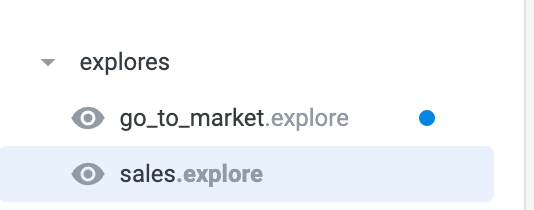
Although it is feasible to create explores within the model file, a best practice is to maintain a dedicated file for each explore. This approach enhances code modularity and minimizes the potential for git conflicts. These individual explore files use the ‘.explore’ extension and can be included in the model file by specifying their file path.
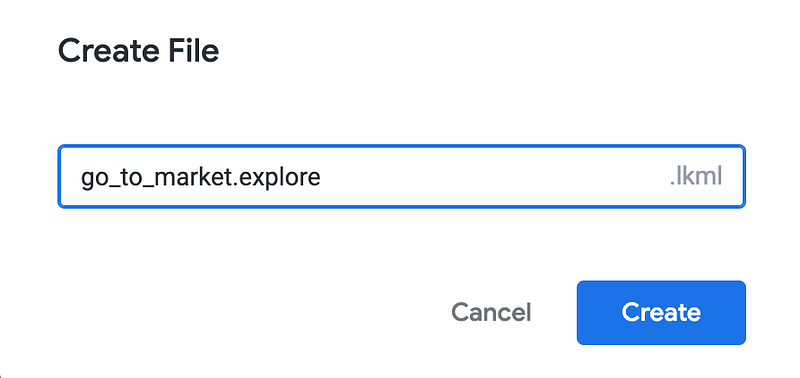
To create explore file use “Generic LookML File” with “.explore” extension
Explore files will look like this
Consider a situation where you need to define a measure or dimension based on fields from multiple views. For example, a Profit measure might be computed as Revenue — Cost, where the Revenue field is derived from a Sales table, while the Cost information comes from a separate Cost table.
In defining the “Profit” measure, these two fields must be combined. But where should you define the “Profit” measure — in the Revenue view? The Cost view?
If you define it in the sales_view, which has the ‘revenue’ field but not ‘cost’ view, it would work, but if you use sales_view in another explore which does not join to cost_view, Looker would raise an error as it cannot recognize the cost field.
To circumvent this issue, it is advisable to define the measure in a separate, dummy view, naming the view the same as the explore name. Here’s how you might execute this:
# sales_explore_view.view

# Note this view does not refer to any actual table ,
# it just has the measure definition

view: sales_explore_view {
 measure: profit_sum {
 label: "Profit $"
 type:sum
# Note here we are referring to the field along with view name
 sql: ${sales_view.revenue} - {cost_view.cost}
 }
}
Once you have established the view file, you can define the explore as follows:
# sales_view.explore


explore: sales_view { # Sales_view is the base view
 label: "Sales Analytics"


 join: cost_view { # Join to cost_view to pull cost information
 sql_on: ${sales_view.product_id} = ${cost_view.product_id}
 relationship: one_to_one
 }


# Join to the dummy view that we create above
 join: sales_explore_view {
 view_label: "Sales"
 sql: ;; # This is a dummy join , give a single space before ";;"
 relationship: one_to_one
 }

}
I hope you found this article valuable. If you have any further questions, suggestions, or just want to connect and continue the conversation, I would be delighted to hear from you on Linkedin


