

Comparing Git Branching Strategies: Git Flow vs. GitHub Flow vs. GitLab Flow
Streamline Your Development Process with the Best Git Branching Models
Thank you for being a part of this journey with me, and I hope to continue providing value to you for years to come! Giving tips by supporting me.
I would be overjoyed if you could support me as a referred member. However, the income I’ve received from my contributions on this platform has not proven sufficient to sustain the frequency of updates I’d hoped for. Facing this reality, I’ve made a difficult decision — to explore new income avenues. However, this isn’t the end; rather, it’s an exciting new beginning. I am thrilled to announce my upcoming Substack newsletter, where I’ll delve into my investing system, harnessing the immense potential of IT technology and embracing a system-thinking approach to investment strategies. Rest assured, I will still be posting when inspiration strikes.
In software R&D, three main branch management models are known:
- Git Flow
- GitHub Flow
- GitLab Flow
Git Flow emerged early in Git’s history, while GitHub Flow and GitLab Flow are supported by major code hosting platforms, advocating frequent, incremental deliveries. Our analysis systematically compares these models, highlighting their strengths, weaknesses, and suitable use cases. These insights aim to benefit the software development community.
GitFlow

In 2010, Vincent Driessen introduced GitFlow as a branching model through his blog post “A successful Git branching model.” GitFlow provided a structured approach to Git-based development, emphasizing organized branches for features, releases, and hotfixes. It became popular for its systematic workflow in Git-based software development (branching and merging), marking a significant milestone in version control practices.
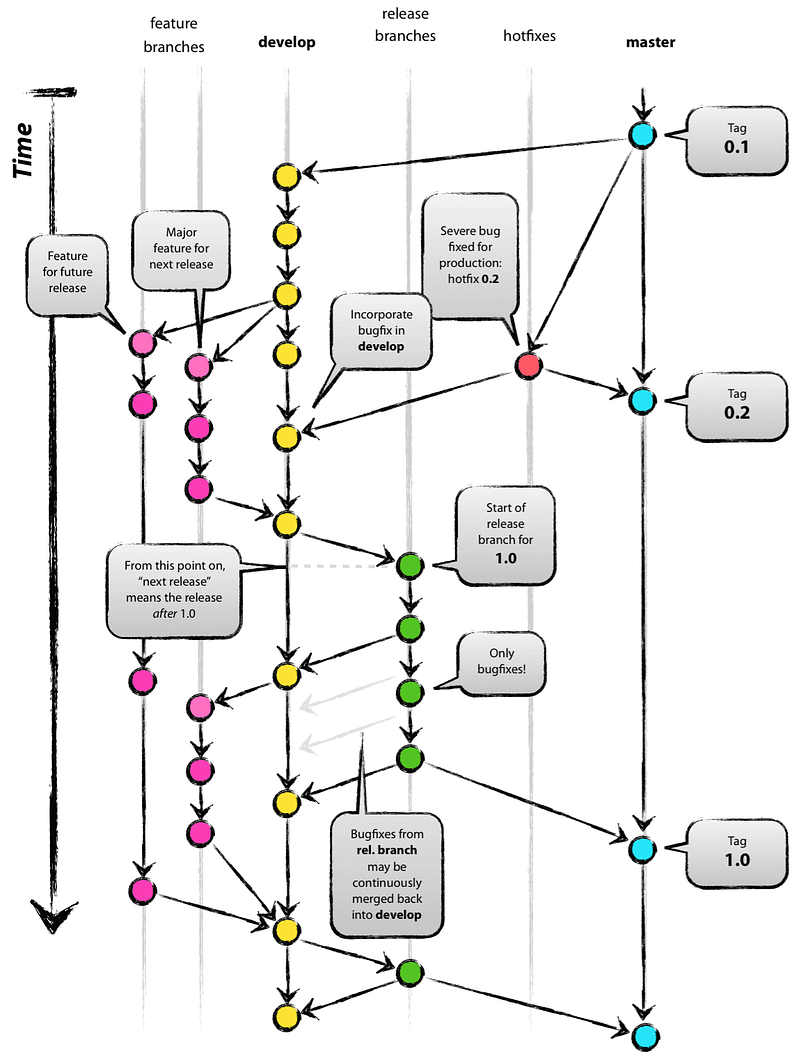
Master branch
- Function — Stores stable version code for production release.
- Life cycle — Permanent.
- Quality requirements — High, undergoes rigorous testing and code review.
Development branch (Develop)
- It is characterized by a decentralized but centralized approach. Each developer interacts with this central repository by pulling and pushing changes.
- Function — Integrates various feature branches.
- Life cycle — Permanent.
Feature branch (Feature/xxx)
- Features — Develop new functionality or features.
- Life cycle — Short-term, created from Develop and merged back into Develop.
Release branch (Release/xxx)
- Function — Prepares for new version releases.
- Life cycle — Short-term, created from Develop and merged into Master.
Hotfix branch (Hotfix/xxx)
- Feature — Addresses urgent issues in production builds.
- Life cycle — Short-term, created from Master, merged to Master and Develop.
Feature Development
- Feature Plan — Create a feature branch from Develop.
- Develop — Code and test on the feature branch.
- Review — Ensure code quality meets standards.
- Merge — Back to Develop via Pull Request or Merge Request.
Feature Release
- Create Release Branch — Create a release branch from Develop.
- Testing and Review — Conduct testing and code review on the release branch.
- Merge into Master — Merge finalized features into the master branch.
- Label with Version — Label the merged commit with a version number.
- Release Software — Deploy the new version from the master branch.
Managing Hotfix
- Create Hotfix Branch — Branch off from the master branch to create a hotfix branch.
- Fix Issues and Test — Address identified issues on the hotfix branch
- Merge into Master and Develop — After validation, merge the hotfix branch into both master and develop branches to integrate fixes into production and development codebases.

Application
- Complex Project Management — Suitable for large teams or projects with regular releases.
- Version Control and Release Management — Ideal for maintaining multiple versions with clear release cycles.
Prerequisites and constraints
- Each production version builds upon the previous one.
- While there may be a parallel period between old and new versions, only functional repairs are made to the old version once the new version is online.
Best Practices
- Ensure the develop branch remains current to facilitate ongoing development activities.
- Develop each project or feature on its dedicated branch to maintain organization and isolation.
- Integrate changes from the develop branch into feature branches frequently to prevent conflicts and maintain consistency.
- Align the timing of merging completed features into the develop branch, and subsequently create release branches and perform version releases.
- Establish methods to track dependencies between feature branches, resolve conflicts collaboratively, and involve senior personnel for complex conflicts or regression testing support.
GitHub Flow

GitHub Flow originated from GitHub’s internal practices, providing a flexible and simple method for rapid iteration in software development. It emphasizes simplicity by utilizing a single permanent master branch for all development. Features, fixes, and improvements are implemented on short-lived feature branches derived from the master branch. Its clear and straightforward approach led to rapid adoption by many open-source projects.
The branching model outlined consists of two main branches:
- Main Branch (Main or Master)
- Function — Hosts stable code ready for release
- Life Cycle — Permanent
- Quality — High-quality standard, undergoes rigorous testing before integration.
2. Support Branches (Feature/ + Descriptive Name)
- Function — Develop new features, and tasks, or fix bugs
- Life Cycle — Temporary (Originating from the main branch and deleted after merging).
- Quality — Testing, code review via Merge requests, and deployment verification for compliance.
The Main Concepts and Features of GitHub Branches
- Main Branch (Main or Master) — Default stable code repository where new features and fixes are developed on separate branches to maintain stability.
- Feature Branches — Develop individual features, fixes, or experiments, with changes merged back via Pull Requests.
- Branch Protection Rules — Administrators set rules to ensure branch stability, quality, and security, such as requiring code reviews or passing tests.
- Pull Requests — Changes from feature branches are merged back into main or target branches via Pull Requests, facilitating discussion, review, and testing.
- Release Branches —Supports creating branches for new version releases, where final testing, bug fixes, and documentation updates occur before merging into the main branch.
- Protected Branches — Designated branches can be marked as “protected” to prevent unauthorized code pushes.
- Collaboration and Permission Control —Offers flexible mechanisms for defining team members’ access, edit, and merge permissions, ensuring secure and maintainable codebases.

- New Feature Planning
- Determine the requirements and create a corresponding feature branch (e.g., feature/new feature).
- Consider establishing branches for future releases during planning.
2. Development and Self-testing
- Work on feature branches, committing code changes continuously.
- Conduct self-tests locally or in a development environment.
3. Create a Pull Request (PR)
- Initiate a merge request to the master branch by creating a PR.
- The PR triggers automated tests (unit, integration).
4. Address Code Review Comments
- Conduct rigorous code reviews post-PR, ensuring thorough discussions.
5. Deployment Verification
- Perform canary or blue-green deployment in a pre-release environment.
- Conduct production data playback testing for real-world conditions.
6. Merge Branches
- After passing all tests and validation, merge the PR into the master branch.
- Trigger deployment to the production environment post-merge.
Advantages
GitHub Flow’s key feature is non-blocking integration, where deployment precedes merging. This ensures all integration effects are known before side effects occur, achieving true continuous integration.
The Applications
- Ideal for frequent updates and quick adaptation to market changes.
- Efficient for smaller teams, ensuring easy adoption.
- Suited for continuous deployment, enabling rapid production changes.
- Supports open-source communities with simple branching and code review emphasis.
GitLab Flow

GitLab Flow leverages GitLab’s platform for collaborative, automated testing, and CI/CD, emphasizing code review and continuous integration. It suits teams of any size and seamlessly integrates with GitLab’s features for scalability and ease of use.
Branching Model
- Main Branch (Main/Master) — Holds the latest stable version, for problem-solving, and undergoes strict code review (MR) and automated testing.
- Feature Branch (feature/descriptive name) — Develop new features. It is temporary, branched from the main, merged back, and deleted post-completion.
- Environment Branches (e.g., staging, test, pre-prod) — Prepares before release, corresponds to release environments, branched from the main, merged back, and deleted afterward.
- Version Branches (e.g., v1.1/v2.0) — Maintains specific versions, branched from the specific main point, serving as a resident branch.
Main Concepts
- Main Branch (Main or Master) — Stores stable code for release and deployment, serving as the source of production code.
- Feature Branches — Develop new features or fix defects, each corresponding to a specific task or function.
- Merge Requests — Requests for merging changes from feature branches into the main branch, enabling code review, testing, and discussion.
- CI/CD — Automated pipeline tests and deploys code changes from merge requests to ensure high-quality delivery.
- Production Deployment — Approved changes are deployed to production after passing testing and review.
- Cyclical Process — Features and fixes are developed in feature branches, merged via merge requests, tested, and deployed, and the cycle repeats.

Feature Delivery Process
- Feature Planning and Requirements Gathering — Based on customer feedback and market analysis, plan Epics, milestones, tasks (Issues), and priorities.
- Feature Development — Develop new features or improvements on a Feature branch. Submit code via Merge Requests (MRs).
- Internal Feedback Loop
- Review Cycle — Conduct automated testing, static scanning, and code reviews on MRs.
- Continuous Review — Establish a review environment, deploy functional code, and test in the review environment.
4. Code Merge — Continuously revise MRs based on feedback. Upon passing review and testing, merge into the main branch and trigger production deployment.
5. Deployment and Monitoring — Deploy to production from the main branch and monitor performance and user feedback.
6. Collect Feedback — Gather user and market feedback for future iterations.

GitLab Flow recommends 11 best practices
- Use feature branches instead of committing directly to the main branch.
- Test all commits, not just those on the main branch.
- Run all tests for each commit, even in parallel if tests take longer.
- Conduct a Code Review before merging into the main branch.
- Automate deployment based on branches or tags.
- Manually set tags instead of relying on automatic CI tagging.
- Post based on tags.
- Never rebase already pushed commits.
- Begin and end development on the main branch.
- Prioritize bug fixes first in the main branch, and then in the release branch.
- Ensure commit messages reflect intent.
Application
- Suitable for CI/CD projects with automated build and deployment integration.
- Ideal for managing multiple deployment environments, particularly in SaaS platforms with post-release grayscale and experimentation periods.
- The merge request review process improves code quality and team communication, beneficial for closely collaborating teams.
- Fits projects needing streamlined branch structures and reduced management overhead while retaining development flexibility.
The Comparison of Branching Strategies
- Branching Strategy
- GitLab Flow combines feature-driven development with feature branching and issue tracking. It maintains a “production” branch solely for production-ready code.
- GitHub Flow emphasizes feature branches, with changes merged directly into the main branch upon completion.
- Git Flow defines specific branches for different purposes, including feature branches, develop branches, release branches, and master branches.
2. Integration Process
- Git Flow and GitLab Flow involve explicit integration steps, such as merging feature branches into specific branches like develop or production.
- GitHub Flow encourages continuous integration and deployment by directly merging feature branches into the main branch once completed.
3. Emphasis on CI/CD
- GitHub Flow prefers CI/CD environments due to its simplicity and direct integration methods.
- GitLab Flow supports CI/CD but offers more flexibility with issue tracking and feature management.
- Git Flow might not be inherently focused on CI/CD, can still be adapted to support such environments. However, it may require additional configuration and management overhead.
Advantages
- GitLab Flow
- Offers a structured method with branches for features, releases, and hotfixes
- Manage multiple versions with clear release cycles
- Support CI/CD with robust testing and automation capabilities
2. GitHub Flow
- Offers a straightforward method with a single permanent master branch, suitable for quick iteration and adaption.
- Ideal for projects with frequent updates
3. Git Flow
- Offers a well-defined branching model with specific branches for different purposes
- Suitable for projects with distinct feature sets.
- Offer clear version control
Disadvantages
- GitLab Flow
- Introduce complexity, especially for smaller projects or teams unfamiliar with the branching model.
- Requires strict adherence to branching and merging procedures
2. GitHub Flow
- Lacks the granularity of branch management compared to other models, potentially leading to issues with larger teams or complex projects.
- Direct merging into the main branch without explicit integration steps may lead to integration conflicts and issues.
3. Git Flow
- Introduce complexity, especially for teams unfamiliar with the Git Flow model.
- Requires strict adherence to the branching model, potentially increasing overhead for smaller projects or teams.
References
If you’ve found any of my articles helpful or useful then please consider throwing a coffee my way to help support my work or give me patronage😊, by using
Last but not least, if you are not a Medium Member yet and plan to become one, I kindly ask you to do so using the following link. I will receive a portion of your membership fee at no additional cost to you.
It is my first affiliate program, if you want to further enhance your system knowledge, you can click the links and buy the course. Honestly speaking, I will receive 20% of your course fees at no additional cost to you. You will have unlimited access to our courses. There is no time expiry and you will have access to all future updates free of cost.


