Enhanced Working Flow From Git Flow, GitHub Flow, and GitLab Flow.
No matter if you’re developing hardware validation tools for different components with multi-threading, or web service considering API, caching, and messaging, a fluent working flow can facilitate your development and troubleshoot.
Requirement Clarification
Following are frequently asked questions. Before designing a suitable working flow for your team, the following questions should be answered by your scenarios.
- How can we fix production issues promptly with less efforts?
- How to align our code in different deployment environments?
- How to reduce overhead to align code for a variety of features in coordinated development?
There is no ONE answer, but in this article, I’ll introduce you to an enhanced model to solve some general bottlenecks, and leverage advantages from Git Flow, GitHub Flow, and GitLab Flow.
Domain Knowledge
In this article, I assume you already know domain knowledge of the three famous working flows. We dive in the comparison of them for further leverage and enhancement.
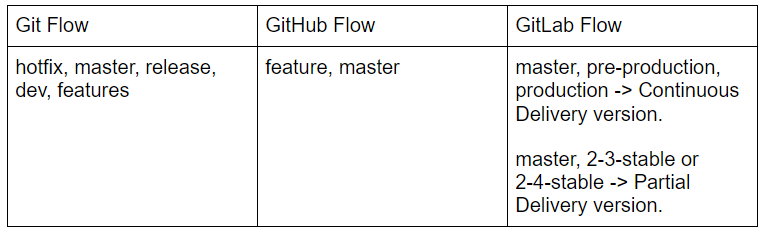
Branch design in three main workflow mechanisms.
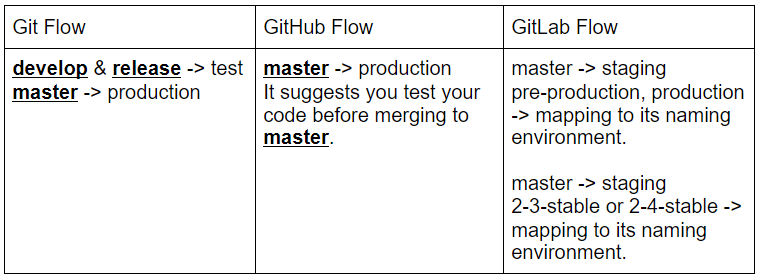
Following is the deployment environment where code comes from.
Disadvantages.
- Git Flow
- Default branch master cannot always be deployed to production.
- Complexity in maintaining branches. Ex. hotfix & release branch needs to merge into both develop & master.
- GitHub Flow
- Everything can be merged to master for enhancing continuous delivery, but code is more unstable thus reducing releasability in master.
- It needs more effort to check if the master can be accurately released to production. Ex. Before your scheduled deployment, there might be someone who just merge code into master.
- GitLab Flow
Continuous Delivery Version
- It’s hard to align production code in master, increasing overhead to track issues. Increased overhead for maintaining different tags in different deployment environments. Ex. spec-v1.0 is in production, but sepc-v5.0 is in pre-production.
- If there is a bug, you need to fix and merge to master(up-stream), and after passing tests, code can be pushed to pre-production, and etc. It causes urgent issues that cannot be pushed to production for urgent fixing. If you chose to package your hotfix, and deploy to production firstly, it causes who needs to deploy a new feature might block by the non-alignment code resulting from your hotfix.
Partial Delivery Version
- Cherry-pick caused issues for hard-tracking commits. It’s also not recommended in git-community.
In this article the enhancement model I propose, I use GitLab for my base version control because there are some enhancement can be fulfilled by its current feature, if you’re using other version control like GitHub, you can still implement the enhancement by scripting.
Continuous Integration
Improve trackability of a feature life cycle & CI enhancement.
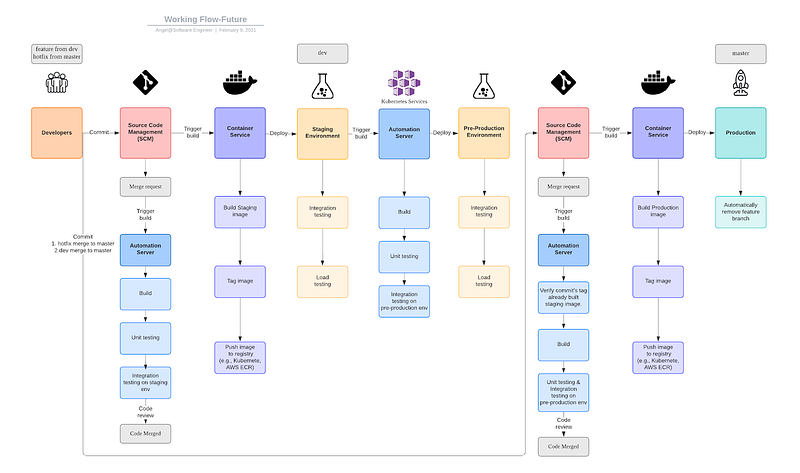
- Add hotfix branch. It can be directly merged to master for fixing production issue. Enhance continuous integration to production by merging small chunks of code for fixing issues, reduce the possibility of fixing conflicts when facing urgent issues.
- Automatically create a merge request to dev to reduce complexity for maintaining branch. For example, developers make mistakes such as merging changes only into master and not into the develop branch.
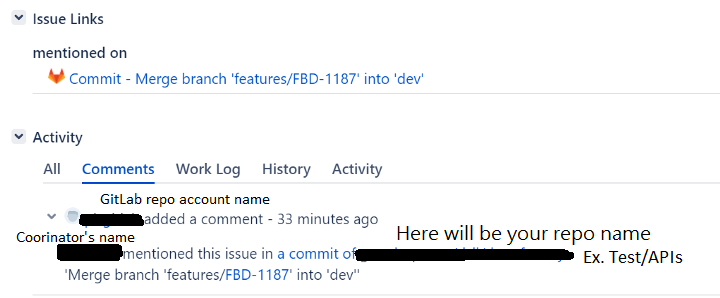
- No release branch. Reduced by GitLab’s feature to connect commits with Jira tickets. Improved trackability and continuous delivery, which means that your default branch master can always be deployed.
- Automatically remove a feature branch after a feature launches to production. Ensures a clean state of feature and hotfix in the life cycle of a project.
Continuous Delivery and Deployment
Use a staging environment and pre-production environment for a more stable testing mechanism.
- Improve testing stability with external users. We have a pre-production environment, data mirrored from production and updated in customized TTL(Time To Live), and a staging environment for data built from developers.
- Reduce overhead to test in the production environment. Avoid negative effects on production by testing new features before launch.
- Isolate testing environment from features before launch and spike state. Ensure integration testing with external teams won’t be interrupted by other testing features still in development.
- Default branch — master can always be deployed to production for its enhanced stability, quality, and hotfix handling, thus enhancing continuous delivery.
Fast Test Automation
Test Precise Coverage
Unit Test — Behavior-driven Development + Test-driven Development
Integration Test — Consumer-Driven Contract Testing
Test Isolation
Adding integration testing automation server.
- Before deploying to a staging or pre-production environment, automating integration testing can help detect if there is any issue by simulating real HTTP API access scenarios.
- Reduce developer’s overhead to fix a known issue that can be detected by integration testing.
- Elevate code stability.
Pre-Test In Merge Request
Adding pre-build and unit testing when submitting a merge request.
- Reduce developer’s code review overhead to fix a known issue that can be detected by unit testing.
- Elevate developer’s support coverage for others’ projects by adding reviewers for a merge request. Avoid only one person knowing how to fix issues for a project.
Branch and Deployment Integration
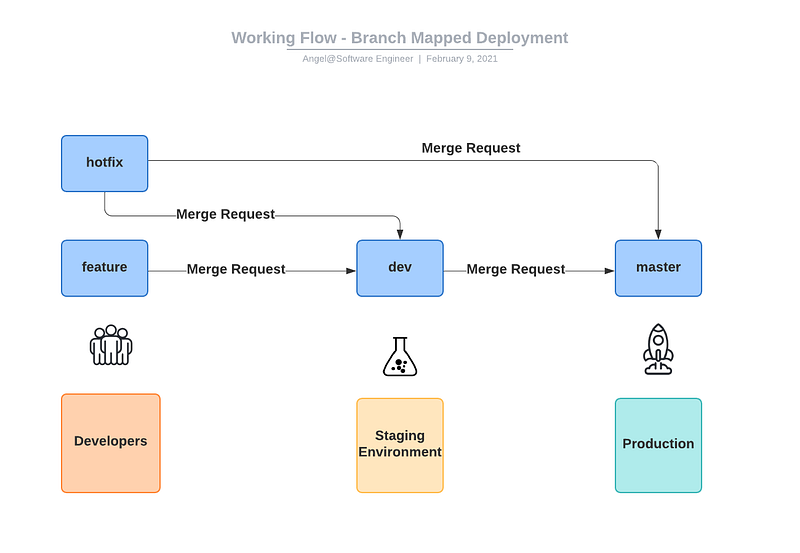
I already talked about why integration is important to working flow. Now we will explore it further.
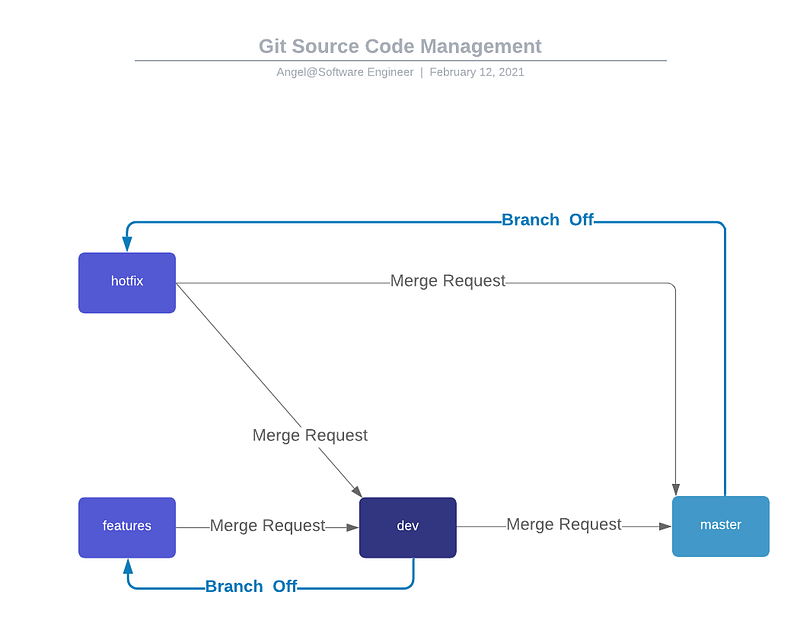
The development branch mapped to the deployment environment is referred from GitLab flow and Git flow. We adopt & make differences as follows.
- Improve trackability of which commit causes the issue.
Adding the hotfix branch as Git flow recommended, but we don’t use the release branch. Since Jira tickets can be connected with GitLab, we don’t need too many branches to track the life cycle of a feature before launching on production.
We use feature branch and design naming in this format
features/<Jira ticket number>to track bugs, for example
features/FBD-1198is same format applied to hotfix branch, for example
hotfix/FBD-1198After this ticket launches to production, CI/CD will automatically remove this feature branch. Ensures a clean state of feature and hotfix in the life cycle of project
2. Improve code consistency and maintainability in different deployment environments.
Adding deployment environment connected with development branches as GitLab flow referred in continuous delivery version.
Our difference is that we use the dev branch for staging and pre-production environments. GitLab flow uses master branch for staging. Alignment for the same tag package in staging and pre-production can reduce overhead maintenance.
Enhancements
- More convenient to track commits with Jira tickets.
- More maintainable because more easily to track issues come from feature or hotfix branch.
- Reduce developer’s overhead to maintain too many branches by automatically deleting a feature branch after deployment to production.
Merge Request Rule
hotfix
- Branch off from master. For hotfix on production.
- Require open a merge pull request for master and dev.
- At least 2 reviewers.
features
- Branch off from dev. For new features development.
- Require open a merge pull request for dev.
- At least 2 reviewers.
dev
- Require open a merge pull request for master. Only do this for production deployment.
- Include at least 3 developers to approve the merge, it’s for notification to inform your team members you’re going to release.
How To Solve Feature-Toggle “Merge Hell”?
As you might know, the well-known tradeoff of Trunk-Based Development & Feature Toggles are as follows.
Advantage are as follows.
Trunk-Based Development
- Easy Continuous Integration implementation because all code developed on a trunk branch.
- master branch in GitHub & GitLab flow, is like a so-called trunk branch.
Feature Toggles
- master branch is always releasable because it must complete several testing before merge.
Disadvantage are as follows.
Trunk-Based Development
trunk is not really releasable for its instability.
Feature Toggles
feature branch might be lost behind the master branch, or lots of conflicts need to be fixed firstly. It might thus cause continuous integration hard to fulfilled.
As we adopt the above flow to enhance continuous integration, there are also solutions to solve multiple versions of features in production.
1. API using v1 and v2 for version control. Response body and request body should consider being version compatible firstly. For example, use
{
'obj1': { 'attr1': on, 'attr2': morning},
'obj2': { 'attr1': off, 'attr2': night}
}
as a request body, you might need lots of versions if obj is increasing. It should be a better design as follows for compatibility.
[
  { 'id':'obj1', 'attr1': on, 'attr2': morning},
  { 'id':'obj2', 'attr1': off, 'attr2': night}
]
2. Slice your feature into several components for a merge request. For example, using DTO, BO, and DAO to clearly slice your feature into different layers. You can submit a merge request for only DAO or DTO firstly to avoid fixing too many conflicts.
3. Use timestamp, or True/False for switch turn-on/turn-off. If your feature is like a webpage, APP, or streaming service, it’s hard to use version control as API does, you can choose this method for last choice.
Conclusion
In short, an organized working flow can boost your efficiency in development and troubleshooting. On the other hand, a poor design will block your time to tracking issues, or spent time on aligning releasable code. I love a quote from Albert Einstein,
Intellectuals solve problems, geniuses prevent them.
I leverage my development experience when I was a software engineer in Hewlett-Packard and Yahoo, compared with 3 main working flow, and propose this new model leveraging the advantages, make more enhancement for bottlenecks I faced, and applying for my current team. Wish this enhancement concepts and model help you design a more efficient working flow for your team.


