
Combining Helm and Kustomize: When, Why, and How?

In our previous article: Helm vs. Kustomize: why, when, and how, we showed what seemed to be a showdown between both tools. This article could be considered a sequel. Here, we are exploring the areas where Helm and Kustomize can be used together in the same project. When can we do that? Why? and How? Please keep reading.
What does each tool do? A quick recap
This part is for those of you who need a quick refresher about when to use each technology on its own.
Helm
Helm is considered the Kubernetes Package Manager. Since Kubernetes applications can become quickly bloated with many manifests (Deployments, StatefulSets, ConfigMaps, Secrets, Services, etc.), there needed to be a way to combine all those manifests together in a single deployable unit. Helm aims at doing just that. It bundles every single manifest that the application needs to be installed on the cluster in a package called a Chart. The manifests in the Chart are not in plain YAML. Instead, they are written as Go templates with placeholders that can be filled dynamically with parameters when the chart is deployed. Those parameters can be brought from a file, typically called values.yaml.
Kustomize
Kustomize is a tool that can modify (customize) Kubernetes manifests by creating patches and overlays. The idea here is that the original Kubernetes manifests are never touched. Instead, they are patched on the fly when Kustomize is run using YAML files that contain the patching instructions. While Helm is a package manager, Kustomize is more of a way to deploy the same Kubernetes manifests to several environments without modifying them.
Both tools are widely used in application deployments. Each has its strong and weak points. If you're interested, this article represents a detailed discussion. For now, let’s consider this interesting use case.
Scenario 01: my Helm chart is not parameterizing this value
The trick here is that when Kustomize is combined with Helm, it is applied to the YAML manifests after Helm processes them and before they are used in the cluster.

We will use the Bitnami Nginx Helm Chart for our testing in this example. The value we will change using Kustomize is the image name. The image name is parameterized in the chart already, and we can change it through the Values file, i.e., we don’t need Kustomize for this. But the idea here is to show you the concept so we can apply it to other charts that might not be that flexible.
To get started, we need to have a directory structure that is similar to the following:
example
├── base
│   └── kustomization.yaml
└── dev
    └── kustomization.yaml
As usual with Kustomize, we have a base directory containing the source files and one or more directories specific to the target environment.
The critical part here is the contents of the base/kustomization.yaml file:
helmCharts:
- name: nginx
  repo: https://charts.bitnami.com/bitnami
  releaseName: myrelease
This is a very minimal version of the file. It uses the helmCharts keyword to instruct Kustomize that we are using a Helm chart as a manifest source instead of supplying some flat files.
You can specify some values that should be passed to the Chart when built through the valuesInline array. You can see a working example on this page: https://github.com/kubernetes-sigs/kustomize/blob/master/examples/chart.md
Another essential thing to notice is that the Chart must be hosted in a repository.
As of this writing, referring to a Helm chart stored locally is impossible.
You need Helm installed on your system before attempting to run this example. Kustomize will use Helm to download and run the chart to generate the necessary manifests.
The second file here is the dev/kustomization.yaml. This is a plain vanilla Kustomization file. You can add patches, overlays, generators, and other mechanisms. In our example, we want to change the image name to something else. The file should look as follows:
apiVersion: kustomize.config.k8s.io/v1beta1
kind: Kustomization
patches:
- patch: |-
    - op: replace
      path: /spec/template/spec/containers/0/image
      value: myregistry/myapp:2.0
  target:
    kind: Deployment
    name: myrelease-nginx
resources:
- ../base
Now, if we run kustomize build --enable-helm in the dev directory, we should see something like the following:
#---- Truncated for brevity--------------
      containers:
      - env:
        - name: BITNAMI_DEBUG
          value: "false"
        - name: NGINX_HTTP_PORT_NUMBER
          value: "8080"
        envFrom: null
#---- Truncated for brevity--------------
Notice how we used the --enable-helm command line argument with Kustomize to activate the helm-template plugin.
If you look at the part we extracted from the output, you’ll see that the image has been successfully changed.
Why should we follow this approach?
If the upstream Helm chart does not parameterize a value that you need, the only option you have is to modify the chart source code. While this method would work, you must check the upstream repository for new chart versions. You must apply changes to the source code each time a new version is released.
The other option is to raise a Pull Request to the upstream repository and get the maintainers to approve and merge it. This is not guaranteed and might take a lot of time.
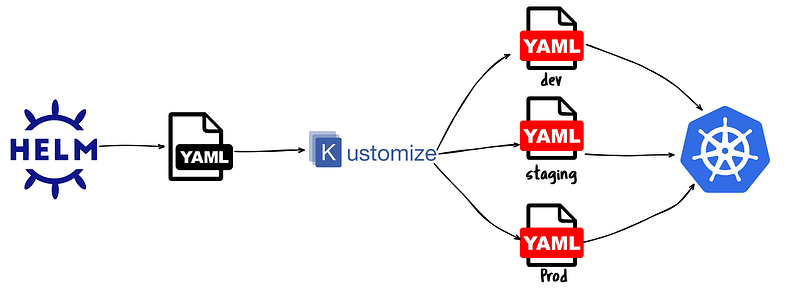
Scenario 02: Deploy to several environments without needing Values
Among the merits of using Kustomize is the ability to deploy the application to several environments/projects at the same time. Combining Helm and Kustomize allows you to deploy the chart to several environments without requiring a values file for each environment.
Scenario 03: Combining several Helm Charts
Commonly, you need more than one Helm Chart to deploy a microservices application. Deploying numerous Helm Charts is not trivial, especially when you need several values for several environments. Tools like Helmfile were created to handle many Helm charts in a declarative way. Additionally, GitOps tools like Argo CD and Flux CD can help you with that since they are declarative. But if you already know Kustomize or your project already uses it, why introduce a new tool to the stack?
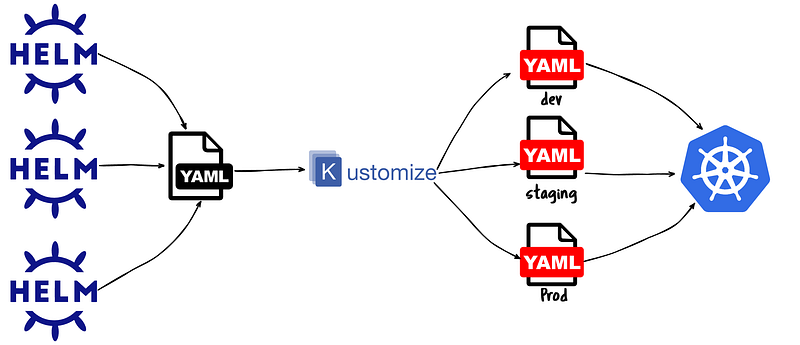
Consider the following modified version of our kustomization file:
helmCharts:
- name: nginx
  repo: https://charts.bitnami.com/bitnami
  releaseName: myrelease
- name: redis
  repo: https://charts.bitnami.com/bitnami
  releaseName: myredis
Here we have added a new Redis Chart to the list. Now, when we run kustomize, it will generate a YAML file that contains the manifests of Nginx and Redis combined. Again, you can use overlays and patches to modify any component in that file.
Scenario 04: Combining Helm Charts and regular manifests
Although this is a relatively rare use case, it might happen. Sometimes, you have an application that is comprised of several Helm Charts, but you also want to augment it with some plain YAML files. Yes, this could be an anti-pattern and has its drawbacks. But should you find yourself in that situation, Kustomize can help.
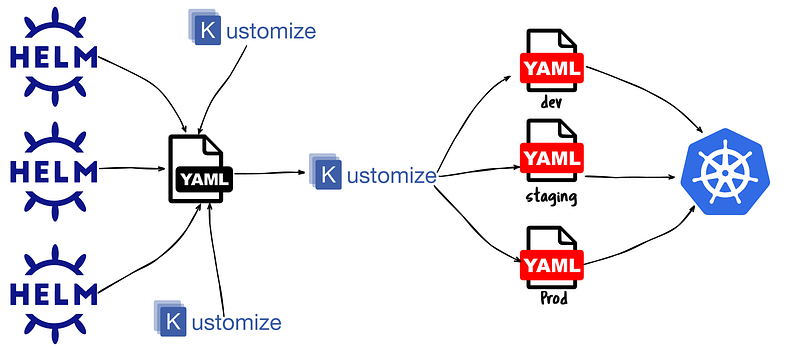
Consider the following modified version of the kustomization.yaml file:
helmCharts:
- name: nginx
  repo: https://charts.bitnami.com/bitnami
  releaseName: myrelease
- name: redis
  repo: https://charts.bitnami.com/bitnami
  releaseName: myredis
resources:
- busybox-deployment.yaml
The added part here is the resources array. You can add whichever YAML files (not Helm templates) you want here. The resulting YAML manifest will contain the output from the Helm charts + the plain manifests. As with the previous scenarios, all Kustomization mechanisms can be applied to that file.
Conclusion
While Helm and Kustomize could appear as rivals competing to win the “best Kubernetes deployment tool” prize, they can work well together.
Kustomize offers the Helm-Template plugin that you can use by adding the --enable-helm when running the Kustomize command.
Several scenarios could use the Helm-Kustomize combination: modifying the generated YAML manifest without touching the Helm source chart, deploying to several environments without requiring several values files, combining several Helm charts declaratively, and combining Helm with plain YAML manifests.
If you’ve enjoyed reading this article, please follow me for more. You may also want to check my Helm, Argo CD, and other valuable video classes at courses.ahmedelfakharany.com.


