
Code Reuse in Angular with Object Composition & Inheritance
Code examples of object composition & inheritance in Angular

Based on my story Inheritance & Object Composition I want to show, how we can use some Angular features for reusing code in really nice ways. I prepared some easy examples below.
Inheritance
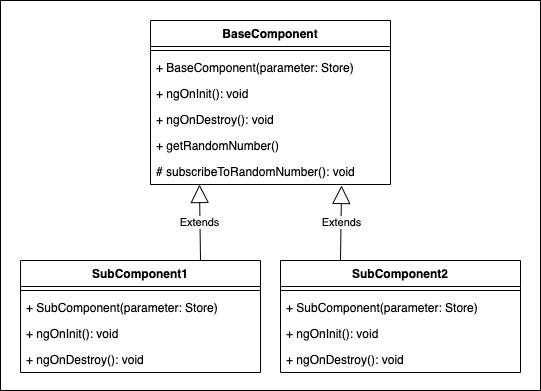
Inheritance is a straightforward principle in Angular. We can combine a base class with a superclass by using the extends term. The superclass inherits fields and methods from the base class.
Subscribing and unsubscribing to an observable in a Redux store is a common repeatable practice. We can DRY, when we separate this logic in a base class.
// base.component.ts

export class BaseComponent implements OnInit, OnDestroy {
  public  randomNumber: number;
  private selectNumber$: Observable<number>;
  private subNumber: Subscription;

  private destroyer$: Subject<void>;

  constructor(protected store: Store<State>) {
    this.destroyer$ = new Subject<void>();
  }

  ngOnInit(): void {
    this.subscribeToRandomNumber();
  }

  ngOnDestroy(): void {
    this.unsubscribeNumber();
  }

  public getRandomNumber() {
    this.store.dispatch(GetRandomNumber());
  }

  protected subscribeToRandomNumber(): void {
    this.selectNumber$ = this.store.select(selectRandomNumber);
    this.subNumber = this.selectNumber$
      .pipe(takeUntil(this.destroyer$))
      .subscribe((next: number) => {
        this.randomNumber = next;
      });
  }

  /*
  @deprecated, because of this.destroyer$
   */
  protected unsubscribeNumber(): void {
    if (this.subNumber) {
      this.subNumber.unsubscribe();
    }
  }
}
Subclasses, which want to use declared stored properties, too, can use the base class subscription for consumption.
// sub.component.ts

export class SubComponent extends BaseComponent implements OnInit, OnDestroy {

  constructor(protected store: Store<State>) {
    super(store);
  }

  ngOnInit(): void {
    super.ngOnInit();
  }

  ngOnDestroy() {
    super.ngOnDestroy();
  }
}
<!-- sub.component.html -->
<div>
Random number: {{randomNumber}}
<button (click)="getRandomNumber()">Get random number</button>
</div>As we can see, the base class can now be reused by subclasses that need to consume the random number of the Redux store. We can extend this example by adding more properties to the appState and creating some base classes to subscribe to. We don’t need to change the old ones because of the encapsulation of the components.
Composition with services
In his article Dependency Inversion Netanel Basal wrote about service reuse with object composition in Angular.
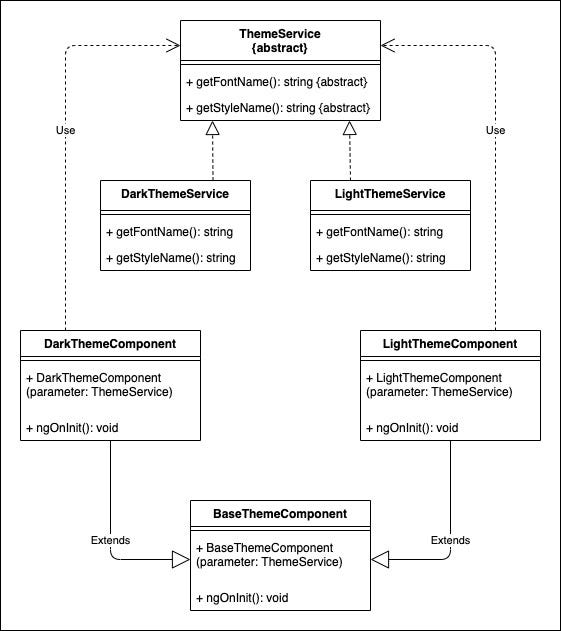
We can combine an abstract service implementation with a concrete service class by using the providers tag in the configuration metadata section where we declare our component. After that, we need to use the abstract class for the service injection in the constructor. Now there is a decoupled composition with services.
Example for configuration metadata:
@Component({
  selector: 'app-dark-theme',
  templateUrl: './dark-theme.component.html',
  styleUrls: ['./dark-theme.component.scss'],
  providers: [{
    provide: AbstractThemeService,
    useClass: DarkThemeService
  }]
})
Firstly, we need an abstract class of a service.
export abstract class AbstractThemeService {
  abstract getFontName(): string;
  abstract getStyleName(): string;
}
Secondly, concrete classes (services) need to implement the abstract class.
@Injectable()
export class LightThemeService implements AbstractThemeService {

  getFontName(): string {
    return 'Comic Sans MS';
  }

  getStyleName(): string {
    return 'light';
  }
}
@Injectable()
export class DarkThemeService implements AbstractThemeService {

  getFontName(): string {
    return 'Arial';
  }

  getStyleName(): string {
    return 'dark';
  }
}
Lastly, we can reuse the code using Dependency Inversion and Angular’s provider tag in components.
@Component({
  selector: 'app-light-theme',
  templateUrl: './light-theme.component.html',
  styleUrls: ['./light-theme.component.scss'],
  providers: [{
    provide: AbstractThemeService,
    useClass: LightThemeService
  }]
})
export class LightThemeComponent implements OnInit {

  public font: string;
  public style: string;

  constructor(private themeService: AbstractThemeService) { }

  ngOnInit(): void {
    this.font = this.themeService.getFontName(); // 'Comic Sans MS'
    this.style = this.themeService.getStyleName(); // 'light'
  }
}
@Component({
  selector: 'app-dark-theme',
  templateUrl: './dark-theme.component.html',
  styleUrls: ['./dark-theme.component.scss'],
  providers: [{
    provide: AbstractThemeService,
    useClass: DarkThemeService
  }]
})
export class DarkThemeComponent implements OnInit {
public font: string;
  public style: string;

  constructor(private themeService: AbstractThemeService) { }

  ngOnInit(): void {
    this.font = this.themeService.getFontName();  // 'Arial'
    this.style = this.themeService.getStyleName();  // 'dark'
  }
}
Additionally, we can create further theme services that implement the abstract class and switch the useClass term in the section where our component is defined without changing any other code.
Also, we can put the internals of the theme components into a base class and inherit them to the light- or dark-theme component to be even more DRY. Please take a look at my GitHub example at the end of the article.
Composition with observables
In Angular, using observables is an excellent concept for sharing information with other modules, components, services, and more. We can combine object composition with observables to make our code more flexible, sustainable, and reusable.
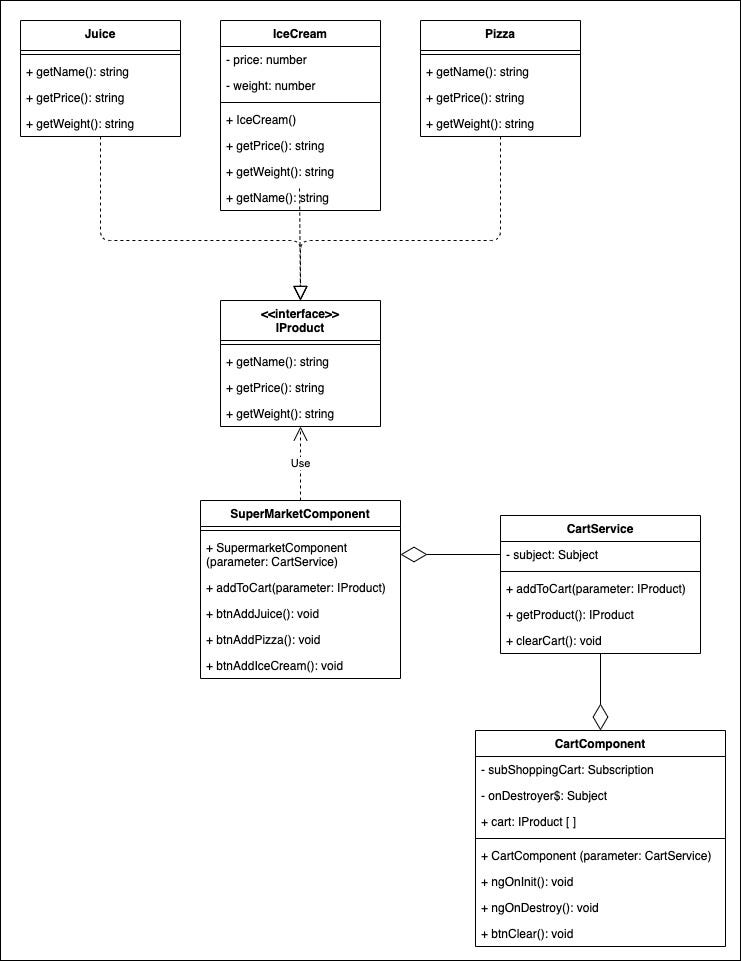
In an example of a supermarket context, there are many products with the same properties, e.g., weight, size, cost, and many more. We can create an interface or an abstract class to abstract them and define the properties there.
export interface IProduct {
  getName(): string;
  getPrice(): number;
  getWeight(): number;
}
After that we concretise some classes, for example, IceCream or Juice that implement the IProduct interface.
export class IceCream implements IProduct {
  private price: number;
  private weight: number;

  constructor() {
    this.price = 1.30;
    this.weight = 100;
  }

  public getPrice(): number {
    return this.price;
  }
  public getWeight(): number {
    return this.weight;
  }

  public getName(): string {
    return 'Ice cream';
  }
}
export class Juice implements IProduct {

  public getPrice(): number {
    return 15.23 - 7.30;
  }
  public getWeight(): number {
    return 8.00 - 3.33;
  }

  public getName(): string {
    return 'Juice';
  }

// ...

}
To store these products from a supermarket component into a cart component, a service with a subject is required. A getProduct() function can return an observable with the interface IProduct we defined above. An addToCart() function expects an IProduct interface as a parameter. So, we are using Dependency Inversion again. At runtime, we will create for example, a juice object that implements the IProduct, and use it in both functions.
@Injectable({providedIn: 'root'})
export class CartService {
  private subject = new Subject<IProduct>();

  public addToCart(product: IProduct): void {
    this.subject.next(product);
  }

  public getProduct(): Observable<IProduct> {
    return this.subject.asObservable();
  }

  public clearCart(): void {
    this.subject.next();
  }
}
To grab some products to fill the cart, we need to define a simple supermarket component.
@Component({
  selector: 'app-supermarket',
  template: '<h2>Supermarket</h2>\n' +
    '<button (click)="btnAddIceCream()">Add ice cream</button>\n' +
    '<button (click)="btnAddPizza()">Add pizza</button>\n' +
    '<button (click)="btnAddJuice()">Add juice</button>',
  styleUrls: ['./supermarket.component.scss']
})
export class SupermarketComponent {

  constructor(private cartService: CartService) { }

  public btnAddIceCream() {
    this.addToCart(new IceCream());
  }

  public btnAddPizza() {
    this.addToCart(new Pizza());
  }

  public btnAddJuice() {
    this.addToCart(new Juice());
  }

  public addToCart(product: IProduct): void {
    this.cartService.addToCart(product);
  }
}
Now we can subscribe to this observable with a shopping cart component.
@Component({
  selector: 'app-cart',
  template: '' +
    '<button (click)="btnClear()">Clear cart</button>\n' +
    '<div *ngFor="let product of cart">\n' +
    '  - {{product.getName()}}, Price: {{product.getPrice()}} Euro,           {{product.getWeight()}}g\n' +
     '</div>\n',
  styleUrls: ['./cart.component.scss']
})
export class CartComponent implements OnInit, OnDestroy {

  public cart: IProduct[];

  private subShoppingCart: Subscription;
  private onDestroyer$: Subject<void>;

  constructor(private cartService: CartService) {
    this.cart = [];
    this.onDestroyer$ = new Subject<void>();
  }

  ngOnInit(): void {
    this.subShoppingCart = this.cartService.getProduct()
      .pipe(takeUntil(this.onDestroyer$))
      .subscribe((next: IProduct) => {
        if (next) {
          this.cart.push(next);
        } else {
          this.cart = [];
        }
      });
  }

  ngOnDestroy() {
    this.onDestroyer$.next();
    this.onDestroyer$.complete();
  }

  public btnClear(): void {
    this.cartService.clearCart();
  }
}
The service can share different products with the observable, because it’s implemented with an interface (very abstract) IProduct.
If we want to add more products to the supermarket, we do not need to modify the service or the cart component. We only need to add a new model and an extension to the supermarket component. Object composition and Dependency Inversion make this possible.
Composition and decorators
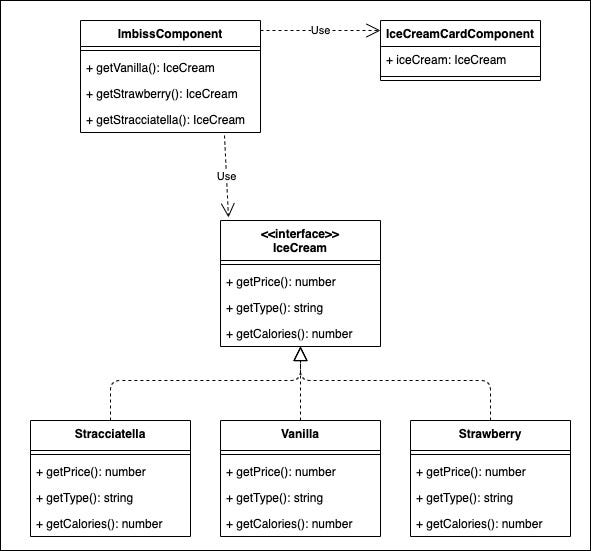
The Input() and Output() decorators are valuable tools for sharing information between components. We can combine them with object composition to be more decoupled and encapsulated. And, of course, we are using Dependency Inversion again.
Let’s code a snack bar with some ice cream on their menu.
First of all, we create an interface (abstract class) and some models (concrete classes) that implement the interface:
export interface IceCream {
  getPrice(): number;
  getType(): string;
  getCalories(): number;
}
export class Vanilla implements IceCream {
public getPrice(): number {
return 1.10;
}
getType(): string {
return 'Vanilla';
}
getCalories(): number {
return 100;
}
}
export class Strawberry implements IceCream {
public getPrice(): number {
return 1.00;
}
getType(): string {
return 'Strawberry';
}
getCalories(): number {
return 98;
}
}The snack bar component has got some get()-functions to create the products and return them as an interface type:
export class ImbissComponent {

  public getVanilla(): IceCream {
    return new Vanilla();
  }

  public getStrawberry(): IceCream {
    return new Strawberry();
  }

  public getStracciatella(): IceCream {
    return new Stracciatella();
  }
}
View:
<app-ice-cream-card [iceCream]="getStracciatella()"></app-ice-cream-card><br>
<app-ice-cream-card [iceCream]="getVanilla()"></app-ice-cream-card><br>
<app-ice-cream-card [iceCream]="getStrawberry()"></app-ice-cream-card>
The ice cream component got the Input() decorator to receive some ice cream models and show them in the view. That’s the point with the magic and Dependency Inversion, because we pass the concrete classes as interfaces.
export class IceCreamCardComponent {
  @Input() iceCream: IceCream;
}
View:
Type: {{this.ice.getType()}}
Price: {{this.ice.getPrice() }}
Calories: {{this.ice.getCalories()}}
Now we can create more and more ice cream types without changing the ice cream card component — friendly reuse of the card.
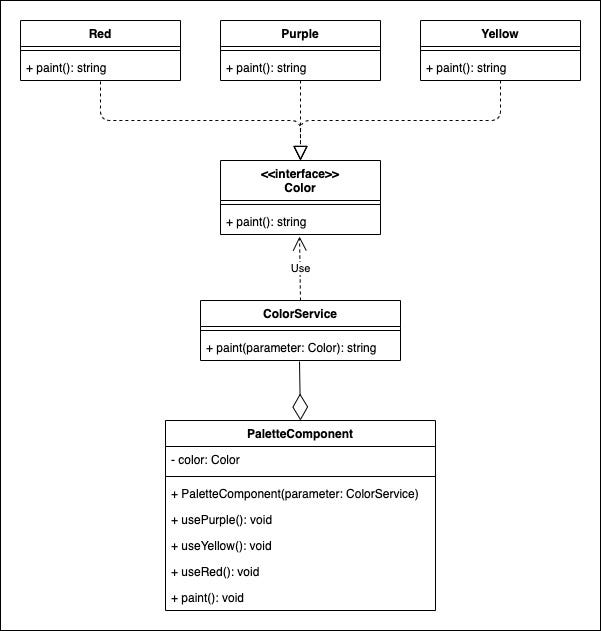
Bonus: composition in a service
Using object composition and Dependency Inversion in conjunction with service parameters is a common way to reuse code in Angular. We can extend and reuse our application code without changing the logic of the service very easily.
Concurrently, we use the principle of Open-Closed.
First, we need an interface and some concrete classes for this example.
export interface Color {
  paint(): string;
}
export class Purple implements Color {
public paint(): string {
return 'purple';
}
}
export class Red implements Color {
public paint(): string {
return 'red';
}
}A service uses the interface as a parameter and calls the paint() function.
@Injectable({
  providedIn: 'root'
})
export class ColorService {

  public paint(color: Color): string {
    return color.paint();
  }
}
In a concrete component we create instances of the concrete classes and use Dependency Inversion in conjunction with the service.
export class PaletteComponent {

  private color: Color;

  constructor(private colorService: ColorService) { }

  public useRed(): void {
    this.color = new Red();
  }

  public usePurple(): void {
    this.color = new Purple();
  }

  public useYellow(): void {
    this.color = new Yellow();
  }

  public paint(): void {
    console.log( this.colorService.paint(this.color));
  }
}
So, we can add more models of colors without changing our service. Nice code reuse!
Conclusion
As we can see, it’s easy to reuse code with inheritance, object composition, and Dependency Inversion. I presented a small number of examples, and I think there are more possibilities in Angular for code reuse with inheritance and object composition.
These principles are common ways to make our code more testable because we can easily mock data. Try it out!
Thanks for reading! Follow me on Medium, Twitter, or Instagram, or subscribe here on Medium to read more about DevOps, Agile & Development Principles, Angular, and other useful stuff. Happy Coding! :)


