
Cloud Masks at Your Service
State-of-the-art cloud masks now available on Sentinel Hub
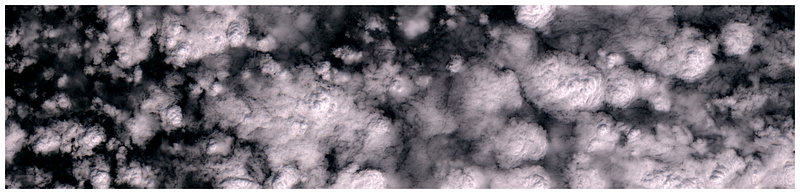
Sentinel-2 Cloud Detector — s2cloudless
A little more than two years have passed since the release of our machine learning-based cloud detection algorithm for Sentinel-2 imagery, and it seems a perfect time to report feedback gathered so far, as well as to share very exciting news regarding its availability through Sentinel Hub.
Since the release of the s2cloudless Python package, we have received very positive feedback from many users, in particular regarding the overall accuracy, flexibility of use, and execution speed. Overall, s2cloudless has been downloaded over 47,000 times and is used in dozens of applications. As well as the algorithm itself, we were happy to share the training and validation data with many users that reached out to us.
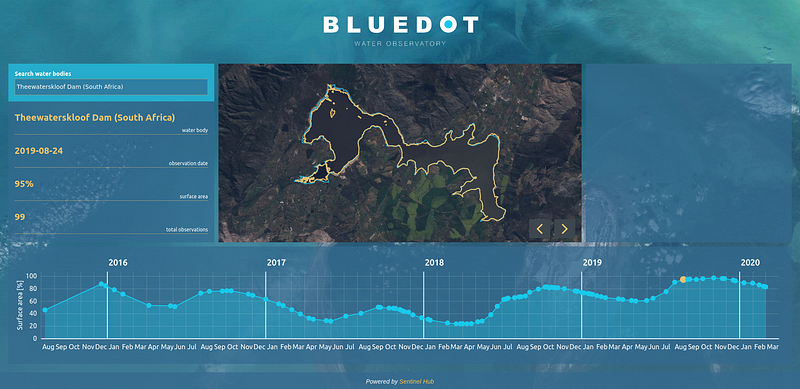
As cloud masking is a key pre-processing step for Sentinel-2 imagery, s2cloudless has become a pillar in our eo-learn library for processing satellite images and is extensively used in our production applications, including our country-wide land cover monitoring system to generate accurate land cover maps, and our BlueDot observatory to monitor surface water levels of open water-bodies.
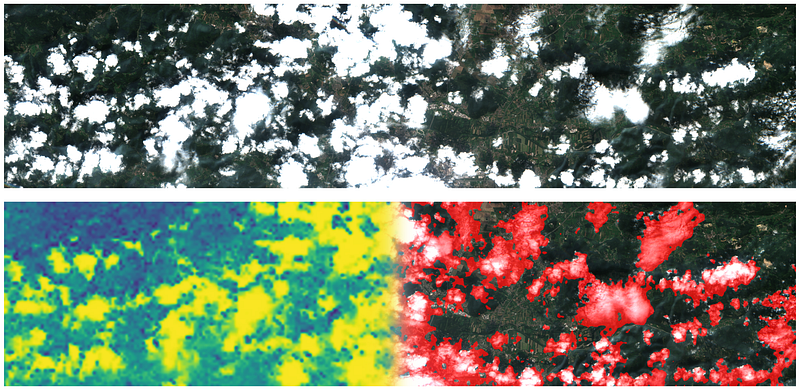
Under the hood, the s2cloudless processes pixel by pixel in an image. The algorithm doesn’t take any spatial context into account like for example convolutional neural nets do, but instead, it assigns each pixel a cloud probability solely based on the pixel’s ten Sentinel-2 band values. Simplicity in terms of input features (a vector of ten numbers vs. a H×W×C image) and scale-invariance of clouds make s2cloudless a very versatile and powerful tool as it turns out that we as users have a lot of freedom in defining what a pixel is. We have trained s2cloudless on 10 m × 10 m Sentinel-2 pixels, but in production apply it on 160 m × 160 m pixels. We can also break the chains of rectangular pixels and run s2cloudless on averaged band values over arbitrary user-defined geometry available through our FIS requests. As long as the clouds cover most of the area defined by the geometry, s2cloudless will give meaningful and very useful output as illustrated bellow.
Cloud Masking Inter-comparison Exercise
As part of the feedback, we were particularly excited when s2cloudless was invited to participate in the Cloud Masking Inter-comparison Exercise (CMIX) workshops jointly organised by ESA and NASA, which aims to provide a standardised evaluation of state-of-the-art cloud masking algorithms for Sentinel-2 and Landsat-8 imagery. This opportunity has been very valuable to gain further knowledge in use-cases and best practices, and to contribute to the discussion on standardisation of validation datasets and algorithm evaluation.
Both our single-scene and multi-temporal cloud masking algorithms for Sentinel-2 imagery entered the exercise, and both algorithms figured among the top-performing cloud masking detectors in terms of user’s and producer’s accuracy. The results of the exercise will soon be made publicly available, along with the evaluation dataset. These results are very helpful in providing a quantitative evaluation of different algorithms, in particular in relation to different use-cases, e.g. land-cover or agricultural applications, marine and water applications, ice cover studies, where one would prioritise user’s accuracy over producer’s accuracy or vice-versa. The CMIX exercise also allowed to put some figures on a feeling shared by many users, such as the partners taking part in the Perceptive Sentinel project, which consider s2cloudless one of the best performing algorithms for cloud masking of Sentinel-2 images.
Available on Sentinel Hub!
Given such positive feedback, we have decided to use s2cloudless and pre-compute the cloud probabilities and masks for the entire Sentinel-2 archive, in order to make them available through the Sentinel Hub services when requesting L1C or L2A data. This processing has already started, and you can request the cloud masks (CLM) and cloud probabilities (CLP) layers for regions in Slovenia and Croatia from 2019 onwards. The entire archive will be processed very soon. Try it for yourself using a simple script on EO Browser! Both layers behave like any other Sentinel-2 band, so you can just go ahead and start using them.
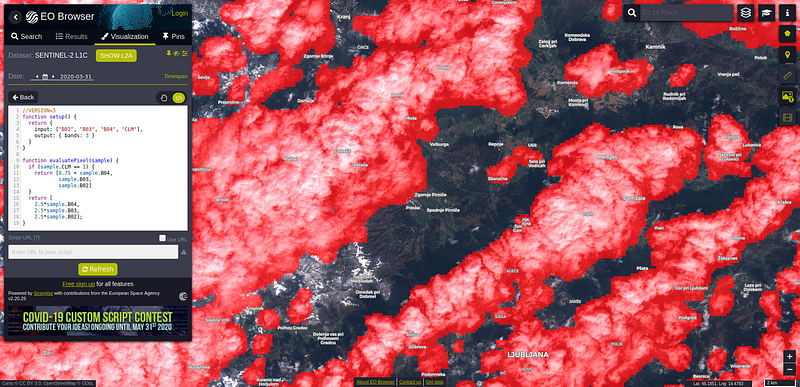
The CLP and CLM layers have the following return values:
- CLM: 0 (
no_cloud), 1 (cloud), 255 (no_data) - CLP: 0–255 (
cloud_proba)
All returned values are in the uint8 range [0-255], so to get the cloud probabilities back to the [0-1] range, you have to divide them by 255.
The CLP and CLM layers are computed on full Sentinel-2 images, sampled at a 160 m resolution. The same machine-learning algorithm is used as in s2cloudless, meaning that the cloud probabilities generated by s2cloudless at 160m match the CLP probabilities returned by Sentinel Hub exactly, provided the bounding box is in alignment with the sampled data used to produce the masks in the first place. More details about the procedure and the resulting product available in Sentinel Hub docs.
All the advantages of using Sentinel Hub, such as automatic resampling to the requested resolution and area-of-interest, apply to the cloud layers as well. Cloud masks in Sentinel Hub are then generated from the cloud probabilities in a slightly different way than the default settings in s2cloudless, but in our experience this makes no difference for most applications. In case you want custom cloud masks, you can achieve this by requesting the CLP layer at your desired resolution and apply customised post-processing, such as averaging, thresholding, or by using binary morphological operators.
We have thoroughly tested the usage of CLP and CLM layers in our applications, and have found large benefits in terms of efficiency, speed, and costs compared to running s2cloudless manually, which required the download of 10 Sentinel-2 bands. Having more accurate and pre-computed pixel-level cloud coverage information instead of the less accurate tile-level one opens up great opportunities for all applications relying on Sentinel-2 imagery.
Updates for eo-learn users
Due to the very well received Jupyter notebook and the accompanying Medium posts about land cover classification on the example of Slovenia, we have updated the example in eo-learn, taking the cloud mask service into account. This way, everyone can see the growth of the project and the benefits of research and development that come with it.
For the first time readers, in our blog post series we have gone through a detailed walkthrough on how to perform land-cover classification with machine learning, applied to Sentinel-2 L1C imagery. The process of calculating the cloud masks the old way took a heavy toll from the point-of-view of everyday personal computers. In order for the cloud masking to work, one needed to download almost all of the Sentinel-2 L1C bands, and then go through a resource hefty process of the calculation, using resources both in terms of CPU time and RAM usage. With the new service in mind, all of the heavy lifting has already been done for you, so you can just download whatever bands you like, alongside the existing cloud masks and probabilities!
In the notebook example, this is how the EOTask for downloading is defined:
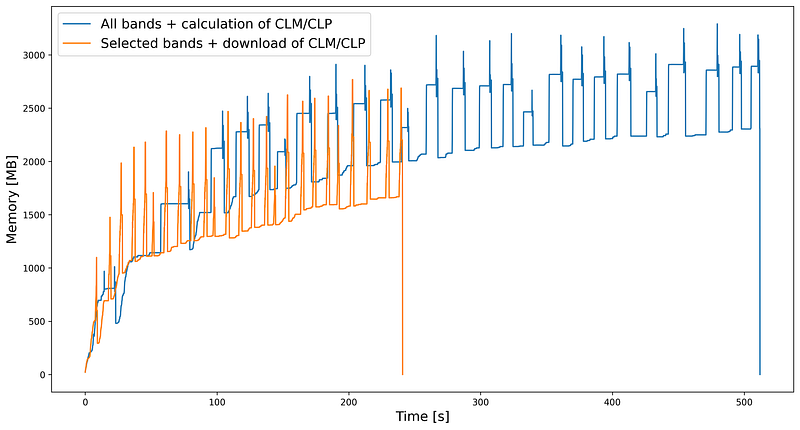
We have compared the usage of computer resources for a process to obtain six final bands (B02, B03, B04, B08, B11, B12) and have the cloud masks ready to use. We executed the process on a single CPU core for 25 EOPatches of size 500 m × 500 m and compared the RAM usage over time. From the image below we can see that with the updated code and downloading the cloud information the process finished two times faster and used less RAM, making the Sentinel-2 imagery requests faster and cheaper.
In addition to that, we have also updated all of the EOPatches for Slovenia 2019, which are available at http://eo-learn.sentinel-hub.com/. The updates include all the benefits of the recent eo-learn updates, such as loading and saving directly to and from Amazon S3 buckets! All you need to do is to specify the correct path, such as:
EOPatch.load('s3://eo-learn.sentinel-hub.com/eopatches_slovenia_2019/eopatch_id_0_col_0_row_19')and you can already start using the EOPatch, loaded directly from AWS. We welcome you to re-discover the notebook example and start playing around with the even richer data than before!
Cloud Service with FIS Requests
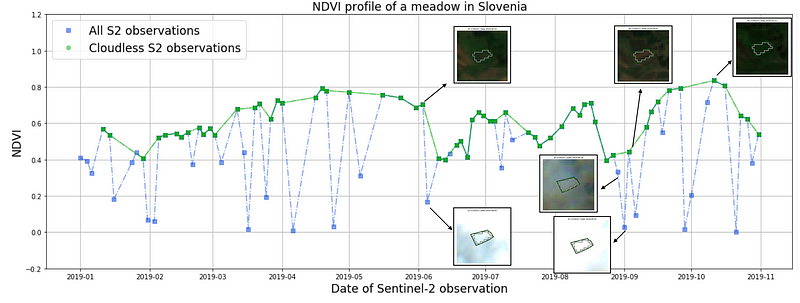
All benefits mentioned above hold true for the users of FIS requests as well. In most of the use cases, only averaged values of NDVI are needed. However, in order to mask cloudy observations, ten bands had to be requested and processed until now. Now the process is much more simple and costs less. A FIS request with the following custom script that returns two bands (NDVI and CLM) will result in averaged NDVI values over user-provided geometry, as well as the fraction of cloudy pixels per each observation. The user only needs to decide what threshold to set in order to filter out the cloudy observations.
Thank you!
All this has been possible thanks to the community that uses our services and tools to create amazing Earth observation applications. Please keep providing us with your invaluable feedback to further improve what we do!
Update (2020–05–06)
After releasing this news we were informed that Google is having the same plans, already in motion, processing data in GEE, using the same s2cloudless package. This fact means a lot to us as it demonstrates the added value of our open source contribution to the EO field. It also represents an external validation of the quality of the cloud masking.
Well, this news also motivated us to speed up the work a bit and process the full archive. Therefore, from today on, you can get the cloud masks for complete archive on Sentinel Hub.
Update (2020–05–12)
Also read more about a background story on how we created a complete archive of Sentinel-2 cloud masks in less than a day.


