
Clone a CodeCommit Repository in a Lambda Function
ACM.353 This took way longer than it should have to figure out
~~~~~~~~~~~~~~~~~~~~~~~~~~~~~~~~~~~~~~~~~~~~~~~~~~~~~~~
⚙️ Check out my series on Automating Cybersecurity Metrics | Code.
🔒 Related Stories: Lambda Security | Container Security | Git Security | CodeCommit Security.
💻 Free Content on Jobs in Cybersecurity | ✉️ Sign up for the Email List
~~~~~~~~~~~~~~~~~~~~~~~~~~~~~~~~~~~~~~~~~~~~~~~~~~~~~~~
I can’t even remember what the last post was because this took so long. Hang on…
Oh yes, I was grappling with network issues slowing me down and pontificating about thoughts for fixing it in an upcoming post.
Prepare yourself for a big revamp, but for now I wanted to do ONE SIMPLE THING. This took me a ridiculous amount of time but I also worked on fixing up my base container image along the way. More on that in a bit.
All I wanted to do was clone an AWS CodeCommit repo.
How hard is that? I already did it in a bunch of prior posts here using different methods:
Apparently, for me, it was ridiculously complicated due to documentation that didn’t really make sense to me initially (is it just me? maybe…) and because I tried a bunch of different methods as a result.
See here:
And here:
But in the end, the solution is ridiculously simple.
See the lines of code below.
First of all, in a roundabout way as explained in the second blog post above I found a clue but searching and searching for how to clone an AWS CodeCommit repo in Lambda because I’m sure someone must have done this before right? I cannot possibly be the first person to do this.
Well, luckily, I am using the AWS CLI. Because I finally found a blog post that hinted at using an AWS CLI git credential helper I had not heard of yet to configure git to use AWS credentials. Bingo. That sounds promising.
I didn’t really like the way that blog post I read solved the problem due the way it changed the home directory. That looks a little suspect but moving on because I’m not going to do that. The solution is much simpler and I’m going to bake it into my base docker container.
Here’s the documentation the post linked to — and based on the title I didn’t think this was applicable to my situation originally, but it is.
I thought it had to do with hard coding credentials which I did not want to do, but it actually has to do with configuring a CLI credential helper for GitHub in step 3 to use the AWS CLI credentials to run git commands with AWS CodeCommit.
There’s the key.
git config --global credential.helper '!aws codecommit credential-helper $@'
git config --global credential.UseHttpPath true
I thought that would miraculously solve all my problems but it did not. That configuration should use the default Lambda credentials to access GitHub but I still had two problems.
First, I was getting this error:
Cloning into bare repository ‘x’… fatal: could not read Username for ‘https://git-codecommit.us-east-2.amazonaws.com': No such file or directory.
That error actually makes no sense. Whatsoever.
To solve this problem it helps to understand the difference between global, system, and no flag in the git config commands above.
- No flags would be used in the current project directory if we had one and would apply only to that project.
- The global option is for the current user only (which really doesn’t make sense seeing as how it is named global — user would have been a better name.)
- The system option applies to the entire system or machine.
Next, we need to understand a bit about containers on Lambda. I’m currently creating my container with a root user. It’s not a good idea to run containers with a root user.
When you deploy your Lambda container, AWS creates a new user in your container and that user won’t have permission to the root user’s files. Therefore if we use the global option, it puts the gitconfig file created by the commands above in the root user home directory. Upon execution the Lambda function can’t access it. Hence the error message that is a bit obscure if you didn’t already know all of that.
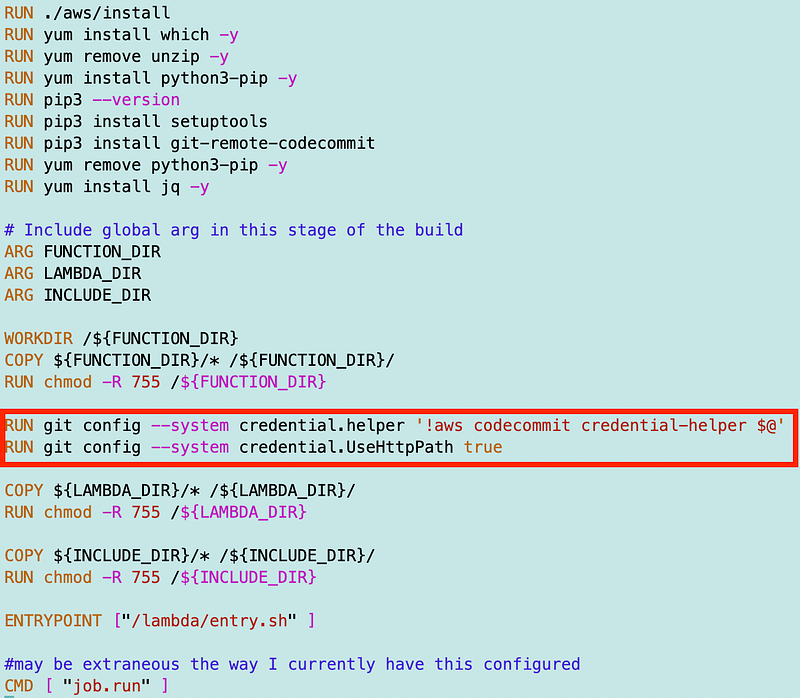
So what can we do? We can switch the commands above to use the system option. It’s in a container so it applies to the entire container, not the host running the container, so we should be ok.
git config --system credential.helper '!aws codecommit credential-helper $@'
git config --system credential.UseHttpPath true
When we do that the new user created by AWS in the container to execute in Lambda and read the credentials and the command works. Yeehaw! Well almost.
I was back to the dreaded timeout. I’m running a git command. I have a private network with a VPC Endpoint for CodeCommit git commands.
According to the documentation, you should use this endpoint if you’re running git commands like git push, pull, and I presumed, clone.
com.amazonaws.
region.git-codecommit
If you are using AWS CodeCommit commands like listing your repositories you should use this endpoint:
com.amazonaws.
region.codecommit
You can also use the fips endpoints but I was getting back public IP addresses for those endpoints previously so I’m not using them. I need to test it again to see if either it is fixed or I did something incorrectly like forget to configure my DNS.
So anyway, I was using the first endpoint. Makes sense right? The only thing I do in my code is clone a repo. But until I also added the second endpoint, my Lambda function seemed to keep timing out.
But wait. There’s more. I got past that and my AWS CodeCommit command seemed to work. Then I added in my AWS S3 command. At that point I got another timeout.
Well, I looked at the memory my function was using and it was at 103 and my function was configured for 125. I gave it some extra memory to hopefully speed it up and alleviate the issue even though it wasn’t maxed out. On the next run, my function worked like a charm.
Well, unfortunately, that seemed to be a fluke because on the next run it timed out again.
Perhaps the endpoint was not the issue afterall. Just to make sure, I ran the VPC LiveTail function on the filter “ 443 “ (note the spaces) on my Lambda VPC. No rejected traffic.
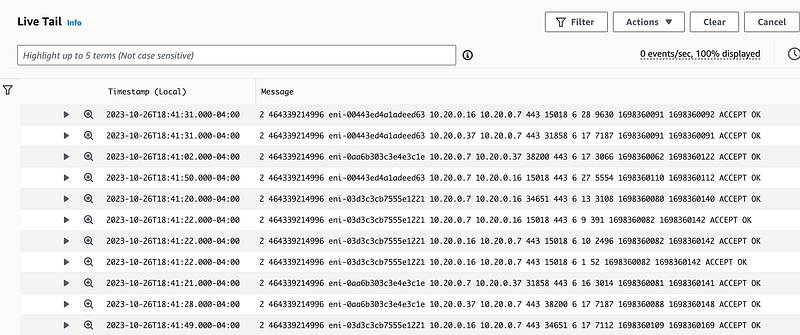
Next I doubled the memory, just about doubled the storage, and increased the timeout to 40 seconds.
At this point it worked and I had to spend some time resolving cross-account S3 issues which I will cover in another post.
It could be that I don’t actually need both endpoints above. I’ll resolve double check that later. I can align the IPs in the output above with my VCP Endpoint IPs to see which ones were accessed when the function executed.
Phew! That took waaaaaaaaay too long to figure out and the end result is very simple code.
Here’s my docker container with the lines I added for this specific problem. More on the rest in the next post.
I have my code that runs the function in job/run.sh. Here’s that code:
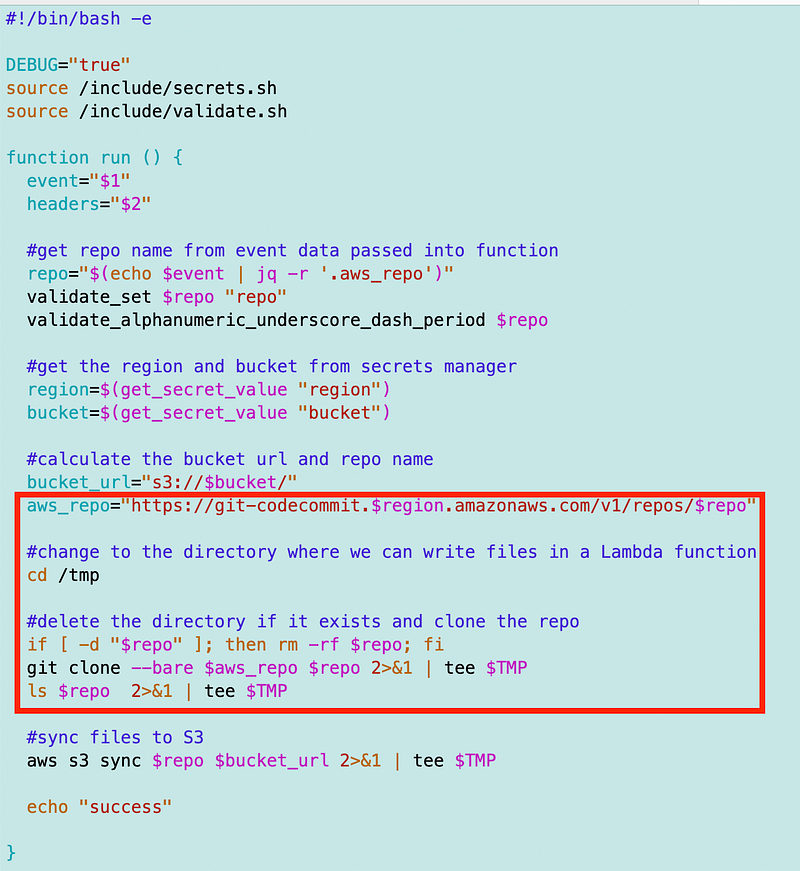
I’ll explain the include files and how I restructured my code to create a base container with the custom bash runtime that I can use for multiple Lambda containers with little modification in an upcoming post. I’ll show you how it will be easier for me to create new Lambda containers and test them locally and remotely. But first I have to fix some of my S3 code.
Follow for updates.
Teri Radichel | © 2nd Sight Lab 2023
About Teri Radichel:
~~~~~~~~~~~~~~~~~~~~
⭐️ Author: Cybersecurity Books
⭐️ Presentations: Presentations by Teri Radichel
⭐️ Recognition: SANS Award, AWS Security Hero, IANS Faculty
⭐️ Certifications: SANS ~ GSE 240
⭐️ Education: BA Business, Master of Software Engineering, Master of Infosec
⭐️ Company: Penetration Tests, Assessments, Phone Consulting ~ 2nd Sight Lab
Need Help With Cybersecurity, Cloud, or Application Security?
~~~~~~~~~~~~~~~~~~~~~~~~~~~~~~~~~~~~~~~~~~~~~~~~~~~~~~~~~~~~~
🔒 Request a penetration test or security assessment
🔒 Schedule a consulting call
🔒 Cybersecurity Speaker for PresentationFollow for more stories like this:
~~~~~~~~~~~~~~~~~~~~~~~~~~~~~~~~~~~~~~~~~~~~~~~~~~~~~~~~~~~~~
❤️ Sign Up my Medium Email List
❤️ Twitter: @teriradichel
❤️ LinkedIn: https://www.linkedin.com/in/teriradichel
❤️ Mastodon: @teriradichel@infosec.exchange
❤️ Facebook: 2nd Sight Lab
❤️ YouTube: @2ndsightlab


