
Clinical Trials as Graphs and Vectors
A search engine powered by Neo4j, Gemini Data, and Qdrant
Clinical research is a scientific investigation that evaluates the safety and effectiveness of medical, surgical, or behavioral interventions on human volunteers. Conducted in hospitals and research institutions, it has multiple lengthy phases, including designing and planning, recruitment and screening of participants, data collection and analysis, and subsequent reporting of trial results. It aims to find better ways to prevent, diagnose, and treat diseases, improve healthcare outcomes, and inform healthcare policies and practices. Clinical research is an essential component in modern healthcare.
The website clinicaltrials.gov is a database for clinical research studies. There, sponsors or investigators can submit and update study information. It is a valuable resource for medical professionals. For example, a pharmaceutical company can search for studies targeting a certain medical condition, review their designs and examine the outcomes. Unfortunately, using clinicaltrials.gov can be difficult due to its lack of medical ontology. This means that finding the right information relies heavily on exact keyword matches. In addition, clinical research data contains various relationships, such as company-drug and drug-condition relations. However, on clinicaltrials.gov, this data is shoehorned into tables that fail to capture their intricate connections fully. Finally, it lacks the ability to perform semantic search, a critical function in today’s digital landscape.
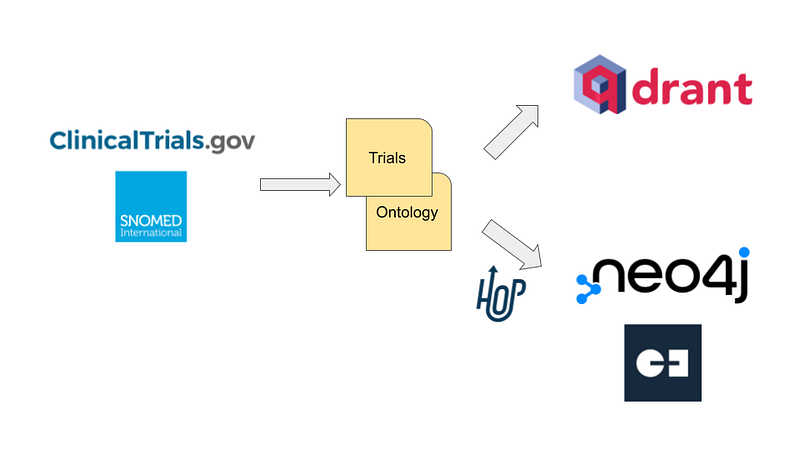
We can address all these issues with the help of a graph database and a vector database. In this article, I would like to present my remake of clinicaltrials.gov. As a demonstration, 24 Japanese clinical studies were downloaded from the site. In addition, the English SNOMED CT provides me with the taxonomies for medical conditions and body structures. On the one hand, I used Apache Hop to import the data into the graph database Neo4j. On the other hand, the trial descriptions were embedded and then inserted into the vector database Qdrant. Users can not only search trials semantically on Qdrant, but also learn their details, relationships, and statistics on Neo4j and Gemini Explore (Figure 1). This two-database setup allows users to quickly answer the three example questions above.
The code for this project is hosted on my GitHub repository here.
1. Data
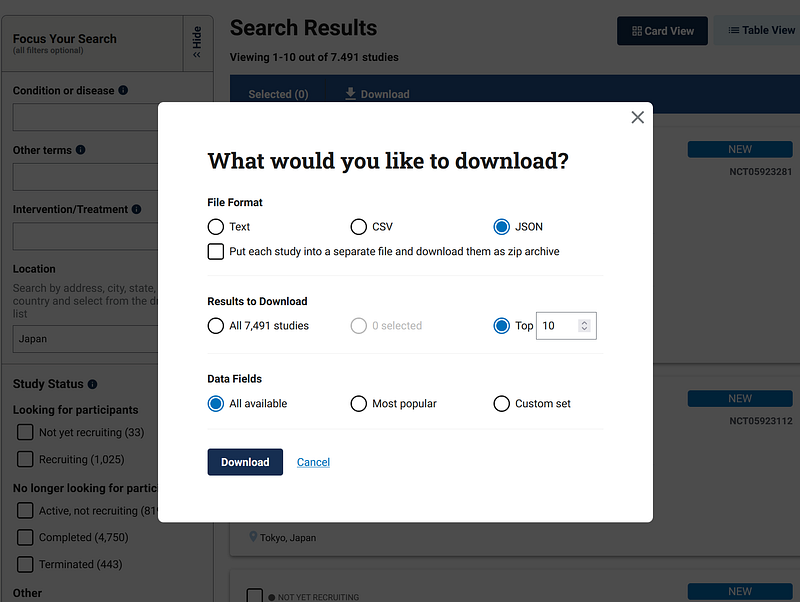
The clinical research data can be downloaded directly or via API from clinicaltrials.gov. In this demonstration, I downloaded the data from 24 Japanese clinical studies in JSON (Figure 2) and converted them into TSV. In production, you can expand the collection accordingly.
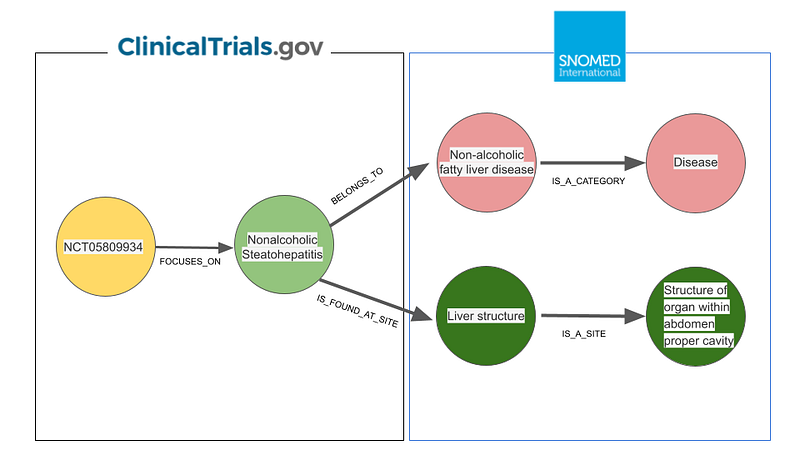
Data from clinicaltrials.gov can become “smarter” when combined with the SNOMED CT taxonomies. I used two sets of taxonomy in this project. The first one describes diseases and the second one describes body structures hierarchically. For example, “nonalcoholic steatohepatitis” is a “non-alcoholic fatty liver disease”, and the latter is a “disease”. By the same token, the “liver structure” is a “structure of organ within the abdomen proper cavity”. All these “IS_A” relations were retrieved via the API from ihtsdotools.org. The disease taxonomy tops out at the “Disease” or the “Morphologically abnormal structure” nodes, while the “Anatomical structure” node is the highest for the body structure taxonomy (Figure 3).
All these data are morphed into a series of node and edge files. They can later be imported into Neo4j Desktop, AuraDB, or Gemini Explore.
2. Apache Hop and graph databases
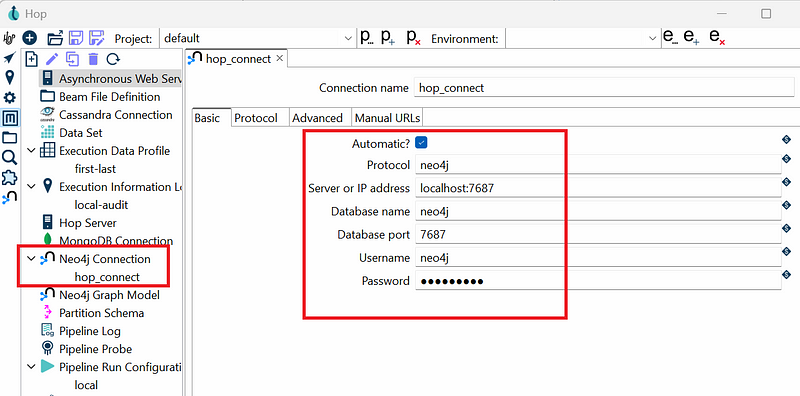
In my previous projects, data processing and database import are fused in one Python script. In this project, I used Apache Hop to orchestrate the Neo4j data import. Hop is an open-source data integration no-code platform. We can design and execute a data workflow or pipeline on its GUI. Before start, I created an empty Neo4j database in Neo4j Desktop. Then in Hop, I configured a Neo4j connection (hop_connect) in the Metadata tab with the login credentials (Figure 4).
There are several ways to import data into Neo4j via Hop. In this demo, I designed my own workflow (Figure 5).
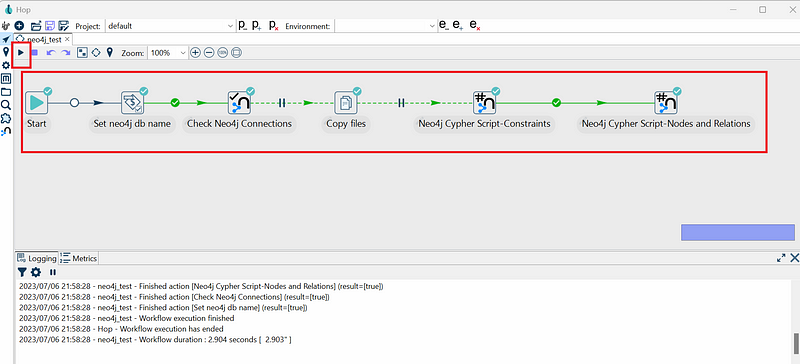
The pipeline consists of six actions. The user must first specify the Neo4j project folder name in the “Set neo4j db name” action. Afterward, the workflow automatically copies the TSV files into the Import project folder. The two “Neo4j Cypher Script” actions create the constraints and import the data in Neo4j via hop_connect. When every step receives a green mark, the process is complete.
I could then test the data in my Neo4j database.
call db.schema.visualization()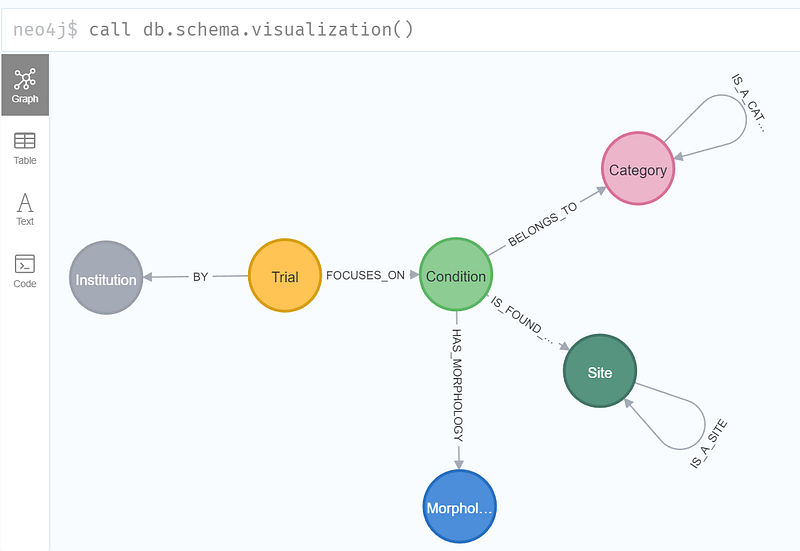
As you can see in Figure 6, the graph in this project consists of six types of nodes. The Trial nodes contain the details about the trials, including the criteria, outcome measures, enrollment counts, and so on. Each trial in this demonstration has focused on some medical condition and is conducted by some institutions. Each medical condition occurs at certain body sites. As mentioned previously, both the sites and the medical conditions are organized into the “IS_A” taxonomies.
The same data were also imported into Neo4j AuraDB (via dump) and Gemini Explore (via AuraDB). These are my platforms of choice in graph data analytics.
3. Qdrant
The description fields in the Trial nodes contain textural information about the trials. But they are written in natural language and not ready for semantic search. A good vector database can do the trick here. There are several popular names on the market, such as Pinecone, Weaviate, Chroma, and Qdrant. For this project, I chose Qdrant. Its free tier comes with 1 GB RAM, 0.5 vCPU, and 20 GB Disk. The interaction with Qdrant is quite straightforward.
#Use the ada-002 embedding from OpenAI

EMBEDDING_MODEL = "text-embedding-ada-002"
openai.api_key = PARAM["OPENAI_API_KEY"]

def get_embedding(text, model=EMBEDDING_MODEL):
   text = text.replace("\n", " ")
   return openai.Embedding.create(input = [text], model=model)['data'][0]['embedding']

#re-create a collection in Qdrant and upsert the embedded descriptions
qdrant_client = QdrantClient(
    url=PARAM["qdrant_URL"],
    api_key=PARAM["qdrant_API_KEY"],
)

qdrant_client.recreate_collection(
    collection_name="description",
    vectors_config=VectorParams(size=1536, distance=Distance.COSINE),
)

qdrant_client.upsert(
    collection_name="description",
    points=[
        PointStruct(
            id=index,
            vector= get_embedding(node_trial[t]["description"]),
            payload={"NCT": t, "description": node_trial[t]["description"]}
        )
        for index, t in enumerate(node_trial)
    ]
)

#query function
def query_vector_db(text, collection_name, top_k=5):
    embedding = get_embedding(text)
    hits = qdrant_client.search(
        collection_name=collection_name,
        query_vector=embedding,
        limit=top_k
    )
    return hits

#run a query question
query_question = "A comprehensive evaluation of PPMX-T003"
results = query_vector_db(query_question, "description")

for result in results:
    print (result.score, result.payload["NCT"], result.payload["description"])
For text embedding, I used ada-002 from OpenAI. The short script above was mostly copy-pasted from Qdrant’s documentation. It connects to my Qdrant cluster with my login credentials and creates a collection “description” if it did not exist. Finally, it goes through each trial and upserts the embedding and the NCT number to the collection. I then tested the setup with the query “A comprehensive evaluation of PPMX-T003”.
4. Test
Now it is time to test the database pair. Let’s assume that a pharmaceutical company is attacking leukemia. It can first study the leukemia trials by executing the following Cypher query.
MATCH p=(t:Trial) -[*..6]->(c:Category {name: "Leukemia"}) RETURN p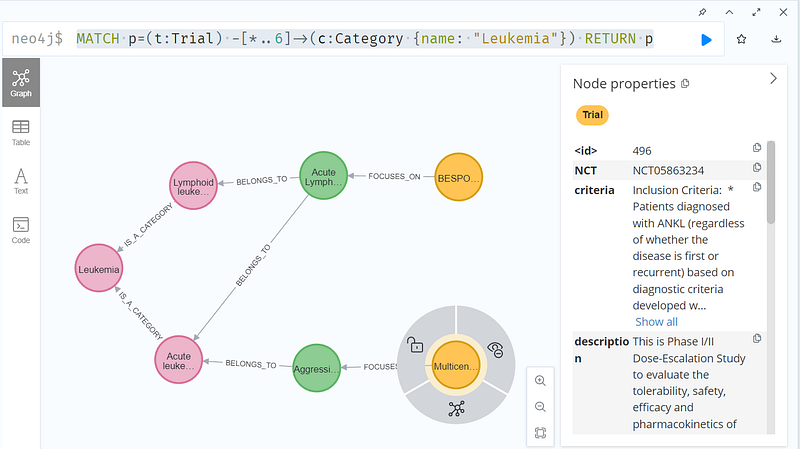
The “BESPONSA” trial is targeting acute lymphocytic leukemia, while the “Multicenter” trial is studying aggressive NK cell leukemia. And yet these two conditions are subtypes of leukemia. Thanks to the SNOMED CT taxonomies, the query above could return these two trials easily. The pharmaceutical company can then study the trial designs by clicking the nodes. It can learn that the “Multicenter” trial is an interventional study. It is recruiting six patients between 20 and 70 years of age.
As the amount of data grows, it will become more challenging to inspect each node individually. In such cases, a statistical dashboard can be productive. And the no-code graph platform Gemini Explore with its Dashboard is a powerful aid. Gemini Explore can take in the same TSV files as Neo4j and will soon support data import from Neo4j server or AuraDB. Once the data are inside, I could generate a dashboard easily (Figure 8).
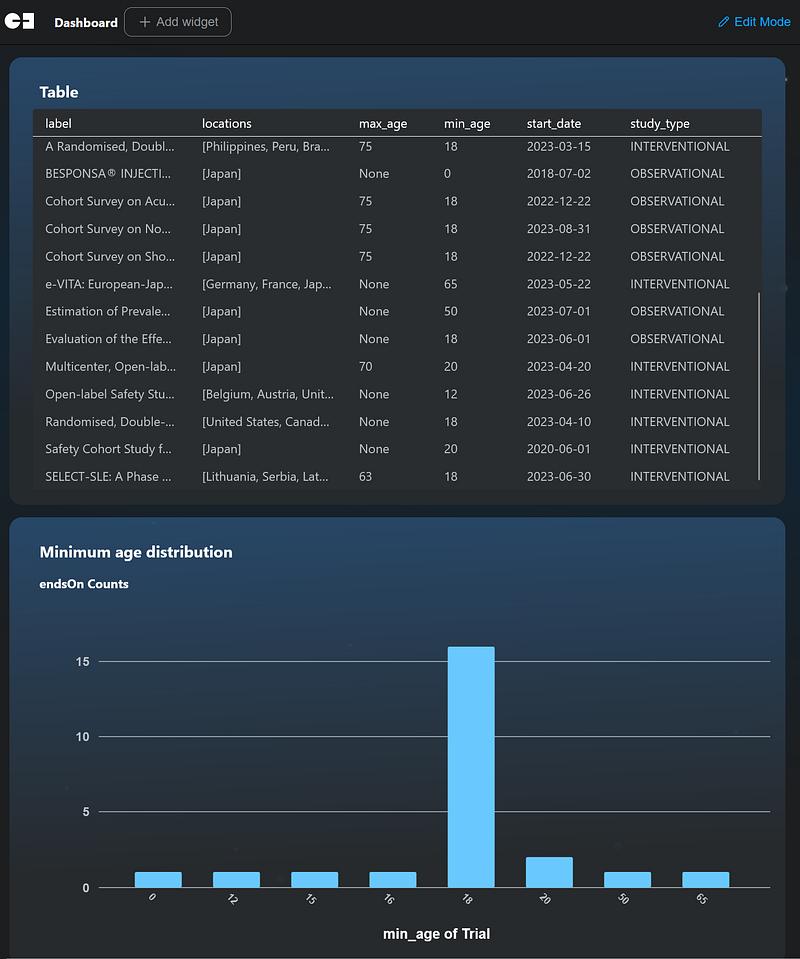
For example, the table shows that the majority of the trials took place in 2023. And the bar chart shows that 16 of the 24 trials set the minimum age at 18.
Now the company wanted to search for trials that compared the drugs iberdomide and lenalidomide. A vector search in Qdrant looks like this.
query_question = "trial that compares iberdomide and lenalidomide"
results = query_vector_db(query_question, "description")

for result in results:
    print (result.score, result.payload["NCT"], result.payload["description"])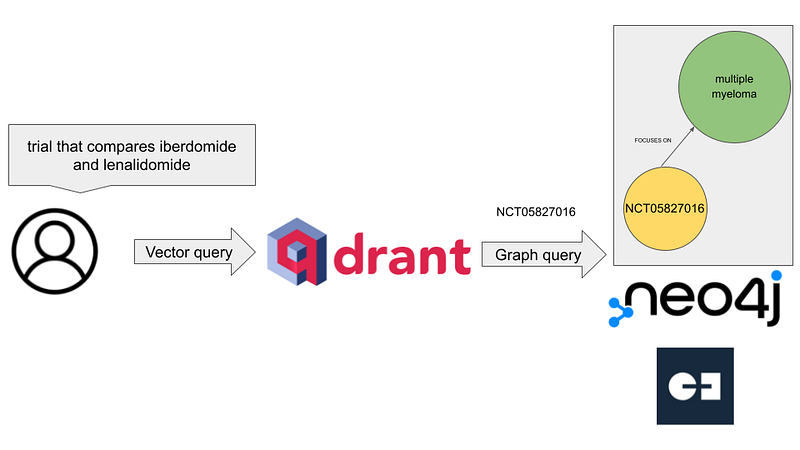
The search returned two trials (Figure 10).
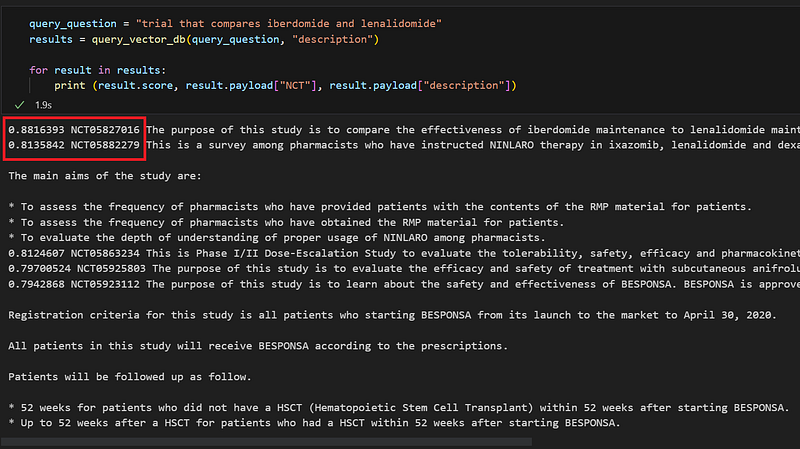
As you can see in Figure 10, the first hit NCT05827016 came with a higher score and it met our search criterion. However, the second hit NCT05882279 with a lower score only mentioned lenalidomide in its description. With the two NCT numbers in hand, I inspected them In Neo4j (Figure 11).
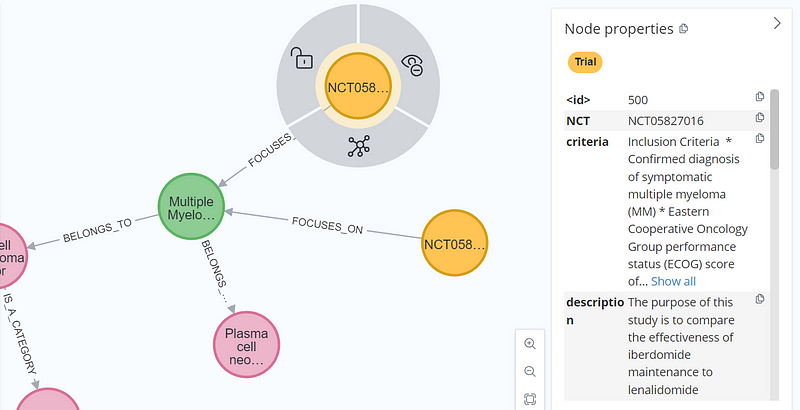
There, I could see that the two trials were related because they both were targeting multiple myeloma.
Conclusion
In the short article Suddenly, It Looks Like We’re in a Golden Age for Medicine, author David Wallace-Wells stated that there are calls for greater acceleration in medical research by redesigning clinical trials. And making the clinical research data more accessible can be the very first step. For this purpose, a smart and contextual reorganization of clinicaltrials.gov is urgently needed. A viable approach is a knowledge graph, enhanced by a vector database. On this platform, medical professionals can get comprehensive overviews of past trials and learn what worked and what didn’t. Considering this particular use case, previous clinical trial knowledge graphs by Chen et al. and Malas et al. are inadequate to meet the requirements because they were designed for machine learning and their lack of taxonomy was not optimized for information retrieval. Finally, their high-code interfaces pose significant challenges for non-technical users.
In this project, I reorganized the clinical research data as graphs and vectors. Neo4j and Gemini Explore revealed the interconnection of the data, while Qdrant allowed users to search the content via natural language. In the future, I would like to unify the two interfaces. A Doctor.ai-style chatbot with LangChain will be my first choice. And Tomaz Bratanic has written some excellent articles about the topic already.
Finally, I could add more ontologies or language systems into the mix. For example, the International Classification of Diseases 11th Revision (ICD-11), which was adopted by the World Health Assembly in May 2019, is a good candidate. And the Unified Medical Language System (UMLS) can also be a great addition. The combination of graphs and vectors can be adopted in other industries as well, such as supply chain, banking, and agriculture.


