
Learn Japanese Onomatopoeia with a Graph Chatbot
Group onomatopoeic synonyms in a graph and build a dictionary chatbot

In the Japanese language, onomatopoeic words, including “giongo (擬音語)”, “giseigo (擬声語)” and “gitaigo (擬態語),” are unique expressions that vividly depict sounds, actions, and feelings. These words are abundant in Japanese culture and are used in various contexts, including literature, manga, anime, and everyday conversations. From the gentle rustling of leaves to the thunderous roar of a train, onomatopoeic words in Japanese capture the essence of the sensory experience in a way that regular words cannot. For example, the word ピカピカ (pikapika) means “shiny, sparkling” and ゆっくり (yukkuri) means “leisurely without haste.”
But onomatopoeic words are hard for foreigners to learn. You cannot deduce their meanings from the spellings most of the time. For example, the word コツコツ (kotsukotsu) means “laboriously, steadily”, while its look-alike ゴツゴツ (gotsugotsu) means “gnarled, rugged”. And the word ゴホゴホ (gohogoho) represents hacking cough, even though its pronunciation does not sound like coughing at all. It takes time, examples, and lots of practice to internalize even the basic ones. And there are 1,190 of them in the JapanDict.
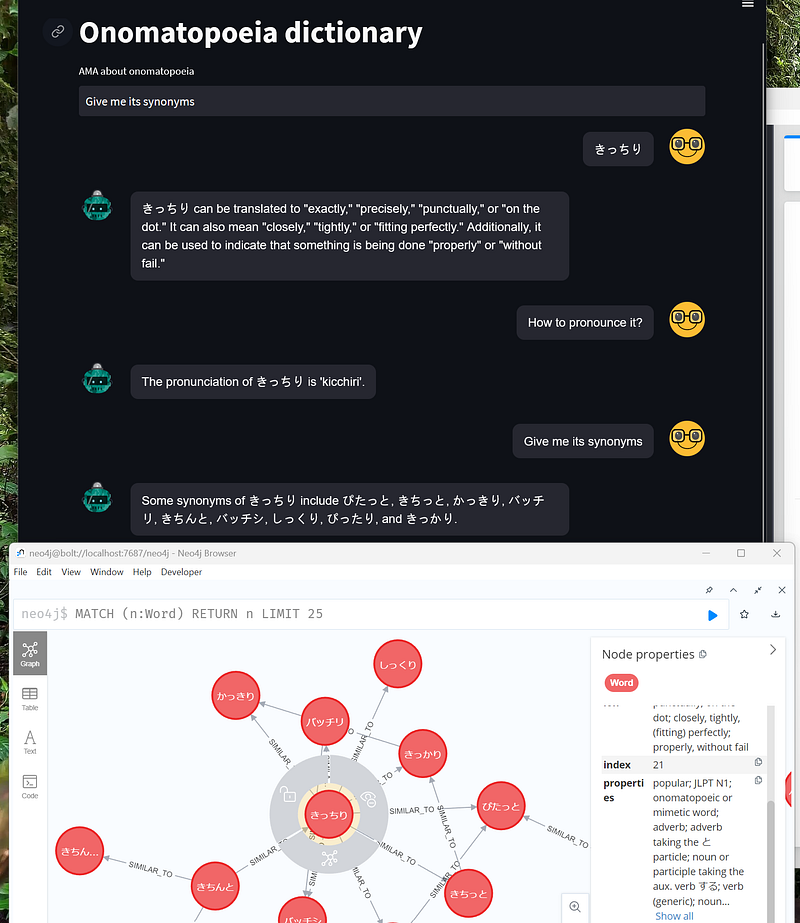
One day, I read Joshua’s excellent post Building An Academic Knowledge Graph with OpenAI & Graph Database — Part 3. It showed me how to convert texts to vectors with OpenAI’s ada-002. Afterward, Tomaz Bratanic’s thought-provoking article Context-Aware Knowledge Graph Chatbot With GPT-4 and Neo4j demonstrated a context-aware chatbot with the latest GPT models. His chatbot understands which subjects the pronouns (he, she, or it) refer to in the conversation (read more about context here). Together, they inspired me to group onomatopoeic synonyms in a graph so that I could learn them together in a dictionary chatbot (Figure 1). And in this article, I would like to show you how to do it with Neo4j/Gemini Explore and plug it into Tomaz’s Streamlit chatbot. The code for this project is hosted on my GitHub repository here.
1. Architecture
This project consisted of a back- and a frontend. The onomatopoeic words, their English explanations, and example sentences are downloaded from the JapanDict website and the Onomato Project. OpenAI’s text-embedding-ada-002 converts the explanations into numeric vectors. This step is also called embedding. And synonyms often have similar embeddings. In other words, their embeddings tend to be close or similar to each other in the vector space. In this project, word pairs are classified as synonyms if their embeddings had high cosine similarities (>0.9) (Figure 2).
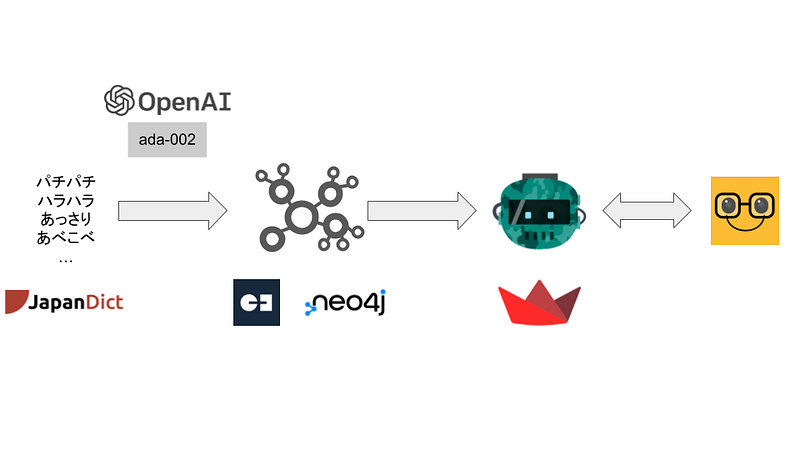
I then stored these words and relationships in graph databases such as AuraDB or Gemini Explore. Finally, I used Tomaz’s code to build a dictionary chatbot as the frontend.
2. Finding Synonyms with OpenAI’s ada-002
I packed the data from JapanDict and Onomato Project into a pandas dataframe. I would like to find synonyms that have similar explanations. And I could find similar explanations by converting them into vectors and computing the cosine similarities. Similarities greater than 0.9 indicated that the word pairs were synonyms (Figure 2).
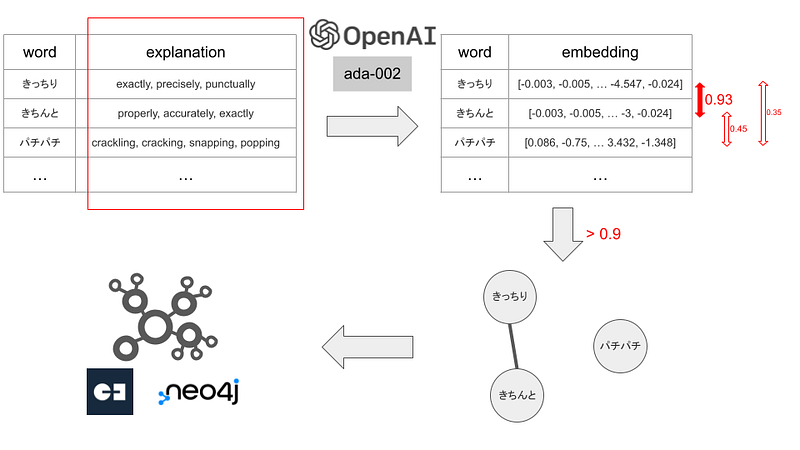
I embedded the explanation column with OpenAI’s text-embedding-ada-002 (Code 1, Lines 3–5, 13). This model has strong performance and costs only $0.0004 / 1K tokens (1, 2, and 3).
#Code 1
EMBEDDING_MODEL = "text-embedding-ada-002"

def get_embedding(text, model=EMBEDDING_MODEL):
   text = text.replace("\n", " ")
   return openai.Embedding.create(input = [text], model=model)['data'][0]['embedding']

def search_synonyms(ddf, index, cutoff=0.9):
    query_embedding = ddf.iloc[index]["embedding"]
    res = ddf["embedding"].apply(lambda x: cosine_similarity(x, query_embedding)).reset_index(name="similarity")

    return res[res["similarity"] > cutoff]

df["embedding"] = df["explanation"].apply(lambda x: get_embedding(x))

nodes = []
edges = set()

for i, row in tqdm(df.iterrows()):
    nodes.append([i, row["word"], row["romaji"], row["explanation"], row["properties"], row["examples"]])

    result_index = search_synonyms(df, i)
    for j, r in result_index.iterrows():
        if i != r["index"]:
            min_tuple = int(min(i, r["index"]))
            max_tuple = int(max(i, r["index"]))
            edges.add(f"{min_tuple},{max_tuple},{round(r['similarity'], 5)}")
Afterward, I computed the cosine similarities for all the word pairs (Code 1, Lines 7–11, 21), and identified those with cosine similarities exceeding 0.9 as synonyms. These synonyms were then linked together in the graph database with edges (Code 1, Lines 22–26).
4. Data storage in AuraDB or Gemini Explore
4.1 AuraDB
The data were formatted into two CSV files. I first imported them into Neo4j’s AuraDB. There, we can gain some quick overviews about the data (Figure 3).
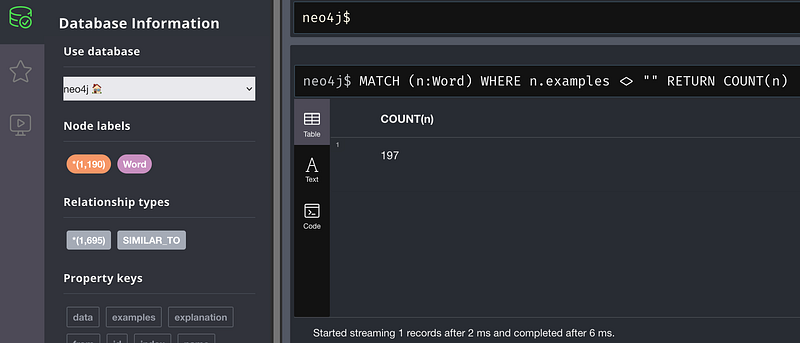
The Neo4j Browser showed that there were 1,190 nodes and 1,695 edges. Those numbers are in concordance with my source data. And a simple Cypher told me that only 197 words contained example sentences.
Because I am preparing for my JLPT N2 exam, I would like to have all the onomatopoeic words assigned to that level.
MATCH (n:Word) WHERE n.properties CONTAINS "JLPT N2" RETURN n 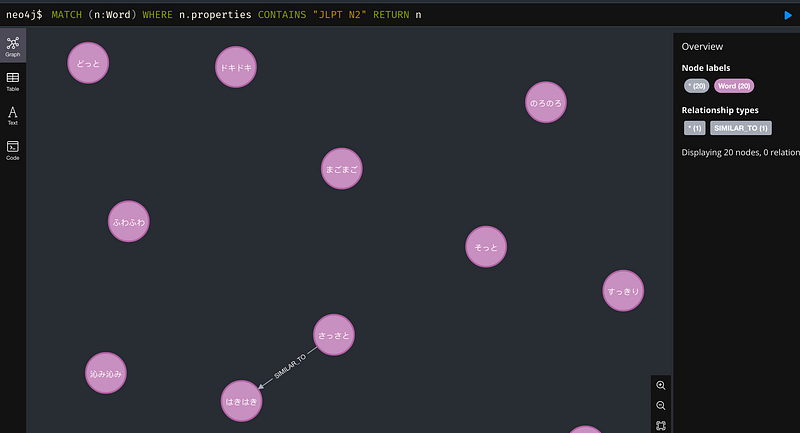
So there are 20 words on the N2 level, including ピカピカ, ドキドキ and ふわふわ (Figure 4). But there is only one synonym pair (はきはき and さっさと). It is time for me to memorize them all.
4.2 Gemini Explore
I have also imported the data into Gemini Explore. My previous article described the import procedure. This no-code graph platform allows us to explore the details by just typing and clicking.
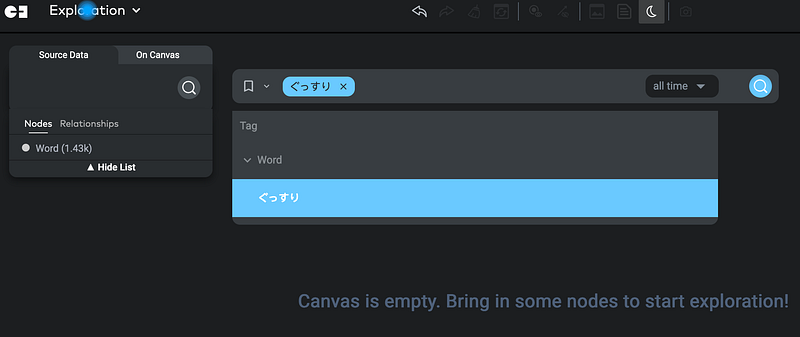
For example, I wanted to learn the synonyms that meant “soundly (sleeping)”. First, I searched for the word ぐっすり in the search bar (Figure 5).
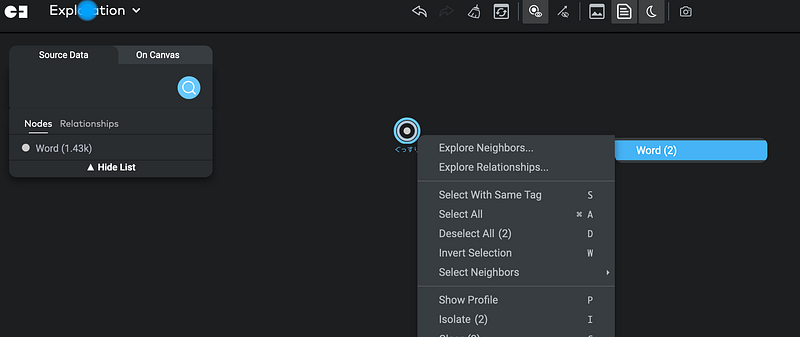
When the node ぐっすり appeared, I opened its context menu and clicked Explore Neighbors ➡️ Word (2) (Figure 6).
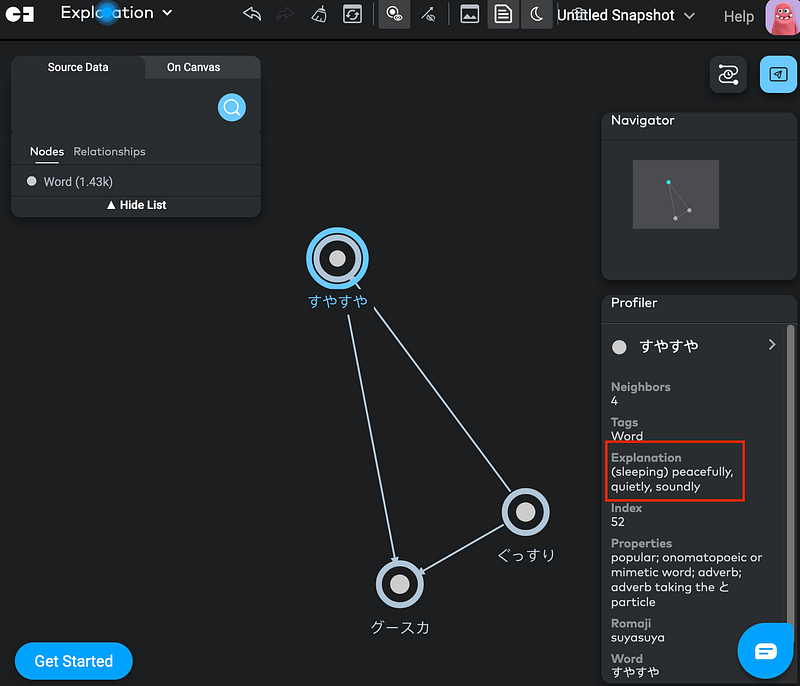
We could see that the cluster contained three words (ぐっすり, すやすや and グースカ) and they all meant “soundly (sleeping)” (Figure 7). So our synonym finding with ada-002 appeared to be a success.
5. Context-aware chatbot with OpenAI’s GPT
Graphs are powerful. But it is not easy for non-programmers to interact with them directly. In this case, a chatbot can serve as a great interface between the graph and the user. Here, I used Tomaz Bratanic’s newest context-aware chatbot. It is amazing that his chatbot can interpret pronouns based on previous conversations. As a result, the dialogs appear more natural and the communications become more effective.
examples = """
# はっきり; What does はっきり mean?
MATCH (w:Word {word: "はっきり"})
RETURN w.explanation AS result

# Give me the synonyms of きっちり; Similar words of きっちり? Other words similar to きっちり? What are the synonyms of きっちり?
MATCH (w:Word {word: "きっちり"}) -[r:SIMILAR_TO]-(o:Word)
RETURN o.word AS result LIMIT 10

# How to pronounce うろうろ?; What is the romaji of うろうろ?
MATCH (w:Word {word: "うろうろ"})
RETURN w.romaji AS result

# Examples of the word うろうろ?; Show me how to use うろうろ
MATCH (w:Word {word: "うろうろ"})
RETURN w.examples AS result

# Show me the words that belong to the JLPT N1; Words in JLPT N1?
MATCH (w:Word)
WHERE w.properties CONTAINS "JLPT N1"
RETURN w.word AS result LIMIT 10

# Show me the words that belong to the JLPT N2; Words in JLPT N2?
MATCH (w:Word)
WHERE w.properties CONTAINS "JLPT N2"
RETURN w.word AS result LIMIT 10

#Which words mean "carelessly"? Give me words that have the meaning "carelessly".; What are the onomatopoeia that mean "carelessly"?
MATCH (w:Word)
WHERE w.explanation CONTAINS "carelessly"
RETURN w.word AS result LIMIT 10
"""
You can read the details of the chatbot in Tomaz’s excellent post. Since his code was very well-written and structured, I only needed to adapt his GPT-4 training prompt for my graph data and make some other cosmetic changes. Then I connected the chatbot with my AuraDB instance and ran it.
6. Tests
It is time to test the chatbot. First, I asked the chatbot to give me the definition, pronunciation, examples, and synonyms of the word きっちり.
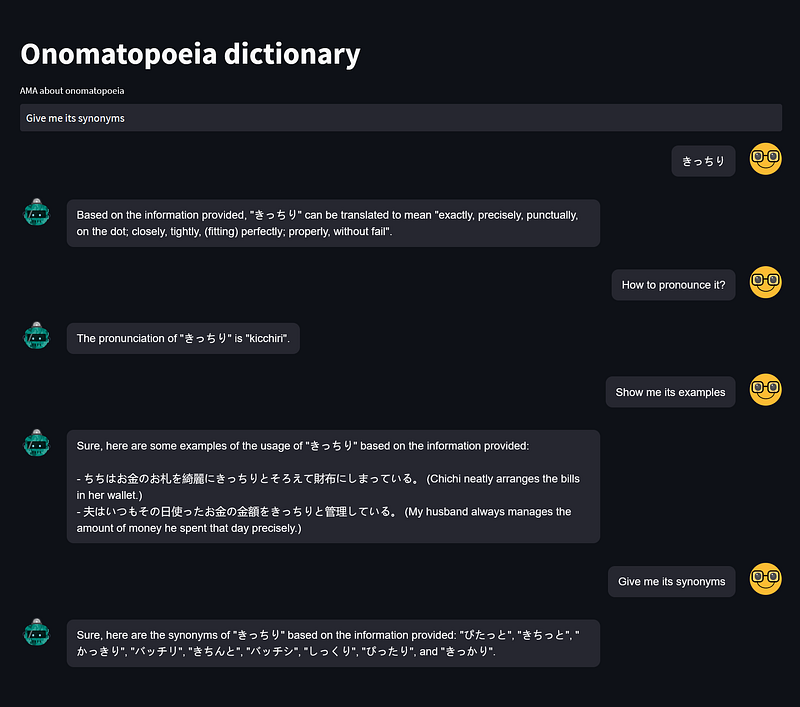
As you can see in Figure 8, the chatbot behaves flawlessly. It successfully interpreted the pronoun “it” as きっちり for three follow-up questions. I compared the answers against their source data and they were all congruent. But it is noteworthy that the chatbot unexpectedly translated the example sentences into English, too. And that is a positive surprise.
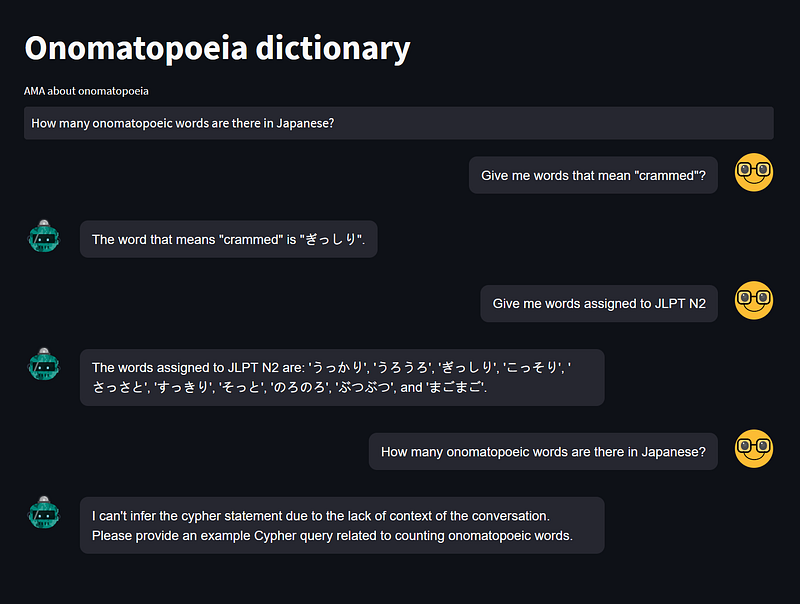
I tested the chatbot with some other questions, too. They were all answered correctly. In the end, I asked an “out-of-domain” question, and the chatbot effectively said ‘I don’t know’ as part of its programmed design. That is great. In contrast, the same question prompted ChatGPT to give me a lengthy, “out-of-the-database” answer without revealing its source.
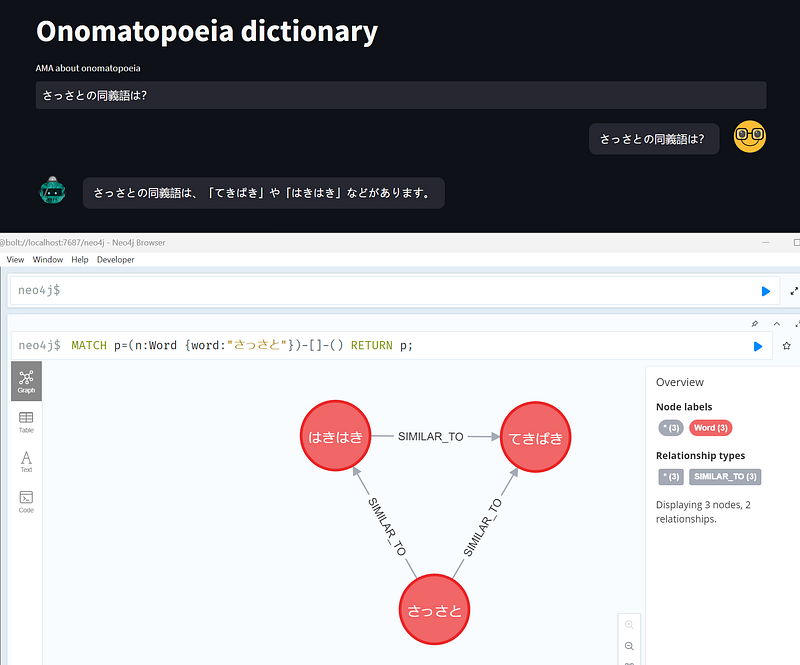
As Tomaz showed in his demonstration, the chatbot was also able to communicate in other languages, including Japanese, of course (Figure 10).
Conclusion
We need all the help we can get to master the onomatopoeic words. Several websites are great for this purpose. For example, Quizlet lets us store our personal vocabulary. And ChatGPT can act as a conversational dictionary. In this article, I combined these two into one app. And word clustering can help us learn onomatopoeia even faster.
In this app, you can choose AuraDB or Gemini Explore to explore the words and their connections. If you prefer to chat, Tomaz’s context-aware chatbot is a great natural language interface. It could handle the context and say “I don’t know” properly. You can even expand the prompts to include more interactions in the future.
This project is also a framework. That is, you can prepare your own documents, calculate the cosine similarities, and start exploring. If you have an e-commerce website, you can group similar products based on their descriptions and make recommendations. Or you group patients based on their clinical problem representations and analyze the clinical plans.


