
CI/CD for a Flutter app with Github Actions: defining a branching strategy
Welcome to this CI/CD series! 👋
If you just got there, make sure you read what environments we chose as we will use them as the base of our branching strategy.

Any modern development project is control versioned, and when working with teammates on a project we need to pick a branching strategy because not every commit can be pushed to a single branch.
As an addition we want to be able to automate deployments to the stores for our different environments as defined in the previous article which means we need to find a way to identify what commits should be pushed to UAT and production environments.
Using Trunk-Based Development
We will use Trunk Based Development as our branching strategy, i.e. a “one branch workflow”. The reason for this choice is that we want to keep things as simple as possible and avoid endless rebases/merges. We think that a two-branches git workflow (e.g. Gitflow workflow) is overkill for our usecase.
If you’re new to trunk based development and don’t understand this choice you can read this great article from BAM.
In short we will have a main branch that will always be our “source of truth” and ready to be tested.
Development process
Our developments will be done on short-lived feature branches that will then be rebased onto main branch, as described in the following schema:
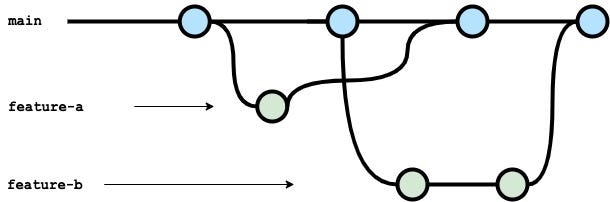
Notes:
- bugfixes that fix UAT bugs should be pushed to
mainbranch exactly the way we do it with feature branches. - your Git branching might differ if you have a more complex organization or way more developers then we do, but we personally try to keep it simple 🙂
Release process
With trunk-based development it will be easy to deploy commits to our UAT and production environments:
- UAT - Every change added to the
mainbranch will trigger a UAT release that will be sent to the UAT store → the release will be sent to the stores’ “internal tests” channel (of the UAT app) → a Github Actions workflow will be responsible for tagging the new UAT release version → exception: adding only documentation to the repo should not trigger new releases - PROD - A manual Github Actions workflow will trigger a PROD release that will be sent to the PROD store → this release will be sent to the stores’ “internal tests” channel (of the production app) → Github Actions workflow will be responsible for tagging the new PROD release version
To keep things simple:
- commits on
mainbranch = features ready to be tested in UAT release/uat/x.y.ztags = UAT releasesrelease/prod/x.y.ztags = production releases
Here is a schema that sums-up above statements:
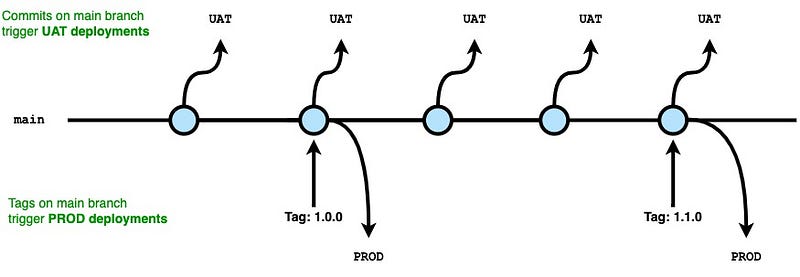
ℹ️ I forgot to add appropriate versions tags in the form release/env/x.y.z on this schema, and I can’t find the source file anymore, sorry!
Thank you for reading! In the next article we will start building, testing and analyzing our app 🧪📦👀
To see the complete topics of this series, please head to the series overview article.
🗃️ Source code: https://github.com/orevial/flutter-ci-cd-demo/


