

ChatGPT Vision is Taking Over the Internet — Here Are the Incredible Use Cases That Will Blow Your Mind
Learn to create websites from design, reading graphs, images, and so on with the help of ChatGPT vision.

Believe it or not, ChatGPT has been a big shot in the AI world right from the get-go.
At first, it started as a simple AI chatbot aimed at helping folks with all sorts of professional stuff. That set the stage for a bunch of other AI tools that hopped on the OpenAI API bandwagon.
Then, not too long after, Google tossed Bard, their own AI chatbot, into the ring. And guess what? It sparked a bunch of other chatbots like Claude, Perplexity, and a whole crew.
During this time, ChatGPT got some fancy updates, like new plugins and a cool feature called custom instruction, among other goodies.
But the latest buzz? ChatGPT Vision.
If you’ve been keeping tabs on OpenAI’s blogs or you’re a fan of their team, you probably already know that ChatGPT can now see, hear, and talk.
Today, we’re digging deep into the nitty-gritty of ChatGPT Vision. Well, this feature is only available to paid users, and it has recently been provided to a specific number of individuals.
Let’s start.
1. ChatGPT Stuns With Its Ability to Decode Cryptic Images
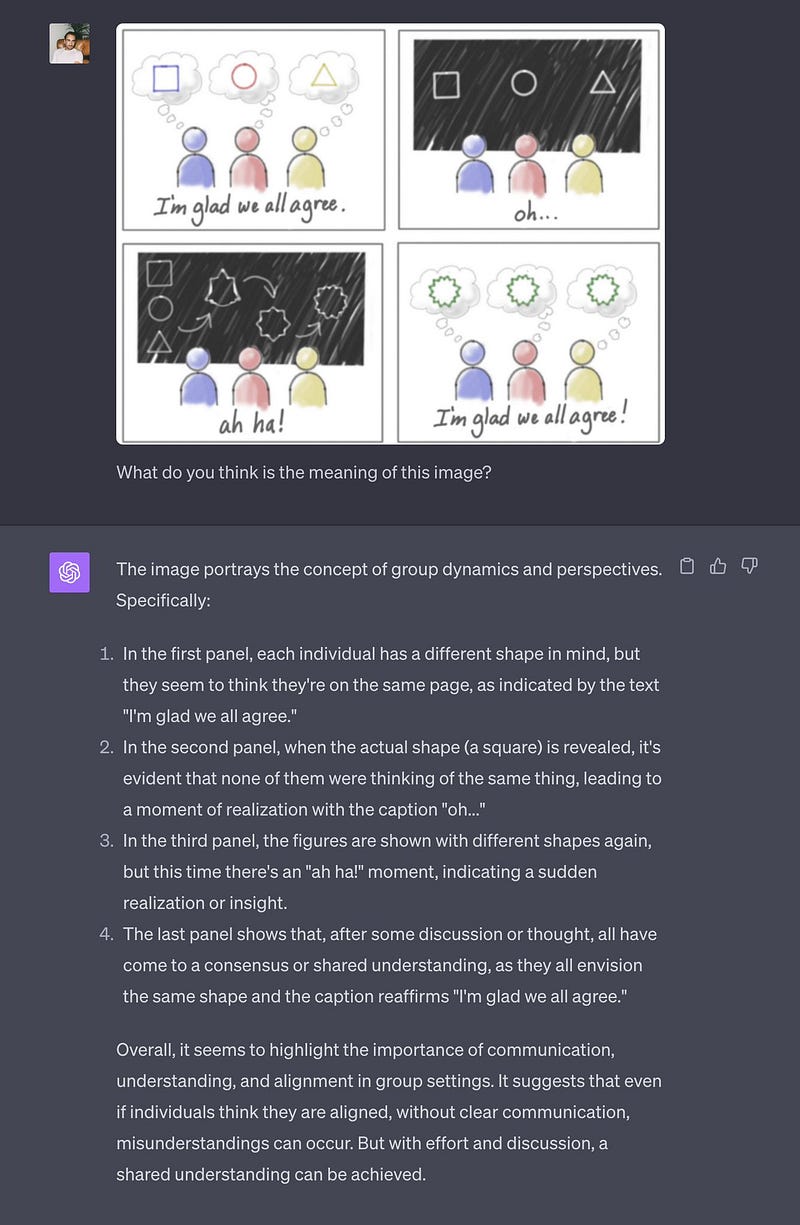
First of all, there’s this Twitter dude named Pietro Schirano.
He threw a pic at ChatGPT and said, “Tell me what this means”. You won’t believe it, but ChatGPT nailed it and gave the right answer.
I literally got shocked.
Now, here’s the juicy part.
Think about building websites, right? If you’ve got a tricky UI design, and you’re thinking, “How the heck do I turn this into a real website?”
Well, guess what? ChatGPT might just be your savior, ’cause it could whip up the code to bring that design to life.
How cool is that, right?
You can learn more about this here.
2. From Screenshot to Full Website — Explaining, Designing, and Coding — All in One!
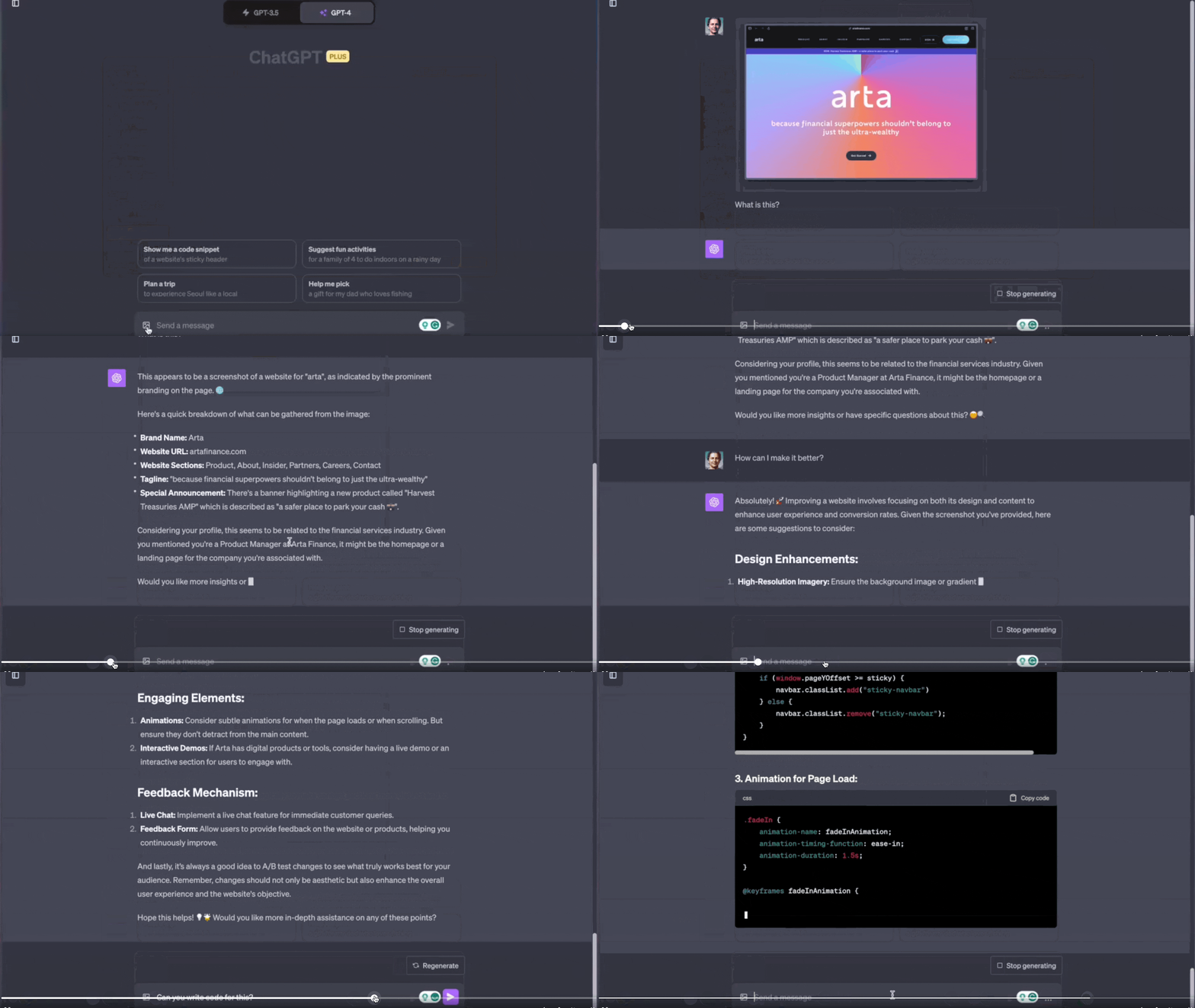
The second example is just plain crazy.
Check this out, a user named Hussein Yahfoufi dropped a screenshot of a website and said, “Hey ChatGPT, explain this to me”.
And, just like we saw in the first example, ChatGPT nailed it.
But here’s where it gets wild.
The user asked ChatGPT how to make the design even better. ChatGPT came through with a bunch of cool suggestions.
And then, for the grand finale, the user said, “Write the code, ChatGPT!” And you won’t believe it — ChatGPT actually wrote the entire code.
It’s mind-blowing, isn’t it?
You can learn more about this here.
3. ChatGPT Turns Figma Designs into Code Like Magic
There’s this Twitter dude, Gabriel Garrett.

He had this slick Figma design, and he’s like, “Why not put ChatGPT to the test?” So, he shoots it over to ChatGPT and says, “Hey, can you whip up this design (exported in the form of PNG from Figma) in React using MUI components?”
And you won’t believe this — ChatGPT, not only pinpointed what should be a data prop in the component, but it also crafted those component prop arguments like a seasoned pro.
It’s like ChatGPT waved a magic wand and, boom, there’s your design transformed into complete code, neat and tidy.
Now, here’s the big deal, as ChatGPT keeps leveling up, mark my words, it’s going be your go-to for tackling the trickiest Figma designs and converting them into code.
You can learn more about this here.
4. ChatGPT’s Mind-Blowing Graph Interpretation
Now, we’ve all seen ChatGPT doing its thing, right?
It can decode images, cook up code from Figma designs, and even decipher screenshots. But here’s the real shocker — ChatGPT has now added graph-cracking to its repertoire.
It’s not just reading graphs; it’s like an artist interpreting the graph’s story, drawing it out for you in plain English.
Here’s a juicy example for you.
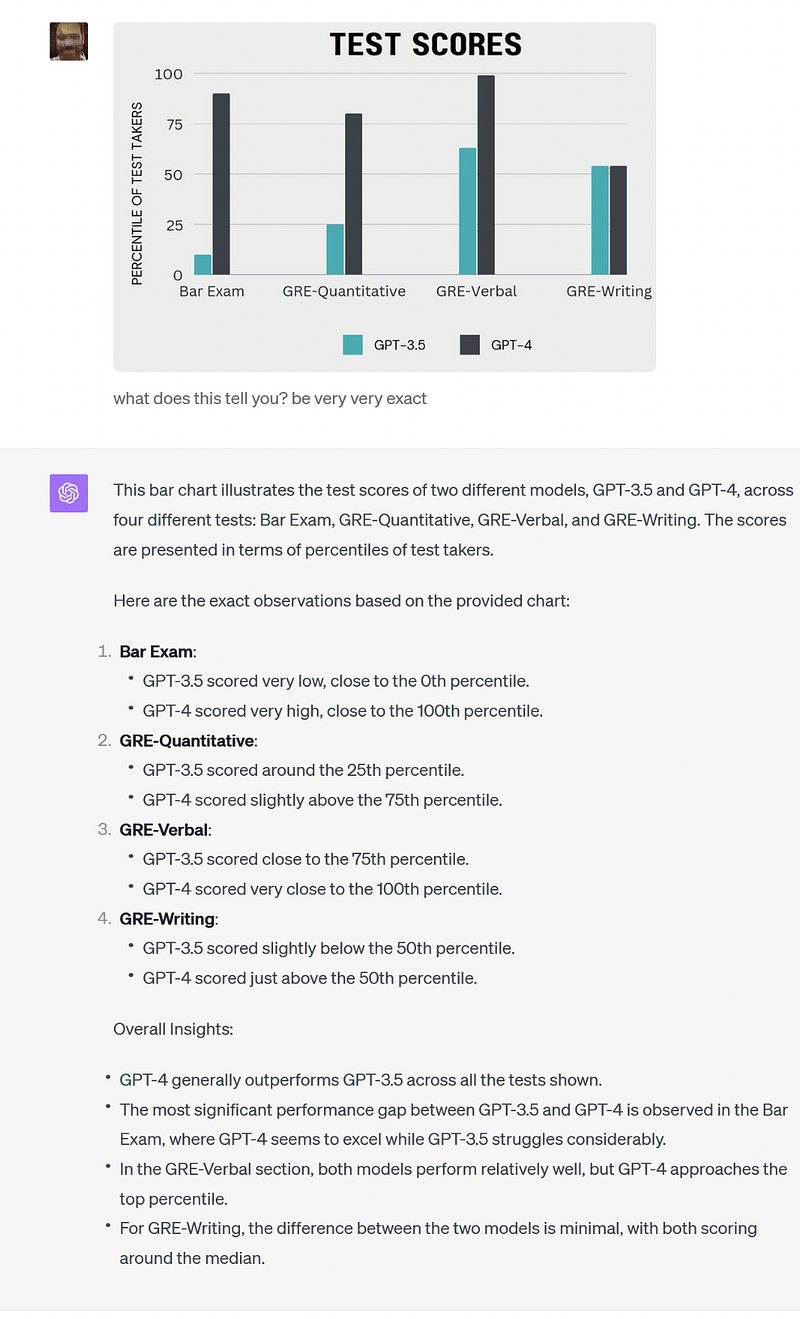
Ethan Mollick, a Twitter user, throws up a graph comparing GPT-3.5 and GPT-4 test scores.
He says, “Hey ChatGPT, tell me what this graph’s trying to say”.
And guess what? ChatGPT drops the exact data from that graph on the response.
I mean, how insane is that?
You can learn more about this here.
5. Turning Grocery Pics into JSON Magic
You won’t believe what went down!
So, Mckay Wrigley, this Twitter user, decided to try something out with ChatGPT. He’s like, “Hey, why not see what ChatGPT’s got up its sleeve?”
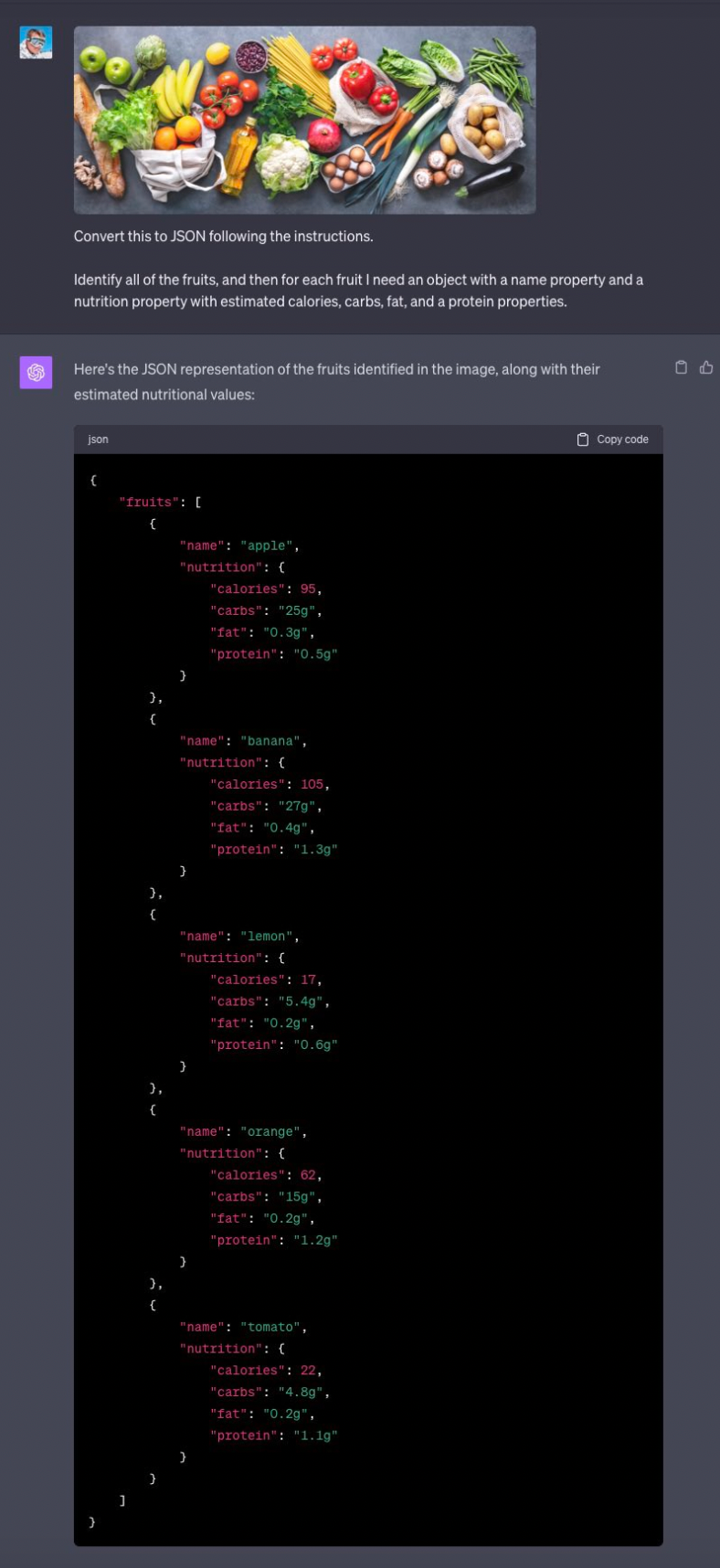
He takes a quick snap of his grocery and tosses it over to ChatGPT.
Then he’s all like, “Can you do the fancy task of making a list in JSON format for all the fruits and their nutrition info from this pic?”
Now, get this, ChatGPT doesn’t just say, “I can give it a shot.”
Nope! It straight-up owns the challenge.
You can learn more about this here.
Bonus
You know, people used to ask me, Hey, why go with Bard over ChatGPT?
And my answer was simple i.e. Bard could dish out the latest internet info, while ChatGPT couldn’t.
Well, guess what? It looks like the OpenAI team heard my plea and added that feature! Yep, now ChatGPT can surf the web, get you the freshest info, and even toss in direct links to the sources.
In a nutshell, it’s not stuck in the past anymore; it’s got the lowdown on stuff happening after September 2021.
Insane, right?
Hope you like it.
That’s it — thanks.
Don’t forget to subscribe to me on Beehiiv for a thrilling dive into AI, tech wizardry, money hacks, side-hustle secrets, and beyond. Your adventure awaits!