
A series on hands-on learning about the crypto world
Buying and minting my first NFTs wasn’t hard -here’s a simple tutorial
The crypto world hasn’t yet unleashed its full potential, and you can still catch the train. Here’s how I very easily purchased and minted my first NFTs using reliable platforms.
Introduction to the crypto world, from superficial to as deep as using programming
The crypto world hasn’t yet unleashed its full potential, and you can still catch the train. As websites and software for crypto-stuff become increasingly more friendly, learning about all this world and getting to do actual stuff done is now possible without being a genius. Here’s how I purchased my first NFT art and even minted my first NFTs, a song and a videoclip made with my own photography and music:
- Al litoral (a guitar-only song in E major): https://teia.art/objkt/711437
- Flowers of Paraná (own photographs of native flowers from NorthEast Argentina, arranged in video with Al litoral sounding in the background): https://teia.art/objkt/711145
This article is part of a small series on learning about the crypto world hands-on. This vast world includes various concepts that I’ve been exploring over the last year, in some cases rather superficially and in some cases quite deep even messing with programming and accessing blockchains. Here are a few highlights by topic:
Notes about the Metaverse, where crypto stuff meets virtual reality and the next iteration of the Internet
Notes on Brave, a web browser for the new Internet
Getting cryptocurrency data to make your own graphics and analyses
Reading and writing on the Ethereum network
Today's hands-on session is on Non-Fungible Tokens (NFTs)
Probably the best place to begin would be by explaining what NFTs are. Whereas I don’t want to mess with a lengthy explanation, because this article is about doing things hands-on, I cannot skip at least a basic explanation within the context of what we’ll be doing.
A non-fungible token, NFT, is a unique, separately identifiable virtual object stored in a blockchain. For what concerns this article, an NFT is a kind of certificate attached to a digital document to attest that is it original. In practice, it is a kind of stamp, stored in a blockchain, that a given digital file is original or one of a (typically) few originals. For example, an NFT could certify that a given JPG file of a photograph, or a given MP3 of a song, etc. is an original unit produced by the author.
NFTs are widely used to certify the originality of digital forms of art, from photographs to music and videos to pieces of code including forms of them generated by code (as in “generative art”, “digital painting”, etc.). In principle, any digital file can be potentially attached to an NFT.
Buying an NFT of a piece of digital artwork from an author would be equivalent to buying an original physical piece from it. Note however that copyright is not necessarily transferred; in fact, most likely it is not -although I won’t mess with this because, as usual, technologies evolve faster than laws, so these kinds of things are very messy, unclear, undefined.
To know more about NFTs, you can check the (quite good, easy to read and complete) entry on NFTs at WikiPedia.
Creating (“minting”) NFTs
The process of attaching a digital asset to a certificate to create an NFT stored in a blockchain is called in the jargon “minting”. Once “minted” the NFT can be bought and sold.
I will keep it simple, and here WikiPedia doesn’t help much. Hopefully, in the future somebody will write a better article about minting. But that definition is good enough.
Tezos: the main blockchain for minting, buying and selling NFTs
Tezos is a decentralized blockchain to execute peer-to-peer transactions (in our content, useful to sell and buy NFTs, for example) and deploy smart contracts (programs that run in the blockchain itself, for example to constitute the NFTs themselves). Tezos is probably the most widely used blockchain for creating and trading NFTs. WikiPedia has a very good article on Tezos here.
The Tezos blockchain has its own cryptocurrency, abbreviated XTZ. NFTs are mainly traded in this currency, and the process of minting consumes energy and involves some work both of which are paid in this currency too. Note that, contrary to Bitcoin or Ethereum, Tezos is very light on resources; therefore it has far lower carbon footprints and ecological impact.
Note too that the Tezos blockchain runs independently of other networks such as Ethereum’s. Thus, it’s not straightforward to for example convert ETH into XTZ and vice versa (although some projects are trying to achieve this). In practice this means that you’ll need some tricks to get XTZ in your virtual wallet, to pay for minting or purchases.
A wallet for Tezos
This brings me to the concept of wallets: software where you keep your cryptocurrency, in this case XTZ (and for different cryptocurrencies you may need different wallers!). Wallets can be either programs that you download and install on your computer, or websites, or web browser extensions.
For ETH, as I showed you in earlier articles, I like MetaMask which is a browser extension.
For XTZ I have only used Kukai -and this will be the one I show in my examples.
Fund your wallet
There are multiple ways to fund your wallet, and they depend on which one you have, what means you have to buy cryptocurrency, etc. These are some options I see:
- Buy right from the wallet, if it offers the possibility (I think Kukai does, but I haven’t tried it out).
- Buy at another exchange and transfer it to the address of your XTZ wallet. Most major exchanges include XTZ in their list of traded coins.
- Get some from somebody else. This is what I did, as a friend had bought too much so I just gave him the money in hand and he sent the corresponding amount of XTZ to my XTZ address.
Buying your first NFTs, here exemplified with Teia.art using the Kukai wallet
(And feel free to adapt to other services and wallets, at your responsibility)
I will explain this as the most basic steps, but ahead of that, a disclaimer that I cannot be held liable for any losses you incur as a result of following these steps. The steps are simple, but I cannot respond to any problems or losses resulting from your actions.
Step 1: Browse Teia (https://teia.art/) or any other NFT showcasing website and discover NFTs you’d like to purchase. There’s music, digital paintings, videos, photographs, 3D objects, code, etc. Browse artists, browse their pieces. Feel free to enjoy them, there’s no cost for that.
Step 2: Get a wallet on Kukai (https://wallet.kukai.app) or wherever you want and fund it with some XTZ. Unlike with BTC, ETH and other cryptocurrencies, fees are very small on tezos. So you probably need just slightly more than the cost of the NFTs you’ll buy. Plus maybe some more for future purchases or for minting your own files.
Critical: make sure you don’t loose your password and most importantly the set of words given to you when you sign up (in more accurate words, when you create your wallet/address in the Tezos blockchain). This set of words will be the only way for you to login into your wallet, and nobody, not even the Tezos creators or any kind of manager, can give you back access to the account if you loose this words.
For the next steps, let the Kukai website open somewhere, making sure you are connected to the Wallet.
Step 3: In Teia, go to the NFT you want to buy and click on “Collect for (cost in XTZ)”. If you don’t see “Collect …” then it will probably say “Not for sale”. You just cannot buy the item.
If “Collect …” does work then you’ll need to ALT-TAB to Kukai, where a message will be asking you to “sign” (confirm) the transaction (purchase) by entering your password. Completing the transaction looks something like:
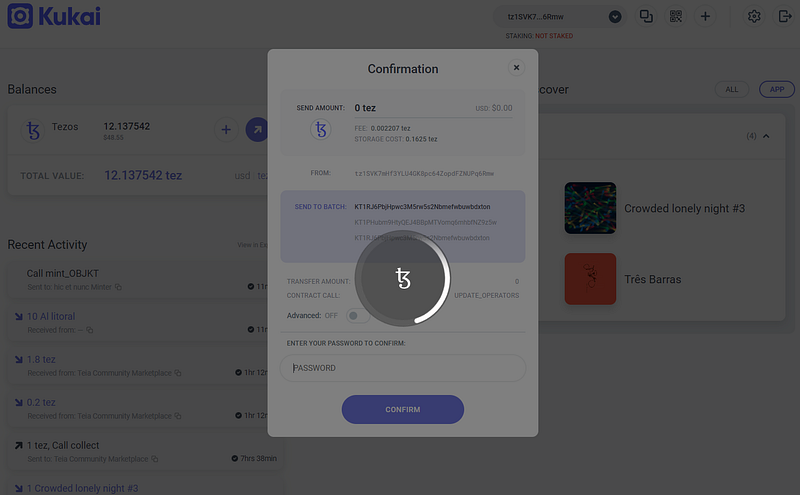
The first two NFTs I’ve bought
This is how my wallet looks like after I’ve bought my two first NFTs:
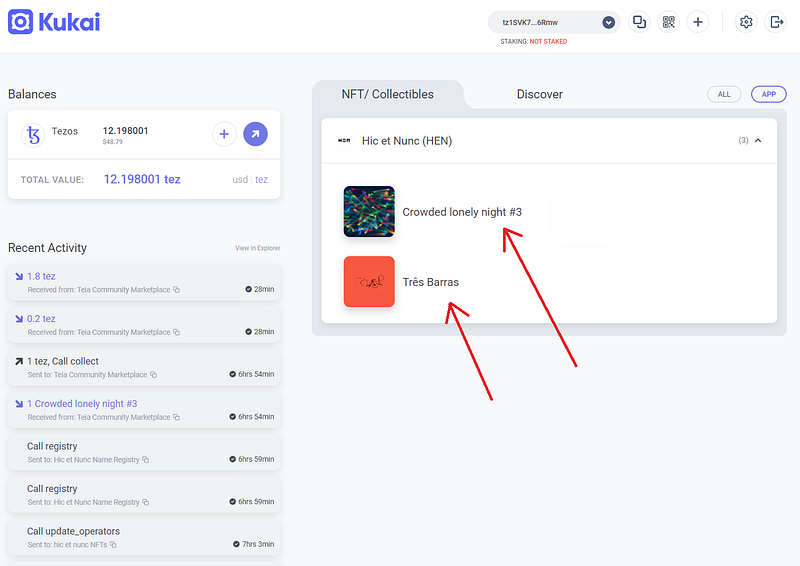
Crowded lonely night #3 is a generative paint and Tres Barras is a song. I enjoyed these two artworks several times in the past, as they are open for everyone to see and listen to. I also enjoy several other pieces of these authors, so by buying these NFTs I can support their work and show that I own legitimate versions of them.
You can enjoy these pieces yourself here, and perhaps consider buying some of the NFT left for these editions -if any:
Minting your first NFT, again exemplified with Teia.art and the Kukai wallet
Same as above, a disclaimer that I cannot be held liable for any losses you incur as a result of following these steps. The steps are simple, but I cannot respond to any problems or losses resulting from your actions.
Step 1. I’m here assuming you’ve already bought some NFTs as explained above, so you are already familiar with Teia.art and have a wallet with Tezos.
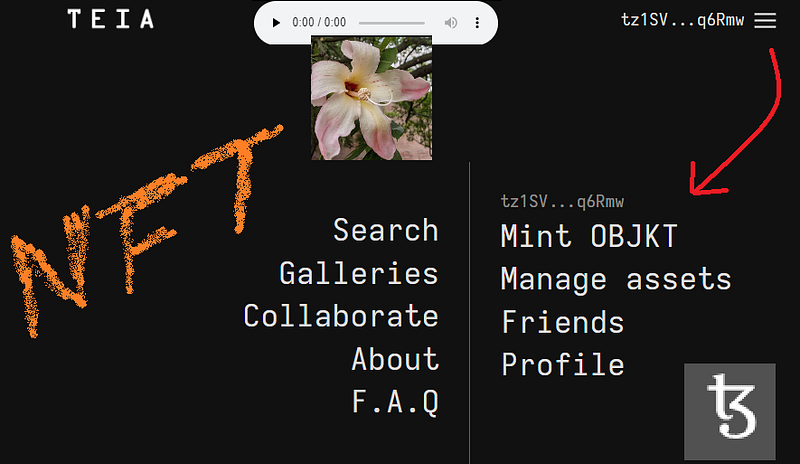
Teia allows minting GIFs, JPEGs, PNGs and SVGs pictures, MP4 videos, 3D objects in GLB format, music as MP3 or WAV, also PDFs and HTML pages, plus a few other types of files. To mint your NFT first look for the Mint OBJKT option in the menu:
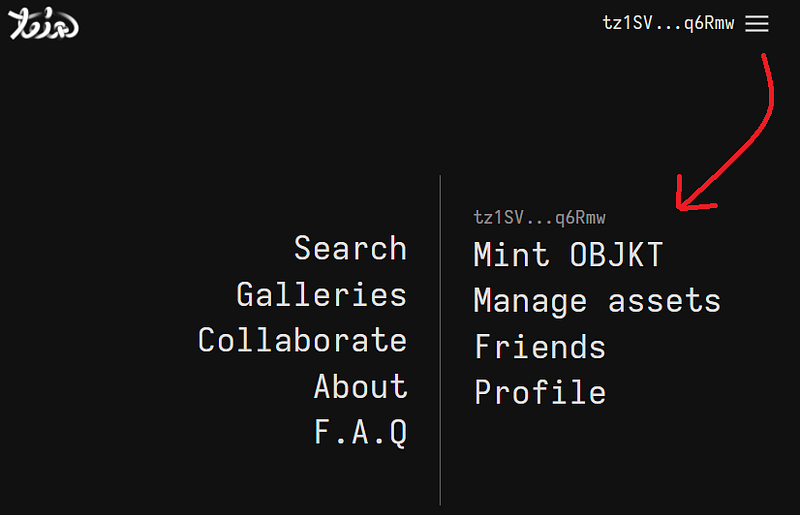
Step 2. Then simply upload the file and a preview (image) and include a Title, a description, some tags, and two more points:
- Number of editions, which essentially how many “authentic copies” of the NFT you want to create.
- Royalties, in % of the NFT price. This is essentially what % of future purchases will go to you each time the NFT is sold. That’s one unique feature of NFTs, highly beneficial to artists, that would be virtually impossible when buying and selling “normal” art but smart contracts enable.
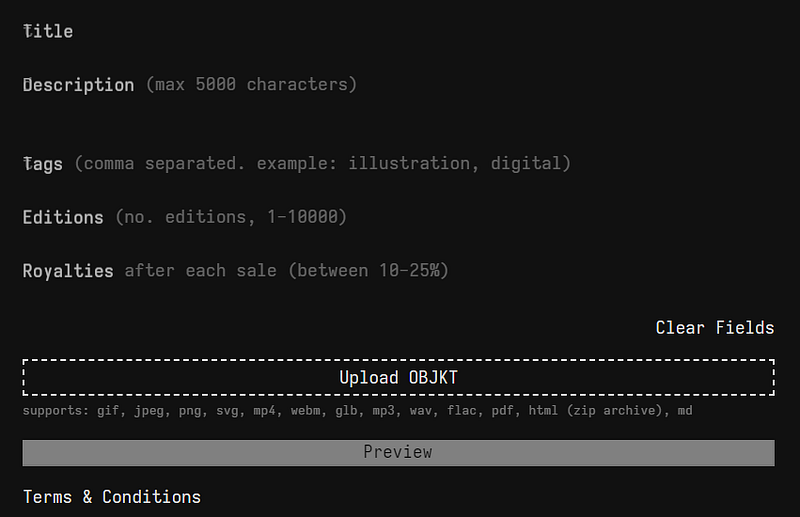
After filling in all the fields (be very careful as there’s no way back to correct typos or mistakes!) you can Preview the NFT (still not minted):
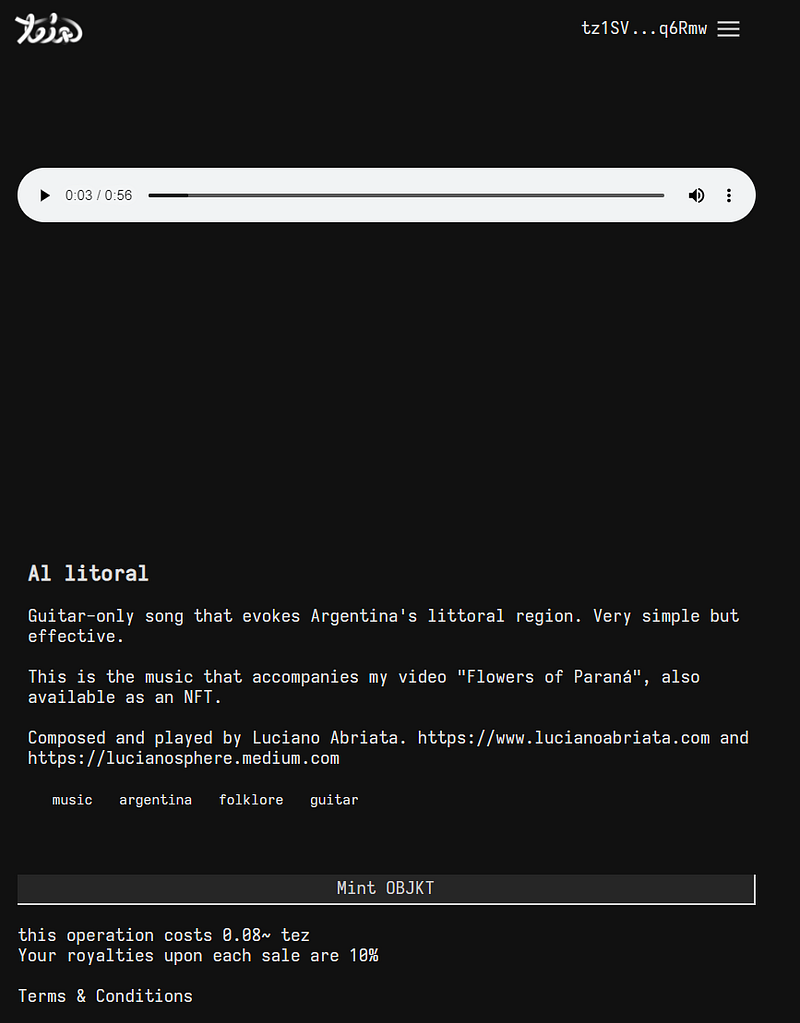
Note this tells you how much you’ll spend on minting. Here it’s 0.08 XTZ which is today less than 40 cents of USD.
Step 3. Click Mint OBJKT. After a few seconds you’ll get a prompt asking you to ALT-TAB to the Kukai window to confirm the transaction, while Teia looks like this:
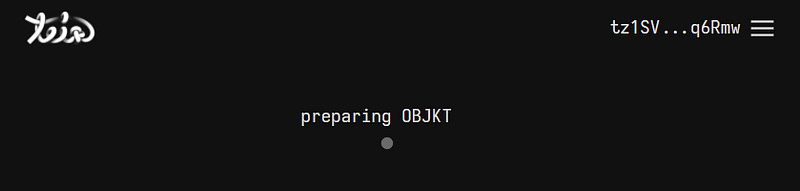
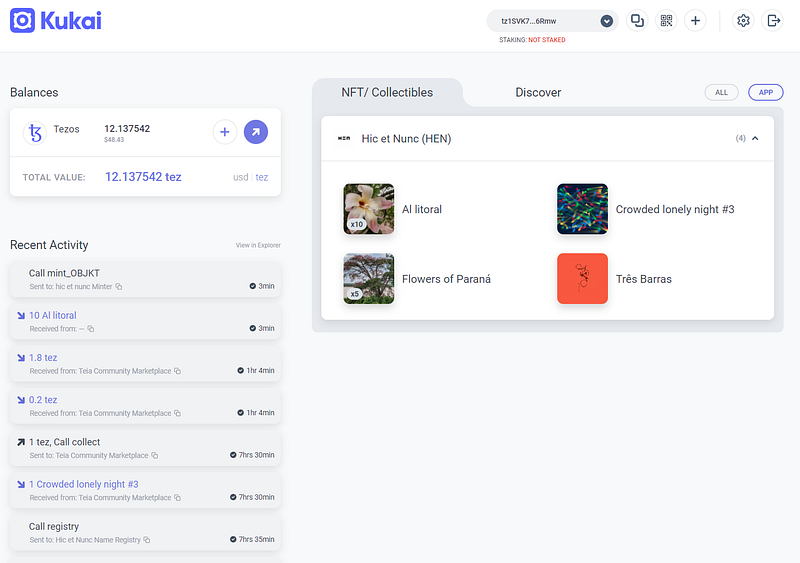
Still some more seconds of this screen in Teia after having confirmed the transaction, possibly even a couple of minutes. And then you’ll be done with the minting process, when you’ll see the newly minted NFT in your Kukai wallet. For example, here you see my wallet holding two NFTs I’ve bought (Crowded lonely night #3 and Tres Barras) and two I minted myself (Al litoral and Flowers of Parana):
Step 4. Note that the just-minted NFTs are not available for trading yet. If you want to make them purchaseable, then first go to the object in Teia:
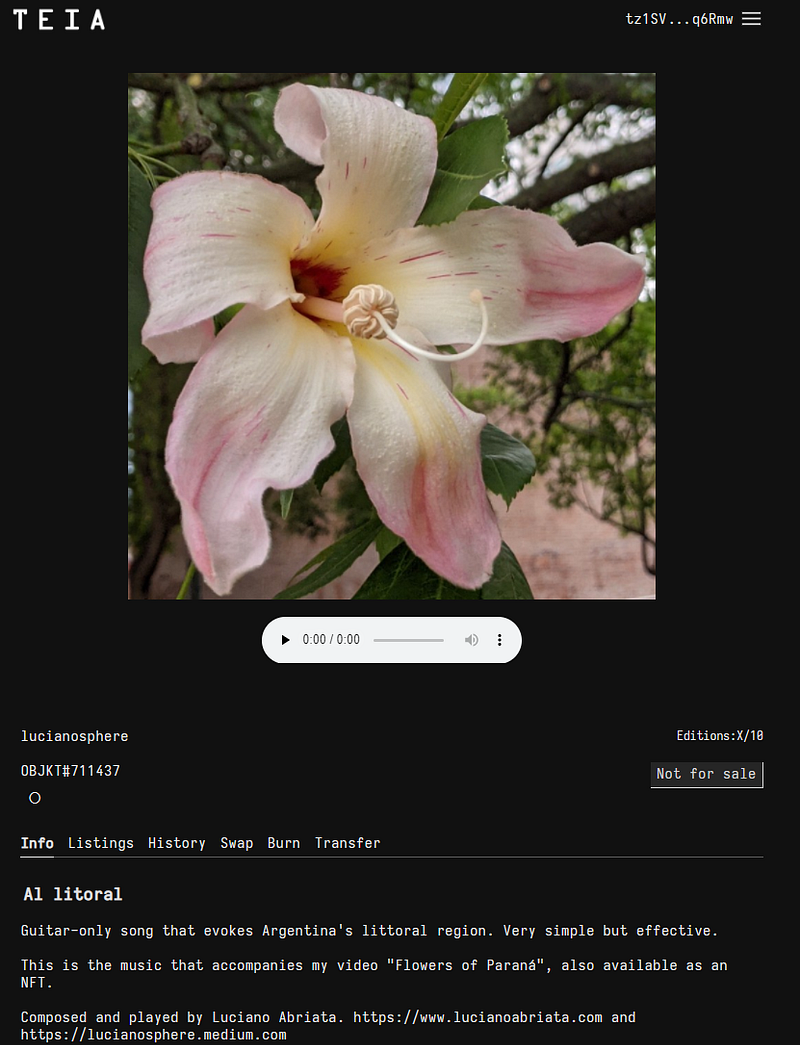
Then go to Swap (jargon word that approximately means “put for sale”) and choose how many original objects of this NFT you want to put for sale, and at what price:
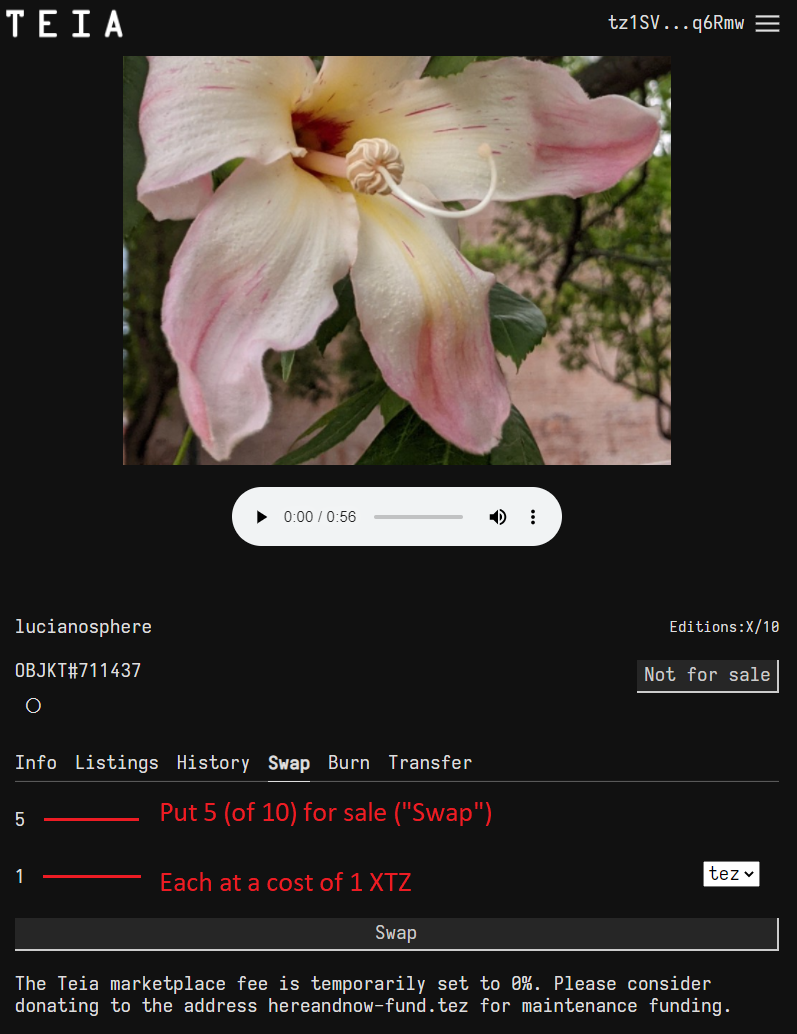
Notice that here I had minted 10 objects, and I put 5 of them for sale from now on.
When you click Swap you’ll have to go once more to Kukai and confirm the transaction.
Now, you are done. You have created your NFT and put it up for sale on Teia! Plus, in the previous section you learned how to buy NFTs from your favorite artists.
Here are my first two minted NFTs:
Al litoral (a guitar-only song in E major): https://teia.art/objkt/711437
Flowers of Paraná (own photographs of native flowers from NorthEast Argentina, arranged in video with Al litoral sounding in the background): https://teia.art/objkt/711145
Conclusions
We’ve seen here what NFTs are, how they apply to art, how to buy NFTs and how to create NFTs for your own artwork. As I always say, there’s no better path to learning than by doing.
Be careful with scams and pay attention to every transaction you sign. Have fun, learn, and who knows may be also become famous through your NFTs!
To know more about the crypto world with articles like this, check out the links in the introduction section of this article.
www.lucianoabriata.com I write and photoshoot about everything that lies in my broad sphere of interests: nature, science, technology, programming, etc. Become a Medium member to access all its stories (affiliate links of the platform for which I get small revenues without cost to you) and subscribe to get my new stories by email. To consult about small jobs check my services page here. You can contact me here.