
Building an AI 8-Ball with RoBERTa
Can an Artificial Neural Network answer yes/no questions? Signs point to yes.
Overview
In this post, I’ll show you how I built an AI 8-Ball that can answer yes/no questions using the power of the Internet and current Machine Learning techniques. I’ll start with a high-level description of the system and then get into the details of the components along with excerpts of the Python code. I’ll show how you can get both a percentage no-to-yes answer and a percentage confidence level as outputs. Finally, I’ll give instructions on how to run the AI 8-Ball to answer your own questions.
Background
Have you ever used a Magic 8-Ball? It was a toy introduced by Mattel in the ’50s that is still sold today. It’s pretty simple. It’s an over-sized 8-ball that answers yes/no questions. It has a 20-sided die floating in a murky liquid that uses the “magic” of random choice to answer questions. Of the twenty possible answers, five of them mean no, like “Very doubtful”, five mean maybe, like “Reply hazy, try again”, and ten mean yes, like “It is certain”.
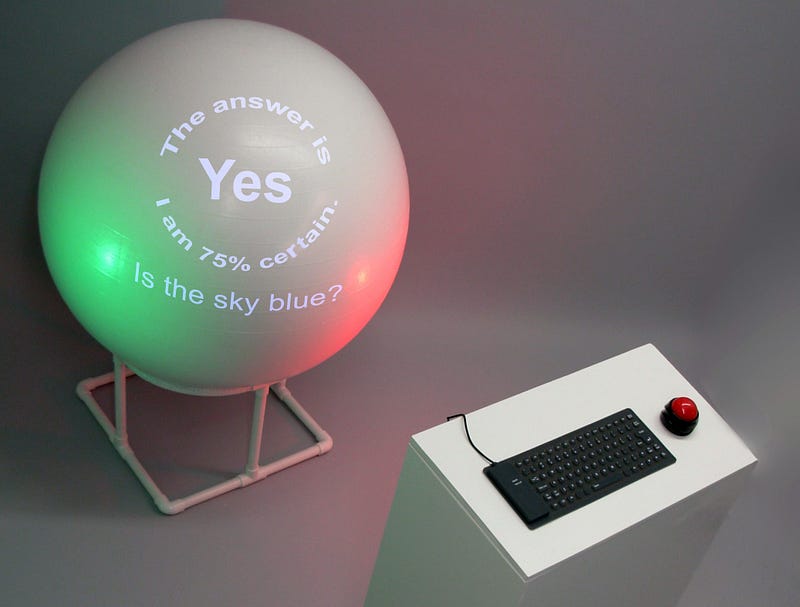
I built an early prototype of an AI 8-Ball back in 2007, pictured above, and showed it at the MIT Stata Center as part of a group show called COLLISIONcollective C11. My first version used an Artificial Neural Network (ANN) that is tiny by today’s standards, with only 1,056 neural connections. My new version uses an ANN called the large RoBERTa model which has 355 million neural connections [1].
The AI 8-Ball
The AI 8-Ball is built using several existing components for Natural Language Processing (NLP). The heart of the system is the large RoBERTa model, which I fine-tuned to answer yes/no questions using the BoolQ dataset from Google AI [2].
Users can type in any question, and the system gathers supporting text passages from Wikipedia, The New York Times, and the BoolQ dataset. I employ a system called PyTextRank to extract keywords from the question that are used to look up Wikipedia and NYT articles. I also use the Universal Sentence Encoder [3] from Google to check for similar questions in the BoolQ dataset. If there is a close match, I use the associated text as a third passage.
All passages, along with the question, are sent into the RoBERTa model to run inferences. Each inference returns three percentages: yes, no, and confidence. The inference with the highest confidence level is reported to the user as the answer. Below is a diagram that shows the components with a sample question and the results.
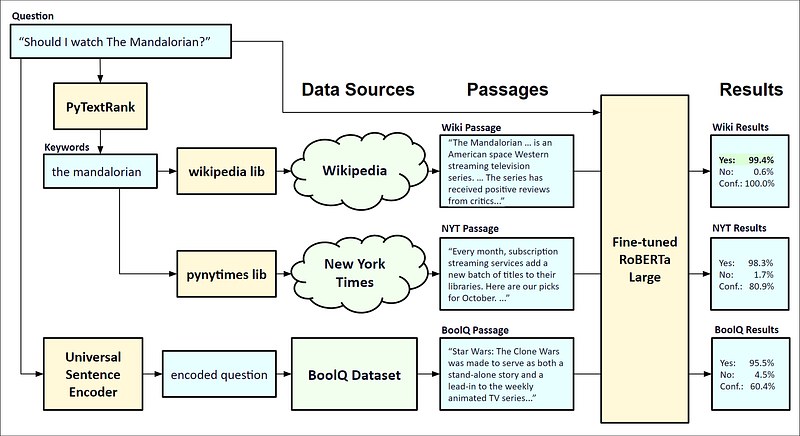
AI 8-Ball Components and Details
BERT and RoBERTa
BERT is the name of an NLP model that was built and trained by Google. The name stands for Bidirectional Encoder Representations from Transformers. The system is designed to perform common NLP tasks like machine translation, document summarization, and text generation. More info about BERT can be found in Rani Horev’s post here.
For this project, I’m using the RoBERTa model, which is an improvement on the original BERT. It was designed and trained by researchers at the University of Washington and Facebook. Enhancements for RoBERTa include training the model longer with bigger batches, using more data with longer sequences, as well as other changes to improve accuracy[4].
The BoolQ Dataset
BoolQ is a dataset from Google AI that contains about 16K examples of text with corresponding yes/no questions [3]. Each entry contains a question, title, answer, and a passage of text. This dataset can be used to train and test NLP systems for answering yes/no questions. For example, here is one of the entries.
{"question": "did the cincinnati bengals ever win a superbowl", "title": "Cincinnati Bengals", "answer": false, "passage": "The Bengals are one of the 12 NFL teams to not have won a Super Bowl as of the 2017 season; however, they are also one of 8 NFL teams that have been to at least one Super Bowl, but have not won the game."}
Fine-tuning the AI 8-Ball
I fine-tuned the RoBERTa model using the BoolQ dataset, starting with code from Michael Vincent’s post here. I amended his code to use a larger model and set the hyperparameters like the batch size and number of epochs to allow it to be trained in Google Colab. My updated training code is here.
Running an Inference
The Python code below shows how to use RoBERTa for answering yes/no questions. As an example, the first paragraph of the Wikipedia article on the Magic 8-Ball is passed into the model along with six yes/no questions.
Both the text and the question are tokenized and passed into the model. It returns a vector that contains a yes and no part. Probabilities of the answer being yes or no can be derived using the softmax function in PyTorch. A confidence level can be derived from the length of the vector. Here are the results of the six questions:
It seems to have answered all questions correctly. Notice how the confidence level varies, but not always in line with the percent yes/no. For example, the first sentence of the passage clearly states that the Magic 8-Ball is a sphere, so the answer to the first question gets high marks for both yes and confidence. However, the sentence in the passage about inventorship refers to the Magic 8-Ball using the pronoun “it”, so that’s why the answers to questions about inventorship are dropped down a bit in certainty. We’ll use this feature later when mapping to the classic Magic 8-Ball answers.
PyTextRank
The system uses an algorithm called TextRank to extract keywords and phrases from the user’s question[5]. It’s based on the famous PageRank algorithm that Larry Page, et. al, invented for web searches. You pass in a block of text and it returns key phrases ranked by relevance. Here is some sample code that shows how it can extract keywords from a question.
Question: Can a computer beat a grandmaster chess player?
Keywords: a grandmaster, chess player, a computer
You can see that it does a good job of extracting the key phrases.

Getting the Text Passages
Now that we have the keywords, we can use them to query Wikipedia and The New York Times to see if there are any relevant articles to use as text passages for the question. Also, we’ll use a search algorithm to find the closest question in the BoolQ dataset using a k-d tree, short for a k-dimensional tree, a data structure used for fast searches of multidimensional data [6]. If the match is close, we’ll use the corresponding text as the third passage. Here is the python code to perform all three searches and pass them into the RoBERTa model to get the results.
Now that we have the three results, we’ll use this code to see which one has the highest confidence level.
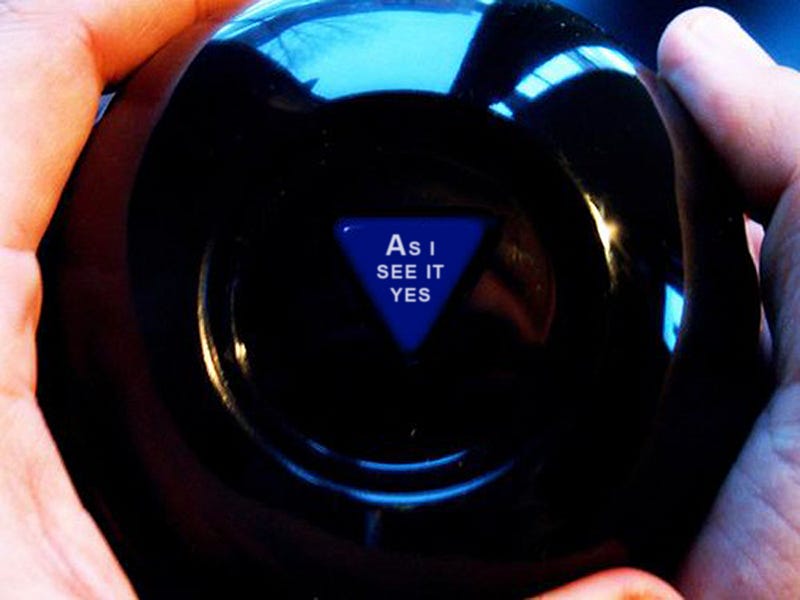
Classic Magic 8-Ball Answers
The above algorithm gives us two output parameters: percentage yes and percentage confidence. In order to map these two parameters to the closest classic Magic 8-Ball answer, I first mapped the 20 answers into a multi-dimensional space using the Universal Sequence Encoder. I then reduced the dimensions to two and rotated the points to align with a no-to-yes horizontal axis and a low-to-high confidence vertical axis. The code to do the mapping is here. The graph below shows the results.
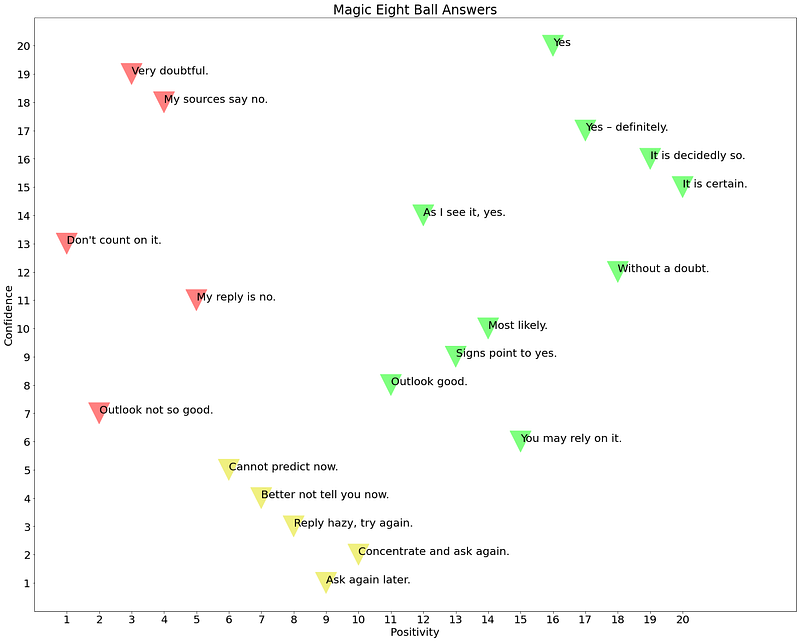
The two parameters for the final answer are mapped to the classic Magic 8-Ball using this code.
Here is the output of the AI 8-Ball for the sample question.
Question: Can a computer beat a grandmaster chess player?Checking the Wikipedia. Checking the New York Times. Checking the BoolQ Dataset.
The AI 8-Ball's Answer: It is certain.Yes: 99.52%
No: 0.48%
Confidence: 100%
Source: BoolQ Dataset
Passage: Chess programs running on commercially-available desktop computers had convincing victories against human players in matches in 2005 and 2006. Since that time, chess programs running on commercial hardware - more recently including mobile phones - have been able to defeat even the strongest human players.With a yes percentage of 99.52% and a confidence of 100%, it maps to the closest answer, “It is certain”.
Running the AI 8-Ball
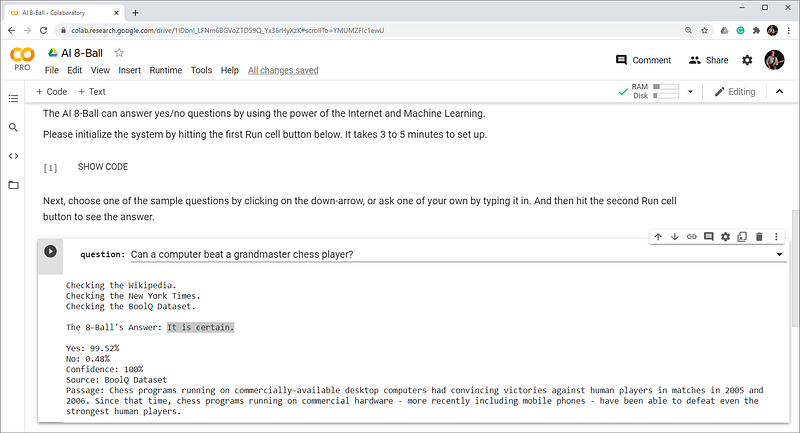
You can run the AI 8-Ball on Google Colab. Note that you will need a Google account to run it.
- Click on the link, here.
- Log into your Google account, if you’re not logged in already.
- Click the first Run cell button (hover over the [ ] icon and click the play button). A warning will appear indicating that this notebook was not created by Google.
- Click Run anyway to initialize the system. It takes about 3 to 5 minutes to download the datasets and configure the fine-tuned RoBERTa model.
- Choose a question or type in your own and hit the second Run cell button to see how the AI 8-Ball answers.
- Repeat step 5 to ask additional questions.
Future Work
Possible improvements to the AI 8-Ball could include using speech to text for asking questions and adding animation to reveal the answer. These additions might give the project more of a “magic” feel.
Acknowledgments
I would like to thank Jennifer Lim, Oliver Strimpel, Vahid Khorasani Ghassab, and Mahsa Mesgaran for their help with this project.
Source Code
All source code for this project is available on GitHub. The sources are released under the CC BY-SA license.

References
[1] Yinhan Liu, Myle Ott, Naman Goyal, Jingfei Du, Mandar Joshi, Danqi Chen, Omer Levy, Mike Lewis, Luke Zettlemoyer, Veselin Stoyanov, “Roberta: A robustly optimized BERTpretraining approach”, 2019, https://arxiv.org/pdf/1907.11692.pdf
[2] Christopher Clark, Kenton Lee, Ming-Wei Chang, Tom Kwiatkowski, Michael Collins, Kristina Toutanova, “BoolQ: Exploring the Surprising Difficulty of Natural Yes/No Questions”, 2019, https://arxiv.org/pdf/1905.10044.pdf
[3] Daniel Cer, Yinfei Yang, Sheng-yi Kong, Nan Hua, Nicole Limtiaco, Rhomni St. John, Noah Constant, Mario Guajardo-Cespedes, Steve Yuan, Chris Tar, Yun-Hsuan Sung, Brian Strope, Ray Kurzweil, “Universal Sentence Encoder”, 2018, https://arxiv.org/pdf/1803.11175.pdf
[4] Jacob Devlin, Ming-Wei Chang, Kenton Lee, Kristina Toutanova, “BERT: Pre-training of Deep Bidirectional Transformers for Language Understanding”, 2018, https://arxiv.org/pdf/1810.04805.pdf
[5] Rada Mihalcea, Paul Tarau, “TextRank: Bringing Order into Texts”, 2004, https://web.eecs.umich.edu/~mihalcea/papers/mihalcea.emnlp04.pdf
[6] Songrit Maneewongvatana, David M. Mount, “Analysis of Approximate Nearest Neighbor Searching with Clustered Point Sets”, 1999, https://arxiv.org/pdf/cs/9901013.pdf