
Building a Data Stream Pipeline — Part 2 with Kafka Streams and Cassandra
Introduction:
In the first part of this series, we built a data stream pipeline to fetch cryptocurrency prices from a Crypto API and store them in Kafka topics named btc_price and eth_price. In this second part, we will extend our pipeline to process the data using Kafka Streams, write the output to new Kafka topics btc_price24 and eth_price24, and store the data from all four topics in Cassandra's tables. We will use Airflow to orchestrate this process.

In this tutorial, we will cover the following steps:
- Install the required dependencies
- Create Cassandra tables for storing the data
- Write data from Kafka topics to Cassandra tables
- Schedule the Consumer program in Airflow
Let’s get started!
Step 1: Install the required dependencies
Before we start, make sure you have the following dependencies installed:
- confluent-kafka:
pip install confluent-kafka - cassandra-driver:
pip install cassandra-driver
Step 2: Create Cassandra tables for storing the data
2.1 First, you need to install Cassandra on your system. You can follow the official documentation for installing Cassandra on your preferred platform:
2.2 After installation, start the Cassandra server. On Linux and macOS, you can run the following command:
<path_to_cassandra>/bin/cassandraOn Windows, start the server by executing the following command in a command prompt:
<path_to_cassandra>\bin\cassandra.bat2.3 Now, to access the Cassandra CLI, you can use the cqlsh tool that comes with Cassandra. On Linux and macOS, run the following command:
<path_to_cassandra>/bin/cqlshOn Windows, execute the following command in a command prompt:
<path_to_cassandra>\bin\cqlsh.batYou should now have access to the Cassandra CLI.
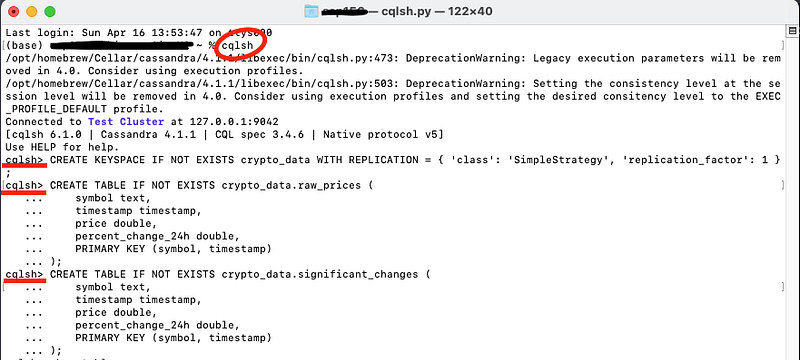
2.4 To store our data in Cassandra, we first need to create the necessary tables. Connect to your Cassandra cluster and execute the following CQL statements to create the tables:
CREATE KEYSPACE IF NOT EXISTS crypto_data WITH REPLICATION = { 'class': 'SimpleStrategy', 'replication_factor': 1 };CREATE TABLE crypto_data.raw_prices (
symbol TEXT,
timestamp TIMESTAMP,
price DOUBLE,
volume_24h DOUBLE,
percent_change_24h DOUBLE,
PRIMARY KEY (symbol, timestamp)
);
CREATE TABLE crypto_data.significant_changes (
symbol TEXT,
timestamp TIMESTAMP,
price DOUBLE,
volume_24h DOUBLE,
percent_change_24h DOUBLE,
PRIMARY KEY (symbol, timestamp)
);
Step 3: Write data from Kafka topics to Cassandra tables
Now, we will write the Kafka Streams program to write the data from the btc_price, eth_price, btc_price24, and eth_price24 topics to the corresponding Cassandra tables. Create a ‘kafka_streams.py’ Python script and copy and paste this code. This script processes the data from the btc_price and eth_price topics, write the output to new Kafka topics btc_price24, and eth_price24, and stores the data in corresponding Cassandra tables:
from confluent_kafka import Consumer, KafkaError, KafkaException, Producer, TopicPartition
from confluent_kafka.serialization import StringDeserializer, StringSerializer
from confluent_kafka.schema_registry import SchemaRegistryClient
from confluent_kafka.schema_registry.json_schema import JSONDeserializer, JSONSerializer
from cassandra.cluster import Cluster
from cassandra.query import SimpleStatement, BatchStatement
from cassandra import ConsistencyLevel
import json
import signal
import sys

def process_message(msg, producer):

    # Deserialize the message value
    deserialized_msg = json.loads(msg.value())
    #print("Received message:", deserialized_msg)


    # Insert the raw price data into the raw_prices table
    insert_raw_price_query = SimpleStatement(
        "INSERT INTO crypto_data.raw_prices (timestamp,symbol, price, volume_24h, percent_change_24h) VALUES (%s, %s, %s, %s, %s)",
        consistency_level=ConsistencyLevel.ONE
    )
    session.execute(insert_raw_price_query, (deserialized_msg['timestamp'],deserialized_msg['name'],  deserialized_msg['price'], deserialized_msg['volume_24h'], deserialized_msg['percent_change_24h']))
    print("Inserted raw price data")

    # Check if the percent change is greater than a certain threshold (e.g., 1%)
    if abs(deserialized_msg['percent_change_24h']) > 1:
        print("Significant price change detected:")
        #print(json.dumps(deserialized_msg, indent=2))

        # Insert the significant price change data into the significant_changes table
        insert_significant_change_query = SimpleStatement(
            "INSERT INTO crypto_data.significant_changes (timestamp, symbol, price, volume_24h, percent_change_24h) VALUES (%s, %s, %s, %s, %s)",
            consistency_level=ConsistencyLevel.ONE
        )
        session.execute(insert_significant_change_query, ( deserialized_msg['timestamp'],deserialized_msg['name'], deserialized_msg['price'], deserialized_msg['volume_24h'], deserialized_msg['percent_change_24h']))
        #print("Inserted significant price change data")

        # Produce the significant price change message to the appropriate Kafka topic
        new_topic = 'btc_price24' if deserialized_msg['name'] == 'Bitcoin' else 'eth_price24'
        producer.produce(new_topic, key=deserialized_msg['name'], value=json.dumps(deserialized_msg))
        producer.flush()
        #print("Produced significant price change message to topic:", new_topic)


def main():
    # Set up the Kafka consumer configuration
    conf = {
        'bootstrap.servers': 'localhost:9092',
        'group.id': 'crypto_stream_processor',
        'auto.offset.reset': 'earliest',
    }

    # Create a Kafka consumer instance
    consumer = Consumer(conf)

    # Subscribe to the 'btc_prices' and 'eth_prices' topics
    consumer.subscribe(['btc_price', 'eth_price'])

    # Set up the Kafka producer configuration
    producer_conf = {
        'bootstrap.servers': 'localhost:9092',
    }

    # Create a Kafka producer instance
    producer = Producer(producer_conf)

    # Register the signal handler with the lambda function to pass consumer and session
    signal.signal(signal.SIGINT, lambda sig, frame: signal_handler(sig, frame, consumer, session))

    # Poll for messages and process them
    while True:
        msg = consumer.poll(1.0)

        if msg is None:
            # No message received in the last poll interval
            continue
        elif msg.error():
            # Handle any errors that occurred while polling for messages
            raise KafkaException(msg.error())
        else:
            process_message(msg, producer)


def signal_handler(sig, frame, consumer, session):
    print('Shutting down gracefully...')
    consumer.close()
    session.shutdown()
    sys.exit(0)


if __name__ == "__main__":
    # Connect to the Cassandra cluster
    cluster = Cluster(['localhost'])
    session = cluster.connect('crypto_data')

    main()
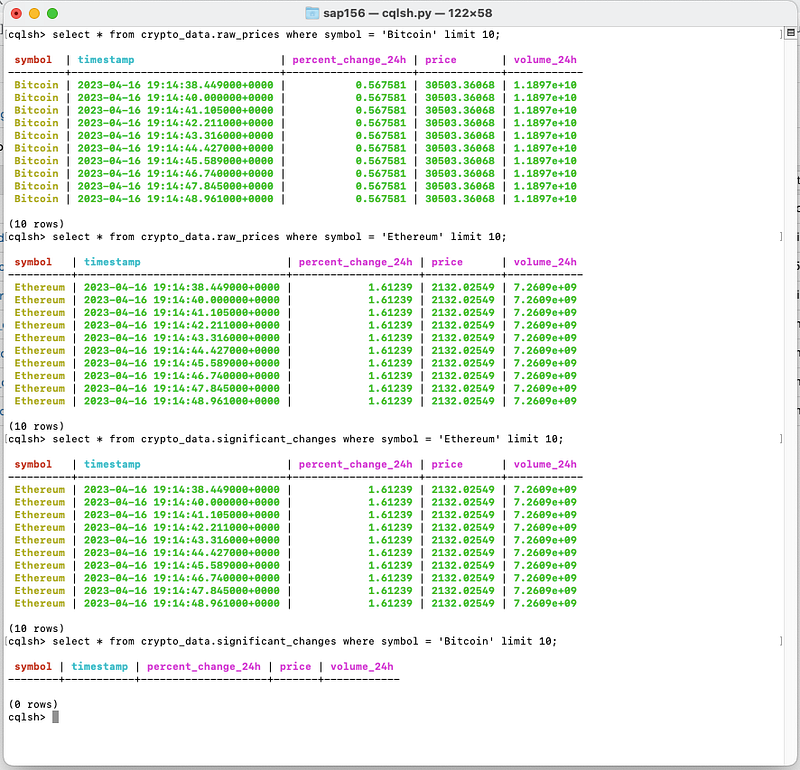
The Kafka Streams program writes the data from the btc_price, eth_price, btc_price24, and eth_price24 topics to the corresponding Cassandra tables.
You can query the Cassandra Tables to check if the data is flowing.
Step 4: Schedule the Consumer Python program in Airflow
Create a new DAG in the dags folder within your Airflow home directory. Name the file crypto_data_consumer.py
from datetime import timedelta
from airflow import DAG
from airflow.operators.python import PythonOperator
from datetime import datetime

# Import the main function from your consumer script
from kafka_streams import main

# Define the DAG
dag = DAG(
    dag_id='crypto_data_consumer',
    default_args={
        'owner': 'airflow',
        'retries': 10000,  # Set a high retry limit
        'retry_delay': timedelta(seconds=10),  # Set a short retry delay
    },
    start_date=datetime(2023, 4, 15),
    catchup=False,
    schedule_interval=timedelta(days=1),  # Set a long schedule interval to avoid starting multiple instances
)

# Define the PythonOperator task
data_consumer_task = PythonOperator(
    task_id='data_consumer',
    python_callable=main,
    dag=dag,
)

# Set the task dependencies
data_consumer_task
Run the DAG in Airflow just like we did for the Producer program in Part 1.
Conclusion:
In this second part of the series, we extended our data stream pipeline by processing the cryptocurrency price data using Kafka Streams, writing the output to new Kafka topics, and storing the data in Cassandra tables. This pipeline can be further extended by adding more processing steps or integrating with other data processing and storage systems as needed. Happy streaming!
Thanks for Reading!
If you like my work and want to support me…


