
Build Your Own Chatbot 🤖 with openAI GPT-3 and Streamlit 🎈
Creating a Chatbot Has Never Been Easier with GPT-3 and Streamlit
👨🏾💻 GitHub ⭐️| 🐦 Twitter | 📹 YouTube | ☕️ BuyMeaCoffee | Ko-fi💜
Not a medium member ? Use this link and read the article for free!
TL;DR
- Streamlit is used to create the chatbot interface and initialize variables to store the chat history.
- The chat history is displayed by iterating through the
generatedandpastlists and using themessagefunction to display each message. - The tutorial provides a detailed guide on how to build a chatbot using OpenAI’s GPT-3 API and Streamlit.
The current blog post is well explained in this video ⤵️
Note : Consider this post/video tutorial as a continutation of the previous tutorial on Summarizing Scientific Articles with OpenAI ✨ and Streamlit 🎈 .
📌 Importing the libraries
The first step is to import the necessary libraries. We will be using openai to access the text generation API and streamlit to create the chatbot interface.
import openai
import streamlit as st

# pip install streamlit-chat
from streamlit_chat import message
Next, we will need to set the API key for OpenAI. This key is used to authenticate our requests to the API.
openai.api_key = st.secrets["api_secret"]Refer to the "🔧 Setting Up" section in the previous article for generating openAI API key and Streamlit secrets.
📢 Generating responses from the API
We create a function called generate_response that takes in a prompt and generates a response using the OpenAI API. The openai.Completion.create function allows us to generate text by providing it with a starting prompt. We can specify the engine to use, the prompt to generate text from, the maximum number of tokens (words and punctuation) to generate with max_tokens, the number of responses to generate with n, and a string to stop generating text at with stop. We can also adjust the temperature parameter, which controls the randomness of the generated text.
def generate_response(prompt):
    completions = openai.Completion.create(
        engine = "text-davinci-003",
        prompt = prompt,
        max_tokens = 1024,
        n = 1,
        stop = None,
        temperature=0.5,
    )
    message = completions.choices[0].text
    return message
We will use Streamlit to create the chatbot interface — by setting the title of the page and initializing some variables to store the chat history.
#Creating the chatbot interface
st.title("chatBot : Streamlit + openAI")

# Storing the chat
if 'generated' not in st.session_state:
    st.session_state['generated'] = []

if 'past' not in st.session_state:
    st.session_state['past'] = []
Next, a function called get_text is created that returns the user's input from a text input field.
# We will get the user's input by calling the get_text function
def get_text():
    input_text = st.text_input("You: ","Hello, how are you?", key="input")
    return input_text
If user_input is not empty, we will generate a response using the generate_response function and store it in a variable called output. We will also append the user's input and the generated response to the past and generated lists, respectively, to keep track of the chat history.
user_input = get_text()

if user_input:
    output = generate_response(user_input)
    # store the output
    st.session_state.past.append(user_input)
    st.session_state.generated.append(output)
Finally, we will display the chat history by iterating through the generated and past lists and using the message function from the streamlit_chat library to display each message.
if st.session_state['generated']:

    for i in range(len(st.session_state['generated'])-1, -1, -1):
        message(st.session_state["generated"][i], key=str(i))
        message(st.session_state['past'][i], is_user=True, key=str(i) + '_user')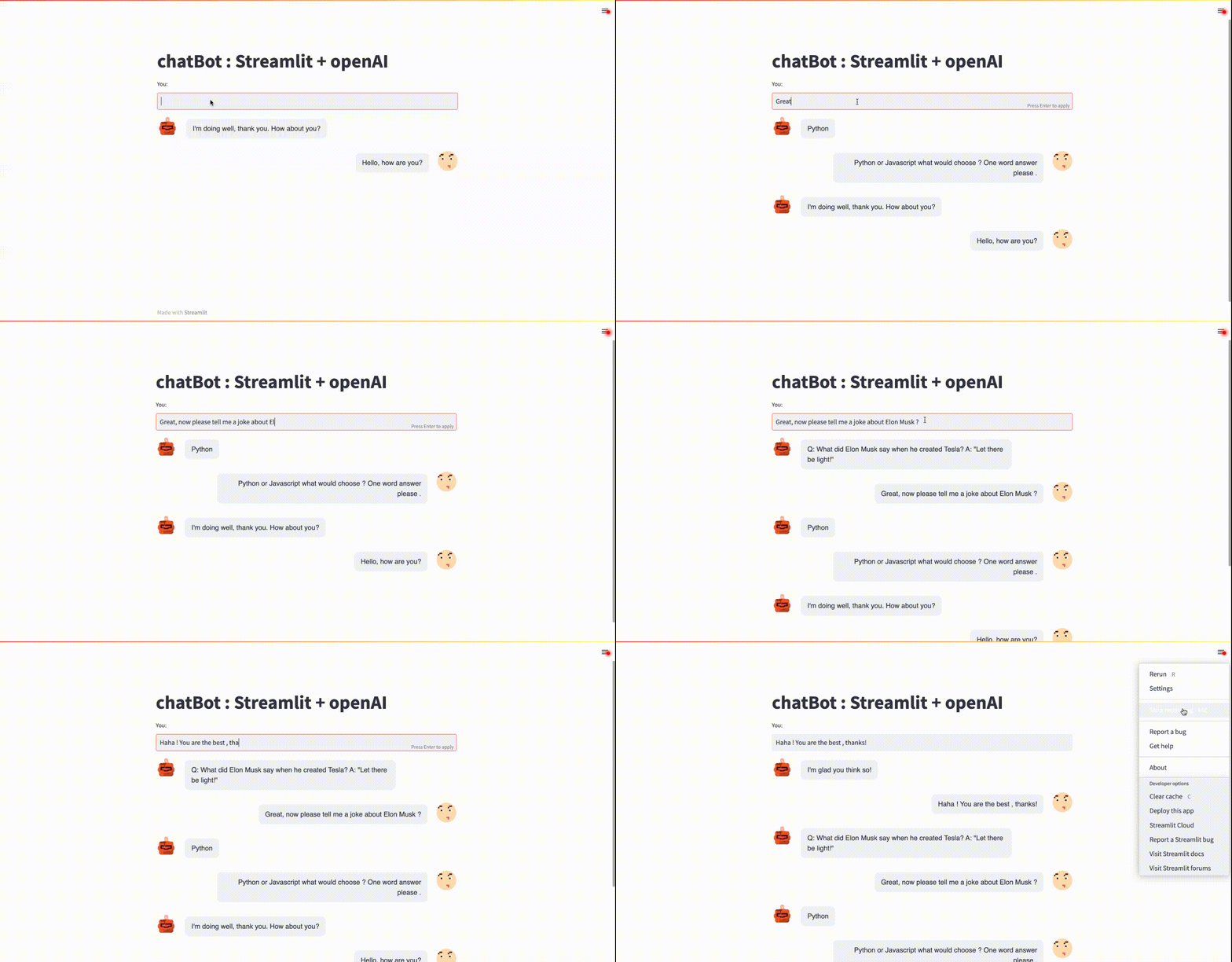
🚀 Conclusion
In conclusion, we have successfully built a chatbot 🤖 using OpenAI’s GPT-3 API and Streamlit🎈! With just a few lines of code, we were able to create a simple but powerful chatbot that can generate responses to user inputs. Congratulations! 🥳
👨🏾💻 GitHub ⭐️| 🐦 Twitter | 📹 YouTube | ☕️ BuyMeaCoffee | Ko-fi💜
Hi there ! I’m always on the lookout for sponsorship, affiliate links and writing gigs to keep growing my online contents. Any support, feedback and suggestions is very much appreciated ! Drop an email here : [email protected]🤗
📝 References :
- Summarizing Scientific Articles with OpenAI ✨ and Streamlit 🎈
- Video tutorial
- Streamlit-Chat component — https://github.com/AI-Yash/st-chat (A big shout-out to the developers) 🥳
- openAI https://openai.com
- Streamlit https://streamlit.io
- https://beta.openai.com/docs/introduction
👨🏾💻 GitHub ⭐️| 🐦 Twitter | 📹 YouTube | ☕️ BuyMeaCoffee | Ko-fi💜


