
Build an AI Chatbot Using LangChain🦜🔗
A detailed guidance on how to use LangChain LLMs and ChatModels in React

LangChain is a framework for developing applications powered by large language models (LLMs). LLMs is a type of AI algorithm that uses deep learning techniques and massively large data sets to understand, summarize, generate, and predict new content.
LangChain exists to make it as easy as possible to develop LLM-powered applications. It provides the capability to build AI powered systems using chains, which break down problems into smaller sub-tasks. Each chain performs a specific task, such as parsing user input, calling LLMs, and parsing output. It introduces context and memory into OpenAI completions (responses) by creating intermediate steps and chaining commands together.
In this article, we will take a look at the basic functionality of LangChain that supports two types of language models:
- LLMs: It takes a string as input and returns a string.
- ChatModels: It takes a list of messages as input and returns a message.
A chatbot is a software application or web interface that aims to mimic human conversation through text or voice interactions. We will build an AI Chatbot Using LangChain.
LangChain LLMs
We use a Vite application to explore LangChain LLMs. The React-based TypeScript project can be created by the following command:
% yarn create vite react-langchain --template react-ts
% cd react-langchain
decamelize is required by langchain. It is a package that converts a camelized string into a lowercased one with a custom separator. For example: unicornRainbow → unicorn_rainbow.
Install both decamelize and langchain.
% yarn add decamelize langchainAfter the installation, they become part of dependencies in package.json:
"dependencies": {
  "decamelize": "^6.0.0",
  "langchain": "^0.0.154",
  "react": "^18.2.0",
  "react-dom": "^18.2.0"
}
langchain/llms/openai is a wrapper of OpenAI LLMs, which requires OPENAI_API_KEY to make API calls. The key can be obtained from OpenAI. It is a free account with $18 credit that can be used during the first 3 months. Afterward, it needs to be continued with a paid model.
It is recommended to set it to an environment variable to keep it handy and safe.
% export OPENAI_API_KEY="<your-openai-key>"Create .env at root to assign the environment value to VITE_OPENAI_API_KEY:
VITE_OPENAI_API_KEY=$OPENAI_API_KEYWe build an app to respond to the user input prompt. The UI is similar to what we did for the next.js GPT app.
Modify src/App.tsx with OpenAI imported from 'langchain/llms/openai':
import React from 'react';
import { OpenAI } from 'langchain/llms/openai';

function App() {
  const [value, setValue] = React.useState<string>('');
  const [prompt, setPrompt] = React.useState<string>('');
  const [result, setResult] = React.useState<string>('');
  const llmRef = React.useRef<OpenAI>();

  const handleInput = React.useCallback(
    (e: React.ChangeEvent<HTMLInputElement>) => {
      setValue(e.target.value);
    },
    []
  );

  const handleKeyDown = React.useCallback(
    async (e: React.KeyboardEvent<HTMLInputElement>) => {
      if (!llmRef.current) {
        return;
      }
      if (e.key === 'Enter') {
        setPrompt(value);
        setResult('Loading...');
        // it takes a string as input and returns a string
        setResult(await llmRef.current.predict(value));
        setValue('');
      }
    },
    [value]
  );

  React.useEffect(() => {
    // create an instance for LangChain LLMs
    llmRef.current = new OpenAI({
      // use OPENAI_API_KEY
      openAIApiKey: import.meta.env.VITE_OPENAI_API_KEY,
    });
  }, []);

  return (
    <>
      <div>Please type your prompt</div>
      <input value={value} onChange={handleInput} onKeyDown={handleKeyDown} />
      <div>Prompt: {prompt}</div>
      <div>Result: {result}</div>
    </>
  );
}

export default App;
Modify src/index.css to style the app:
:root {
  font-family: Inter, system-ui, Avenir, Helvetica, Arial, sans-serif;
  line-height: 1.5;
  font-weight: 400;

  color-scheme: light dark;
  color: rgba(255, 255, 255, 0.87);
  background-color: #242424;

  font-synthesis: none;
  text-rendering: optimizeLegibility;
  -webkit-font-smoothing: antialiased;
  -moz-osx-font-smoothing: grayscale;
  -webkit-text-size-adjust: 100%;
}

body {
  margin: 0;
  display: flex;
  place-items: flex-start;
  min-width: 320px;
  min-height: calc(100vh - 40px);
}

#root {
  display: flex;
  flex-direction: column;
  padding: 20px;
  width: 100%;
  gap: 20px;
}

input {
  width: 80%;
}
Execute yarn dev, and we have the app running.
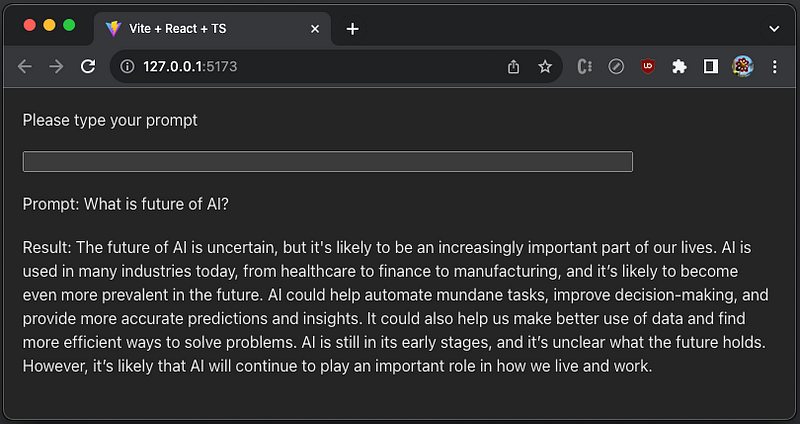
The above screenshot is the completion of the prompt, What is future of AI?
LangChain ChatModels
Our LangChain ChatModels app is composed by the model—ChatOpenAI, the tools — Calculator and SerpApi, and the agent — initializeAgentExecutorWithOptions.
The model — ChatOpenAI
ChatOpenAI is imported from 'langchain/chat_models/openai', which takes a list of messages as input and returns a message.
The tools — Calculator and SerpApi
Calculator is a tool to evaluate mathematical expressions.
SerpApi is a real-time API to access Google search results. In order to use SerpApi, we need to rigister at https://serpapi.com/ to get SERPAPI_API_KEY. The free account allows 100 searches per month.
Similar to OPENAI_API_KEY, we set up SERPAPI_API_KEY as an environment variable.
% export SERPAPI_API_KEY="<your-serpapi-key>"In .env, assign the environment value to VITE_SERPAPI_API_KEY:
VITE_OPENAI_API_KEY=$OPENAI_API_KEY
VITE_SERPAPI_API_KEY=$SERPAPI_API_KEY
The agent — initializeAgentExecutorWithOptions
In LangChain, an agent has access to a suite of tools and determines which ones to use based on the user input. For multiple tools, the output of one tool can be the input to the next.
In our example, the agent initializeAgentExecutorWithOptions is invoked, which takes two tools, Calculator and SerpApi.
Modify src/App.tsx with ChatOpenAI imported from 'langchain/chat_models/openai':
import React from 'react';
import { ChatOpenAI } from 'langchain/chat_models/openai';
import { initializeAgentExecutorWithOptions, AgentExecutor } from 'langchain/agents';
import { SerpAPI } from 'langchain/tools';
import { Calculator } from 'langchain/tools/calculator';

function App() {
  const [value, setValue] = React.useState<string>('');
  const [prompt, setPrompt] = React.useState<string>('');
  const [result, setResult] = React.useState<string>('');
  const executor = React.useRef<AgentExecutor>();

  const handleInput = React.useCallback(
    (e: React.ChangeEvent<HTMLInputElement>) => {
      setValue(e.target.value);
    },
    []
  );

  const handleKeyDown = React.useCallback(
    async (e: React.KeyboardEvent<HTMLInputElement>) => {
      if (!executor.current) {
        return;
      }
      if (e.key === 'Enter') {
        setPrompt(value);
        setResult('Loading...');
        // agent takes a list of messages as input and returns a message
        const response = await executor.current.call({input: value});
        setResult(response.output);
        setValue('');
      }
    },
    [value]
  );

  React.useEffect(() => {
    const init = async () => {

      // define a model
      const model = new ChatOpenAI({
        // use OPENAI_API_KEY
        openAIApiKey: import.meta.env.VITE_OPENAI_API_KEY,
        // use GPT 4
        modelName: 'gpt-4',
        // temperature is a number between 0 and 2, with a default value of
        // 1 or 0.7 depending on the selected model. The temperature is used
        // to control the randomness of the output. When it is set higher,
        // there will be more random outputs.
        temperature: 0,
      });

      // define two tools
      const tools = [
        new Calculator(),
        new SerpAPI(import.meta.env.VITE_SERPAPI_API_KEY),
      ];

      // initialize the agent with two tools
      executor.current = await initializeAgentExecutorWithOptions(
        tools,
        model,
        {
          agentType: 'openai-functions',
          // show verbose information in browser console
          verbose: true,
        }
      );
    };

    init();
  }, []);

  return (
    <>
      <div>Please type your prompt</div>
      <input value={value} onChange={handleInput} onKeyDown={handleKeyDown} />
      <div>Prompt: {prompt}</div>
      <div>Result: {result}</div>
    </>
  );
}

export default App;
Execute yarn dev, and we have the app running.
Here is the first chat:
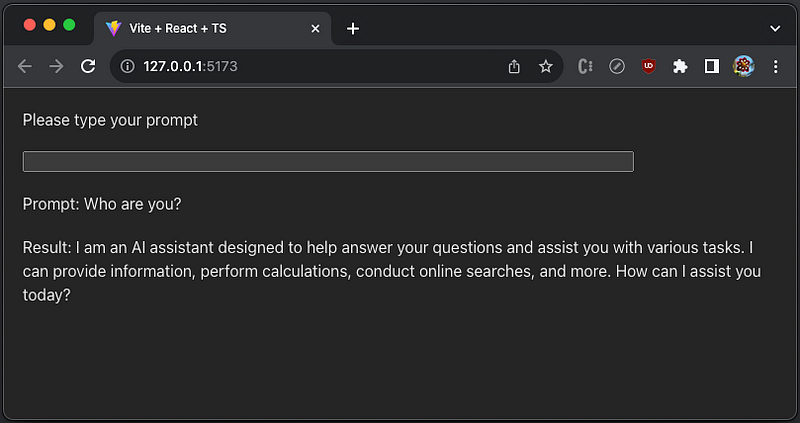
The verbose information shows in browser console:
[chain/start] [1:chain:AgentExecutor] Entering Chain run with input: {
  "input": "Who are you?",
  "chat_history": []
}
console.js:123 [llm/start] [1:chain:AgentExecutor > 2:llm:ChatOpenAI] Entering LLM run with input: {
  "messages": [
    [
      {
        "lc": 1,
        "type": "constructor",
        "id": [
          "langchain",
          "schema",
          "SystemMessage"
        ],
        "kwargs": {
          "content": "You are a helpful AI assistant.",
          "additional_kwargs": {}
        }
      },
      {
        "lc": 1,
        "type": "constructor",
        "id": [
          "langchain",
          "schema",
          "HumanMessage"
        ],
        "kwargs": {
          "content": "Who are you?",
          "additional_kwargs": {}
        }
      }
    ]
  ]
}
console.js:132 [llm/end] [1:chain:AgentExecutor > 2:llm:ChatOpenAI] [2.64s] Exiting LLM run with output: {
  "generations": [
    [
      {
        "text": "I am an AI assistant designed to help answer your questions and assist you with various tasks. I can provide information, perform calculations, conduct online searches, and more. How can I assist you today?",
        "message": {
          "lc": 1,
          "type": "constructor",
          "id": [
            "langchain",
            "schema",
            "AIMessage"
          ],
          "kwargs": {
            "content": "I am an AI assistant designed to help answer your questions and assist you with various tasks. I can provide information, perform calculations, conduct online searches, and more. How can I assist you today?",
            "additional_kwargs": {}
          }
        },
        "generationInfo": {
          "finish_reason": "stop"
        }
      }
    ]
  ],
  "llmOutput": {
    "tokenUsage": {
      "completionTokens": 41,
      "promptTokens": 117,
      "totalTokens": 158
    }
  }
}
console.js:102 [chain/end] [1:chain:AgentExecutor] [2.64s] Exiting Chain run with output: {
  "output": "I am an AI assistant designed to help answer your questions and assist you with various tasks. I can provide information, perform calculations, conduct online searches, and more. How can I assist you today?"
}
Here is the second chat:
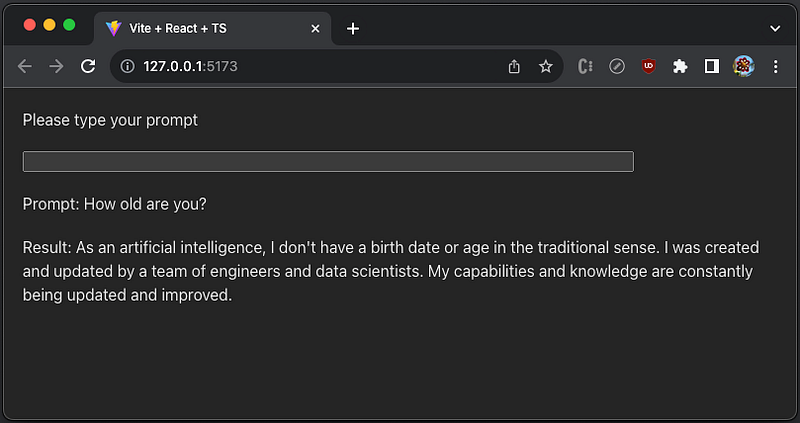
The verbose information shows in browser console:
[chain/start] [1:chain:AgentExecutor] Entering Chain run with input: {
  "input": "How old are you?",
  "chat_history": [
    {
      "lc": 1,
      "type": "constructor",
      "id": [
        "langchain",
        "schema",
        "HumanMessage"
      ],
      "kwargs": {
        "content": "Who are you?",
        "additional_kwargs": {}
      }
    },
    {
      "lc": 1,
      "type": "constructor",
      "id": [
        "langchain",
        "schema",
        "AIMessage"
      ],
      "kwargs": {
        "content": "I am an AI assistant designed to help answer your questions and assist you with various tasks. I can provide information, perform calculations, conduct online searches, and more. How can I assist you today?",
        "additional_kwargs": {}
      }
    }
  ]
}
console.js:123 [llm/start] [1:chain:AgentExecutor > 2:llm:ChatOpenAI] Entering LLM run with input: {
  "messages": [
    [
      {
        "lc": 1,
        "type": "constructor",
        "id": [
          "langchain",
          "schema",
          "SystemMessage"
        ],
        "kwargs": {
          "content": "You are a helpful AI assistant.",
          "additional_kwargs": {}
        }
      },
      {
        "lc": 1,
        "type": "constructor",
        "id": [
          "langchain",
          "schema",
          "HumanMessage"
        ],
        "kwargs": {
          "content": "Who are you?",
          "additional_kwargs": {}
        }
      },
      {
        "lc": 1,
        "type": "constructor",
        "id": [
          "langchain",
          "schema",
          "AIMessage"
        ],
        "kwargs": {
          "content": "I am an AI assistant designed to help answer your questions and assist you with various tasks. I can provide information, perform calculations, conduct online searches, and more. How can I assist you today?",
          "additional_kwargs": {}
        }
      },
      {
        "lc": 1,
        "type": "constructor",
        "id": [
          "langchain",
          "schema",
          "HumanMessage"
        ],
        "kwargs": {
          "content": "How old are you?",
          "additional_kwargs": {}
        }
      }
    ]
  ]
}
console.js:132 [llm/end] [1:chain:AgentExecutor > 2:llm:ChatOpenAI] [3.30s] Exiting LLM run with output: {
  "generations": [
    [
      {
        "text": "As an artificial intelligence, I don't have a birth date or age in the traditional sense. I was created and updated by a team of engineers and data scientists. My capabilities and knowledge are constantly being updated and improved.",
        "message": {
          "lc": 1,
          "type": "constructor",
          "id": [
            "langchain",
            "schema",
            "AIMessage"
          ],
          "kwargs": {
            "content": "As an artificial intelligence, I don't have a birth date or age in the traditional sense. I was created and updated by a team of engineers and data scientists. My capabilities and knowledge are constantly being updated and improved.",
            "additional_kwargs": {}
          }
        },
        "generationInfo": {
          "finish_reason": "stop"
        }
      }
    ]
  ],
  "llmOutput": {
    "tokenUsage": {
      "completionTokens": 45,
      "promptTokens": 170,
      "totalTokens": 215
    }
  }
}
console.js:102 [chain/end] [1:chain:AgentExecutor] [3.30s] Exiting Chain run with output: {
  "output": "As an artificial intelligence, I don't have a birth date or age in the traditional sense. I was created and updated by a team of engineers and data scientists. My capabilities and knowledge are constantly being updated and improved."
}
Build a Chatbot
We have seen how LangChain LLMs and ChatModels work. The above demo displays one conversation each time. It illustrates the concept, but the app itself is not a real chatbot yet.
react-chatbot-kit is installed to implement chatbot:
% yarn add react-chatbot-kitAfter the installation, react-chatbot-kit becomes part of dependencies in package.json:
"dependencies": {
  "decamelize": "^6.0.0",
  "langchain": "^0.0.154",
  "react": "^18.2.0",
  "react-chatbot-kit": "^2.1.2",
  "react-dom": "^18.2.0"
}
Here is the chatbot interface:
interface IChatbotProps {
  actionProvider: any;
  messageParser: any;
  config: IConfig;
  headerText?: string;
  placeholderText?: string;
  saveMessages?: (ref: any) => any;
  messageHistory?: IMessage[] | string;
  validator?: (input: string) => Boolean;
  runInitialMessagesWithHistory?: Boolean;
  disableScrollToBottom?: boolean;
}
It has three required props, actionProvider, messageParser, and config. Let’s configure these props with LangChain APIs.
Create src/ActionProvider.tsx, which defines the action generateResponse that sets up and invokes LangChain APIs to generate an output based on the user input.
import React from 'react';
import { ChatOpenAI } from 'langchain/chat_models/openai';
import {
  initializeAgentExecutorWithOptions,
  AgentExecutor,
} from 'langchain/agents';
import { SerpAPI } from 'langchain/tools';
import { Calculator } from 'langchain/tools/calculator';

const ActionProvider = ({ createChatBotMessage, setState, children }: any) => {
  const executor = React.useRef<AgentExecutor>();

  React.useEffect(() => {
    const init = async () => {
      // define a model
      const model = new ChatOpenAI({
        // use OPENAI_API_KEY
        openAIApiKey: import.meta.env.VITE_OPENAI_API_KEY,
        // use GPT 4
        modelName: 'gpt-4',
        // temperature is a number between 0 and 2, with a default value of
        // 1 or 0.7 depending on the selected model. The temperature is used
        // to control the randomness of the output. When it is set higher,
        // there will be more random outputs.
        temperature: 0,
      });

      // define two tools
      const tools = [
        new Calculator(),
        new SerpAPI(import.meta.env.VITE_SERPAPI_API_KEY),
      ];

      // initialize the agent with two tools
      executor.current = await initializeAgentExecutorWithOptions(
        tools,
        model,
        {
          agentType: 'openai-functions',
          // show verbose information in browser console
          verbose: true,
        }
      );
    };

    init();
  }, []);

  const generateResponse = async (message: string) => {
    if (executor.current) {
      // agent takes a list of messages as input and returns a message
      const response = await executor.current.call({ input: message });
      // the message is converted to a string message
      const botMessage = createChatBotMessage(response.output);

      setState((prev: any) => ({
        ...prev,
        // combine the previous and new messages
        messages: [...prev.messages, botMessage],
      }));
    }
  };

  return (
    <div>
      {React.Children.map(children, (child) => {
        return React.cloneElement(child, {
          actions: {
            // define the action
            generateResponse,
          },
        });
      })}
    </div>
  );
};

export default ActionProvider;
Create src/MessageParser.tsx, which invokes generateResponse defined in src/ActionProvider.tsx for parsing messages.
import React from 'react';

const MessageParser = ({ children, actions }: any) => {

  const parse = (message: string) => {
    // generateResponse is defined in src/ActionProvider.tsx
    actions.generateResponse(message);
  };

  return (
    <div>
      {React.Children.map(children, (child) => {
        return React.cloneElement(child, {
          parse,
          actions: {},
        });
      })}
    </div>
  );
};

export default MessageParser;
Create src/config.ts, which defines the initial message, bot name, and chatbot styles.
import { createChatBotMessage } from 'react-chatbot-kit';

const config = {
  initialMessages: [createChatBotMessage(`Let's talk`, {})],
  botName: 'AI Bot',
  customStyles: {
    botMessageBox: {
      backgroundColor: 'royalblue',
    },
    chatButton: {
      backgroundColor: 'gray',
    },
  },
};

export default config;
Modify src/index.css with react-chatbot-kit specific styles:
:root {
  font-family: Inter, system-ui, Avenir, Helvetica, Arial, sans-serif;
  line-height: 1.5;
  font-weight: 400;

  color-scheme: light dark;
  color: rgba(255, 255, 255, 0.87);
  background-color: #242424;

  font-synthesis: none;
  text-rendering: optimizeLegibility;
  -webkit-font-smoothing: antialiased;
  -moz-osx-font-smoothing: grayscale;
  -webkit-text-size-adjust: 100%;
}

body {
  margin: 0;
  display: flex;
  place-items: flex-start;
  min-width: 320px;
  min-height: calc(100vh - 40px);
}

#root {
  display: flex;
  flex-direction: column;
  padding: 20px;
  width: 100%;
}

.react-chatbot-kit-chat-container {
  width: 100%;
}

.react-chatbot-kit-chat-bot-message {
  width: auto;
}
Modify src/App.tsx to render the Chatbot:
import Chatbot from 'react-chatbot-kit';
import 'react-chatbot-kit/build/main.css';

import config from './config';
import MessageParser from './MessageParser';
import ActionProvider from './ActionProvider';

function App() {
  return (
    <Chatbot
      config={config}
      actionProvider={ActionProvider}
      messageParser={MessageParser}
    />
  );
}

export default App;
Execute yarn dev, and we can chat with LangChain AI:
This demo is located at this repository.
Conclusion
LangChain is a framework for developing applications powered by large language models (LLMs). It provides the capability to build AI powered systems using configurable chains, which makes it as easy as possible to develop LLM-powered applications
We have built the examples of LangChain LLMs and ChatModels in a Vite application. With react-chatbot-kit, LangChain is alive as a chatbot, carrying a conversation with human inputs.
Do you want to give it a try? A few lines of code for an LLM-powered application?
In addition, LangSmith is built on top of LangChain for building production-grade LLM applications, and you can continue reading in this article.
Thanks for reading!
Thanks, Ahmet Gyger and Subir Mansukhani, for working with me on Domino products.
Want to Connect?

If you are interested, check out my directory of web development articles.
In Plain English
Thank you for being a part of our community! Before you go:
- Be sure to clap and follow the writer! 👏
- You can find even more content at PlainEnglish.io 🚀
- Sign up for our free weekly newsletter. 🗞️
- Follow us on Twitter(X), LinkedIn, YouTube, and Discord.


