
Introducing Vite — Next Generation Frontend Tooling With Speed and Simplicity
React + TypeScript + Vite and an example of React Router

Introduction
Vite is the next generation frontend tooling that adopts many latest and coolest frontend technologies to provide a faster and leaner development experience for modern web projects.
Vite consists of two major parts:
- A dev server that serves source files over native ES modules, with rich built-in features and fast Hot Module Replacement.
- A build command that bundles code with Rollup, pre-configured to output highly optimized static assets for production.
In addition, Vite is highly extensible via its Plugin API and JavaScript API with full typing support.
Vite supports JavaScript/TypeScript, React, Vue, Preact, Lit, Svelte, Solid, and Qwik.
For the last two years, Vite’s usage has surpassed Create React App:
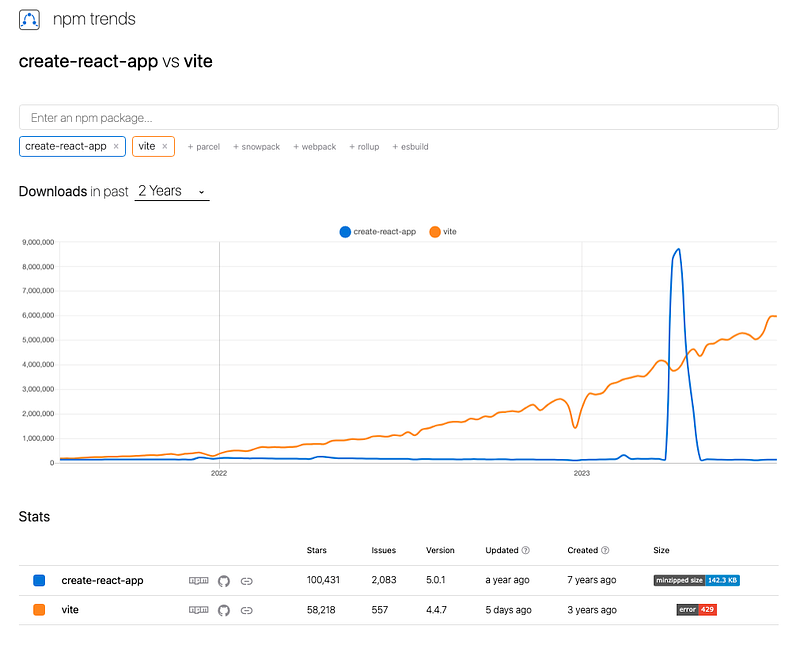
In this article, we will explore Vite with React and TypeScript. We will also provide an example on how to use React Router in the Vite project.
Install and Run Vite
We can run the following command to install Vite with an interactive wizard:
% yarn create vite
Alternatively, we can explicitly specify options to create a Vite project with React and TypeScript support.
% yarn create vite my-vite-app --template react-ts
Go to the directory and install the packages:
% cd my-vite-app
% yarn install
The project is ready to go.
package.json is located at the root directory. Inside package.json, there are four scripts, "dev", "build", "preview", and "lint".
"scripts": {
    "dev": "vite",
    "build": "tsc && vite build",
    "lint": "eslint . --ext ts,tsx --report-unused-disable-directives --max-warnings 0",
    "preview": "vite preview"
  },
The "dev" script
"dev" is a script to execute vite (vite, vite dev, or vite serve), which starts the Vite dev server in the current directory.
The following is a list of vite options:
% npx vite --help
vite/4.4.7

Usage:
  $ vite [root]

Commands:
  [root]           start dev server
  build [root]     build for production
  optimize [root]  pre-bundle dependencies
  preview [root]   locally preview production build

For more info, run any command with the `--help` flag:
  $ vite --help
  $ vite build --help
  $ vite optimize --help
  $ vite preview --help

Options:
  --host [host]           [string] specify hostname
  --port <port>           [number] specify port
  --https                 [boolean] use TLS + HTTP/2
  --open [path]           [boolean | string] open browser on startup
  --cors                  [boolean] enable CORS
  --strictPort            [boolean] exit if specified port is already in use
  --force                 [boolean] force the optimizer to ignore the cache and re-bundle
  -c, --config <file>     [string] use specified config file
  --base <path>           [string] public base path (default: /)
  -l, --logLevel <level>  [string] info | warn | error | silent
  --clearScreen           [boolean] allow/disable clear screen when logging
  -d, --debug [feat]      [string | boolean] show debug logs
  -f, --filter <filter>   [string] filter debug logs
  -m, --mode <mode>       [string] set env mode
  -h, --help              Display this message
  -v, --version           Display version number
When vite executes for the first time, it prebundles the project dependencies before loading the site locally, for the purpose of converting dependencies that are shipped as CommonJS or UMD into ESM, and converting ESM dependencies with many internal modules into a single module to improve subsequent page load performance. It is done automatically and transparently by default.
In order to re-bundle dependencies, we can start the dev server with the --force command line option, or manually delete the node_modules/.vite cache directory.
Execute yarn dev, and the dev server is ready at http://127.0.0.1:5173/.
 VITE v4.4.7  ready in 538 ms

  ➜  Local:   http://127.0.0.1:5173/
  ➜  Network: use --host to expose
  ➜  press h to show help
Here is Vite’s starting page:

Change anything inside App.tsx, and we can see Hot Module Replacement working.
The "build" script
"build" runs TypeScript compiler tsc, and calls vite build to build for production.
The following is a list of vite build options:
% npx vite build --help
vite/4.4.7

Usage:
  $ vite build [root]

Options:
  --target <target>             [string] transpile target (default: 'modules')
  --outDir <dir>                [string] output directory (default: dist)
  --assetsDir <dir>             [string] directory under outDir to place assets in (default: assets)
  --assetsInlineLimit <number>  [number] static asset base64 inline threshold in bytes (default: 4096)
  --ssr [entry]                 [string] build specified entry for server-side rendering
  --sourcemap [output]          [boolean | "inline" | "hidden"] output source maps for build (default: false)
  --minify [minifier]           [boolean | "terser" | "esbuild"] enable/disable minification, or specify minifier to use (default: esbuild)
  --manifest [name]             [boolean | string] emit build manifest json
  --ssrManifest [name]          [boolean | string] emit ssr manifest json
  --force                       [boolean] force the optimizer to ignore the cache and re-bundle (experimental)
  --emptyOutDir                 [boolean] force empty outDir when it's outside of root
  -w, --watch                   [boolean] rebuilds when modules have changed on disk
  -c, --config <file>           [string] use specified config file
  --base <path>                 [string] public base path (default: /)
  -l, --logLevel <level>        [string] info | warn | error | silent
  --clearScreen                 [boolean] allow/disable clear screen when logging
  -d, --debug [feat]            [string | boolean] show debug logs
  -f, --filter <filter>         [string] filter debug logs
  -m, --mode <mode>             [string] set env mode
  -h, --help                    Display this message
Execute yarn build, and the project is built for production.
% yarn build
yarn run v1.22.10
warning ../package.json: No license field
$ tsc && vite build
vite v4.4.7 building for production...
✓ 34 modules transformed.
dist/index.html                   0.46 kB │ gzip:  0.30 kB
dist/assets/react-35ef61ed.svg    4.13 kB │ gzip:  2.14 kB
dist/assets/index-d526a0c5.css    1.42 kB │ gzip:  0.74 kB
dist/assets/index-c7e05d32.js   143.41 kB │ gzip: 46.10 kB
✓ built in 839ms
✨  Done in 3.06s.
By default, build output is dist. However, it can be changed via build.outDir in vite.config.ts.
// vite.config.js
export default defineConfig({
  build: {
    outDir: 'myDistFolder',
  },
})
Execute yarn build, and the production build is created under myDistFolder.
% yarn  build
yarn run v1.22.10
warning ../package.json: No license field
$ tsc && vite build
vite v4.4.7 building for production...
✓ 34 modules transformed.
myDistFolder/index.html                   0.46 kB │ gzip:  0.30 kB
myDistFolder/assets/react-35ef61ed.svg    4.13 kB │ gzip:  2.14 kB
myDistFolder/assets/index-d526a0c5.css    1.42 kB │ gzip:  0.74 kB
myDistFolder/assets/index-c7e05d32.js   143.41 kB │ gzip: 46.10 kB
✓ built in 778ms
✨  Done in 2.71s.
The production build also has a watch option: vite build --watch. Alternatively, the watch options can be configured more granularly via build.watch:
// vite.config.js
export default defineConfig({
  build: {
    watch: {
      // watch options are defined at https://rollupjs.org/configuration-options/#watch
    },
  },
})
The "preview" script
"preview" locally previews the production build.
The following is a list of vite preview options:
% npx vite preview --help
vite/4.4.7

Usage:
  $ vite preview [root]

Options:
  --host [host]           [string] specify hostname
  --port <port>           [number] specify port
  --strictPort            [boolean] exit if specified port is already in use
  --https                 [boolean] use TLS + HTTP/2
  --open [path]           [boolean | string] open browser on startup
  --outDir <dir>          [string] output directory (default: dist)
  -c, --config <file>     [string] use specified config file
  --base <path>           [string] public base path (default: /)
  -l, --logLevel <level>  [string] info | warn | error | silent
  --clearScreen           [boolean] allow/disable clear screen when logging
  -d, --debug [feat]      [string | boolean] show debug logs
  -f, --filter <filter>   [string] filter debug logs
  -m, --mode <mode>       [string] set env mode
  -h, --help              Display this message
Execute yarn preview, and the preview server is ready at http://127.0.0.1:4173/.
% yarn preview
yarn run v1.22.10
warning ../package.json: No license field
$ vite preview
  ➜  Local:   http://127.0.0.1:4173/
  ➜  Network: use --host to expose
  ➜  press h to show help
However, it is advised not to use preview as a production server. Preview is not designed for real production.
The "lint" script
"lint" runs eslint for the project.
The following is a list of eslint options:
% npx eslint --help
eslint [options] file.js [file.js] [dir]

Basic configuration:
  --no-eslintrc                   Disable use of configuration from .eslintrc.*
  -c, --config path::String       Use this configuration, overriding .eslintrc.* config options if present
  --env [String]                  Specify environments
  --ext [String]                  Specify JavaScript file extensions
  --global [String]               Define global variables
  --parser String                 Specify the parser to be used
  --parser-options Object         Specify parser options
  --resolve-plugins-relative-to path::String  A folder where plugins should be resolved from, CWD by default

Specify Rules and Plugins:
  --plugin [String]               Specify plugins
  --rule Object                   Specify rules
  --rulesdir [path::String]       Load additional rules from this directory. Deprecated: Use rules from plugins

Fix Problems:
  --fix                           Automatically fix problems
  --fix-dry-run                   Automatically fix problems without saving the changes to the file system
  --fix-type Array                Specify the types of fixes to apply (directive, problem, suggestion, layout)

Ignore Files:
  --ignore-path path::String      Specify path of ignore file
  --no-ignore                     Disable use of ignore files and patterns
  --ignore-pattern [String]       Pattern of files to ignore (in addition to those in .eslintignore)

Use stdin:
  --stdin                         Lint code provided on <STDIN> - default: false
  --stdin-filename String         Specify filename to process STDIN as

Handle Warnings:
  --quiet                         Report errors only - default: false
  --max-warnings Int              Number of warnings to trigger nonzero exit code - default: -1

Output:
  -o, --output-file path::String  Specify file to write report to
  -f, --format String             Use a specific output format - default: stylish
  --color, --no-color             Force enabling/disabling of color

Inline configuration comments:
  --no-inline-config              Prevent comments from changing config or rules
  --report-unused-disable-directives  Adds reported errors for unused eslint-disable directives

Caching:
  --cache                         Only check changed files - default: false
  --cache-file path::String       Path to the cache file. Deprecated: use --cache-location - default: .eslintcache
  --cache-location path::String   Path to the cache file or directory
  --cache-strategy String         Strategy to use for detecting changed files in the cache - either: metadata or content - default: metadata

Miscellaneous:
  --init                          Run config initialization wizard - default: false
  --env-info                      Output execution environment information - default: false
  --no-error-on-unmatched-pattern  Prevent errors when pattern is unmatched
  --exit-on-fatal-error           Exit with exit code 2 in case of fatal error - default: false
  --debug                         Output debugging information
  -h, --help                      Show help
  -v, --version                   Output the version number
  --print-config path::String     Print the configuration for the given file
Vite Source Folder
After the installation, the folder, my-vite-app, looks like this:
my-vite-app
├── README.md
├── public
│   └── vite.svg
├── src
│   └── ...
├── index.html
├── package.json
├── tsconfig.json
├── tsconfig.node.json
├── vite.config.ts
├── .eslintrc.cjs
└── .gitignoremy-vite-app: It is the directory that contains the Vite project.README.md: It describes that this project is a template forReact + TypeScript + Vite, and provides some recommendation.public: It is the directory for static assets, including the Vite logo,vite.svg.src: It is the source directory.index.html: It is the entry point for a Vite project.
<!doctype html>
<html lang="en">
  <head>
    <meta charset="UTF-8" />
    <link rel="icon" type="image/svg+xml" href="/vite.svg" />
    <meta name="viewport" content="width=device-width, initial-scale=1.0" />
    <title>Vite + React + TS</title>
  </head>
  <body>
    <div id="root"></div>
    <script type="module" src="/src/main.tsx"></script>
  </body>
</html>
Vite treats index.html as source code and part of the module graph. It resolves <script type="module" src="..."> that references to src/main.tsx.
URLs inside index.html are automatically rebased so there is no need for special %PUBLIC_URL% placeholders.
package.json: It is a JSON file that holds metadata relevant to the project. It is used for managing the project’s scripts, dependencies, and devDependencies.
{
  "name": "my-vite-app",
  "private": true,
  "version": "0.0.0",
  "type": "module",
  "scripts": {
    "dev": "vite",
    "build": "tsc && vite build",
    "lint": "eslint . --ext ts,tsx --report-unused-disable-directives --max-warnings 0",
    "preview": "vite preview"
  },
  "dependencies": {
    "react": "^18.2.0",
    "react-dom": "^18.2.0"
  },
  "devDependencies": {
    "@types/react": "^18.2.15",
    "@types/react-dom": "^18.2.7",
    "@typescript-eslint/eslint-plugin": "^6.0.0",
    "@typescript-eslint/parser": "^6.0.0",
    "@vitejs/plugin-react": "^4.0.3",
    "eslint": "^8.45.0",
    "eslint-plugin-react-hooks": "^4.6.0",
    "eslint-plugin-react-refresh": "^0.4.3",
    "typescript": "^5.0.2",
    "vite": "^4.4.5"
  }
}
For this project, dependencies includes react and react-dom, while devDependencies includes vite, React plugin @vitejs/plugin-react, etc.
tsconfig.json: It is TypeScript config file, which specifies the source files and the compiler options.
{
  "compilerOptions": {
    "target": "ES2020",
    "useDefineForClassFields": true,
    "lib": ["ES2020", "DOM", "DOM.Iterable"],
    "module": "ESNext",
    "skipLibCheck": true,

    /* Bundler mode */
    "moduleResolution": "bundler",
    "allowImportingTsExtensions": true,
    "resolveJsonModule": true,
    "isolatedModules": true,
    "noEmit": true,
    "jsx": "react-jsx",

    /* Linting */
    "strict": true,
    "noUnusedLocals": true,
    "noUnusedParameters": true,
    "noFallthroughCasesInSwitch": true
  },
  "include": ["src"],
  "references": [{ "path": "./tsconfig.node.json" }]
}tsconfig.node.json: It is TypeScript config file for Vite that is running inside node.js.
{
  "compilerOptions": {
    "composite": true,
    "skipLibCheck": true,
    "module": "ESNext",
    "moduleResolution": "bundler",
    "allowSyntheticDefaultImports": true
  },
  "include": ["vite.config.ts"]
}vite.config.ts: It is the Vite config file, which configures the plugin,@vitejs/plugin-react.
import { defineConfig } from 'vite'
import react from '@vitejs/plugin-react'

// https://vitejs.dev/config/
export default defineConfig({
  plugins: [react()],
})
defineConfig can take three types of config — UserConfig, Promise<UserConfig>, and UserConfigExport.
export declare function defineConfig(config: UserConfig): UserConfig;

export declare function defineConfig(config: Promise<UserConfig>): Promise<UserConfig>;

export declare function defineConfig(config: UserConfigExport): UserConfigExport;
UserConfig is the basic config that is defined as follows:
export declare interface UserConfig {
  /**
   * Project root directory. Can be an absolute path, or a path relative from
   * the location of the config file itself.
   * @default process.cwd()
   */
  root?: string;
  /**
   * Base public path when served in development or production.
   * @default '/'
   */
  base?: string;
  /**
   * Directory to serve as plain static assets. Files in this directory are
   * served and copied to build dist dir as-is without transform. The value
   * can be either an absolute file system path or a path relative to project root.
   *
   * Set to `false` or an empty string to disable copied static assets to build dist dir.
   * @default 'public'
   */
  publicDir?: string | false;
  /**
   * Directory to save cache files. Files in this directory are pre-bundled
   * deps or some other cache files that generated by vite, which can improve
   * the performance. You can use `--force` flag or manually delete the directory
   * to regenerate the cache files. The value can be either an absolute file
   * system path or a path relative to project root.
   * Default to `.vite` when no `package.json` is detected.
   * @default 'node_modules/.vite'
   */
  cacheDir?: string;
  /**
   * Explicitly set a mode to run in. This will override the default mode for
   * each command, and can be overridden by the command line --mode option.
   */
  mode?: string;
  /**
   * Define global variable replacements.
   * Entries will be defined on `window` during dev and replaced during build.
   */
  define?: Record<string, any>;
  /**
   * Array of vite plugins to use.
   */
  plugins?: PluginOption[];
  /**
   * Configure resolver
   */
  resolve?: ResolveOptions & {
    alias?: AliasOptions;
  };
  /**
   * CSS related options (preprocessors and CSS modules)
   */
  css?: CSSOptions;
  /**
   * JSON loading options
   */
  json?: JsonOptions;
  /**
   * Transform options to pass to esbuild.
   * Or set to `false` to disable esbuild.
   */
  esbuild?: ESBuildOptions | false;
  /**
   * Specify additional picomatch patterns to be treated as static assets.
   */
  assetsInclude?: string | RegExp | (string | RegExp)[];
  /**
   * Server specific options, e.g. host, port, https...
   */
  server?: ServerOptions;
  /**
   * Build specific options
   */
  build?: BuildOptions;
  /**
   * Preview specific options, e.g. host, port, https...
   */
  preview?: PreviewOptions;
  /**
   * Dep optimization options
   */
  optimizeDeps?: DepOptimizationOptions;
  /**
   * SSR specific options
   */
  ssr?: SSROptions;
  /**
   * Experimental features
   *
   * Features under this field could change in the future and might NOT follow semver.
   * Please be careful and always pin Vite's version when using them.
   * @experimental
   */
  experimental?: ExperimentalOptions;
  /**
   * Legacy options
   *
   * Features under this field only follow semver for patches, they could be removed in a
   * future minor version. Please always pin Vite's version to a minor when using them.
   */
  legacy?: LegacyOptions;
  /**
   * Log level.
   * @default 'info'
   */
  logLevel?: LogLevel;
  /**
   * Custom logger.
   */
  customLogger?: Logger;
  /**
   * @default true
   */
  clearScreen?: boolean;
  /**
   * Environment files directory. Can be an absolute path, or a path relative from
   * root.
   * @default root
   */
  envDir?: string;
  /**
   * Env variables starts with `envPrefix` will be exposed to your client source code via import.meta.env.
   * @default 'VITE_'
   */
  envPrefix?: string | string[];
  /**
   * Worker bundle options
   */
  worker?: {
    /**
     * Output format for worker bundle
     * @default 'iife'
     */
    format?: 'es' | 'iife';
    /**
     * Vite plugins that apply to worker bundle
     */
    plugins?: PluginOption[];
    /**
     * Rollup options to build worker bundle
     */
    rollupOptions?: Omit<RollupOptions, 'plugins' | 'input' | 'onwarn' | 'preserveEntrySignatures'>;
  };
  /**
   * Whether your application is a Single Page Application (SPA),
   * a Multi-Page Application (MPA), or Custom Application (SSR
   * and frameworks with custom HTML handling)
   * @default 'spa'
   */
  appType?: AppType;
}
Promise<UserConfig> is Promise typed UserConfig.
UserConfigExport is the combination of UserConfig, Promise<UserConfig>, and some function types:
export declare type UserConfigExport = UserConfig | Promise<UserConfig> | UserConfigFnObject | UserConfigFnPromise | UserConfigFn;

export declare type UserConfigFn = (env: ConfigEnv) => UserConfig | Promise<UserConfig>;

export declare type UserConfigFnObject = (env: ConfigEnv) => UserConfig;

export declare type UserConfigFnPromise = (env: ConfigEnv) => Promise<UserConfig>;
For a function type, the input parameter is type of ConfigEnv:
export declare interface ConfigEnv {
    command: 'build' | 'serve';
    mode: string;
    /**
     * @experimental
     */
    ssrBuild?: boolean;
}
In Vite, command value is serve during dev (vite, vite dev, or vite serve), and build when building for production (vite build). mode is the working environment, which can be development, production , staging, testing, etc.
Here is an example of a more complex config file:
// vite.config.js
import { defineConfig } from 'vite';
import react from '@vitejs/plugin-react'

export default defineConfig(({ command, mode }) => ({
  base: command === 'build' ? '/etc.clientlibs/<project>/clientlibs/' : '/',
  publicDir: command === 'build' ? false : 'src/assets',

  build: {
    manifest: false,
    minify: mode === 'development' ? false : 'terser',
    outDir: 'dist',
    sourcemap: command === 'serve' ? 'inline' : false,

    rollupOptions: {
      output: {
        assetFileNames: 'clientlib-site/resources/[ext]/[name][extname]',
        chunkFileNames: 'clientlib-site/resources/chunks/[name].[hash].js',
        entryFileNames: 'clientlib-site/resources/js/[name].js',
      },
    },
  },

  plugins: [react()],

  server: {
    origin: 'http://localhost:3000',
  },
}));
Vite Source Files
The src folder is for React source files. Out of the box, there are the following files:
src
 ├── assets
 │   └── react.svg
 ├── App.css
 ├── App.tsx
 ├── index.css
 ├── main.tsx
 └── vite-env.d.ts
Vite’s default types are for its node.js API. The declaration file, vite-env.d.ts, is added to shim the environment of client side code in a Vite application.
/// <reference types="vite/client" />Alternatively, vite/client can be added to compilerOptions.types inside tsconfig.json:
{
  "compilerOptions": {
    "types": ["vite/client"]
  }
}
Except vite-env.d.ts, other source files are commonly seen in a React project:
src/assets: It is the recommended directory for assets, including the React logo,react.svg.App.css: It is the styling file used byApp.tsx.
#root {
  max-width: 1280px;
  margin: 0 auto;
  padding: 2rem;
  text-align: center;
}

.logo {
  height: 6em;
  padding: 1.5em;
  will-change: filter;
  transition: filter 300ms;
}
.logo:hover {
  filter: drop-shadow(0 0 2em #646cffaa);
}
.logo.react:hover {
  filter: drop-shadow(0 0 2em #61dafbaa);
}

@keyframes logo-spin {
  from {
    transform: rotate(0deg);
  }
  to {
    transform: rotate(360deg);
  }
}

@media (prefers-reduced-motion: no-preference) {
  a:nth-of-type(2) .logo {
    animation: logo-spin infinite 20s linear;
  }
}

.card {
  padding: 2em;
}

.read-the-docs {
  color: #888;
}App.tsx: It is the Vite’s starting page, including Vite and React logos, along with an incremental count.
import { useState } from 'react'
import reactLogo from './assets/react.svg'
import viteLogo from '/vite.svg'
import './App.css'

function App() {
  const [count, setCount] = useState(0)

  return (
    <>
      <div>
        <a href="https://vitejs.dev" target="_blank">
          <img src={viteLogo} className="logo" alt="Vite logo" />
        </a>
        <a href="https://react.dev" target="_blank">
          <img src={reactLogo} className="logo react" alt="React logo" />
        </a>
      </div>
      <h1>Vite + React</h1>
      <div className="card">
        <button onClick={() => setCount((count) => count + 1)}>
          count is {count}
        </button>
        <p>
          Edit <code>src/App.tsx</code> and save to test HMR
        </p>
      </div>
      <p className="read-the-docs">
        Click on the Vite and React logos to learn more
      </p>
    </>
  )
}

export default Appindex.css: It is a global styling file used bymain.tsx.
:root {
  font-family: Inter, system-ui, Avenir, Helvetica, Arial, sans-serif;
  line-height: 1.5;
  font-weight: 400;

  color-scheme: light dark;
  color: rgba(255, 255, 255, 0.87);
  background-color: #242424;

  font-synthesis: none;
  text-rendering: optimizeLegibility;
  -webkit-font-smoothing: antialiased;
  -moz-osx-font-smoothing: grayscale;
  -webkit-text-size-adjust: 100%;
}

a {
  font-weight: 500;
  color: #646cff;
  text-decoration: inherit;
}
a:hover {
  color: #535bf2;
}

body {
  margin: 0;
  display: flex;
  place-items: center;
  min-width: 320px;
  min-height: 100vh;
}

h1 {
  font-size: 3.2em;
  line-height: 1.1;
}

button {
  border-radius: 8px;
  border: 1px solid transparent;
  padding: 0.6em 1.2em;
  font-size: 1em;
  font-weight: 500;
  font-family: inherit;
  background-color: #1a1a1a;
  cursor: pointer;
  transition: border-color 0.25s;
}
button:hover {
  border-color: #646cff;
}
button:focus,
button:focus-visible {
  outline: 4px auto -webkit-focus-ring-color;
}

@media (prefers-color-scheme: light) {
  :root {
    color: #213547;
    background-color: #ffffff;
  }
  a:hover {
    color: #747bff;
  }
  button {
    background-color: #f9f9f9;
  }
}main.tsx: It is the starting file for a React project.
import React from 'react'
import ReactDOM from 'react-dom/client'
import App from './App.tsx'
import './index.css'

ReactDOM.createRoot(document.getElementById('root')!).render(
  <React.StrictMode>
    <App />
  </React.StrictMode>,
)
An Example of React Router
For a web application, routing is the mechanism to render the whole or partial page based on the provided URL, params, or user actions on a button, link, icon, etc.
We use the Vite project to run the React Router 6 example.
Install packages:
% yarn add react-router-dom lorem-ipsum
react-router-dom: It includes react-router’s core functionality and a few DOM-specific APIs, including<BrowserRouter>,<HashRouter>, and<Link>.lorem-ipsum: It is a package to generate lorem ipsum placeholder text, which is commonly used in publishing, graphic design, and web development.
react-router-dom and lorem-ipsum become part of dependencies in package.json.
"dependencies": {
   "lorem-ipsum": "^2.0.8",
   "react-router-dom": "^6.14.2"
}
Add/modify some files in the src folder:
src
 ├── assets
 │   └── react.svg
 ├── App.css
 ├── App.tsx
 ├── index.css
 ├── main.tsx
 ├── MainPage.tsx
 ├── Pages.tsx
└── vite-env.d.tsPages.tsx: It is page builder, which exportsPageOneandPageTwo.
import { useParams } from 'react-router-dom';
import { loremIpsum } from 'lorem-ipsum';

const BuildPage = ({index}: {index: number}) => {
  const { id } = useParams();
  return (
    <>
      <h3>Page {index}</h3>
      <div>
      Page {index} {id && <span> - paragraph {id}</span>} content: {loremIpsum({ count: 5 })}
      </div>
    </>
  );
};
export const PageOne = () => BuildPage({index: 1});
export const PageTwo = () => BuildPage({index: 2});MainPage.tsx: It creates routing buttons and an outlet to display the child route.
import { useNavigate, Link, Outlet } from 'react-router-dom';

export const MainPage = () => {
  const navigate = useNavigate();
  return (
    <>
      <nav>
        <ul>
          <li>
            <button onClick={() => navigate('one', { replace: false })}>
              Page One
            </button>{' '}
            - <Link to="one/1">P1</Link>, <Link to="one/2">P2</Link>
          </li>
          <li>
            <button onClick={() => navigate('two', { replace: false })}>
              Page Two
            </button>{' '}
            - <Link to="two/1">P1</Link>, <Link to="two/2">P2</Link>
          </li>
        </ul>
      </nav>
      <hr />
      <Outlet />
    </>
  );
};App.tsx: It builds the nested routes forMainPageand children (PageOneorPageTwo).
import { useEffect } from 'react';
import {
  BrowserRouter,
  useLocation,
  useRoutes,
} from 'react-router-dom';
import { MainPage } from './MainPage';
import { PageOne, PageTwo } from './Pages';

function App() {
  const location = useLocation();
  useEffect(() => {
    console.log('Current location is', location);
  }, [location]);
  const routes = useRoutes([
    {
      path: '/',
      element: <MainPage />,
      children: [
        { index: true, element: <div>No page is selected</div> },
        { path: '*', element: <PageOne /> },
        {
          path: 'one',
          element: <PageOne />,
          children: [{ path: ':id', element: <PageOne /> }],
        },
        {
          path: 'two',
          element: <PageTwo />,
          children: [{ path: ':id', element: <PageTwo /> }],
        },
      ],
    },
  ]);
  return routes;
}

const AppWrapper = () => {
  return (
    <BrowserRouter>
      <App />
    </BrowserRouter>
  );
};

export default AppWrapper;
Execute yarn dev, and we see how React Router works in the Vite project.
The Vite project works as well as Create React App, but faster, with less scaffolding code.
This is the source code repository with React Router.
Tips for Vite project
We have used Vite to build enterprise software. Here are some changes we made from the default project:
- In
tsconfig.json, changemoduleResolutionfrom"bundler"to"node". This change allows us to use Typescript 4, asbundleris a new feature in Typescript 5.0 - In
vite.config.ts, adddefine.globalto fix the error,Uncaught ReferenceError: global is not defined. The fix is foryarn devonly, otherwise, it breaksyarn build.
import { defineConfig, UserConfig } from 'vite'
import react from '@vitejs/plugin-react'

// https://vitejs.dev/config/
export default defineConfig(({ command}) => {
  const obj: UserConfig = {
    plugins: [react()],
  };

  if (command === 'serve') {
    obj.define = ({
      global: {},
    });
  }
  return obj;
});- In additon, defining
'process.env'can fix node.js’process is undefinederror.
 import { defineConfig, UserConfig } from 'vite'
import react from '@vitejs/plugin-react'

// https://vitejs.dev/config/
export default defineConfig(({ command}) => {
  const obj: UserConfig = {
    plugins: [react()],
    'process.env': process.env,
  };

  if (command === 'serve') {
    obj.define = ({
      global: {},
    });
  }
  return obj;
});- For included files, it is required to migrate from
requireto ES moduleimport.
Conclusion
Vite is the next-generation frontend tooling that adopts many latest and coolest frontend technologies to provide a faster and leaner development experience for modern web projects.
Vite supports JavaScript/TypeScript, React, Vue, Preact, Lit, Svelte, Solid, and Qwik. For the last two years, Vite’s usage has surpassed Create React App.
Using Vite to build enterprise software, we enjoy its speed and simplicity.
Thanks for reading!
Thanks, Rajasekhar Gandavarapu, S Sreeram, Urian Chang, Josh Brown, and Richard Tom, for working with me on Domino products.
Want to Connect?

If you are interested, check out my directory of web development articles.
In Plain English
Thank you for being a part of our community! Before you go:
- Be sure to clap and follow the writer! 👏
- You can find even more content at PlainEnglish.io 🚀
- Sign up for our free weekly newsletter. 🗞️
- Follow us on Twitter, LinkedIn, YouTube, and Discord.


