
Medium Tips
Breaking News: Your Followers can Subscribe to all of Your Stories by Email Updates
UPDATE: 31 July 2021, it seems that anyone can subscribe now to your emails, if you have the Email Subscription function turned on.
On 9th December 2020 Medium published a post on their 3 Minute Blog titled “Level Up Your Following” with the sub-title and explanation “Writers: Keep your readers in the loop by letting them subscribe to email updates. You own your subscriber list.”
It pays to keep up-to-date with changes on Medium by visiting their official blog often. One way you can get to the Blog is to scroll down your Medium homepage to the section on the right under “WHO TO FOLLOW”.
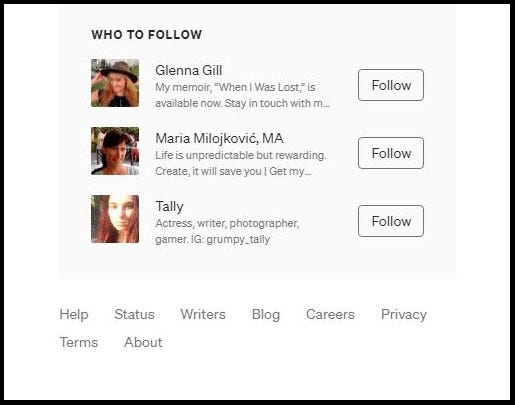
Under that section you will see words, including “Blog”. These words are links. Click on “Blog” to go to Medium’s official blog. 😃
I have previously written a story about sending out emails notifying your subscribers that you have self-published a story on Medium.
To my pleasant surprise, I have found that this new function of Medium’s, to promote email subscriptions, works for ALL YOUR STORIES.
So this article that you are reading now should be read in conjunction with reading my other article.
My previous article has instructions and advice on how to set up an email subscription service and how it 👀 looks.
The article is available by clicking on the link below.
I have tested the “Promotion” function to find it works for all Medium stories, whether they are in a publication or not.
First, I enabled “Promotion by Email”, as explained in my article ABOVE.
Second, with the support of a friend who subscribed to my email list, I found out that you need to have at least one subscriber, for the option to send an email out.
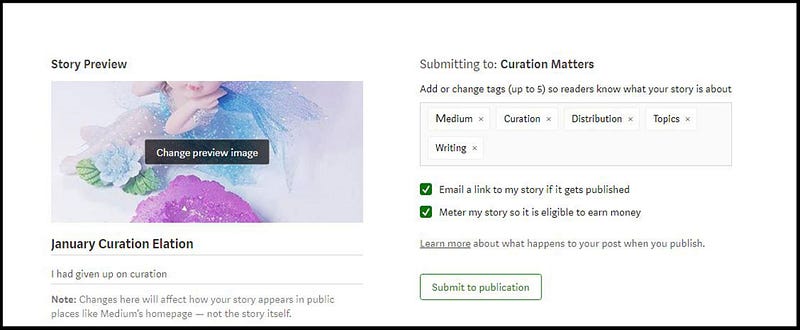
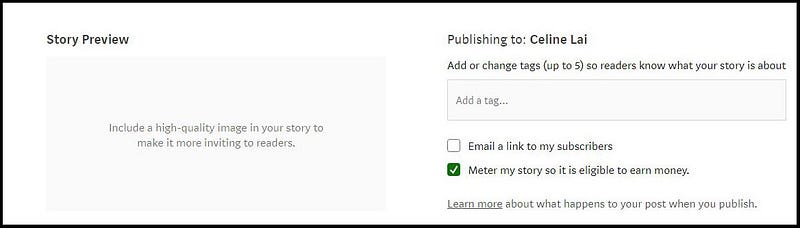
For the story at the top of this page, after fulfilling the above, I ticked the option to “Email a link to my story if it gets published.”
Lo and behold, shortly after the story was published in the Publication, my subscriber and I received an email about it. Here is what it looked like. 😺
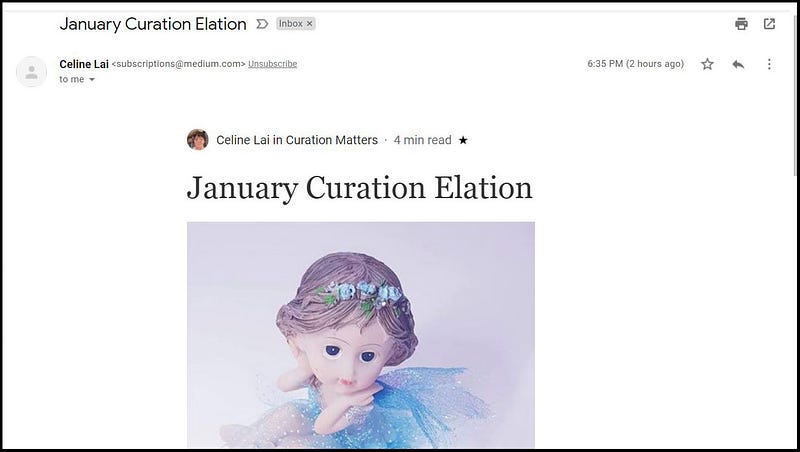
You can see the email is sent out on behalf of Medium. So, my email address is not given out. My subscriber(s) can opt to stop receiving emails from me by clicking on the word “Unsubscribe” next to Medium’s email address ([email protected]).
The email is automatically sent to your subscribers, as well as to yourself. It took about 5 minutes after I published the story above, for my Subscriber to receive the email, which was carbon-copied by Medium to me, at the same time. 😄
Update: it may take up to 24 hours for an email with a link to your story in a Publication to be sent out. It took 22 hours for my subscriber to get an Email about this story that you’re reading now. I don’t know for sure, but perhaps the email to my subscriber for the story above, went out quicker, because it is in one of my own Publications.
Originally when trying out this Email Subscriber / Promotion function, I read Medium’s Help Page about it and the Responses on the blog.
It wasn’t clear that this feature can be used to promote ALL STORIES, i.e. those within a publication and those not.
The power to email out a link to YOUR Medium stories is determined by you turning on the option to “Promote by Email” AND importantly by you having one subscriber or more.
Very important information follows
- Only a Follower can subscribe. A person who is not following you, at this point of time, will NOT see the Promotion messages associated with your Medium Profile. UPDATE: July 2021 ←- NOW ANYONE CAN SUBSCRIBE
- You cannot magically convert all your Followers to Subscribers. Subscribing is done on a case by case basis, initiated by the subscriber, for obvious reasons of privacy.
- You can notify your Followers that they can subscribe via creating and publishing a story about the Subscription feature. They may find your story through the usual channels which apply to everyone, e.g. if they go to their Following list and find your story that way. They may find the Subscriber / Promotion Option via seeing the “Promotion message”. It appears:
- on your personal “About” page on Medium
- on your Profile page (after the second 2nd story in your list of stories on your personal Medium Profile page, or “timeline”), and
- at the bottom of some of your stories (i.e. your self-published stories & supposedly at the end of your stories which are in Publications which do not have Publication Newsletters they send out)
- You cannot see the names of Medium users who have subscribed to your stories. However, you can export a list of email addresses that your Subscriber(s) used to subscribe, at any time you like. [ See the previous article that I wrote on how to do this ]
- Following the above, you cannot cancel any subscription, on behalf of the Subscriber, or because you don’t want a particular person subscribing.
- A Subscriber can un-subscribe by clicking on the “Un-subscribe” link at the top or bottom of an email that she/he receives, related to one of your stories.
- UPDATE: 31 July 2021, Medium have now put an Envelope icon at the top of profile pages of writers who have the Email Subscription function turned on. You can now subscribe to anyone who has this enabled (whether you are following them or not) by clicking on the green solid envelope icon. You can un-subscribe easy-peasy by clicking on the outlined green envelope icon.
- When you see a solid green Envelope Icon you will know that you haven’t subscribed.
- I officially asked Medium how does one un-subscribe from email subscriptions, which they signed up for using the “Promotion / Email Subscriber” function. Their reply was “The only way to do so is by unsubscribing through an email.” This means you can’t unsubscribe BEFORE you receive an email from the writer you are subscribing to (unless you immediately un-subscribe, see 2nd point following).
- I assume this reply or advice applies to individually un-subscribing, or to un-subscribing, case by case, i.e. to unsubscribing from one person at a time.
- Immediately after you subscribe, you can hit the “Unsubscribe” button. BUT if you go away from the writer’s page, and return, the Unsubscribe option will no longer be there.
- There is a way to un-subscribe from all writers that you have subscribed to, apparently, which will be discussed later.
- At the time of writing this, there is no option for choosing the frequency of emails for Subscribers. I’m under the impression that soon after each individual story is published by a writer (whether in a Publication or not), that the Subscriber(s) will receive an email about such.
In my opinion, it would be great if Medium enabled DAILY or WEEKLY email “digests” to be received by Subscribers, so that they are potentially not inundated with emails!
- The owners or creators of privately run Medium Publications (i.e. those not run by the Medium company) can set up Newsletters to be emailed out manually by them to Publication Newsletter subscribers. For example, 2 of the 3 Publications that I run, have got Newsletter Subscriptions.
Go to the story below for an example. My Newsletter for “Thirty Over Fifty” is called “Thirty Over Fifty — Peace, Faith and Hope.” 😄
The sign-up for Newsletter Subscriptions appears at the bottom or end of stories in a Publication, IF the owner of the Publication has enabled newsletter subscriptions!
https://readmedium.com/a-smitten-of-kittens-lost-their-mittens-3a95b79ef951
- The “Promotion” message prompting readers to subscribe to your stories will NOT appear at the bottom of any of your stories which are published in Publications that have Publication Newsletters enabled.
Note: not ALL Medium Publications have Newsletters “switched on”. For example, if you go to my Publication, “Lockdown Peaceful Space — Live, Love, Learn” you will find no message or mention of a newsletter subscription. Click on any of the stories in this Publication and you won’t find a Sign-up form for a Newsletter.
IMPORTANT — you will only see “Email a link to my story if it gets published” if you have at least one (1) subscriber
😻 😘 💮 📚😻 😘 💮 📚😻 😘 💮 📚😻 😘 💮 📚😻 😘 💮 📚
- I have only just started subscribing to some writers, and if need be, I’ll add updates on how this Email Subscriber function (as I call it) works in practice.
However, I can verify that my friend who is helping test this out, whom I followed & subscribed to, published a story in a Publication. I received an email about her story.
This information points to the fact that a Medium writer who enables the “Promotion” option / feature can (or should) see an option to “Email a link to my story if it gets published” for stories that they submit to Publications, as well as for stories that they “self-publish”, i.e. publish on their own “timeline” or not in a Publication.
If you own or run your own Medium Publication(s) and submit a story to your own Publication, you will see this option. The screenshot at the top relates to a story that I wrote, that I submitted to one of my own Publications.
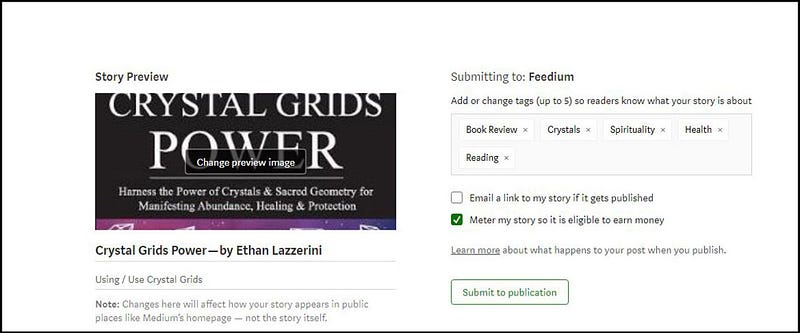
However, I also submitted a “Book Review” story to Feedium, a privately run Publication on Medium, that I do not run. When submitting, I was pleased to see the option to “Email a link to my story if it gets published”.
For Consideration before YOU subscribe to someone, and if you have Subscribers to YOUR stories
If you subscribe to several Medium writers to get their stories by email, you can turn off receiving emails from ALL writers you subscribed to
.
If you go to your Settings by clicking on your Avatar (little round picture representing you) at the top right of your Medium homepage, and scroll down to “Emails from writers and publications” you will see “Receive emails from writers you’ve subscribed to when they publish their stories.”
This option can be turned on or off, and I can only assume that you turn it off if you don’t want emails from anyone whom YOU have subscribed to.
Why would you use this? I have yet to ask Medium, in order to clarify, and I’ll insert their reply here when I receive it. One possible reason is to temporarily switch off all emails from those you are subscribing to.
.
If you have SUBSCRIBERS you cannot block a Subscriber unless you know the subscriber’s Medium Username
.
You can BLOCK Medium writers if you know who you want to block, by clicking on the three little dots at the top right of the person’s Medium Profile page, and selecting “Block this author”.
This means they will not see your Profile page / “timeline” with your stories, and they won’t be able to Follow you, or subscribe to your emails.
If a blocked user visits your profile page, he or she will see a message that they’ve been blocked.
You can block a person, whether he or she is following you or not. So, you can block people who aren’t following you, if you don’t want them to see your Stories, you don’t want to see theirs, and to stop them from following you.
If you block a Follower, your name will disappear from the list of Medium writers whom they are following.
I am mentioning this information about blocking a user, because I am “big” on privacy control. You might feel a Follower or a Subscriber is using your work or you just might not like them.
If you enable email subscribers, you may very well be able to work out the Medium Username associated with an email in your exported list. Try googling the email address which may lead you to the Medium username.
Why would you go out of your way to try to match up Email addresses with Medium Usernames??
You would if you are besotted with data or information, as I am, and/or if you want to try to “keep tabs” on who actually has subscribed to your story emails.
Blocking could help you with removing an Email Subscriber, because if you know the Medium username of an email subscriber whom you don’t want following you or subscribing to your story links, you can BLOCK them. This will remove them as an Email Subscriber.
I have tested BLOCKING with a supporter Subscriber.
She was a Follower who subscribed to my stories by email, then I blocked her, for test purposes!
I then kept checking my “Export Subscribers” list and found that 2 hours after I had blocked her, I still had one subscriber showing under “Export subscribers”.
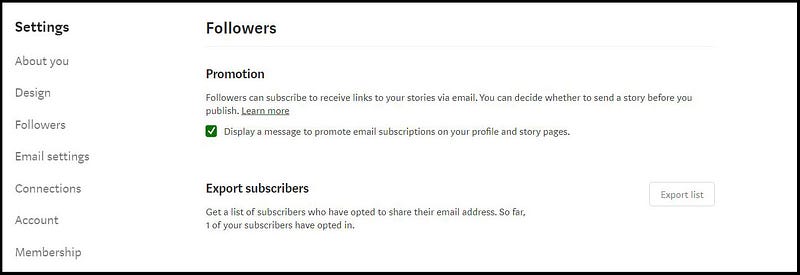
However, I downloaded the “Export list” to find it empty! 😆 Hooray!
This shows a bit of a “lag” with perhaps the 1 in the number of subscribers “opted in” changing 12 hours or so after blocking the person. Never mind, because I then did a “test story” in my test Medium Publication.
Five (5) minutes after my story was published, I received an email link to it. But my friend did not. This was because I had BLOCKED her (for testing).
And this is evidence that BLOCKING a Follower will remove them from your “promotional” Email Subscriber List.
4 hours after blocking the Follower, my Export list showed zero subscribers.
At this point, to get it out into the open, I want to share a thought about the wording “Get a list of subscribers who have opted to share their email address. So far [ xyx ] of your subscribers have opted in.”
I think that the above in bold is simply a long-winded verbose way of saying “Get a list of your email subscribers.”
I look at it this way:
“Get a list of people who have opted / agreed to share their email addresses. So far [ xyx ] people have signed up.”
.
A Writer May Forget to tick the Box !
If you have subscribed to a Medium writer’s stories, but don’t receive any emails, it may be because by default the option to “email a link” to subscribers is OFF, when publishing a story to a Publication or not.
Of course, if the option has not been enabled on a story, i.e. ticked, well then, your Subscriber(s) will NOT receive an email advice!

Last but not least…..
.
Here is a link to Medium’s Help Centre page on “emailing story links to subscribers.”
https://help.medium.com/hc/en-us/articles/360059837393-Email-story-links-to-subscribers
And here is the link to my previous article on using the “Email Subscriber” function. It gives detailed instructions on how to set up this function. It also shows screenshots of what using this function looks like. So you will know what the emails that are sent out look like, to watch out for them! 😄

If you get use from any of my Medium articles, please clap, which will encourage me to keep writing them!


