
Blazor Project Structure: Blazor Server vs. Blazor WebAssembly
Similarities and differences

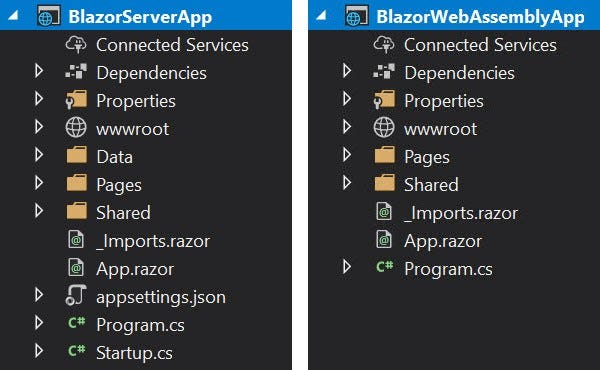
In the previous article, How to Choose a Blazor Hosting Model According to Your Needs, a brief mention was made of the Blazor Server and Blazor WebAssembly project structures.
Both of them have a similar structure.
Program.cs File
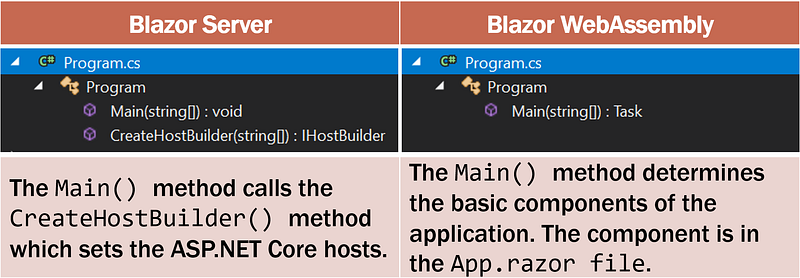
It contains methods Main()that are entry points for both types of projects, Blazor Server and Blazor WebAssembly. The following table shows the differences between the two.
Startup.cs File
- This file exists only in the Blazor Server project, containing application startup logic.
- Used by the
CreateHostBuilder()method in theProgram.csfile. - The Startup class defines methods, including (1)
ConfigureServices: configuring the application DI ( dependency injection ) service, and (2)Configure: configuring the application request processing pipeline.
App.razor File
- This file is the application’s root component that manages client-side routing using the Router component.
- The contents are the same for the Blazor Server and Blazor WebAssembly projects.
<Router AppAssembly="@typeof(Program).Assembly">
    <Found Context="routeData">
        <RouteView RouteData="@routeData"
        DefaultLayout="@typeof(MainLayout)" />
    </Found>
    <NotFound>
        <LayoutView Layout="@typeof(MainLayout)">
            <p>Sorry, there's nothing at this address.</p>
        </LayoutView>
    </NotFound>
</Router>- The Router component renders pages that match the requested address.
- The router uses the Found property to display content when a match is found.
- If a match is not found, the NotFound property is used to display the message,
Sorry, there's nothing at this address.
_Imports.razor File
- The file contains a list of common namespaces that use
@usingdirectives so that it doesn't have to include it in every razor component. - The following are the contents of the file
_Imports.razorin the Blazor Server project.
@using System.Net.Http
@using Microsoft.AspNetCore.Authorization
@using Microsoft.AspNetCore.Components.Authorization
@using Microsoft.AspNetCore.Components.Forms
@using Microsoft.AspNetCore.Components.Routing
@using Microsoft.AspNetCore.Components.Web
@using Microsoft.JSInterop
@using BlazorServerApp
@using BlazorServerApp.Shared- Whereas in the Blazor WebAssembly project, the contents of the file
_Imports.razorare as follows.
@using System.Net.Http
@using System.Net.Http.Json
@using Microsoft.AspNetCore.Components.Forms
@using Microsoft.AspNetCore.Components.Routing
@using Microsoft.AspNetCore.Components.Web
@using Microsoft.AspNetCore.Components.WebAssembly.Http
@using Microsoft.JSInterop
@using BlazorWebAssemblyApp
@using BlazorWebAssemblyApp.Shared
Appsettings.json File (Blazor Server)
- This file only exists in the Blazor Server project.
- Used to save application configuration settings.
wwwroot Folder
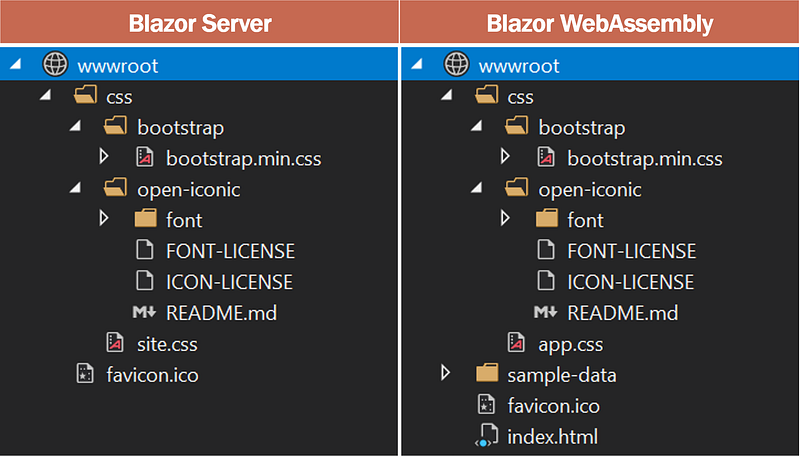
The wwwroot folder contains static application assets such as images, cascading style sheets, hypertext markup language, etc.
wwwroot/index.html File
- It is the root page in the Blazor WebAssembly project, which is implemented as an HTML page.
- It is the start page (homepage) of an application.
- The page has standard HTML, HEAD, and BODY tags and specifies where the application’s root component
App.razormust be provided. - The page loads the
_framework/blazor.webassembly.jsfile. This file is responsible for: - downloading compiled applications, dependencies, and .NET runtimes, - initializing the runtime to run Blazor applications in the browser.
Shared Folder
It contains other UI components in the form of .razor files that are used together in applications.
MainLayout.razor: main application layout components.NavMenu.razor: implements the sidebar navigation menu. ComponentsNavLinkcreate navigation links to other Razor components. The componentNavLinkhighlights the selected navigation menu item, helping the user know which component is currently displayed.
Pages Folder
The Pages folder contains components/pages that can be routed and form the Blazor application. The route for each page is determined using the @page directive. The component has a .razor extension.
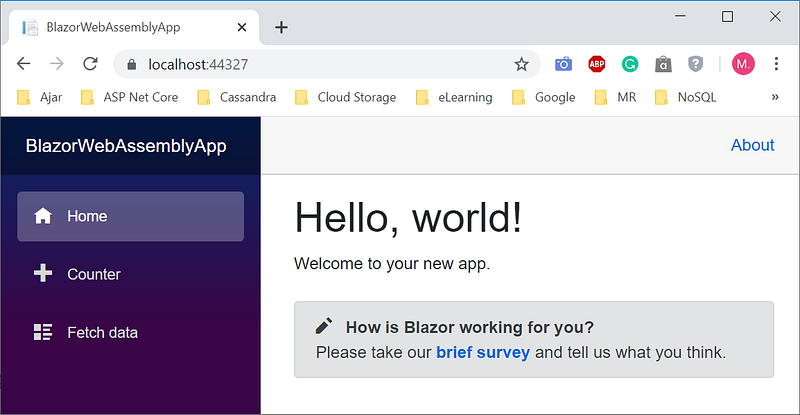
In the previous article, we have given examples of creating Blazor Server and Blazor WebAssembly applications. Both produce almost the same web. The difference is only the title. The following is the display when the Blazor WebAssembly application runs.
The following table shows the similarities and differences in the contents of folders Pages in the two types of projects.
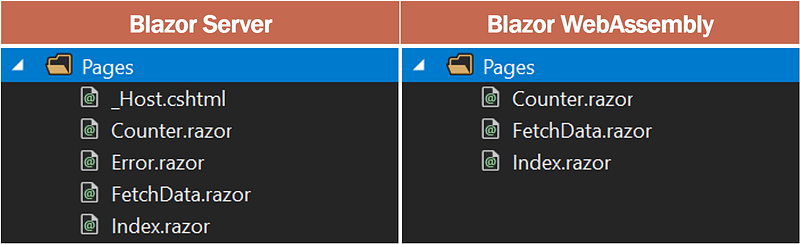
Both have three files razor same, those areIndex.razor, Counter.razorand FetchData.razor, and in order will be executed when selecting a menu Home, Counter and Fetch data.
The other two files, _Host.cshtmland Error.razor, are only owned by Blazor Server.
Pages/_Host.cshtml File
- It is the root page in the Blazor Server project, which is implemented as a razor page.
- When the first request is made, this page is displayed in response.
- The host page as HTML, HEAD, and BODY tags specifies where the application’s root component
App.razormust be provided. - The page loads the
_framework/blazor.server.jsfile. This file is responsible for managing the real-time SignalR connection between the browser and the server. This connection is used to exchange information between clients and servers.
Pages/Error.razor File
The file is run when an unhandled exception occurs in the application.
Data Folder
- This folder only exists in the Blazor Server project.
- Contains classes and implementations related to data.
- In the example case of both projects, the data folder contains
WeatherForecastclasses andWeatherForecastServiceimplementations that provide weather data examples to theFetchDataapplication component.
The structure of the Blazor Server and Blazor WebAssembly project does not differ much. The only difference is the way the application is hosted. If implemented correctly, it’s easy to convert the Blazor server application to the Blazor WebAssembly application and vice-versa.


