
How to Choose a Blazor Hosting Model According to Your Needs
Blazor Server versus Blazor WebAssembly: advantages and disadvantages.
Table of Contents
⦁ Introduction ⦁ Blazor Server Hosting Model ▹ Advantages of the Blazor Server Hosting Model ▹ Disadvantages of the Blazor Server Hosting Model ▹ Creating a Blazor Server Application ▹ Running the Blazor Server Application ⦁ Blazor WebAssembly Hosting Model ▹ Advantages of the Blazor WebAssembly Hosting Model ▹ Disadvantages of the Blazor WebAssembly Hosting Model ▹ Creating a Blazor WebAssembly Application ▹ Running the Blazor WebAssembly Application ⦁ Choose Which One? ⦁ Summary ⦁ References

Introduction
Blazor is a framework for building a UI (user interface) client-side web. To make web applications with a rich and dynamic interactive UI, Blazor uses C# without using JavaScript. The Blazor application comprises reusable web UI components implemented using C#, HTML, and CSS. Client and server code is written in C#, so it is possible to share code and libraries.
Blazor offers two hosting models: (1) Blazor Server is server-side. (2) Blazor WebAssembly is client-side. Both have advantages and disadvantages. The application and component models are the same regardless of the hosting model. This article discusses web creation using each hosting model's built-in ASP.NET Core 3.1 Blazor template. For that, ASP.NET Core must be installed on the computer.
Blazor Server Hosting Model
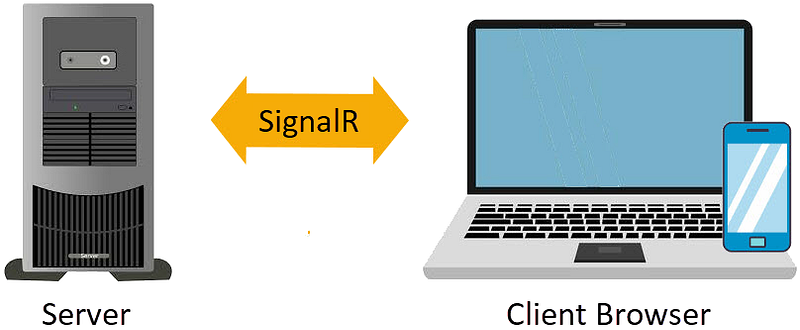
In this hosting model, the application is run on the server. The connection between the client and server uses SignalR. When an event appears on the client, for example, a button is clicked, and information about the event is sent to the server via the SignalR connection. The server handles events and calculates HTML differences between before and after events. The whole HTML is no longer sent to the client; only the difference is sent to the client via the SignalR connection. The browser then updates the user interface. Because only the difference is sent, the interface update process is faster and more responsive.
Advantages of the Blazor Server Hosting Model
- The application loads much faster as the download size is smaller than a Blazor WebAssembly application.
- The application takes full advantage of server capabilities, including usage of any .NET Core compatible APIs.
- Clients with limited resources can still function. Even browsers that don't support WebAssembly can be used.
- .NET Core on the server is used to run the app, so existing .NET tooling, such as debugging, works as expected.
- It's more secure because the .NET/C# application code, including the application component code, is on the server and not downloaded to the client.
Disadvantages of the Blazor Server Hosting Model
- It requires a full-blown ASP.NET Core server to host the application. Deployment scenarios without a server are not possible.
- There is no offline support; an active connection to the server is always needed. If the server is down, the application stops working.
- Since each user interaction involves a round trip to the server, the lag time is longer when compared to Blazor WebAssembly hosting.
- Scalability may be challenging, especially for many users, as the server must manage multiple client connections and handle client states.
Creating a Blazor Server Application
- Open Visual Studio 2019
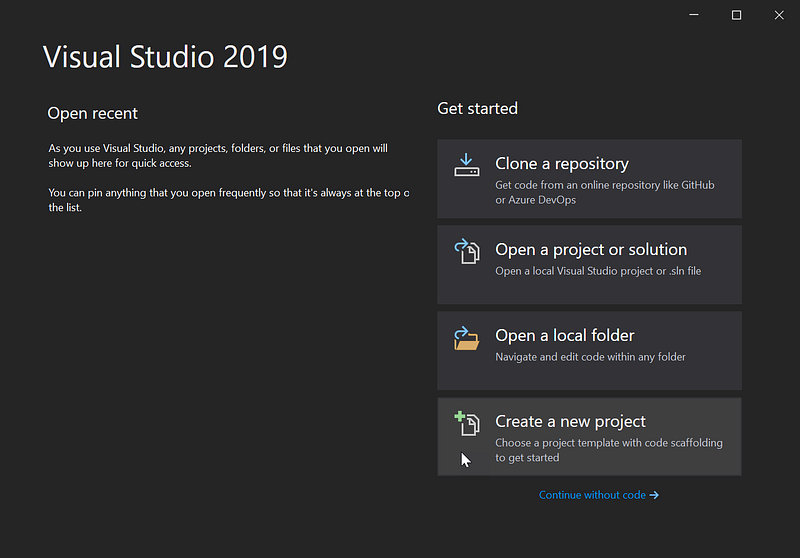
- Click
Create a new projectto create a new project.
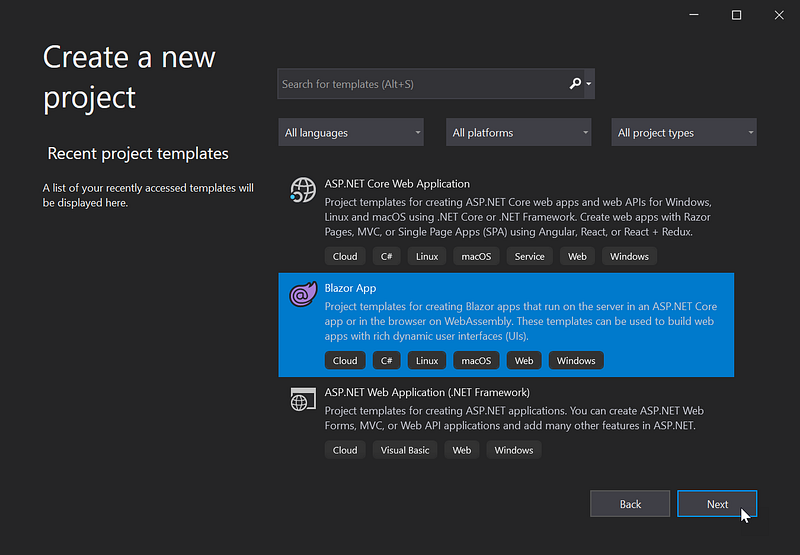
- Select
Blazor App, clickNext.
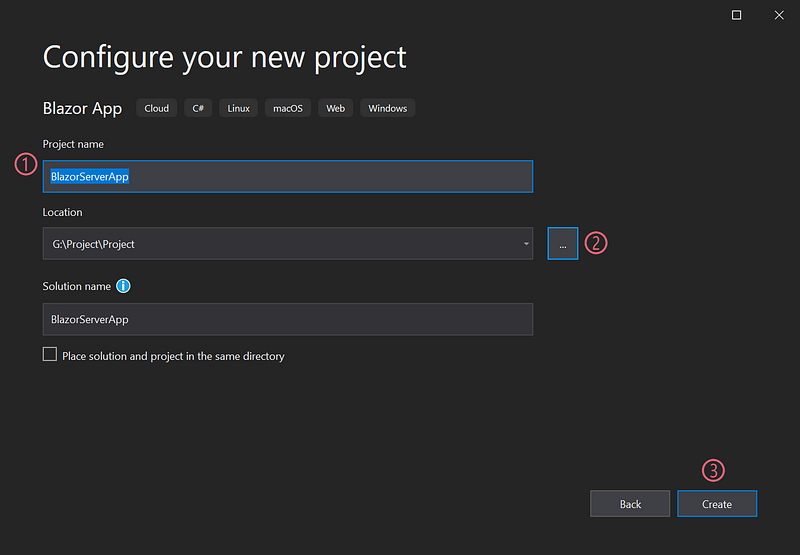
- The project name default,
BlazorApp1, be altered, for example, named withBlazorServerApp. - Click
…to specify the project folder. - Click
Create.
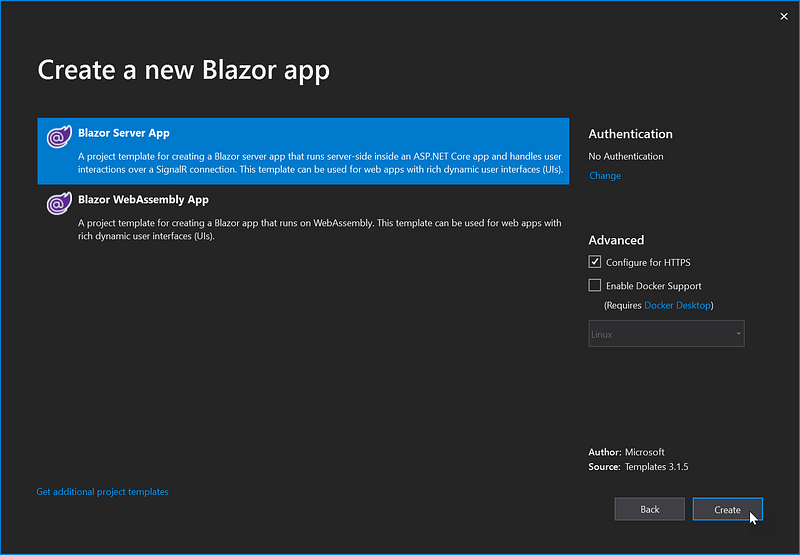
- From the two hosting model choices, choose
Blazor Server App. - Click
Create.
Running the Blazor Server Application
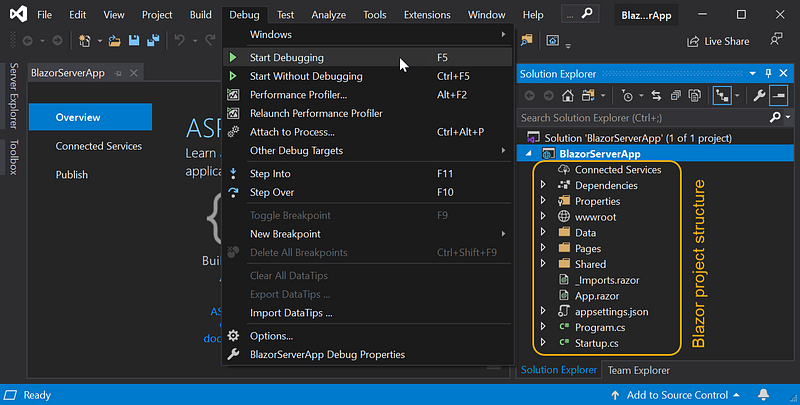
- The right part of the screen is a list of files and folders, which are the ASP.NET Core Blazor Server project structure.
- Select the menu
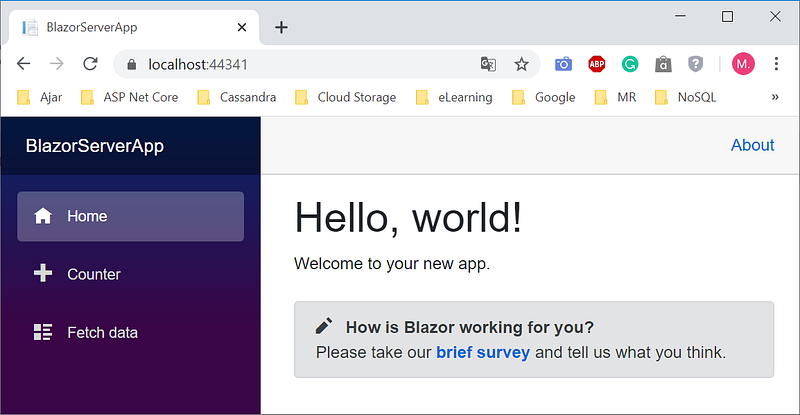
Debug|Start Debuggingor pressF5to debug and display the following homepage.
Blazor WebAssembly Hosting Model
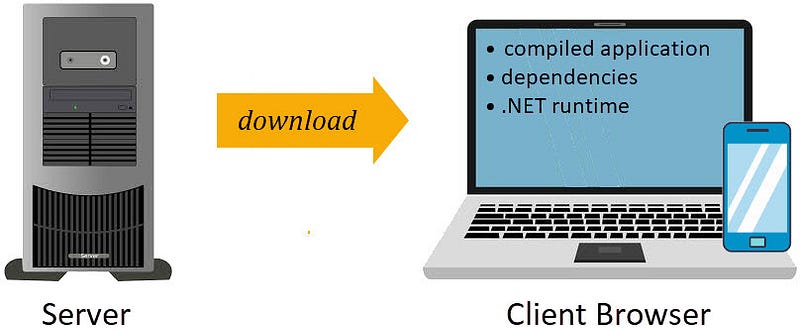
The application runs directly in the browser using WebAssembly in this hosting model. All needs, namely compiled applications, dependencies, and .NET runtimes, are downloaded from the server to the client browser. A Blazor WebAssembly application can run entirely on the client side without connection to the server. If necessary, an optional configuration can be made so that the Blazor WebAssembly application can interact with the server over the network using API calls or SignalR.
Advantages of the Blazor WebAssembly Hosting Model
- A Blazor WebAssembly application can run entirely on the client machine. After the application is downloaded, a connection to the server is not required.
- Work is passed down from server to client. Client resources and capabilities are fully utilized.
- An ASP.NET Core web server as the application host is not required. For example, scenarios for deployment without a server are possible using CDN (Content Delivery Network).
Disadvantages of the Blazor WebAssembly Hosting Model
- Larger download size, it takes longer to load from server to client.
- Browser capabilities limit the application since the application runs entirely on the client browser.
- It requires adequate client hardware and software. For example, at least a browser with WebAssembly support is required.
Creating a Blazor WebAssembly Application
- Perform steps as in making the Blazor Server application above.
- When the following screen appears:
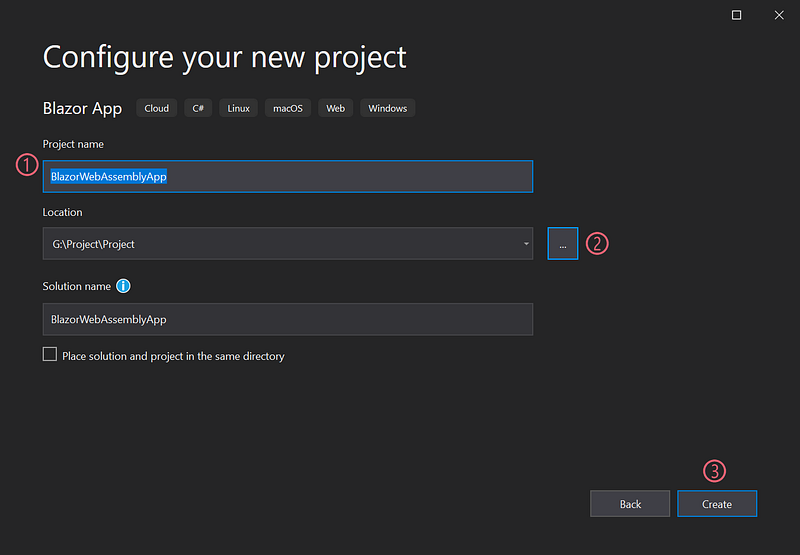
- Type
BlazorWebAssemblyAppas the name of the project. - Click
…to specify the project folder. - Click
Create. - Next, the following screen appears:
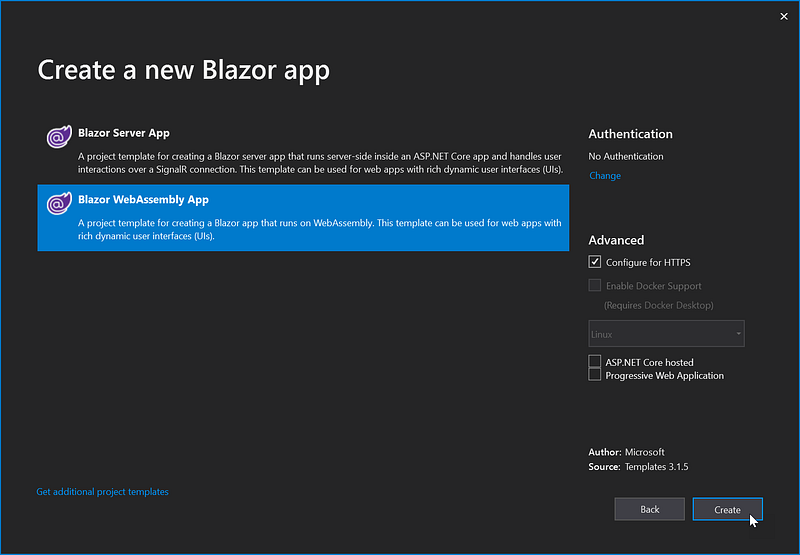
- Select
Blazor WebAssembly App, then clickCreate.
Running the Blazor WebAssembly Application
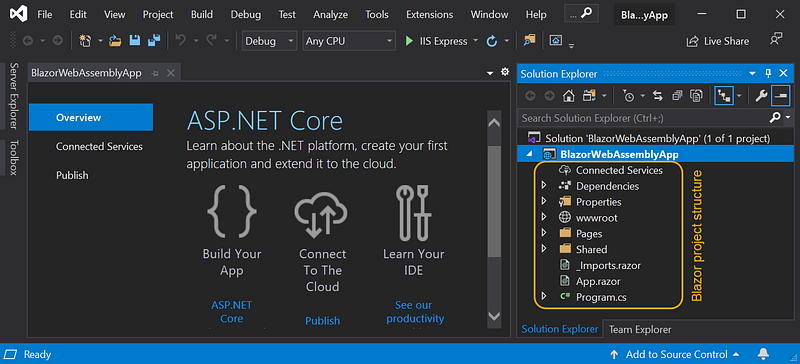
- The right part of the screen is a list of files and folders, which are the ASP.NET Core Blazor WebAssembly project's structure.
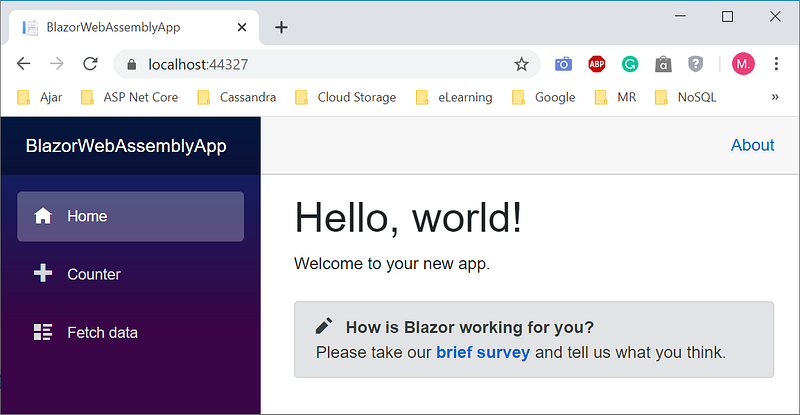
- Select the menu
Debug|Start Without Debuggingor pressCtrl F5to bypass the debugging process and display the following home page.
Choose Which One?
Each option has advantages and disadvantages. To choose the suitable hosting model, consider the following factors:
Security Considerations If your application requires high security or needs to access sensitive server-side resources, Blazor Server hosting allows you to control and secure access more effectively.
Network Connectivity If your target users are in regions with limited or unreliable internet connectivity, Blazor WebAssembly may not be the best choice as it requires a larger initial download. Blazor Server might be a better option in such cases.
Performance Requirements If you need real-time UI updates and have a low-latency requirement, Blazor Server hosting would be the preferred choice. On the other hand, if you need better performance in terms of UI rendering speed, Blazor WebAssembly can provide a snappier user experience.
Application Size and Complexity Blazor WebAssembly might be more suitable for small to medium-sized applications, while larger and more complex applications may benefit from Blazor Server hosting.
Development Experience Consider the familiarity of your development team with different hosting models. It might influence your choice if you are already experienced with WebAssembly or SignalR.
Summary
Blazor WebAssembly hosting model requires an internet connection only at the beginning when downloading the app. Once the application is downloaded, a connection to the server is not required. Thus, the ASP.NET Core web server as the application host is no longer needed.
Blazor Server hosting model always requires an internet connection. Applications can fully utilize the server's capabilities, including using .NET Core compatible APIs. Clients with limited resources can still function, even using browsers that don't support WebAssembly.
It's essential to analyze your project's specific needs and goals to decide on the best Blazor hosting model for your application.
Hopefully beneficial. Your feedback will be precious.


