avatarChristianlauer

Free AI web copilot to create summaries, insights and extended knowledge, download it at here

1902

Abstract

uery results selected to explore</span></pre></div><div id="4f2b"><pre><span class="hljs-keyword">location</span> <span class="hljs-title">= ‘US</span><span class="hljs-comment"># Location inserted based on the query results selected to explore</span></pre></div><div id="1610"><pre>client = bigquery.Client(<span class="hljs-attribute">project</span>=project, <span class="hljs-attribute">location</span>=location)</pre></div><div id="1768"><pre>dat<span class="hljs-built_in">a_table</span>.enable_dataframe_formatter()</pre></div><div id="caff"><pre>auth<span class="hljs-selector-class">.authenticate_user</span>()</pre></div><p id="970a">After that you can use the following command to process the data generated by the BigQuery job:</p><div id="6cb1"><pre># Running <span class="hljs-keyword">this</span> code will <span class="hljs-keyword">read</span> results <span class="hljs-keyword">from</span> your <span class="hljs-keyword">previous</span> job</pre></div><div id="10ae"><pre><span class="hljs-attr">job</span> = client.get_job(‘bquxjob_2c7453c<span class="hljs-number">63_183</span>er0edf8c’) <span class="hljs-comment"># Job ID inserted based on the query results selected to explore</span></pre></div><div id="3df2"><pre><span class="hljs-attribute">results</span> <span class="hljs-operator">=</span> job.to_dataframe()</pre></div><div id="f6ac"><pre><span class="hljs-attribute">results</span></pre></div><p id="3697">This should simplify the process for Data Scientists and Analysts who want to read data from a Data Warehouse or Data Lakehouse that is build on BigQuery and use it for Data Science purposes.</p><div id="1dad" class="link-block"> <a href="https://readmedium.com/what-is-a-data-lakehouse-2f7407ea1039"> <div> <div> <h2>What is a Data Lakehouse?</h2> <div><h3>New Paradigm or just a Buzzword?</h3>

Options

</div> <div><p>medium.com</p></div> </div> <div> <div style="background-image: url(https://miro.readmedium.com/v2/resize:fit:320/1*rGkOZVGjawueUONwsIJ74A.jpeg)"></div> </div> </div> </a> </div><p id="841c">If you work a lot with BigQuery, you might also be interested in the following new features in Google BigQuery — a lot has happened here in the last weeks.</p><div id="2ac6" class="link-block"> <a href="https://readmedium.com/google-launches-new-data-service-datastream-88fdef635c48"> <div> <div> <h2>Google launches new Data Service Datastream</h2> <div><h3>New Tool for Seamless Replication from Databases to BigQuery</h3></div> <div><p>medium.com</p></div> </div> <div> <div style="background-image: url(https://miro.readmedium.com/v2/resize:fit:320/1*JGsSAe3Fk25qipg13R8XVg.jpeg)"></div> </div> </div> </a> </div><div id="2eae" class="link-block"> <a href="https://readmedium.com/3-great-news-for-google-cloud-data-engineers-ddd041c72de9"> <div> <div> <h2>3 Great News for Google Cloud Data Engineers</h2> <div><h3>How Google improves Data Integration lately</h3></div> <div><p>medium.com</p></div> </div> <div> <div style="background-image: url(https://miro.readmedium.com/v2/resize:fit:320/1*wUBy4Q09hJ2aEKM2Qv7JvQ.jpeg)"></div> </div> </div> </a> </div><h2 id="a28a">Sources and Further Readings</h2><p id="93f8">[1] Google, <a href="https://cloud.google.com/bigquery/docs/release-notes">BigQuery release notes</a> (2022)</p></article></body>

Better Integration of BigQuery and Colab

How you can now easily use Python within Google BigQuery

Photo by James Lee on Unsplash

Google is better integrating its two data analytic tools, BigQuery and Colab — a Notebook for Python. This brings BigQuery SQL and Python closer together, which will especially please Data Scientists and Analysts who work a lot with Python.

To do this, you can now integrate your query results into Colab with a single click [1]. Previously, this was only possible using Google Data Studio and Google Sheets.
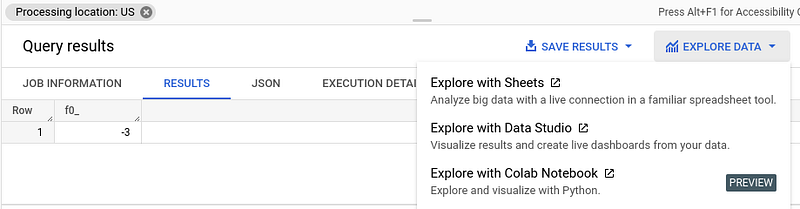
Explore Data with Colab Function — Image by Author

The practical thing is that Colab will then open automatically and generate the necessary code for you.

# @title Setup
from google.colab import auth
from google.cloud import bigquery
from google.colab import data_table
project = ‘triple-silo-2778657# Project ID inserted based on the query results selected to explore
location = ‘US# Location inserted based on the query results selected to explore
client = bigquery.Client(project=project, location=location)
data_table.enable_dataframe_formatter()
auth.authenticate_user()

After that you can use the following command to process the data generated by the BigQuery job:

# Running this code will read results from your previous job
job = client.get_job(‘bquxjob_2c7453c63_183er0edf8c’) # Job ID inserted based on the query results selected to explore
results = job.to_dataframe()
results

This should simplify the process for Data Scientists and Analysts who want to read data from a Data Warehouse or Data Lakehouse that is build on BigQuery and use it for Data Science purposes.

If you work a lot with BigQuery, you might also be interested in the following new features in Google BigQuery — a lot has happened here in the last weeks.

Sources and Further Readings

[1] Google, BigQuery release notes (2022)

Data Science
Google
Python
Programming
Technology
Recommended from ReadMedium