
Data Visualization
Basics of Time Series with Python
Working functions and fundamentals of time series with pandas
Time series analysis is a part of daily activities happening around us with respect to time. As the day, month, years are passing with observation around us left with some information. To get this information we took help from statistical analysis to make the data/information in some formats and do analysis. Now with more and more data is generated everywhere it is difficult to use simple low-level tools for analysis. So, the new tools and algorithms are developed to make that data in a suitable format in large amount and solve our purpose to get information.
The time-series data are collected and stored in such a manner that we do future predictions and stabilize the business growth with increasing revenue by every year.
What we deal with in time series data? In simple terms, we deal with time and date. Oh! wait for a second, but it is more widen view than just time and date. It is comprised of seconds, minutes, and hours in time and day, week, month, and year in date.
The applications of time series are in numerous fields like weather forecasting, stock market, signal systems, data transfer management, etc.
We will analyze and do practical on time series with python step by step. The basic functionality to deal with data and time is datetime in python.
#first we have to import the datetime object in python
from datetime import datetime
datetime(year=2020, month=12, day=30)

#Output:
datetime.datetime(2020, 12, 30, 0, 0)
The one thing we noticed in the output is two zeroes, these zeroes refer to hours and minutes after three arguments year, month, and day that is compulsory.
#lets give other arguments also
datetime(year=2020, month=12, day=30, hour=2, minute=3, second=15,
         microsecond=45)

#output:
datetime.datetime(2020, 12, 30, 2, 3, 15, 45)
Well, we saw to create the data and time with datetime object. Before we deep dive let’s get some definitions used in python for time series.
- Datetime: It is used for basic functionalities for time and series in python.
- Dateutils: It is also a basic function object but as a third-party module. You can install
dateutilsif it is not installed in your python environment by pip command.
pip install python-dateutil
- Time stamps: It is used to know the exact reference of the object at a particular moment.
- Time delta: It is the duration of the period in terms of days, hours, minutes, or seconds between two time stamps in a
datetimeclass. - Calendar: The class calendar object contains many functionalities related to the calendar. By using calendar class we can access many methods like calendar, weak day, month range, month, HTML calendar, and many more.
- Time intervals: It is an interval time point i.e, starts point and endpoint.
- Time: It is a method in a
datetimeclass in which we can access and use many time functionalities.
Date and time functionalities are also in the NumPy library. They are with the names of datetime64 and timedelta64.
We can also see the primary creation method of data and time in the Pandas library. They are shown below:
In date time→ to_datetime , to_range
In time deltas→ to_timedelta , timedelta_range
In time span→ period , period_range
The good use of date and time in time series analysis is when we use the date or time component as an index in a series or data frame. Series is a single column and data frame is a combination of many columns in a matrix form.
The dateutils use parsing that deals with parts of strings. Given below example shows how to parse is used to get a datetime format from the string in date and time format.
#import the parser function from the dateutil library
from dateutil import parser
date = parser.parse("10th of July, 2015")
date

#output:
datetime.datetime(2015, 7, 10, 0, 0)
-------------------------------------------------------------------
#import the parse for string
from dateutil.parser import parse
parse("Yesterday was January 4, 2021", fuzzy_with_tokens=True)

#output:
(datetime.datetime(2021, 1, 4, 0, 0), ('Yesterday was ', ' ', ' '))
Now we will discuss the date and time with pandas because with pandas we can work on series or data frame with large data and a date/time as an index is an ease with python.
Time series example with pandas:
#import pandas library
import pandas as pd

pd.Timedelta("2 days")

#output: Timedelta('2 days 00:00:00')
To make a series of dates in pandas and use it as an index then we use DatetimeIndex.
index = pd.DatetimeIndex(['2020-1-20', '2020-02-01','2021-01-01',
                          '2021-02-01'])
index

#output:
DatetimeIndex(['2020-01-20', '2020-02-01', '2021-01-01',
               '2021-02-01'], dtype='datetime64[ns]', freq=None)
Suppose we want to make another series and keep the index series as an index to another series. Hence, two columns will be formed and we can call it a data frame also. To make a series with a column we use pd.series.
data = pd.Series([0, 1, 2, 3], index=index)
print(data)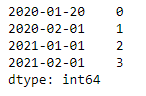
To make a data frame of date we can use dataframe in pandas
df = pd.DataFrame({'year': [2020, 2021], 'month': [1, 2], 'day': [1,
                   1]})

print(df)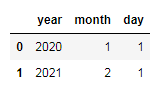
We can convert this dataframe to datetime format by using to_datetime
pd.to_datetime(df)

#output:
0   2020-01-01
1   2021-02-01
dtype: datetime64[ns]
We can create the series of date column by using pd.series
series_date = pd.Series(['2020-1-20', '2020-1-21', '2020-1-22',
              '2020-1-23', '2020-1-24', '2020-1-25', '2020-1-26'])

print(series_date)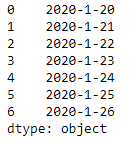
To know about time delta with pandas.
pd.Timedelta("2 days 00:00:00")

#output:
Timedelta('2 days 00:00:00')
----------------------------------------------
pd.Timedelta("2 days 2 hours")

#output:
Timedelta('2 days 02:00:00')
----------------------------------------------
pd.Timedelta(days=2, seconds=2)

#output:
Timedelta('2 days 00:00:02')
----------------------------------------------
# integers with a unit, 1 is specify for day
pd.Timedelta(2, unit="d")

#output:
Timedelta('2 days 00:00:00')
----------------------------------------------
# a NaT
pd.Timedelta("nan")

#output:
NaT
----------------------------------------------
pd.Timedelta("nat")

#output:
NaT
----------------------------------------------
# ISO 8601 Duration strings
pd.Timedelta("P0DT0H1M0S")

#output:
Timedelta('0 days 00:01:00')
Now we will add two new parameters i.e. period and frequency. The period depend on frequency. The period is the number of times the data will change according to the frequency as per year, month or day.
#period change as per Year
s_year = pd.Series(pd.date_range("2020-1-1", periods=5, freq="Y"))
s_year

#period change as per Month
s_month = pd.Series(pd.date_range("2020-1-1", periods=5, freq="M"))
s_month

#period change as per day
s_day = pd.Series(pd.date_range("2020-1-1", periods=5, freq="D"))
s_day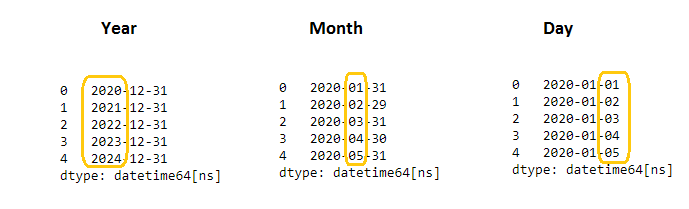
Conclusion:
The basic of time series fundamentals is much for analysis with date and time data frames. Making an index of date and time gives immense help to analyze records for data and time.
I hope you like the article. Reach me on my LinkedIn and twitter.


